
Singing Machine ISM2040
Singing Machine Home Stage Karaoke System User Manual
Model: ISM2040
Introduction
Welcome to the Singing Machine Home Stage Karaoke System. This manual provides detailed instructions for setting up, operating, and maintaining your new karaoke system. Please read this manual thoroughly before use to ensure proper functionality and to maximize your entertainment experience.
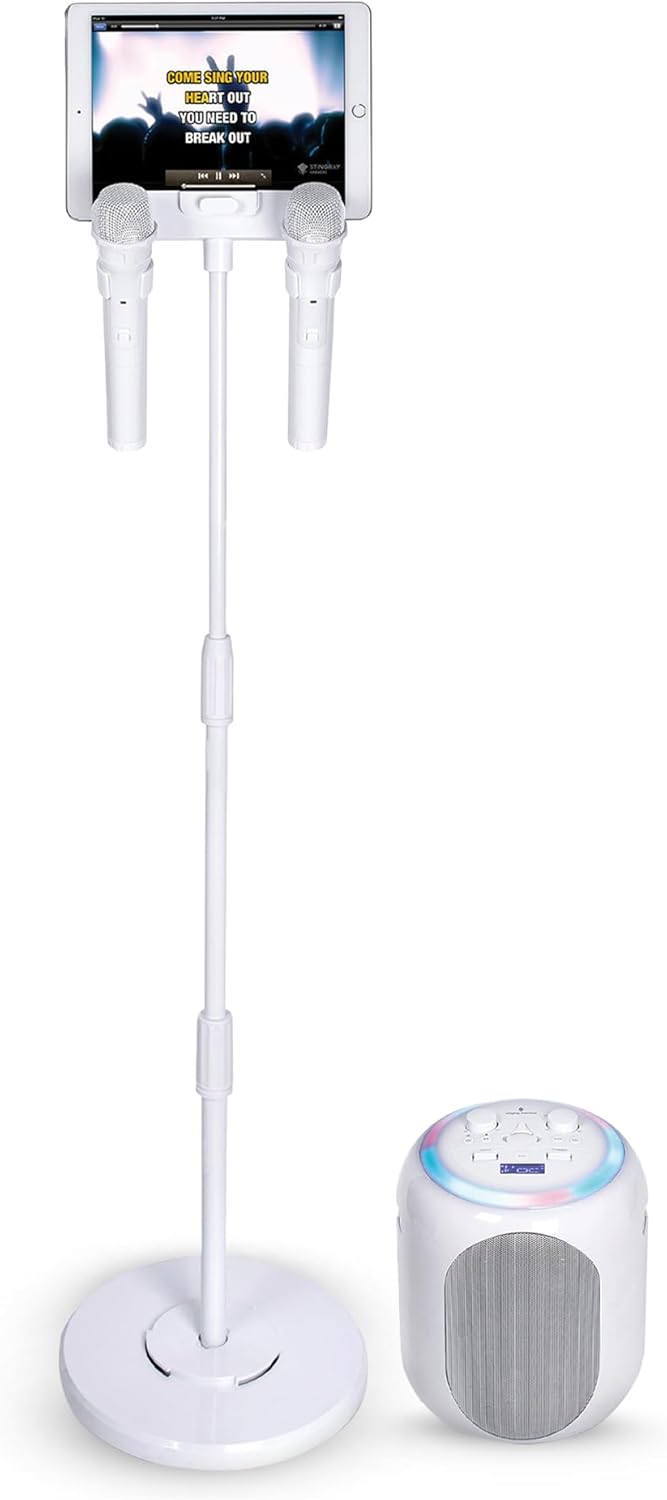
Image: The Singing Machine Home Stage Karaoke System, featuring the main speaker unit, an adjustable microphone stand with a device holder, and two wireless microphones.
Important Safety Information
To reduce the risk of electric shock, fire, or injury, always follow these basic safety precautions:
- Read all instructions before operating the apparatus.
- Do not use this apparatus near water.
- Clean only with a dry cloth.
- Do not block any ventilation openings. Install in accordance with the manufacturer's instructions.
- Do not install near any heat sources such as radiators, heat registers, stoves, or other apparatus (including amplifiers) that produce heat.
- Protect the power cord from being walked on or pinched, particularly at plugs, convenience receptacles, and the point where they exit from the apparatus.
- Only use attachments/accessories specified by the manufacturer.
- Unplug this apparatus during lightning storms or when unused for long periods of time.
- Refer all servicing to qualified service personnel. Servicing is required when the apparatus has been damaged in any way, such as power-supply cord or plug is damaged, liquid has been spilled or objects have fallen into the apparatus, the apparatus has been exposed to rain or moisture, does not operate normally, or has been dropped.
- The battery is rechargeable. Do not attempt to replace the battery yourself. Contact qualified service personnel for battery replacement.
Package Contents
Verify that all items listed below are included in your package:
- Singing Machine Home Stage Karaoke System (Main Unit)
- Adjustable Microphone Stand with Device Holder
- 2 Wireless Microphones
- Power Adapter
- User Manual (this document)
Product Features
The Singing Machine Home Stage Karaoke System is designed to provide a comprehensive and enjoyable karaoke experience with advanced features:
- Detachable High-Output Bluetooth Speaker: The main speaker unit can be detached from the stand for flexible placement and portability.
- Pitch Lab Technology: Exclusive technology for vocal enhancement, including pitch correction and harmonizing effects.
- Voice Enhancer: Improves vocal quality for a professional sound.
- Lead Vocal Removal Technology: Reduces or eliminates original vocals from songs, allowing you to sing along.
- Music-Synchronized LED Light Show: Dynamic lighting effects that sync with the beat of the music.
- Adjustable Microphone Stand: Features a built-in holder for smartphones and tablets, providing easy access to lyrics.
- Recording Function: Record up to 5 minutes of your performances to share.
- Rechargeable Battery: Provides up to 5 hours of continuous use for portable entertainment.
- Wide Compatibility: Works with any music or karaoke application.
- Singing Machine Karaoke App Access: Includes a 1-month subscription to the Singing Machine Karaoke app, offering access to over 100,000 songs.

Image: An illustration of the karaoke system highlighting its key features such as Bluetooth streaming, Pitch Lab technology, powerful speakers, and voice-changing effects.
Setup Guide
1. Assembly
- Unpack Components: Carefully remove all components from the packaging.
- Assemble Microphone Stand:
- Attach the base to the bottom pole of the stand.
- Extend the adjustable pole to your desired height and secure it.
- Attach the device holder to the top of the pole.
- Attach Speaker Unit: The main speaker unit can be attached to the base of the stand or used separately. If attaching, align the speaker with the designated slot on the stand's base and secure it.
- Insert Microphones: Place the two wireless microphones into the holders on the device stand.
2. Power Connection
- Connect the provided power adapter to the DC IN port on the back of the main speaker unit.
- Plug the power adapter into a standard wall outlet.
- Ensure the unit is fully charged before first use for optimal battery life. The battery indicator will show charging status.
3. Microphone Setup
The system includes two wireless microphones. Ensure they have fresh batteries installed (if not pre-installed or rechargeable). Turn on each microphone using its power switch. They should automatically pair with the main unit.
Operating Instructions
1. Powering On/Off
Press and hold the Power button on the main speaker unit to turn the system on or off.
2. Bluetooth Connection
- Turn on the karaoke system.
- Activate Bluetooth on your smartphone, tablet, or other compatible device.
- Search for "Singing Machine" in your device's Bluetooth settings and select it to pair.
- Once paired, you can stream music wirelessly from your device to the karaoke system.
3. Playing Music and Singing
- Music Playback: Play music from your connected Bluetooth device or through other input options (e.g., AUX if available).
- Microphone Volume: Adjust the microphone volume using the dedicated knob on the main unit.
- Master Volume: Control the overall sound output with the Master Volume knob.
- Vocal Effects: Experiment with the Pitch Lab and voice enhancer features to modify your vocals. Refer to the specific controls on the unit for these adjustments.
- Lead Vocal Removal: Press the "Vocal Remove" button (if present) to reduce or eliminate lead vocals from a song.
- Light Show: The LED lights will automatically synchronize with the music.
4. Recording Performances
To record your singing, ensure a USB drive is inserted into the designated port (if available). Press the Record button to start and stop recording. Recordings will be saved to the USB drive.

Image: Users enjoying the karaoke system, illustrating the ability to record and share performances with family and friends.
Maintenance
Cleaning
- Always unplug the unit from the power source before cleaning.
- Use a soft, dry cloth to clean the exterior surfaces of the karaoke system and microphones.
- Do not use liquid cleaners, aerosols, or abrasive cleaning agents.
Storage
When not in use, store the system in a cool, dry place away from direct sunlight and extreme temperatures. If storing for an extended period, ensure the battery is partially charged (around 50%) to prolong its lifespan.
Battery Care
- The system contains a rechargeable Lithium Ion battery.
- Avoid fully discharging the battery frequently.
- Recharge the battery regularly, even if the unit is not in frequent use.
- Do not expose the battery to excessive heat or direct flame.
- Only qualified personnel should replace the battery.
Troubleshooting
| Problem | Possible Cause | Solution |
|---|---|---|
| No power | Unit not plugged in; battery drained; power adapter faulty. | Ensure power adapter is securely connected and plugged into a working outlet. Charge the unit. Try a different outlet. |
| No sound from speaker | Volume too low; device not paired; incorrect input source. | Increase Master Volume. Ensure Bluetooth device is properly paired. Select correct input source. |
| No sound from microphones | Microphones off; microphone volume too low; microphone batteries drained. | Turn on microphones. Increase Microphone Volume. Replace or recharge microphone batteries. |
| Bluetooth pairing issues | Device too far; Bluetooth not enabled; interference. | Move device closer to the unit. Ensure Bluetooth is enabled on your device. Turn off other Bluetooth devices nearby. |
| Recording not working | USB drive not inserted; USB drive full or corrupted. | Insert a compatible USB drive. Ensure USB drive has sufficient space and is formatted correctly. |
Specifications
| Feature | Detail |
|---|---|
| Model Number | ISM2040 |
| Dimensions (L x W x H) | 10.3 x 10.3 x 12.6 inches |
| Item Weight | 18.7 pounds |
| Power Source | AC Adapter, Rechargeable Lithium Ion Battery |
| Battery Life | Up to 5 hours (rechargeable) |
| Microphones | 2 Wireless Microphones included |
| Connectivity | Bluetooth |
| Special Features | Voice Enhancer, Pitch Lab Technology, LED Light Show, Detachable Speaker, Recording Function |
| Color | White |
Warranty and Support
Singing Machine products are designed for quality and reliability. For warranty information and customer support, please refer to the warranty card included with your product or visit the official Singing Machine website.
For technical assistance or inquiries, please contact Singing Machine Customer Service. Contact details can typically be found on the product packaging or the official website.
Online Resources: For additional support, FAQs, and product registration, please visit the Singing Machine official website.
Important Note Regarding Videos
While this product supports video integration for an enhanced user experience, specific official product videos from the seller were not available in the provided data for embedding within this manual. Please refer to the product's official listing or the manufacturer's website for any available video demonstrations or tutorials.
Related documentsISM2040


Ask a question about this manual
Ask about setup, troubleshooting, compatibility, parts, safety, or missing instructions. Manuals+ will review the question and use this page’s manual context to help answer it.