
PHILIPS TAT1207BK/00
PHILIPS T1207 True Wireless Headphones User Manual
Model: TAT1207BK/00
1. Introduction
Thank you for choosing PHILIPS T1207 True Wireless Headphones. This manual provides essential information for setting up, operating, maintaining, and troubleshooting your new headphones. Please read it carefully to ensure optimal performance and longevity of your device.

Image: The Philips T1207 True Wireless Headphones, showcasing their compact and sleek design.
2. What's in the Box
Your PHILIPS T1207 True Wireless Headphones package includes the following items:
- PHILIPS T1207 True Wireless Headphones (Left and Right earbuds)
- Charging case
- USB-C charging cable
- Ear tips (3 sizes: Small, Medium, Large)
- Quick Start Guide (this document)

Image: Contents of the Philips T1207 package, including the earbuds, charging case, USB-C cable, and three sizes of ear tips.
3. Setup
3.1 Initial Charging
Before first use, fully charge the headphones and the charging case. Connect the supplied USB-C cable to the charging case and a power source. The charging indicators on the case will show charging status. A full charge takes approximately 2 hours.

Image: The Philips T1207 earbuds resting in their compact charging case, ready for charging or storage.
3.2 Selecting Ear Tips
For optimal sound quality and a secure fit, choose the ear tips that best suit your ear canals. Experiment with the different sizes (S, M, L) provided to find the most comfortable and effective seal. A proper fit helps in sound isolation and bass response.
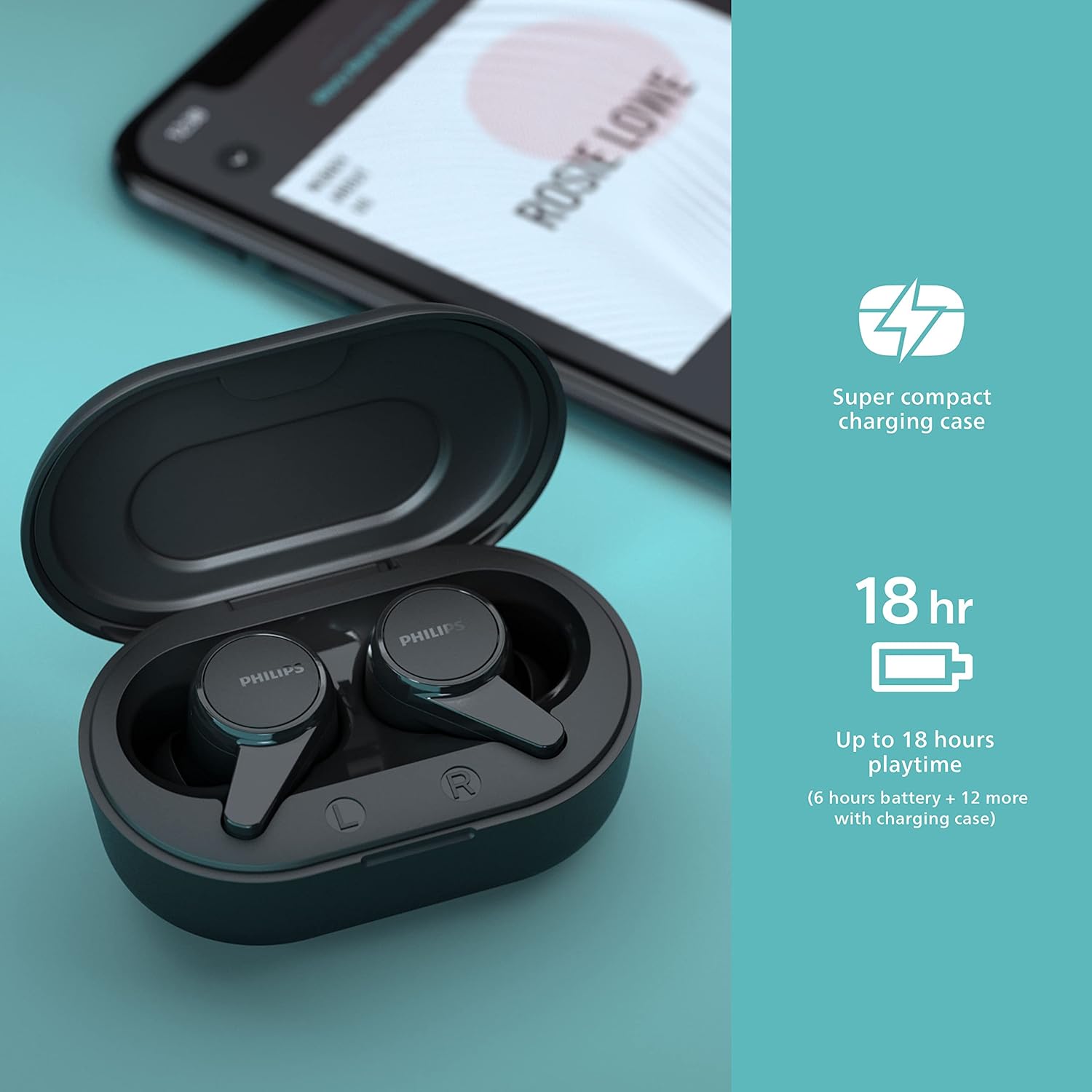
Image: A Philips T1207 earbud displayed alongside the three different sizes of interchangeable ear tips, highlighting options for a secure and comfortable fit.
3.3 Bluetooth Pairing
- Open the charging case. The headphones will automatically enter pairing mode.
- On your device (smartphone, tablet, etc.), enable Bluetooth.
- Search for "PHILIPS T1207" in the list of available Bluetooth devices and select it to connect.
- Once paired, the headphones will automatically connect to the last paired device when taken out of the case.
4. Operating Instructions
4.1 Controls
The PHILIPS T1207 headphones feature integrated controls on the earbuds for easy management of your audio and calls:
- Play/Pause: Single tap on either earbud.
- Next Track: Double tap on the right earbud.
- Previous Track: Double tap on the left earbud.
- Answer/End Call: Single tap on either earbud.
- Reject Call: Press and hold either earbud.
- Activate Voice Assistant: Triple tap on either earbud.
4.2 Mono Mode
You can use either the left or right earbud independently. Simply take one earbud out of the case, and it will automatically connect to your device. This feature is useful for extending talk time or staying aware of your surroundings.
4.3 Battery Life and Charging
The headphones provide up to 6 hours of playtime on a single charge. The super-compact charging case offers an additional 12 hours of battery life, totaling up to 18 hours of combined playtime. A quick 15-minute charge in the case provides an extra hour of listening.
4.4 IPX4 Water Resistance
The PHILIPS T1207 headphones are rigorously tested to meet an IPX4 rating, making them splash and sweat resistant. This means they can withstand splashes of water from any direction, making them suitable for workouts and outdoor activities in light rain. Note: The charging case is not water resistant.

Image: The Philips T1207 earbuds shown with water splashing around them, illustrating their IPX4 water resistance for protection against sweat and light rain.
5. Maintenance
To ensure the longevity and optimal performance of your headphones, follow these maintenance guidelines:
- Cleaning: Regularly clean the earbuds and charging case with a soft, dry, lint-free cloth. Do not use abrasive cleaners or solvents.
- Ear Tips: Remove and clean the ear tips periodically with mild soap and water. Ensure they are completely dry before reattaching them to the earbuds.
- Charging Contacts: If you experience charging issues, gently clean the charging contacts on both the earbuds and inside the case with a dry cotton swab.
- Storage: When not in use, store the headphones in their charging case to protect them from dust and damage. Avoid exposing them to extreme temperatures or direct sunlight.
6. Troubleshooting
If you encounter issues with your PHILIPS T1207 headphones, refer to the following common problems and solutions:
| Problem | Possible Cause | Solution |
|---|---|---|
| Headphones do not turn on. | Low battery. | Place earbuds in the charging case and charge fully. |
| Cannot pair with device. | Bluetooth not enabled; headphones not in pairing mode; device too far. | Ensure Bluetooth is on. Take earbuds out of case to enter pairing mode. Keep devices within 10 meters. |
| No sound or low sound. | Volume too low; improper ear tip fit; earbud obstruction. | Increase volume on your device. Try different ear tip sizes for a snug fit. Clean earbud mesh if obstructed. |
| One earbud has no sound. | Earbuds not properly synced. | Place both earbuds back in the charging case, close the lid, wait a few seconds, then take them out again. This often re-syncs them. |
| Charging case not charging. | Cable issue; power source issue. | Try a different USB-C cable or power adapter. Ensure the cable is securely connected. |
If the problem persists after trying these solutions, please contact Philips customer support for further assistance.
7. Specifications
- Model Name: ANC True Wireless Headphones
- Item Model Number: TAT1207BK/00
- Connectivity Technology: Wireless (Bluetooth)
- Bluetooth Version: 5.2
- Bluetooth Range: 10 Meters
- Ear Placement: In Ear
- Form Factor: In Ear
- Impedance: 16 Ohm
- Battery Life (Headphones): 6 Hours
- Battery Life (with Charging Case): Up to 18 Hours
- Charging Time: 2 Hours
- Water Resistance Level: IPX4 (Water Resistant)
- Control Type: Button (Call Control, Voice Assistant)
- Included Components: 3 pair eartips (S/M/L), charging case, USB-C charging cable
- Item Weight: 3.2 ounces
- Manufacturer: Philips Audio
- UPC: 840063202375
8. Warranty and Support
Your PHILIPS T1207 True Wireless Headphones come with a manufacturer's warranty. Please refer to the warranty card included in your package for specific terms and conditions. For technical support, product registration, or to find answers to frequently asked questions, please visit the official Philips support website or contact their customer service.
Thank you for choosing Philips.
Ask a question about this manual
Ask about setup, troubleshooting, compatibility, parts, safety, or missing instructions. Manuals+ will review the question and use this page’s manual context to help answer it.