
1. Introduction
This manual provides detailed instructions for the safe installation, operation, and maintenance of your TroposAir Fusion 66-inch Smart Ceiling Fan. Please read all instructions carefully before beginning installation and retain this manual for future reference. This ceiling fan is designed for both indoor and outdoor (damp-rated) use, featuring a high-efficiency DC motor and smart control capabilities.
2. Safety Information
Always follow basic safety precautions when installing and operating electrical appliances to reduce the risk of fire, electric shock, and personal injury.
- Ensure the power is turned off at the circuit breaker before installation or servicing.
- All wiring must be in accordance with national and local electrical codes. If you are unfamiliar with wiring, consult a qualified electrician.
- The mounting structure must be capable of supporting the weight of the fan (approximately 35 lbs).
- Do not operate the fan with damaged blades or housing.
- Keep hands, clothing, and other objects clear of the fan blades when the fan is in operation.
- This fan is damp-rated, suitable for covered outdoor areas, but not for direct exposure to water.
3. Package Contents
Verify that all components are present before beginning installation:
- Fan Motor Assembly
- Fan Blades (10 count)
- Hanging Bracket
- Downrod
- Remote Control with Wall Mount
- Hardware Pack (screws, washers, wire nuts)
- Instruction Manual
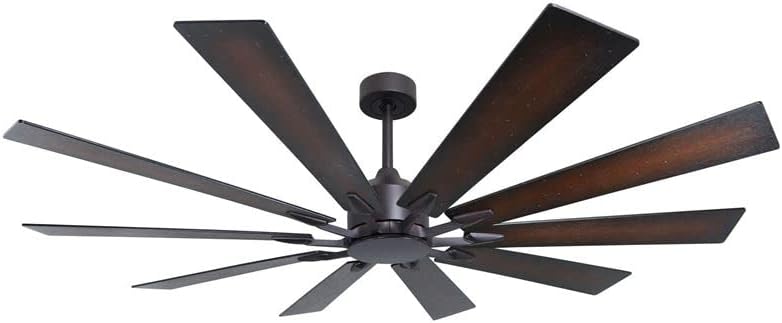
Image 1: TroposAir Fusion 66-inch Smart Ceiling Fan, Oil Rubbed Bronze finish. This image displays the fan's central motor housing, downrod, and ten long, dark-finished blades extending outwards, characteristic of its windmill design.
4. Setup and Installation
Professional installation is recommended for optimal safety and performance. This fan supports dual-mount installation (standard or angled ceiling).
- Mounting the Hanging Bracket: Secure the hanging bracket to a ceiling joist or an outlet box rated for fan support. Ensure all screws are tightened securely.
- Assembling the Downrod: Insert the downrod through the canopy and coupling, securing it with the provided pin and clip.
- Wiring the Fan: Connect the fan's electrical wires to the household wiring according to the wiring diagram provided in the separate installation guide. Ensure all connections are secure with wire nuts.
- Attaching the Fan Motor: Carefully lift the fan motor assembly and hang it onto the hanging bracket.
- Installing the Blades: Attach each of the ten fan blades to the motor housing using the unique blade mounting system and screws provided. Ensure all blades are firmly secured.
- Securing the Canopy: Slide the canopy up and secure it to the hanging bracket, covering the wiring connections.
- Power On and Test: Restore power at the circuit breaker and test the fan's basic functions using the remote control.
- Smart Feature Setup (WiFi): Refer to the separate smart control guide for instructions on connecting your fan to your home WiFi network and integrating with smart home systems.
5. Operating Instructions
The TroposAir Fusion fan is controlled via the included remote control and can also be integrated with smart home systems via WiFi.
Remote Control Functions:
- Power On/Off: Press the power button to turn the fan on or off.
- Fan Speed: Use the speed buttons to cycle through 6 fan speeds.
- Reverse Function: Press the reverse button to change the direction of blade rotation. This is useful for seasonal air circulation (downward airflow for cooling in summer, upward airflow for heat distribution in winter).
- Light Control: If a light kit is installed (sold separately), use the light button to turn the light on/off and adjust brightness.
- Programmable Features: The remote may include programmable timer functions. Refer to the remote's specific instructions for details.
Smart Control (WiFi):
Once connected to your home WiFi network, the fan can be controlled and programmed through a compatible smart home application. This allows for advanced scheduling, voice control, and integration with other smart devices.
6. Maintenance
Regular maintenance ensures optimal performance and longevity of your ceiling fan.
- Cleaning: Periodically wipe the fan blades and motor housing with a soft, damp cloth. Do not use abrasive cleaners or solvents. Ensure power is off before cleaning.
- Blade Balance: If the fan wobbles, check that all blade screws are tight and that blades are not warped. A balancing kit (not included) may be used if necessary.
- Lubrication: The fan motor features permanently lubricated and sealed bearings, requiring no additional lubrication.
- Electrical Connections: Annually inspect all electrical connections for tightness.
7. Troubleshooting
If you experience issues with your fan, consult the following common troubleshooting steps:
- Fan Does Not Start:
- Check that power is supplied to the fan at the circuit breaker.
- Ensure all wire connections are secure.
- Verify remote control batteries are fresh and correctly inserted.
- Fan Makes Noise:
- Check that all motor housing screws are tight.
- Ensure blade attachment screws are secure.
- Verify the canopy is not touching the ceiling.
- Fan Wobbles:
- Ensure the hanging bracket is securely mounted.
- Check that all blade screws are tightened evenly.
- Verify blades are not bent or damaged.
- Remote Control Not Working:
- Replace batteries.
- Ensure the remote is within range of the fan's receiver.
- Re-pair the remote with the fan if necessary (refer to remote instructions).
8. Specifications
| Feature | Specification |
|---|---|
| Brand | TroposAir |
| Model Name | Fusion |
| Color | Oil Rubbed Bronze |
| Size | 66 inches (Blade Length) |
| Product Dimensions | 66"D x 66"W x 17.5"H |
| Number of Blades | 10 |
| Motor Type | High Efficiency DC-Motor |
| Fan Speeds | 6 |
| Control Method | Remote, WiFi (Smart Feature) |
| Indoor/Outdoor Usage | Damp Rated (Indoor/Covered Outdoor) |
| Voltage | 120 Volts (DC) |
| Wattage | 45.00 W |
| Air Flow Capacity | 10494 Cubic Feet Per Minute |
| Special Features | Programmable, WiFi, Reverse Function |
| Included Components | Downrod, Fan Blades, Fan Motor, Hanging Bracket, Remote |
9. Warranty and Support
For warranty information and technical support, please refer to the documentation included with your purchase or contact TroposAir customer service directly. Keep your proof of purchase for warranty claims.
Manufacturer: TroposAir
UPC: 840246111241


