
1. Introduction
This manual provides detailed instructions for the FCXJTU Digital Countdown Days Timer, Model PS-220. This device is designed to assist with time management for various events, offering countdown, count-up, and clock functionalities. Please read this manual thoroughly before use to ensure proper operation and longevity of your timer.

Image 1.1: Front view of the FCXJTU Digital Countdown Days Timer, showing its large LCD display with countdown and clock functions.
2. Key Features
- Extended Countdown Capability: Supports countdowns up to 999 days, 23 hours, 59 minutes, and 59 seconds.
- Integrated Clock Function: Displays current time with switchable 12-hour and 24-hour formats.
- Large, Clear Display: Features a 13.8cm x 4cm (5.4in x 1.6in) LCD screen for easy readability.
- Versatile Placement Options: Includes a removable stand for desktop use and three strong magnets for attachment to metal surfaces.
- Simple Operation: Dedicated buttons for setting the countdown timer and the clock.
- Battery Powered: Operates on 2 CR2032 batteries (included).
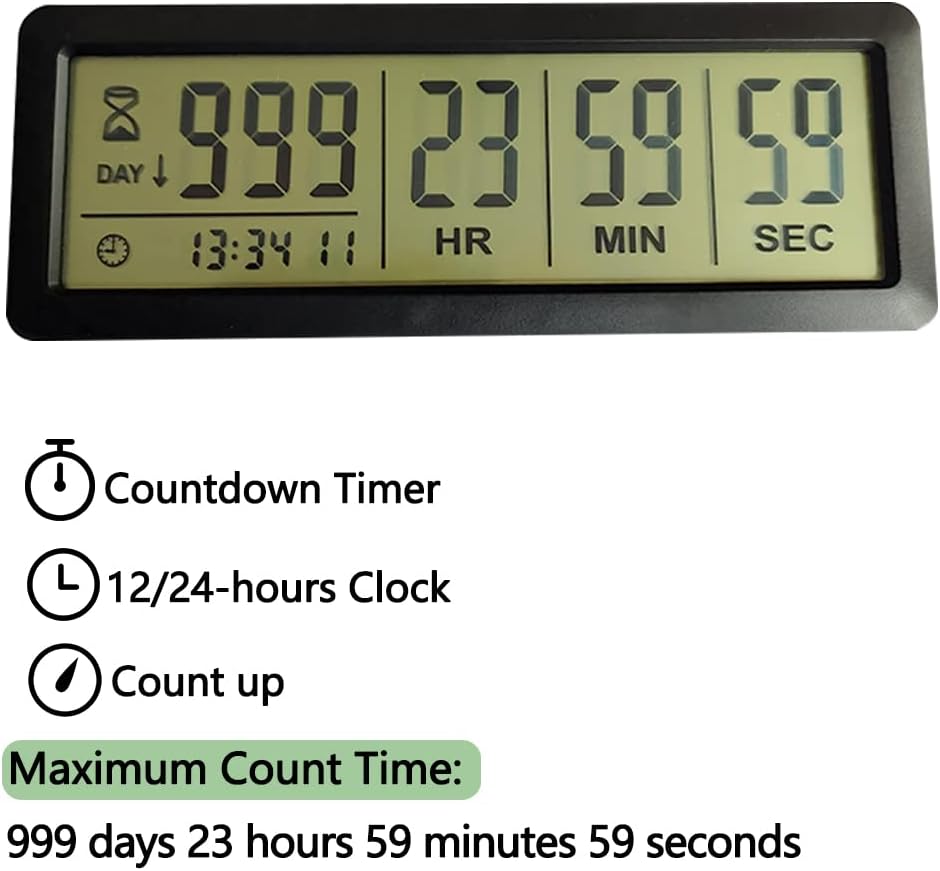
Image 2.1: Overview of the timer's primary functions and maximum timing capacity.
3. Package Contents
Upon opening the package, verify that all items are present:
- 1 x FCXJTU Digital Countdown Days Timer (Model PS-220)
- 2 x CR2032 Batteries (pre-installed or included separately)
- 1 x Removable Stand
4. Setup and Battery Installation
The timer requires two CR2032 batteries for operation. These are typically included. If the display is dim or not functioning, replace the batteries.
- Locate the battery cover on the back of the timer.
- Open the battery cover by sliding it or gently prying it open (refer to Image 4.1).
- Insert two CR2032 batteries, ensuring the positive (+) side faces upwards as indicated inside the compartment.
- Close the battery cover securely.
- The timer display should now activate.

Image 4.1: Rear view of the timer, highlighting the battery cover and button layout.
5. Operating Instructions
5.1 Setting the Clock
- Press and hold the CLOCK button until the hour digits begin to flash.
- Use the UP/START and DOWN buttons to adjust the hour.
- Press the CLOCK button again to move to the minute digits. Adjust with UP/START and DOWN.
- Repeat for seconds if applicable.
- Press the CLOCK button one more time to confirm and exit clock setting mode.
- To switch between 12-hour and 24-hour formats, briefly press the CLOCK button while in normal clock display mode.
5.2 Setting the Countdown Timer
- Press and hold the SET button until the day digits begin to flash.
- Use the UP/START and DOWN buttons to adjust the days.
- Press the SET button to move to the hour digits. Adjust with UP/START and DOWN.
- Repeat for minutes and seconds.
- After setting all desired values, press the SET button one more time to confirm the countdown target.
- Press the UP/START button to begin the countdown.
- To pause the countdown, press UP/START again. Press again to resume.
- To clear the countdown, press and hold the SET button until the digits reset to 0.
5.3 Count-Up Function
The timer can also function as a count-up timer. To use this feature:
- Ensure the countdown timer is cleared (all digits are 0).
- Press the UP/START button. The timer will begin counting upwards from 0 days, 0 hours, 0 minutes, 0 seconds.
- Press UP/START again to pause the count-up. Press again to resume.
- To reset the count-up timer, press and hold the SET button.

Image 5.1: Example applications of the timer for academic purposes.

Image 5.2: Example applications of the timer for personal events and holidays.
6. Placement Options
The FCXJTU Digital Countdown Days Timer offers flexible placement options:
- Desktop Use: Utilize the integrated removable stand to prop the timer upright on any flat surface.
- Magnetic Attachment: The back of the timer features three strong magnets, allowing it to be securely attached to metal surfaces such as refrigerators, whiteboards, or metal cabinets.

Image 6.1: Detail of the timer's back, illustrating the magnetic points and the removable stand.
7. Maintenance
- Cleaning: Wipe the timer with a soft, dry cloth. Do not use abrasive cleaners or immerse the device in water.
- Battery Replacement: If the display becomes dim or unresponsive, replace the two CR2032 batteries as described in Section 4. Dispose of old batteries responsibly.
- Storage: When not in use for extended periods, store the timer in a cool, dry place. Consider removing batteries if storing for several months to prevent leakage.
8. Troubleshooting
| Problem | Possible Cause | Solution |
|---|---|---|
| Display is blank or dim. | Low or dead batteries. | Replace the two CR2032 batteries (refer to Section 4). |
| Timer not responding to button presses. | Batteries are incorrectly installed or depleted. | Check battery orientation or replace batteries. |
| Countdown not starting. | Countdown value not set or START button not pressed. | Ensure a countdown value is set and press the UP/START button to begin. |
| Clock time is incorrect. | Clock not set or reset. | Re-set the clock time (refer to Section 5.1). |
9. Specifications
- Model: PS-220
- Brand: FCXJTU
- Color: Black
- Material: Acrylonitrile Butadiene Styrene (ABS)
- Product Dimensions: 15.5cm (6.1in) W x 5.7cm (2.2in) H x 1.1cm (0.4in) D
- LCD Screen Size: 13.8cm (5.4in) W x 4cm (1.6in) H
- Item Weight: 79 grams (2.79 ounces)
- Power Source: 2 x CR2032 Batteries (included)
- Maximum Countdown: 999 Days, 23 Hours, 59 Minutes, 59 Seconds
- Functions: Countdown, Count-up, 12/24-hour Clock

Image 9.1: Dimensional overview of the timer.
10. Warranty and Support
For warranty information or technical support, please refer to the contact details provided with your purchase or visit the official FCXJTU website. Keep your purchase receipt as proof of purchase for any warranty claims.


