
1. Product Overview
The CZKE TOVPD1-60-EC is a versatile Din Rail mounted protective device designed to safeguard electrical appliances and circuits from various power anomalies. It integrates over-voltage, under-voltage, and over-current protection functions, along with automatic recovery capabilities. The device features a digital display for real-time voltage and current measurements, and allows for adjustable protection parameters.
This device is suitable for protecting household appliances and electrical systems by cutting off the power supply instantaneously when overvoltage, undervoltage, or overcurrent faults are detected, thereby preventing equipment damage.

Figure 1: Overview of the TOVPD1-60-EC device highlighting its protection capabilities including surge, over/under voltage, overcurrent, and wire protection.
2. Features
- Over-voltage Protection: Automatically disconnects power when voltage exceeds a set limit.
- Under-voltage Protection: Automatically disconnects power when voltage drops below a set limit.
- Over-current Protection: Automatically disconnects power when current exceeds a set limit.
- Automatic Recovery: Restores power automatically after voltage or current returns to normal range and a set delay time.
- Voltage Display: Real-time display of current voltage.
- Current Display: Real-time display of current consumption.
- Adjustable Parameters: User-configurable settings for protection values and recovery times.
- Voltage Calibration: Allows for fine-tuning of voltage measurement accuracy.
3. Technical Parameters
The following table outlines the key technical specifications and adjustable parameters for the TOVPD1-60-EC device:

Figure 2: Detailed technical parameters and default settings for the TOVPD1-60-EC protective device.
| Function | Parameter Range | Default Value |
|---|---|---|
| Power Supply | 230VAC 50/60Hz | |
| Max. Loading Power | 1~40A Adjustable (for 40A variant) 1~63A Adjustable (for 63A variant) | 40A (for 40A variant) 63A (for 63A variant) |
| Over-voltage Protection Value | 230V~300V | 270V |
| Over-voltage Recovery Voltage | 225V~295V | 250V |
| Over-voltage Protection Action Time | 0.1s~30s | 0.5s |
| Over-voltage Recovery Delay Time | 1s~500s | 30s |
| Under-voltage Protection Value | 140V~210V | 170V |
| Under-voltage Recovery Voltage | 145V~215V | 190V |
| Under-voltage Protection Action Time | 0.1s~30s | 0.5s |
| Under-voltage Recovery Delay Time | 1s~500s | 30s |
| Over-current Adjustment Range | 1-40A (for 40A variant) 1-63A (for 63A variant) | 20A (for 40A variant) 40A (for 63A variant) |
| Over-current Action Time | 0.1s~30s | 0.5s |
| Over-current Recovery Delay Time | 1s~500s | 30s |
| Power-on Delay Time | 1s~500s | 10s |
| Power Consumption | <2W | |
| Electrical Machinery Life | 100,000 times | |
| Installation | 35mm DIN rail | |
| Boundary Dimension | 86 × 38 × 68 mm | |
| Voltage Adjustable | +/- 9.5% | |
4. Installation
The TOVPD1-60-EC device is designed for installation on a standard 35mm DIN rail. Ensure all power is disconnected before beginning installation.
- Mounting: Snap the device onto a 35mm DIN rail in your electrical panel. Ensure it is securely fastened.
- Wiring: Connect the incoming power supply (Line and Neutral) to the 'IN' terminals at the top of the device. Connect the outgoing load (Line and Neutral) to the 'OUT' terminals at the bottom of the device. Ensure correct polarity and secure connections. The wiring method is typically 'over-entering down-out'.
- Verification: Double-check all wiring connections for tightness and correctness to prevent short circuits or improper operation.

Figure 3: Front view of the TOVPD1-60-EC, illustrating the 'IN' (input) and 'OUT' (output) terminals for wiring connections.
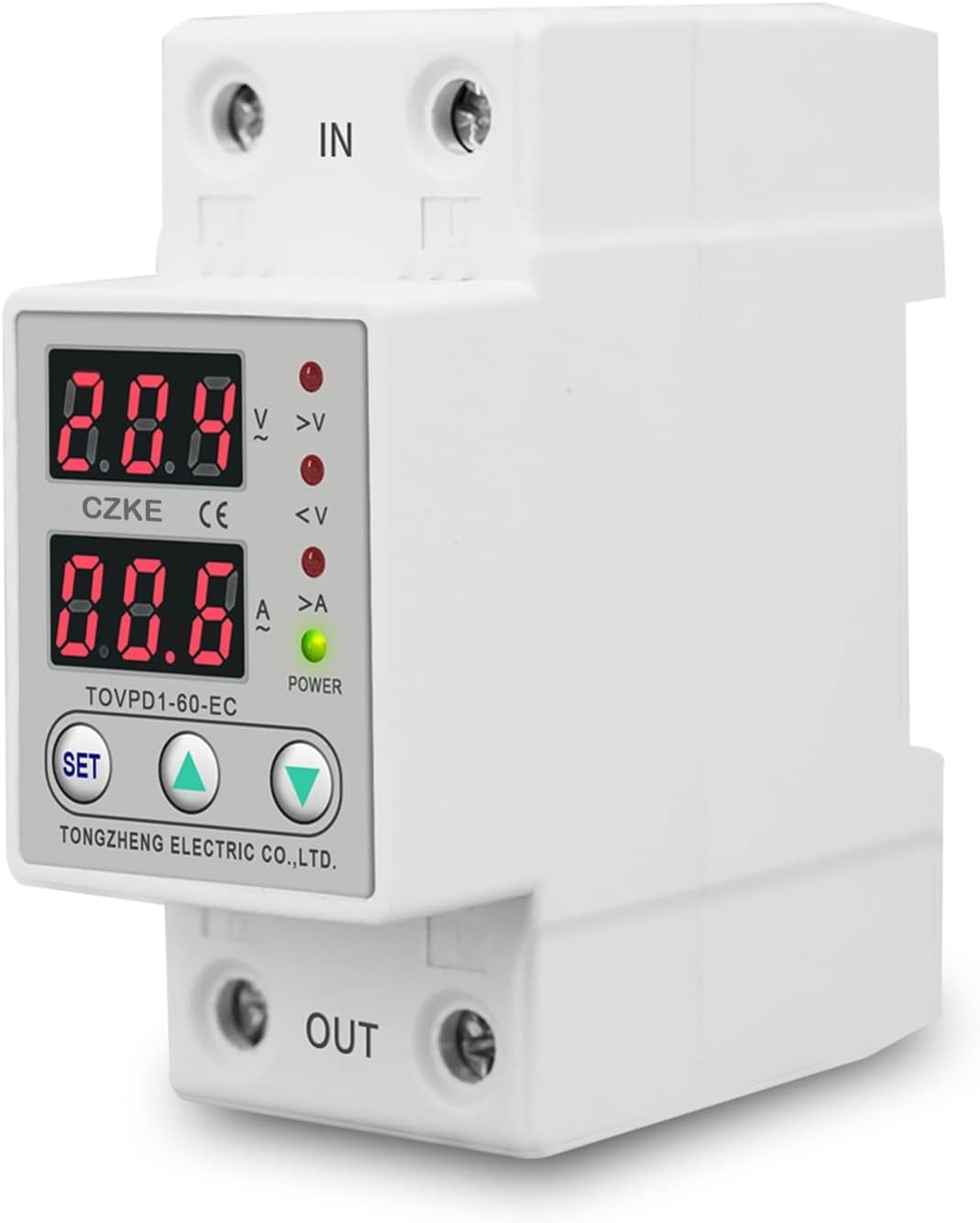
Figure 4: Side view of the TOVPD1-60-EC, demonstrating its compatibility with a 35mm DIN rail for secure mounting.
5. Operation and Settings
The device features a digital display and three buttons for operation and parameter adjustment.
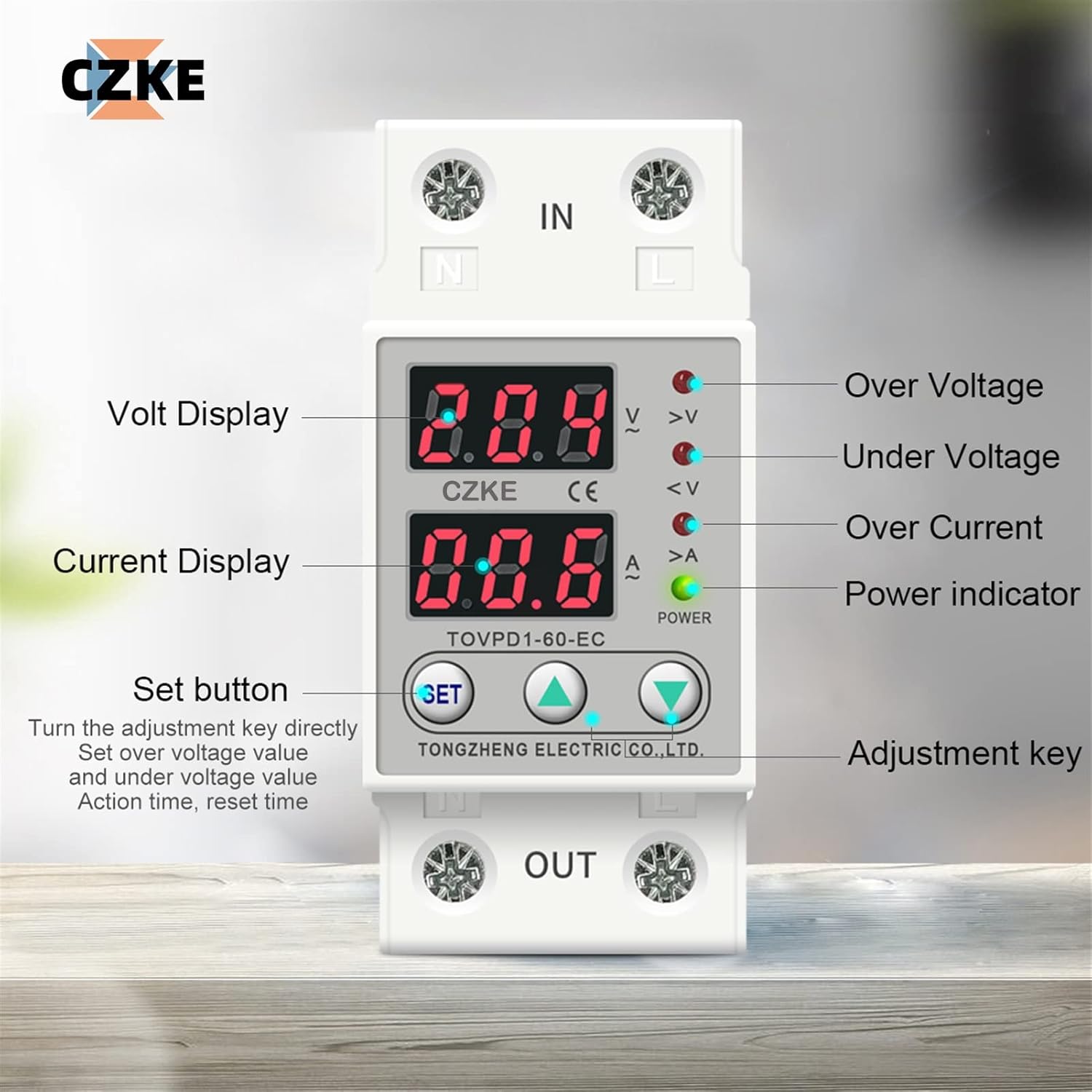
Figure 5: Detailed view of the TOVPD1-60-EC's display, indicators, and control buttons (SET, Up, Down) for parameter adjustment.
5.1. Display Indicators
- Volt Display: Shows the real-time input voltage.
- Current Display: Shows the real-time load current.
- >V (Over Voltage) Indicator: Lights up when an over-voltage condition is detected.
- <V (Under Voltage) Indicator: Lights up when an under-voltage condition is detected.
- >A (Over Current) Indicator: Lights up when an over-current condition is detected.
- POWER Indicator: Lights up when the device is powered on and operating normally.
5.2. Adjusting Parameters
To adjust the protection parameters (e.g., over-voltage value, recovery time, etc.):
- Press and hold the SET button for approximately 3-5 seconds until the display starts flashing, indicating entry into setting mode.
- Use the Up (▲) and Down (▼) buttons to navigate through the different parameters. Each press of the SET button will cycle to the next parameter.
- When the desired parameter is displayed, use the Up (▲) and Down (▼) buttons to adjust its value.
- After setting the value, press the SET button again to confirm the setting and move to the next parameter, or wait for a few seconds for the device to automatically save the settings and exit the setting mode.
- The device will automatically save the new settings and return to normal operation after a period of inactivity in setting mode.
Refer to the 'Technical Parameters' section for the adjustable ranges and default values for each setting.
6. Troubleshooting
If the device is not functioning as expected, consider the following troubleshooting steps:
- No Power Display: Check the incoming power supply connections. Ensure the main circuit breaker is on.
- Device Trips Frequently: Review your set protection values (over-voltage, under-voltage, over-current). They might be set too sensitively for your electrical environment or load. Check for actual voltage/current fluctuations in your system.
- Device Does Not Recover: Verify the recovery delay time settings. Ensure the fault condition (over/under voltage, over current) has genuinely cleared and stabilized.
- Incorrect Voltage/Current Reading: If you suspect the readings are inaccurate, you can use the voltage calibration feature (A13 voltage adjustable +/-9.5%) or compare with a known accurate meter.
- Device Not Protecting: Ensure the device is correctly wired and the 'POWER' indicator is on. Check if the protection parameters are set to appropriate values (not disabled or set to extreme limits).
For persistent issues, consult a qualified electrician or contact customer support.
7. Maintenance
The TOVPD1-60-EC is designed for minimal maintenance. However, periodic checks can ensure optimal performance and longevity:
- Visual Inspection: Periodically inspect the device for any signs of physical damage, discoloration, or loose connections.
- Cleanliness: Keep the device free from dust and debris. Use a dry, soft cloth for cleaning. Do not use liquid cleaners.
- Connection Checks: Ensure all wiring connections remain tight and secure. Loose connections can lead to overheating or intermittent operation.
Always disconnect power before performing any maintenance or inspection.
8. Warranty and Support
For warranty information, technical support, or service inquiries, please refer to the product packaging or contact your retailer or the manufacturer directly. Keep your purchase receipt as proof of purchase.
Manufacturer: CZKE-US