
1. Introduction
Thank you for choosing the BOTRIC AD101-22VMS Mini Square Shape Digital Voltmeter. This manual provides essential information for the safe and effective installation, operation, and maintenance of your new device. Please read this manual thoroughly before use and retain it for future reference.
This digital voltmeter is designed for signal indication, warning signals, accident signals, and other indication signals within electrical power lines, telecommunication systems, machine tools, ships, textiles, printing machinery, mining equipment, and similar applications.
2. Safety Information
⚠ WARNING: Electrical Shock Hazard ⚠
- This meter is designed exclusively for measuring 50-60Hz AC city electricity.
- DO NOT use this device to measure square wave signals, output from inverters, or corrected sine wave signals. Doing so will result in permanent damage to the meter and may pose a safety risk.
- Ensure all power is disconnected before installation or maintenance.
- Installation should only be performed by qualified personnel.
- Always follow local electrical codes and regulations.
- Do not operate the device if it appears damaged.
Always exercise caution when working with electrical circuits.
3. Product Overview
The BOTRIC AD101-22VMS is a compact digital voltmeter featuring a clear red LED display for easy voltage readings. Its mini square shape is ideal for panel mounting in various industrial and home improvement applications.

Figure 3.1: Front view of the BOTRIC AD101-22VMS Digital Voltmeter. This image shows the square red LED display, which typically indicates voltage readings, and the grey housing with a red cap on the rear connection side.
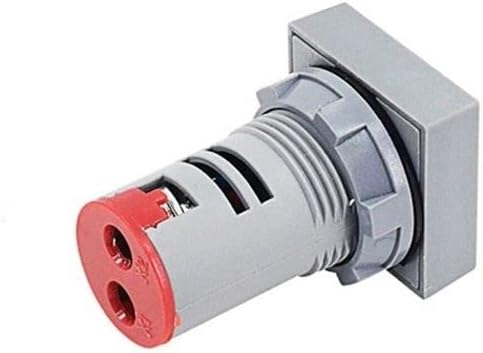
Figure 3.2: Rear view of the BOTRIC AD101-22VMS Digital Voltmeter. This perspective highlights the cylindrical body, threaded mounting nut, and the two red screw terminals for electrical connections.
Key Features:
- Compact mini square design
- Bright red LED digital display
- Designed for 50-60Hz AC city electricity measurement
- Easy panel mounting
4. Setup and Installation
Before proceeding with installation, ensure you have read and understood the safety information in Section 2.
- Prepare Mounting Hole: Cut a suitable square or round hole in your panel according to the dimensions of the voltmeter's body. Ensure the hole is clean and free of burrs.
- Insert Voltmeter: Carefully insert the voltmeter into the prepared hole from the front of the panel.
- Secure Device: From the rear of the panel, thread and tighten the provided mounting nut onto the voltmeter's body until it is securely fastened to the panel. Do not overtighten.
- Wiring: Connect the two terminals on the rear of the voltmeter to the AC circuit you wish to measure. Ensure the power source is 50-60Hz AC city electricity. Refer to Figure 3.2 for terminal location.
- Verify Connections: Double-check all wiring connections for security and correctness before applying power.
- Apply Power: Once all connections are verified, apply power to the circuit. The voltmeter should illuminate and display the measured voltage.
5. Operating Instructions
The BOTRIC AD101-22VMS Digital Voltmeter operates automatically once correctly installed and powered. It continuously displays the AC voltage of the connected circuit.
- Reading the Display: The red LED display will show the current AC voltage in numerical format.
- Voltage Range: The specific voltage range for your model is indicated on the device itself or in the specifications section of this manual. Ensure the measured voltage falls within this range.
- Frequency: The meter is designed for 50-60Hz AC frequencies only.
6. Maintenance
The BOTRIC AD101-22VMS Digital Voltmeter requires minimal maintenance. Regular inspection and cleaning will help ensure its longevity and accurate operation.
- Cleaning: Disconnect power before cleaning. Use a soft, dry cloth to wipe the display and housing. Do not use abrasive cleaners, solvents, or immerse the device in water.
- Inspection: Periodically inspect the wiring connections for any signs of looseness, corrosion, or damage. Ensure the mounting nut remains tight.
- Environmental Conditions: Ensure the operating environment is within the specified temperature and humidity ranges to prevent damage.
7. Troubleshooting
If you encounter issues with your voltmeter, refer to the following common problems and solutions:
| Problem | Possible Cause | Solution |
|---|---|---|
| No display / Meter not lighting up | No power to the circuit; Incorrect wiring; Faulty meter. |
|
| Incorrect voltage reading | Measuring non-sine wave AC (e.g., square wave, inverter output); Meter damage. |
|
| Intermittent display | Loose wiring connection; Unstable power supply. |
|
If the problem persists after attempting these solutions, contact the seller or a qualified electrician for assistance.
8. Specifications
| Attribute | Value |
|---|---|
| Model | AD101-22VMS |
| Brand | Generic (BOTRIC) |
| Measurement Type | Voltmeter |
| Input Voltage/Frequency | 50-60Hz AC City Electricity (Specific voltage range not provided, refer to device labeling) |
| Display Type | Digital LED (Red) |
| Shape | Mini Square |
| Manufacturer | Generic |
| ASIN | B09X3BNS2V |
9. Warranty and Support
Specific warranty terms for the BOTRIC AD101-22VMS Digital Voltmeter are typically provided by the seller or manufacturer at the time of purchase. Please refer to your purchase documentation or contact the retailer from whom you purchased this product for detailed warranty information.
For technical support or further inquiries, please contact the seller or manufacturer directly. Ensure you have your product model number (AD101-22VMS) and purchase details available when seeking support.