
Banglijian B09X1CZCLY
Banglijian Rechargeable ITC Hearing Aids User Manual
Model: B09X1CZCLY
1. Introduction
This manual provides comprehensive instructions for the safe and effective use of your Banglijian Rechargeable ITC (In-The-Canal) Hearing Aids. Please read this manual thoroughly before using the device and retain it for future reference.

Image 1.1: Banglijian Rechargeable ITC Hearing Aids with charging case and accessories.
The Banglijian ITC Hearing Aids are designed for adults with mild to moderate hearing loss, offering clear sound amplification, noise reduction, and feedback cancellation. They feature a discreet, comfortable design, quick charging, and a portable charging case.
2. What's Included in the Package
Upon opening your package, please verify that all the following items are present:

Image 2.1: Visual representation of all items included in the package.
- 2 x Banglijian ITC Hearing Aids (Beige color)
- 6 x Ear Domes (2 medium size pre-assembled, 2 small, 2 large)
- 1 x Charging Box
- 1 x Pack of 8 Wax Guards
- 2 x Cleaning Brushes
- 1 x Power Adapter
- 1 x USB-C Cable
- 1 x User Manual (this document)
3. Product Components and Controls
Familiarize yourself with the different parts of your hearing aids and charging case:

Image 3.1: Detailed diagram showing the microphone, multi-function button, magnetic suction point, charging contact point, ear dome, indicator lights, charging slots, and Type-C charging port.
3.1 Hearing Aid Components
- Microphone: Captures sound from the environment.
- Multi-function button:
- Short Press: Adjusts between 9 volume levels.
- Long Press (approx. 3 seconds): Switches between 3 program settings.
- Magnetic Suction Point: Ensures secure placement in the charging box.
- Charging Contact Point: Connects with the charging box for power transfer.
- Ear Dome: Soft silicone tip that fits into the ear canal. Available in small, medium, and large sizes for optimal fit.
- Red and Blue Lines: Red indicates the right ear hearing aid, Blue indicates the left ear hearing aid for easy identification.
3.2 Charging Box Components
- Indicator Light (Device): Shows charging status of individual hearing aids.
- Button: Used to check the charging status of the devices.
- Charging Slot: Securely holds and charges the hearing aids.
- Indicator Light (Box): Shows charging status of the charging box itself.
- Type-C Charging Port: For connecting the USB-C cable and power adapter to charge the box.
4. Initial Setup
4.1 Selecting the Correct Ear Dome Size
Choosing the right ear dome size is crucial for comfort, sound quality, and to prevent whistling (feedback). Experiment with the provided small, medium, and large ear domes to find the best fit for your ear canal. The ear dome should fit snugly but comfortably inside your ear.
4.2 Inserting the Hearing Aids
- Identify the left and right hearing aids using the blue (left) and red (right) lines.
- Gently insert the hearing aid into your ear canal until the ear dome fits snugly. Ensure a tight connection between the ear dome, the tube, and the device to minimize feedback.
- If you experience whistling, try repositioning the hearing aid or selecting a different ear dome size.
4.3 Adapting to Your Hearing Aids
It takes time to adjust to new hearing aids. We recommend the following:
- Start with the volume as low as possible.
- Initially use the "Noisy Mode" program if available, then gradually adjust.
- Allow 2-4 weeks for your ears and brain to adapt to the amplified sounds.
5. Charging Instructions
Your Banglijian hearing aids come with a portable charging case for convenience.

Image 5.1: Illustration of the compact size and charging capabilities of the hearing aids and case.
5.1 Charging the Hearing Aids
- Place the hearing aids into their respective charging slots in the charging box. The magnetic contact points will ensure they snap into place.
- The indicator lights on the charging box will show the charging status of the individual hearing aids.
- A full charge takes approximately 2-3 hours and provides up to 20-25 hours of use.
5.2 Charging the Charging Box
- Connect the provided USB-C cable to the Type-C charging port on the charging box and the power adapter.
- Plug the power adapter into a wall outlet.
- The indicator light on the charging box will illuminate to show it is charging.
- The charging box can provide 5-10 full charges for the hearing aids before needing to be recharged itself.
Note: Always use the original provided charger and cable. Charging with low power for extended periods can damage the battery.
6. Operation
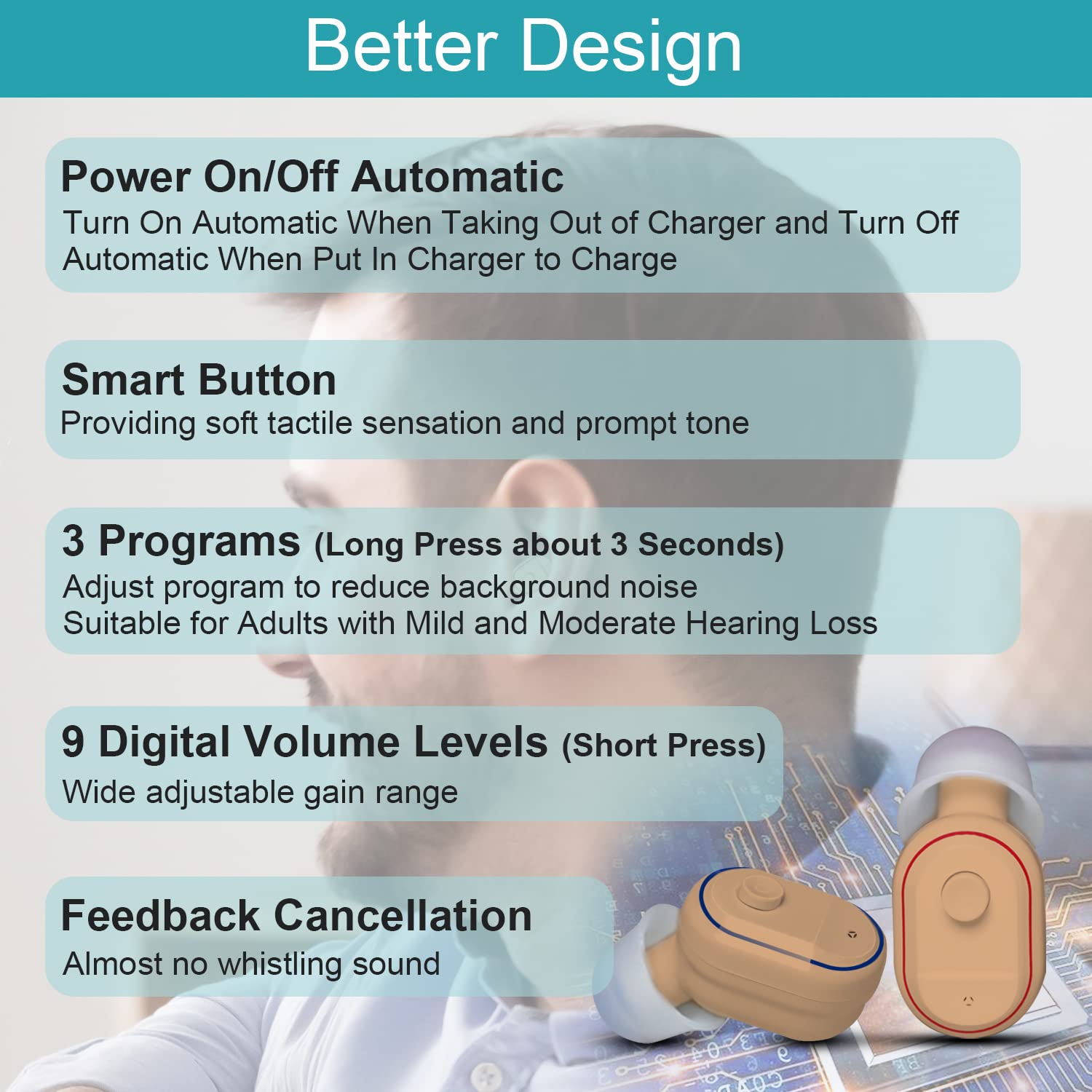
Image 6.1: Overview of the hearing aid's operational features including automatic power, volume, and program settings.
6.1 Power On/Off
- Power On: The hearing aids will automatically turn on when removed from the charging box.
- Power Off: The hearing aids will automatically turn off when placed back into the charging box for charging.
6.2 Adjusting Volume
The hearing aids feature 9 digital volume levels.
- Short Press the multi-function button to cycle through the 9 volume levels.
- We recommend starting at the lowest comfortable volume and gradually increasing it as needed.
6.3 Switching Programs
The hearing aids offer 3 program settings to adapt to different listening environments.
- Long Press the multi-function button for approximately 3 seconds to switch between the programs.
- These programs are designed to reduce background noise and enhance sound clarity in various situations.
6.4 Feedback Cancellation
The design incorporates feedback compression technology to minimize whistling sounds. If feedback occurs, ensure the ear dome is properly seated and the device is inserted correctly.
7. Maintenance and Care
Proper maintenance ensures optimal performance and extends the lifespan of your hearing aids.
7.1 Daily Cleaning
- Use the provided cleaning brushes to gently remove any earwax or debris from the ear domes and the hearing aid body.
- Ensure the surface of the device remains clean.
- Regularly clean the ear domes.
7.2 Wax Guard Replacement
The wax guards prevent earwax from entering the hearing aid. Replace them as needed using the provided pack of 8 wax guards. Refer to the user manual's first page for detailed instructions on wax guard replacement if not covered here.
7.3 Storage
- When not in use, store the hearing aids in the charging box. The hard shell design protects them during transport.
- To prevent moisture damage and extend battery life, place the device into a hearing aid dry box regularly.
- Keep the devices away from children and pets.
8. Troubleshooting
| Problem | Possible Cause | Solution |
|---|---|---|
| Whistling/Feedback Sound |
|
|
| Difficulty Adapting to Device |
|
|
| Device Not Charging |
|
|
| No Sound/Low Sound |
|
|
9. Specifications
| Feature | Detail |
|---|---|
| Model | B09X1CZCLY |
| Product Dimensions | 0.95 x 0.49 x 0.1 inches |
| Weight | 0.13 ounces (per device) |
| Battery Type | Rechargeable (1 product-specific battery included) |
| Charging Time (Hearing Aids) | 2-3 hours |
| Operating Time (Full Charge) | Up to 25 hours |
| Charging Box Capacity | Provides 5-10 full charges for hearing aids |
| Volume Levels | 9 Digital Levels |
| Program Settings | 3 Programs (for different environments) |
| Maximum Gain | 31 ± 4 dB |
| Material | Acrylonitrile Butadiene Styrene (ABS), Silicone |
| Color | Beige |

Image 9.1: Visual indicating the maximum gain and target user group for the hearing aids.
10. Important Safety Information
- This device is not waterproof. Keep it away from water and moisture.
- Keep the device and all accessories away from children and pets to prevent damage or choking hazards.
- Always use the original provided charger and cable. Using unauthorized chargers may damage the device or battery.
- Avoid prolonged low-power states, as this can damage the battery. Charge the device in time.
- Consult a doctor before use if you are an adult 18 years and older with mild to moderate hearing loss.
- This device is not intended for severe or profound hearing loss.
- Do not attempt to repair or modify the device yourself. Contact customer service for assistance.
11. Warranty and Customer Support
Banglijian offers a comprehensive after-sales service for your peace of mind:
- 30-Day Return/Replacement Policy: Enjoy a 30-day no-questions-asked return or replacement period. Items must be in their original condition.
- 1-Year Warranty: A 1-year warranty covers quality problems under normal conditions of use. This warranty does not cover loss or damages due to improper use (e.g., falling, getting wet, animal or human destruction).
- Customer Service: For any questions or issues after receiving your item, please contact our customer service team via email. Contact information can be found on the first page of your user manual. We are committed to providing timely assistance and ensuring your satisfaction.
no relevant documents
Ask a question about this manual
Ask about setup, troubleshooting, compatibility, parts, safety, or missing instructions. Manuals+ will review the question and use this page’s manual context to help answer it.