Introduction
This manual provides detailed instructions for the installation, operation, and maintenance of your LDCRE PIR Motion Sensor Light Switch. This device is designed to detect human movement using infrared technology, enabling automatic control of lighting and other electrical functions. It is suitable for various applications, including corridors, bathrooms, basements, warehouses, and garages.
The sensor offers high and stable sensitivity, contributing to energy efficiency.

Image: Two LDCRE PIR Motion Sensor Light Switches, showing the main unit, DC input/output cables, mounting screws, and double-sided adhesive pads.
Product Features
- PIR motion sensor detects human movement via infrared radiation.
- 120-degree cone angle detection range with a distance of 5-7 meters (16-26 feet).
- Adjustable delay time from 2 to 360 seconds.
- Compatible with 5V-24V DC power systems.
- Low power consumption and compact design.
- Suitable for motion-activated lighting, LED strips, and automatic sensory devices.
Setup and Installation
Follow these steps for proper installation of your motion sensor switch.
1. Wiring Connections
The sensor switch features DC coupler cables for easy integration into existing low-voltage systems.
- Connect your DC power source (5V-24V) to the input DC jack of the sensor.
- Connect your LED strip light or other compatible DC device to the output DC plug of the sensor.
- Ensure all connections are secure before applying power.

Image: A motion sensor switch connected to an LED strip, demonstrating a typical installation setup.
2. Mounting the Sensor
The sensor can be mounted using the provided screws or double-sided adhesive tape. Consider the detection range and angle when choosing a mounting location.
- Ceiling Installation: For overhead detection, mount the sensor on the ceiling. The detection range is approximately 5-8 meters with a 140-degree cone angle.
- Wall Installation: For horizontal detection, mount the sensor on a wall. The detection range is also 5-8 meters, covering a semi-circular area.

Image: Diagrams showing optimal placement for ceiling and wall installations, including detection patterns and distances.
Avoid placing the sensor near heat sources, air conditioning vents, or direct sunlight, as these can interfere with its performance.
Operating Instructions
The sensor operates automatically once powered. The primary adjustable setting is the delay time.
Adjusting Delay Time
The delay time determines how long the connected light or device remains on after motion is no longer detected. The default setting is 15 seconds, and it can be adjusted from 2 to 360 seconds.
- Locate the small potentiometer (adjustable screw) on the circuit board inside the sensor housing.
- To reduce the delay time, turn the potentiometer clockwise.
- To increase the delay time, turn the potentiometer counter-clockwise.
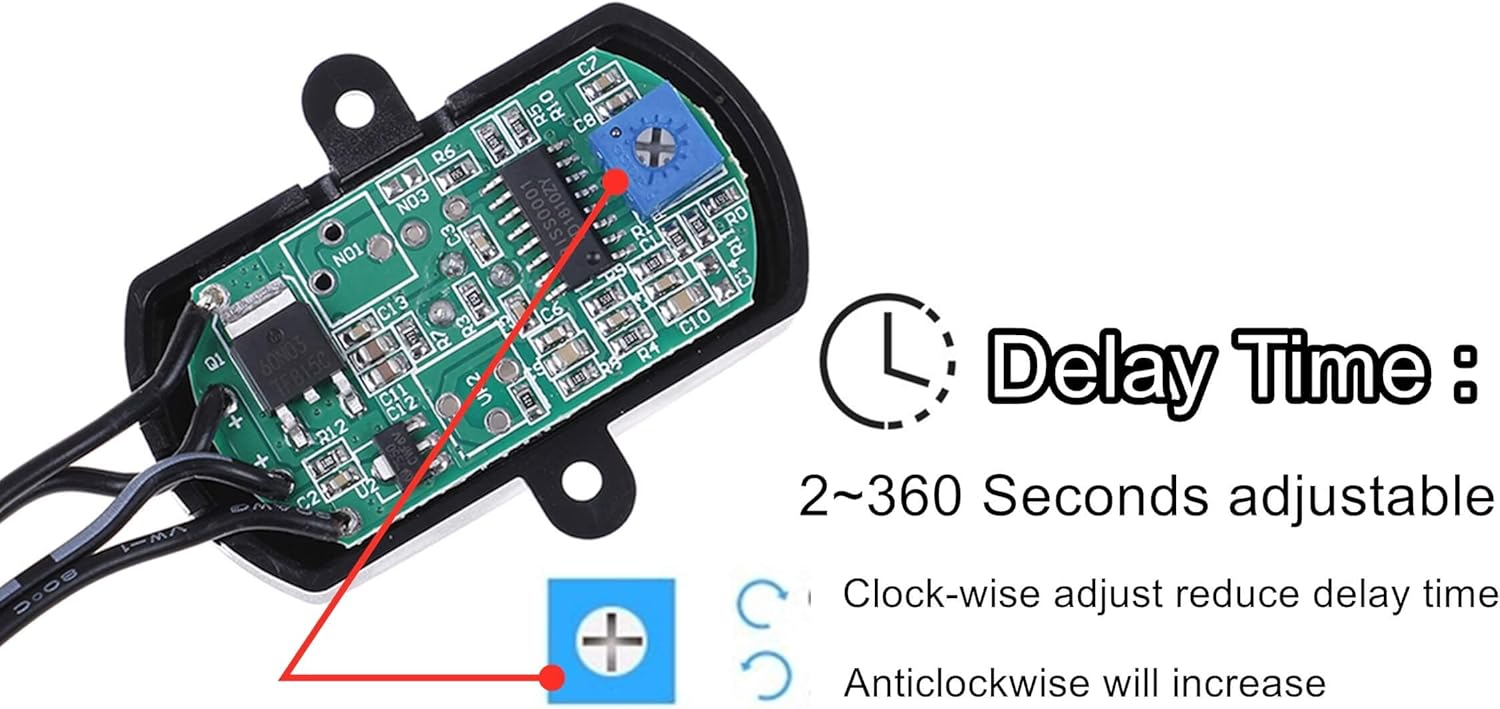
Image: Internal view of the sensor showing the potentiometer for adjusting the delay time (2-360 seconds).
Use a small screwdriver to carefully adjust the potentiometer. Test the delay time after each adjustment to achieve the desired duration.
Maintenance
The LDCRE PIR Motion Sensor Light Switch requires minimal maintenance.
- Keep the sensor lens clean and free from dust or obstructions. Use a soft, dry cloth for cleaning.
- Ensure the sensor is not exposed to excessive moisture or extreme temperatures beyond its operating range.
- Periodically check wiring connections for any signs of wear or looseness.
Troubleshooting
If you encounter issues with your motion sensor switch, refer to the following common problems and solutions:
- Light does not turn on when motion is detected:
- Check power supply connections to ensure the sensor is receiving power.
- Verify that the connected light or device is functioning correctly.
- Ensure the sensor lens is clean and unobstructed.
- Confirm the sensor is mounted within an appropriate detection range and angle.
- Light stays on continuously or turns on without motion:
- Check for constant movement within the sensor's detection zone.
- Ensure the sensor is not exposed to rapid temperature changes (e.g., from heaters, air conditioners) or direct sunlight, which can cause false triggers.
- Verify the delay time adjustment. If the potentiometer is set to maximum, it might appear to stay on for a very long time.
- Delay time cannot be adjusted:
- Ensure you are turning the potentiometer in the correct direction for the desired change (clockwise to decrease, counter-clockwise to increase).
- Make small adjustments and test. If the issue persists, the potentiometer or sensor may be faulty.
- Detection range is too short or inconsistent:
- Re-evaluate the mounting location to ensure optimal coverage and minimize obstructions.
- Ensure the sensor lens is clean.
- Avoid placing the sensor where large objects or furniture might block the detection path.
Specifications
| Feature | Detail |
|---|---|
| Brand | LDCRE |
| Model Number | PIR Sensor LED Motion Sensor Switch |
| Operating Voltage | 5V-24V DC |
| Working Temperature | -20 °C to +38 °C |
| Quiescent Current | < 50uA |
| Output Current | 5A |
| Trigger Mode | Continuous trigger |
| Output Mode | Inductive Output |
| Delay Range | 2-360 seconds (adjustable, default 15S) |
| Induction Mode | Passive Infrared (PIR) |
| Sensing Distance | 5-8 meters (16-26 feet) |
| Detection Angle | 120 degrees (cone angle) |
| Product Dimensions | Approximately 0.89"D x 0.89"H (main unit) |
| Cable Length | Approximately 11.8 inches / 30 cm |
| DC Plug Size | 2.1mm inner diameter, 5.5mm outer diameter |

Image: Product dimensions and DC plug/jack specifications.
Warranty and Support
For warranty information or technical support, please refer to the retailer where the product was purchased or contact LDCRE customer service directly. Keep your purchase receipt as proof of purchase.
Applications
The LDCRE PIR Motion Sensor Light Switch is versatile and can be used in various settings to automate lighting.

Image: Examples of common applications including kitchen under-cabinet lighting, under-bed lighting, wardrobe lighting, and stairway lighting.