
1. Product Overview
The [4-Pack] Submersible LED Lights are designed to provide vibrant, multi-color illumination for various aquatic and decorative settings. These battery-operated lights feature 16 color options and multiple dynamic modes, controlled conveniently via an included IR remote. Their IP68 waterproof rating ensures reliable performance in water, making them ideal for aquariums, ponds, pools, vases, and party decorations.

Image 1.1: Overview of the Submersible LED Lights and Remote Controls.
2. Package Contents
Please verify that all items listed below are included in your package:
- 4 x Submersible LED Lights
- 4 x 24-Key IR Remote Controllers
- (Note: AAA batteries for lights are not included. CR2032 button cell batteries for remotes are included.)
3. Specifications
| Feature | Detail |
|---|---|
| Brand | Generic |
| Model Name | YFY2201 |
| Dimensions | 2.7"L x 2.7"W x 1.1"H (per light) |
| Material | Plastic |
| Light Source | 10 SMD LED diodes per light |
| Colors | 16 static colors |
| Dynamic Modes | Fade, Flash, Smooth, Strobe |
| Water Resistance | IP68 Waterproof |
| Light Battery | 3 x AAA batteries (not included) |
| Remote Battery | CR2032 Button Cell (included) |
| Control Method | IR Remote Control |
| Operating Range | Up to 10m (remote) |
| Battery Life | Approximately 12 hours |

Image 3.1: Product Dimensions and Remote Control Layout.
4. Setup Instructions
- Battery Installation (Lights):
- Carefully twist the top cover of the LED light counter-clockwise to open.
- Insert 3 x AAA batteries (not included) into the battery compartment, ensuring correct polarity (+/-).
- Replace the top cover and twist it clockwise until it is absolutely tight. This is crucial for maintaining the IP68 waterproof seal. If not tightened sufficiently, water leakage may occur.
- Battery Installation (Remote):
- The remote control comes with a CR2032 button cell battery pre-installed. Remove the plastic insulation tab from the battery compartment before first use.
- Initial Test:
- Before submerging, press the "ON" button on the remote control to ensure the light functions correctly.
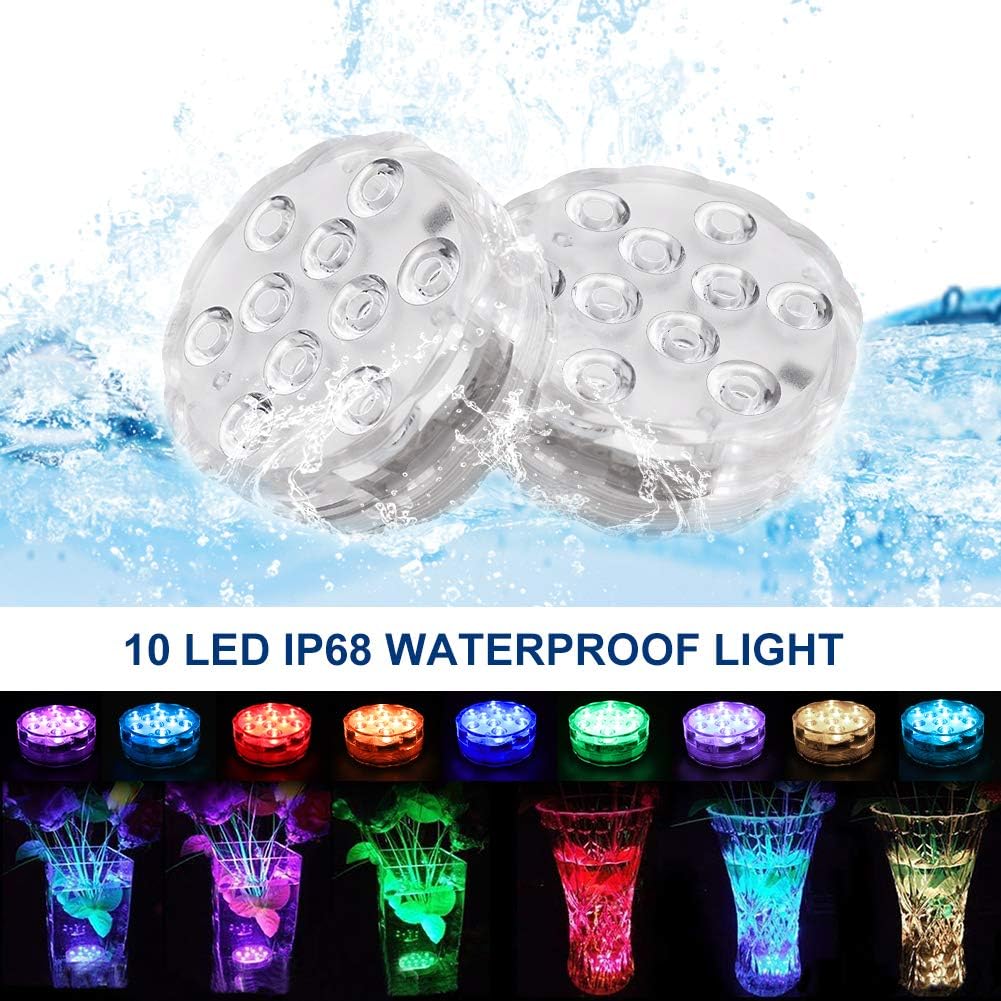
Image 4.1: Waterproof Design and Application in Vases.
5. Operating Instructions
Use the provided 24-key IR remote control to operate the submersible LED lights.
- Power ON/OFF: Press the ON button to turn the lights on, and OFF to turn them off.
- Static Colors: Select any of the 16 colored buttons to set a static color.
- Brightness Adjustment: Use the Up or Down arrow buttons (sun icon) to adjust the brightness of the static lighting.
- Dynamic Color Changing Modes:
- FLASH: Rapidly cycles through colors.
- STROBE: Flashes a single color. Select your desired color first, then press STROBE.
- FADE: Smoothly transitions between colors.
- SMOOTH: Gradual transitions between colors.

Image 5.1: Demonstrating the 16 Available Colors.

Image 5.2: Examples of Product Application in various settings.
6. Maintenance and Care
- Drying After Use: Always remove the lights from water after use. Do not keep them submerged indefinitely.
- Cleaning: Wipe the lights with a soft, damp cloth to remove any residue. Do not use abrasive cleaners or solvents.
- Battery Replacement: When the lights dim or stop responding, replace the AAA batteries in the lights and the CR2032 battery in the remote. Ensure the light's cap is tightened securely after battery replacement to maintain waterproofing.
- Storage: Store the lights in a cool, dry place when not in use. Remove batteries if storing for extended periods to prevent leakage.
7. Troubleshooting
| Problem | Possible Cause | Solution |
|---|---|---|
| Light does not turn on. | Dead or incorrectly installed batteries. Remote battery dead. | Replace AAA batteries in the light, ensuring correct polarity. Replace CR2032 battery in the remote. Ensure remote is pointed directly at the light. |
| Light flickers or dims. | Low battery power. | Replace AAA batteries in the light. |
| Water inside the light. | Cap not tightened sufficiently. | Remove light from water immediately. Open, dry thoroughly, and replace batteries if corroded. Ensure cap is twisted clockwise until it cannot turn any further before next use. |
| Remote not responding. | Remote battery dead or out of range. Obstruction between remote and light. | Replace CR2032 battery. Ensure remote is within 10m range and has a clear line of sight to the light. |
8. Important Warnings
- Waterproofing: Always ensure the cap is twisted clockwise until it cannot turn any further before placing the light underwater. Failure to do so will compromise the waterproof seal and may lead to water damage and product malfunction.
- Usage: These lights are intended for special occasion lighting and temporary decorative use. They are not designed for permanent submersion.
- Battery Safety:
- Do not mix old and new batteries.
- Do not mix alkaline, standard (carbon-zinc), or rechargeable (nickel-cadmium) batteries.
- Remove exhausted batteries promptly.
- Dispose of batteries properly according to local regulations.
- Temperature: Avoid using or storing the lights in extreme temperatures, especially prolonged exposure to high heat, as this can affect battery life and product integrity.
9. Warranty and Support
This product comes with a 12-month warranty from the date of purchase, covering manufacturing defects. For warranty claims, technical support, or any inquiries, please contact your retailer or the manufacturer directly with your purchase details.
Please retain your proof of purchase for warranty purposes.