
1. Introduction
This manual provides essential instructions for the safe and effective use of your Walimex Pro Roll-up Panel Background 210x220cm Black, Model 23211. Designed for professional photography and video production, this portable background offers a stable, wrinkle-free surface with an easy-to-use roll-up mechanism.

Figure 1: Walimex Pro Roll-up Panel Background 210x220cm Black.
Key Features:
- Stable and Mobile: The robust metal casing protects the background and ensures stability during use, while also allowing for easy transport.
- Wrinkle-Free and Opaque: The low-reflection fabric provides a smooth, uniform background surface.
- Uncomplicated Setup: Features an automatic roll-up system with an auto-hold function, allowing for quick deployment and secure positioning at any desired height.

Figure 2: Overview of product features including stability, wrinkle-free material, and easy setup.
2. Safety Instructions
- Always handle the background with care to prevent damage to the fabric or the roll-up mechanism.
- Ensure the background is placed on a stable, level surface to prevent tipping.
- Do not force the roll-up or retraction mechanism. If resistance is met, check for obstructions.
- Keep the product away from open flames, excessive heat, and sharp objects.
- Store the background in its retracted state in a dry, clean environment.
3. Package Contents
Please verify that all components are present upon unpacking:
- 1x Walimex Pro Roll-up Panel Background 210x220cm Black (Model 23211)

Figure 3: The Walimex Pro Roll-up Panel Background as supplied.
4. Setup
The Walimex Pro Roll-up Panel Background is designed for quick and easy deployment. Follow these steps to set up your background:
- Place the background casing on a flat, stable surface. Ensure there is enough clear space behind and above the unit for the background to extend.
- Locate the handle or pull-tab at the top edge of the background fabric.
- Gently pull the background fabric upwards from the casing. The internal mechanism will automatically extend the support rods and hold the background at your desired height.
- Adjust the height as needed. The auto-hold function will keep the background securely in place.
- To retract, gently pull the background up slightly further to release the lock, then guide it slowly back into the casing. Do not release abruptly.

Figure 4: Step-by-step visual guide for setting up the background.
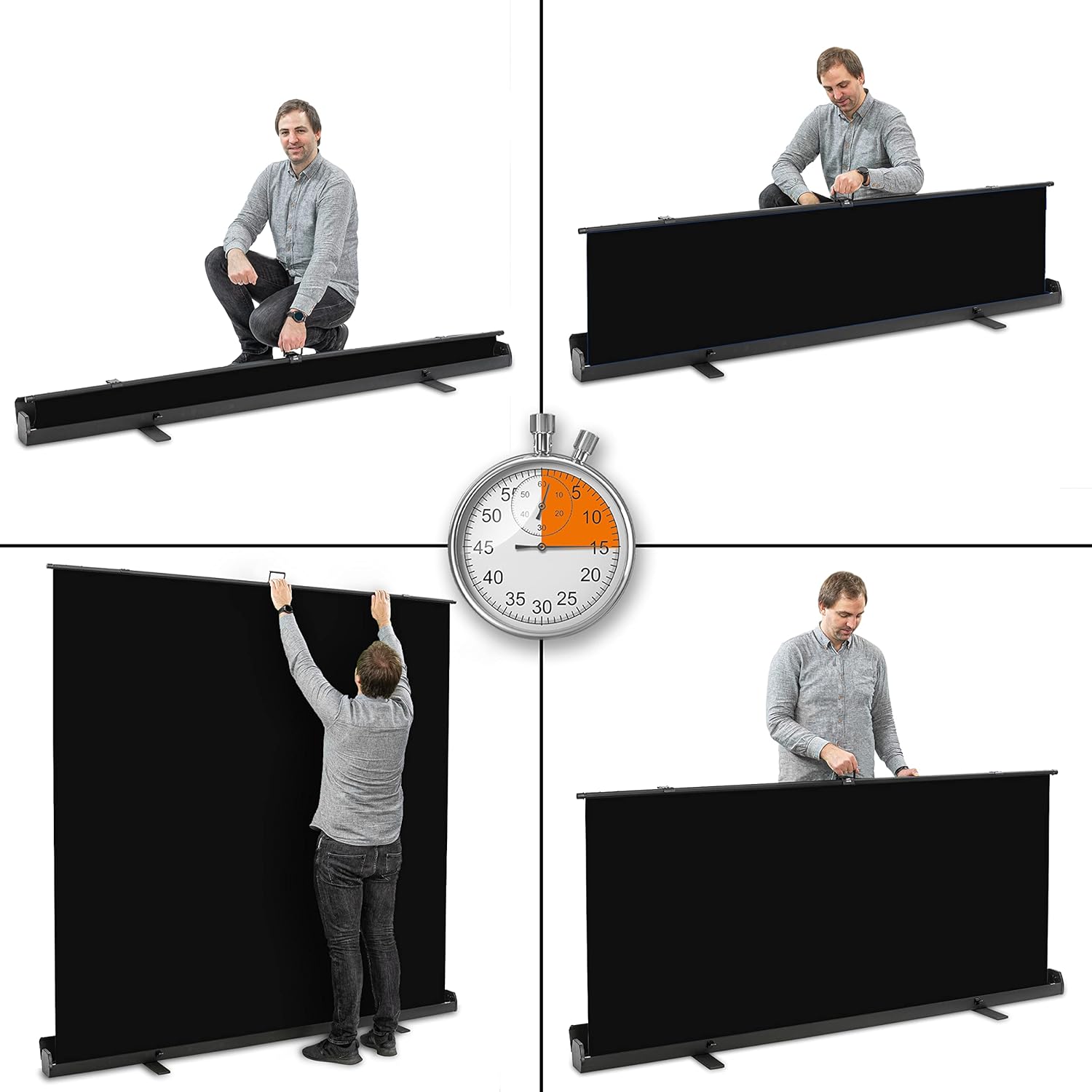
Figure 5: Additional visual instructions for deploying the background.
5. Operation
Once set up, the Walimex Pro Roll-up Panel Background provides a consistent surface for your creative work. Its simple operation allows for quick adjustments:
- Height Adjustment: The auto-hold mechanism allows you to stop the background at any desired height. Simply pull up to extend and release to lock.
- Retraction: To retract the background, gently pull the top edge upwards by a small amount to disengage the locking mechanism, then slowly guide the fabric back into the casing. Ensure it retracts smoothly without snagging.
- Portability: The compact design when retracted, along with the integrated handle, makes it easy to transport the background between locations.

Figure 6: Demonstrating portability and practical use of the background.
6. Maintenance and Care
Proper care will extend the lifespan and maintain the quality of your Walimex Pro Roll-up Panel Background:
- Cleaning: The background fabric should be cleaned by hand washing only. Use a mild detergent and cold water. Do not machine wash, tumble dry, or iron.
- Storage: Always retract the background fully into its casing before storage. Store in a dry, dust-free environment, away from direct sunlight and extreme temperatures.
- Inspection: Periodically inspect the fabric for any tears or damage, and the roll-up mechanism for smooth operation.
7. Troubleshooting
If you encounter any issues with your background, consider the following:
- Background not extending/retracting smoothly: Check for any obstructions in the mechanism or if the fabric is snagged. Ensure the unit is on a level surface.
- Background not holding position: Ensure the fabric is pulled up firmly to engage the auto-hold lock. If the issue persists, the internal mechanism may require inspection by a qualified technician.
- Wrinkles in fabric: While designed to be wrinkle-free, minor creases can occur from improper storage. Gently extend the background and allow it to hang for some time in a warm environment to relax the fabric. Do not iron.
8. Specifications
| Attribute | Detail |
|---|---|
| Brand | Walimex Pro |
| Model Number | 23211 |
| Color | Black |
| Dimensions (Extended) | 210cm (Width) x 220cm (Height) |
| Item Weight | 11.14 Kilograms |
| Care Instructions | Hand wash only |
| Country of Origin | China |

Figure 7: Detailed dimensions of the background panel.
9. Warranty and Support
For warranty information or technical support, please refer to the purchase documentation or contact Walimex Pro customer service directly. Keep your proof of purchase for any warranty claims.