
PREXISO P40B-3LIH
PREXISO Laser Distance Meter User Manual
Model: P40B-3LIH
Introduction
Thank you for purchasing the PREXISO Laser Distance Meter. This compact and high-precision device is designed for various measurement tasks in DIY projects, home improvements, and indoor construction or civil engineering applications. Please read this manual carefully before use to ensure safe and optimal operation.

Image: The PREXISO Laser Distance Meter (P40B-3LIH) with its included USB charging cable.
Safety Information
WARNING: Laser Radiation
- This device emits Class 2 laser radiation (620-690nm, <1mW).
- Do not stare into the laser beam.
- Do not direct the laser beam towards people or animals.
- Avoid direct eye exposure.
- Use only as described in this manual.
Always ensure a safe working environment. Keep the device away from children.
Product Overview
The PREXISO Laser Distance Meter is designed for ease of use and portability, featuring a compact and lightweight design.

Image: Detailed view of the device highlighting its digital display, measurement button, area/volume/Pythagoras function button, reference conversion button, laser beam exit, and USB charging interface.
Key Features:
- Compact and Lightweight: Weighs only 40g, approximately 1/3 the size of typical products, making it highly portable.
- Durable Construction: Made from ABS material with an outer bar for enhanced grip and slip resistance.
- USB Rechargeable: Equipped with a USB charging port, providing 3-5 hours of continuous use on a single charge.
- Automatic Power-Off: Device powers off after 120 seconds of inactivity to conserve battery.
- Backlit Display: Ensures clear readability even in low-light conditions.

Image: A visual comparison demonstrating the compact size of the PREXISO Laser Distance Meter (right) next to a larger, standard laser distance meter (left).
Setup
1. Charging the Device
Before first use, fully charge the device using the provided USB cable.
- Connect the small end of the USB cable to the charging port on the side of the laser distance meter.
- Connect the larger end of the USB cable to a standard USB power adapter (not included) or a computer USB port.
- The battery indicator on the display will show charging status. A full charge typically takes 3-5 hours.

Image: The PREXISO Laser Distance Meter connected to a USB power source for charging, illustrating the USB charging capability.
2. Attaching the Safety Strap
For added security and to prevent accidental drops, it is recommended to attach and use the safety strap.
- Thread the safety strap through the designated loop on the device.
- Secure the strap around your wrist during use.
Operating Instructions
Power On/Off
- Press the LASER ON button to turn on the device.
- The device will automatically turn off after 120 seconds of inactivity.
Measurement Reference Point
The device allows you to set the measurement reference point from either the front or the rear of the device.
- Press the UNITS button to toggle between front and rear reference points. The display will indicate the current reference point.
Measurement Modes
The PREXISO Laser Distance Meter offers 6 different measurement modes:

Image: Visual representation of the six measurement modes: Distance, Continuous, Area, Volume, Pythagorean 2-point, and Pythagorean 3-point measurement.
- Distance Measurement:
- Press the LASER ON button once to activate the laser.
- Aim the laser at the target point.
- Press the LASER ON button again to take a single measurement. The result will be displayed.
- Continuous Measurement (Tracking):
- From distance measurement mode, press and hold the LASER ON button. The device will continuously measure and display the distance as you move.
- Release the button to stop continuous measurement.
- Area Measurement:
- Press the UNITS button repeatedly until the area icon (a square) appears on the display.
- Measure the length and width as prompted by the device. The area will be automatically calculated and displayed.
- Volume Measurement:
- Press the UNITS button repeatedly until the volume icon (a cube) appears on the display.
- Measure the length, width, and height as prompted. The volume will be automatically calculated and displayed.
- Pythagorean 2-Point Measurement:
- Press the UNITS button repeatedly until the Pythagorean 2-point icon appears.
- Follow the on-screen prompts to measure the hypotenuse and one leg of a right triangle. The device will calculate the other leg.
- Pythagorean 3-Point Measurement:
- Press the UNITS button repeatedly until the Pythagorean 3-point icon appears.
- Follow the on-screen prompts to measure three points to calculate an indirect height or distance.
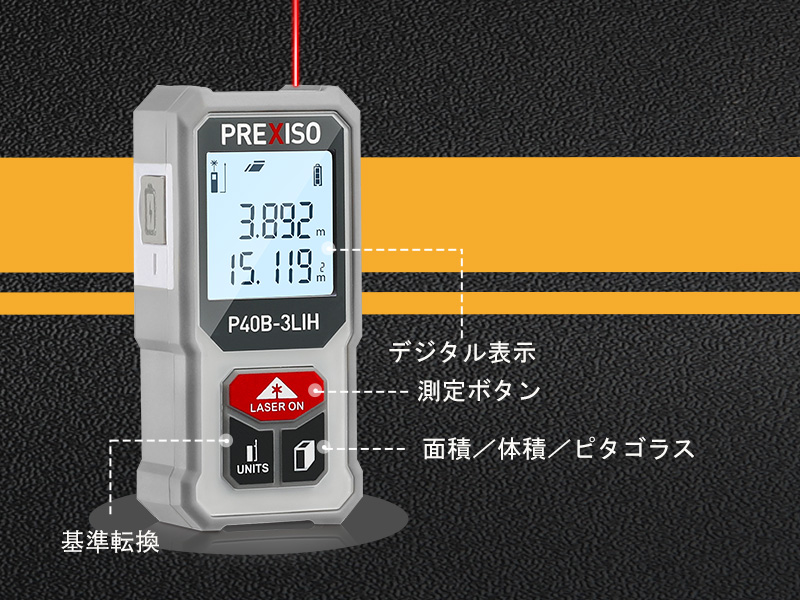
Image: Examples of the laser distance meter being used in different indoor and construction environments for various measurements.
Maintenance
- Cleaning: Use a soft, damp cloth to clean the device. Do not use abrasive cleaners or solvents.
- Storage: Store the device in a cool, dry place when not in use. Avoid extreme temperatures and direct sunlight.
- Battery Care: Recharge the battery regularly, even if the device is not used frequently, to maintain battery health.
- Lens Care: Keep the laser lens clean for accurate measurements. Use a soft, lint-free cloth specifically designed for optical lenses.
Troubleshooting
| Problem | Possible Cause | Solution |
|---|---|---|
| Device does not turn on. | Low battery or no charge. | Charge the device using the USB cable. |
| Inaccurate measurements. | Poor measurement environment (e.g., strong light, reflective surfaces), dirty laser lens, or incorrect reference point. | Ensure optimal indoor conditions. Clean the laser lens. Verify the correct measurement reference point (front/rear). |
| Laser not visible. | Too much ambient light, or laser is off. | Use in lower light conditions. Press the LASER ON button to activate the laser. |
| Device turns off unexpectedly. | Automatic power-off activated (120 seconds of inactivity). | This is normal behavior to conserve battery. Turn the device back on. |
If the problem persists, please contact customer support.
Specifications
| Feature | Detail |
|---|---|
| Brand | PREXISO |
| Model | P40B-3LIH |
| Product Dimensions | 3.5 x 2 x 7 cm |
| Product Weight | 40 g |
| Color | Gray |
| Material | ABS |
| Power Source | Battery Powered (USB Rechargeable) |
| Battery Type | Lithium |
| Laser Class | Class 2 (620-690nm, <1mW) |
| Measurement Range | 0.35m to 40m |
| Measurement Tolerance | ±3mm |
| Auto Power-Off | 120 seconds of inactivity |
| Measurement Modes | Distance, Continuous, Area, Volume, Pythagorean (2-point, 3-point) |
Warranty & Support
This PREXISO Laser Distance Meter comes with a 2-year warranty period from the date of purchase.
If you encounter any issues or have questions regarding your device, please do not hesitate to contact our customer support team. Please refer to your purchase documentation for specific contact details.
Related documentsP40B-3LIH


Ask a question about this manual
Ask about setup, troubleshooting, compatibility, parts, safety, or missing instructions. Manuals+ will review the question and use this page’s manual context to help answer it.