1. Introduction
The AUTOPHIX 7150 is a professional full-system OBD2 diagnostic scanner specifically designed for Ford, Lincoln, and Mercury vehicles. It provides comprehensive diagnostic capabilities, including reading and clearing fault codes, viewing live data, and performing various service functions across all major vehicle systems such as Engine, ABS, SRS, SAS, BMS, EPB, and TPMS. This manual provides detailed instructions for setting up, operating, maintaining, and troubleshooting your device.

Image: The AUTOPHIX 7150 diagnostic scanner, featuring its display screen and connection cable.
2. Key Features
The AUTOPHIX 7150 offers a wide array of features to assist with vehicle diagnostics and maintenance:
- Full System Diagnostics: Quickly scans and identifies malfunctions in all vehicle systems, including Engine, ABS, SAS, SRS, TPMS, TCM, ESP, EPB, EPS, SCM, and BMS.
- Comprehensive Service Functions: Supports various reset and maintenance functions such as Oil Reset, TPMS Reset, PCM/TCM KAM Reset, ABS Bleeding, Transmission Learning, SAS Reset, EPB Reset, Brake Pad Reset, Throttle Position Learning, Battery Registration, Injector Coding (IQA), BMS Reset, ETC Reset, and DPF Regeneration.
- Universal OBD2 Functions: Compatible with all vehicle brands manufactured after 1996, allowing for reading and clearing generic fault codes, I/M readiness status, and live data stream analysis.
- Battery Registration: Essential function for registering new battery installations to ensure proper battery management system operation in Ford vehicles.
- Accurate Data Stream: Provides fast and precise live sensor data in both text and graphical formats for intuitive analysis.
- User-Friendly Interface: Features a 2.6-inch 262K TFT color LCD screen and a silicone keypad for easy navigation and operation.
- Lifetime Free Software Updates: Ensures the device remains up-to-date with the latest vehicle models and diagnostic protocols.
- DTC Lookup Library: Built-in database for quick definition of diagnostic trouble codes.

Image: Overview of the various vehicle systems diagnosable by the AUTOPHIX 7150.

Image: Specialized functions available for Ford, Lincoln, and Mercury vehicles.

Image: A visual representation of the advanced diagnostic and service functions.
3. Setup
Follow these steps for the initial setup of your AUTOPHIX 7150 diagnostic scanner:
- Connect to Vehicle: Locate the vehicle's OBD2 port, typically under the dashboard on the driver's side. Plug the scanner's cable firmly into the OBD2 port.
- Power On: The scanner will power on automatically once connected to the vehicle's OBD2 port. No external power source is required.
- Language Selection: Upon first use, you may be prompted to select your preferred language. Use the navigation buttons to select English and press the 'OK' button to confirm.
- System Initialization: The device will perform a brief system initialization. Wait for the main menu to appear on the screen.

Image: The scanner connected to a vehicle's OBD2 port, ready for operation.
4. Operating Instructions
4.1. Full System Diagnostics
To perform a full system diagnostic scan:
- From the main menu, select the 'Diagnostics' or 'Full System Scan' option.
- The scanner will automatically identify the vehicle's VIN and begin scanning all available control modules.
- Once the scan is complete, a report will display all detected fault codes and their descriptions.
- Select a specific system or fault code to view detailed information, live data, or to clear the code.
4.2. Special Functions
The AUTOPHIX 7150 supports various special functions crucial for maintenance and repair:
- Oil Reset: Resets the oil service light after an oil change.
- EPB Reset: Resets the electronic parking brake system after brake pad replacement.
- Battery Registration: Registers a new battery with the vehicle's battery management system (BMS). This is crucial for proper charging and battery life.
- TPMS Reset: Resets the Tire Pressure Monitoring System after tire rotation or sensor replacement.
- DPF Regeneration: Initiates the Diesel Particulate Filter regeneration process to clear accumulated soot.
- SAS Calibration: Calibrates the Steering Angle Sensor after steering system repairs.
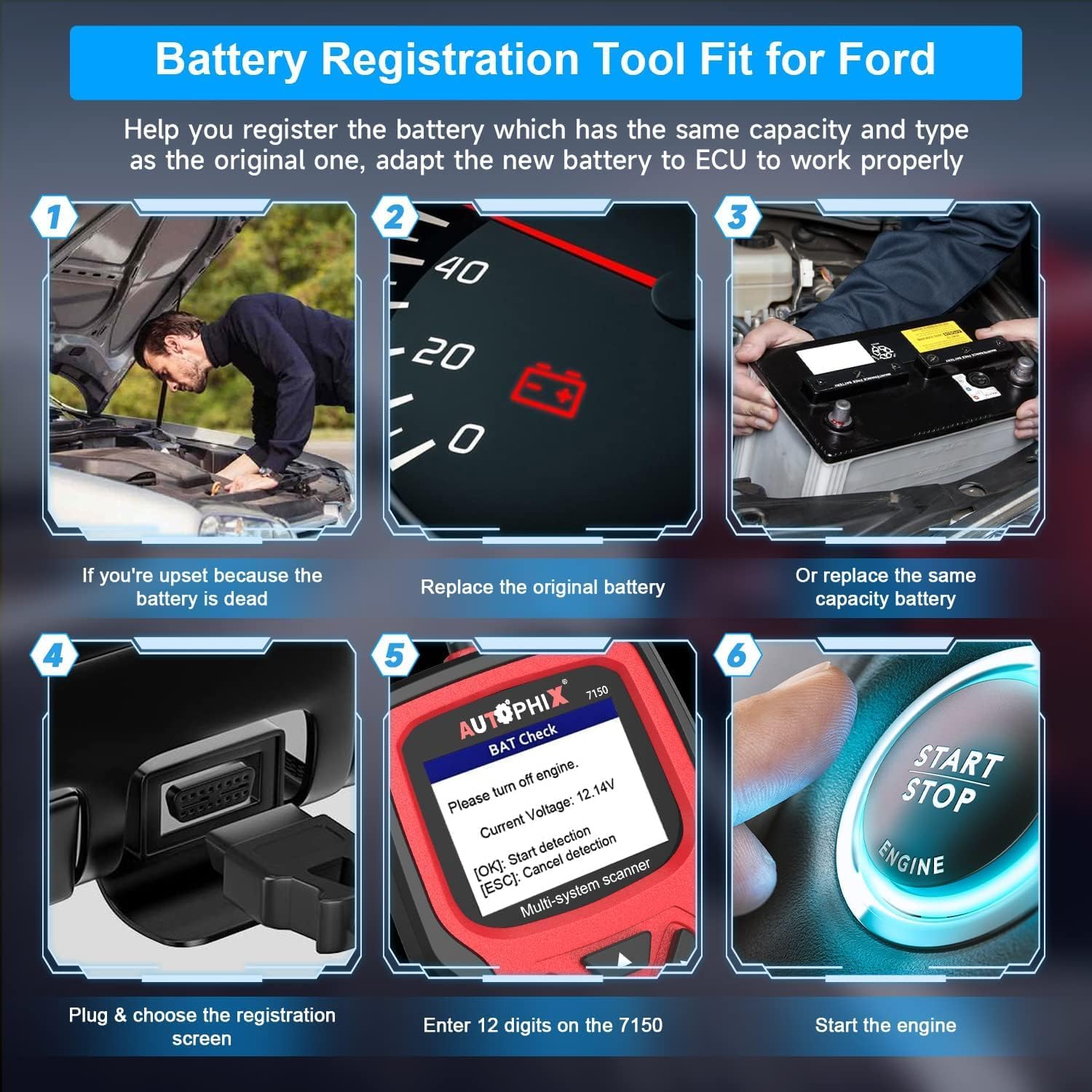
Image: Step-by-step guide for performing battery registration.

Image: Compatibility chart showing supported Ford, Lincoln, and Mercury models.
5. Maintenance
To ensure the longevity and optimal performance of your AUTOPHIX 7150 scanner:
- Cleaning: Wipe the device with a soft, dry cloth. Avoid using abrasive cleaners or solvents.
- Storage: Store the scanner in a cool, dry place away from direct sunlight and extreme temperatures.
- Software Updates: The AUTOPHIX 7150 comes with lifetime free software upgrades. Regularly check the official AUTOPHIX website for new software versions to ensure compatibility with the latest vehicle models and to access new features. Follow the instructions provided on the website for updating the device firmware.
- Cable Care: Avoid bending or twisting the OBD2 cable excessively to prevent internal damage.
6. Troubleshooting
If you encounter issues while using the AUTOPHIX 7150, consider the following common problems and solutions:
- Device Not Powering On:
- Ensure the OBD2 cable is securely connected to the vehicle's OBD2 port.
- Verify the vehicle's ignition is in the ON position (engine can be off).
- Check the vehicle's battery voltage.
- Communication Error:
- Confirm the vehicle supports the OBD2 protocol (most vehicles after 1996 do).
- Ensure the vehicle's ignition is on.
- Try connecting to a different vehicle to rule out a vehicle-specific issue.
- Update the scanner's software to the latest version.
- Incorrect Readings/Functions Not Working:
- Verify the vehicle model and year are correctly selected in the scanner's menu.
- Ensure the software is up-to-date.
- For specific functions, ensure all prerequisites (e.g., engine off, specific ignition state) are met as per the on-screen instructions.
- Screen Freezes/Unresponsive:
- Disconnect the scanner from the vehicle and reconnect it.
- Perform a software update if available.
If problems persist, utilize the 'FEEDBACK' function within the scanner's settings menu to report the issue to AUTOPHIX support. This function helps in diagnosing and resolving complex problems.
7. Specifications
| Specification | Value |
|---|---|
| Manufacturer | AUTOPHIX |
| Model Number | 7150 |
| Item Weight | 590 g |
| Product Dimensions (L x W x H) | 25.91 x 20.27 x 7.11 cm |
| Power Source | Cable Electric (via OBD2 port) |
| Screen Size | 2.6 Inches (262K TFT color LCD) |
| Supported Languages | English, French, Spanish, Italian, Portuguese, German, Danish, Swedish, Norwegian, Russian, Finnish (11 languages) |
8. Warranty and Support
The AUTOPHIX 7150 diagnostic scanner is backed by a comprehensive warranty and dedicated customer support:
- Warranty: This product offers an 8-year warranty from the date of purchase.
- Returns: Enjoy a 60-day free return policy for refund or replacement.
- Customer Service: For any questions, technical assistance, or support, please refer to the Q&A section on the product page or contact AUTOPHIX customer service via email or Amazon message.


