
1. Introduction
Thank you for choosing the Wansa WF-2002 Home Treadmill. This manual provides essential information for the safe assembly, operation, and maintenance of your new fitness equipment. Please read this manual thoroughly before using the treadmill and keep it for future reference.
The Wansa WF-2002 is designed for home use, offering a convenient way to perform cardiovascular exercise. It features a 1000W motor, a speed range of 0.8-12 km/h, and 3 automatic programs to help you achieve your fitness goals.
2. Safety Information
WARNING: To reduce the risk of serious injury, read all important precautions and instructions in this manual before using the treadmill.
- Consult your physician before starting any exercise program.
- Keep children and pets away from the treadmill during operation.
- Place the treadmill on a level surface with at least 2 meters of clear space behind it and 0.6 meters on each side.
- Ensure all bolts and nuts are securely tightened before each use.
- Wear appropriate exercise clothing and athletic shoes.
- Do not operate the treadmill if it has a damaged power cord or plug, or if it is not working properly.
- Always hold the handrails when starting or stopping the treadmill.
- Use the safety key feature. Attach the clip to your clothing before starting your workout.
- Do not step on or off the treadmill while the belt is moving.
- Unplug the treadmill from the power outlet when not in use or before cleaning and maintenance.
3. Package Contents
Carefully unpack all components and ensure you have received the following items:
- Wansa WF-2002 Treadmill Base
- Motor Cover
- User Manual
- Power Cable
If any parts are missing or damaged, please contact customer support immediately.
4. Setup and Assembly
Assembly is required for the Wansa WF-2002 Treadmill. Please follow these steps carefully:
- Unpack Components: Remove all parts from the packaging and place them on a clear, flat surface.
- Attach Upright Posts: Secure the upright posts to the treadmill base using the provided hardware. Ensure they are firmly attached.
- Install Console: Mount the console onto the top of the upright posts. Connect any necessary cables from the console to the main unit.
- Attach Handrails: Secure the handrails to the upright posts.
- Connect Power: Plug the power cable into the treadmill and then into a grounded electrical outlet.
- Final Check: Inspect all connections and ensure all bolts are tightened. Test the safety key function.
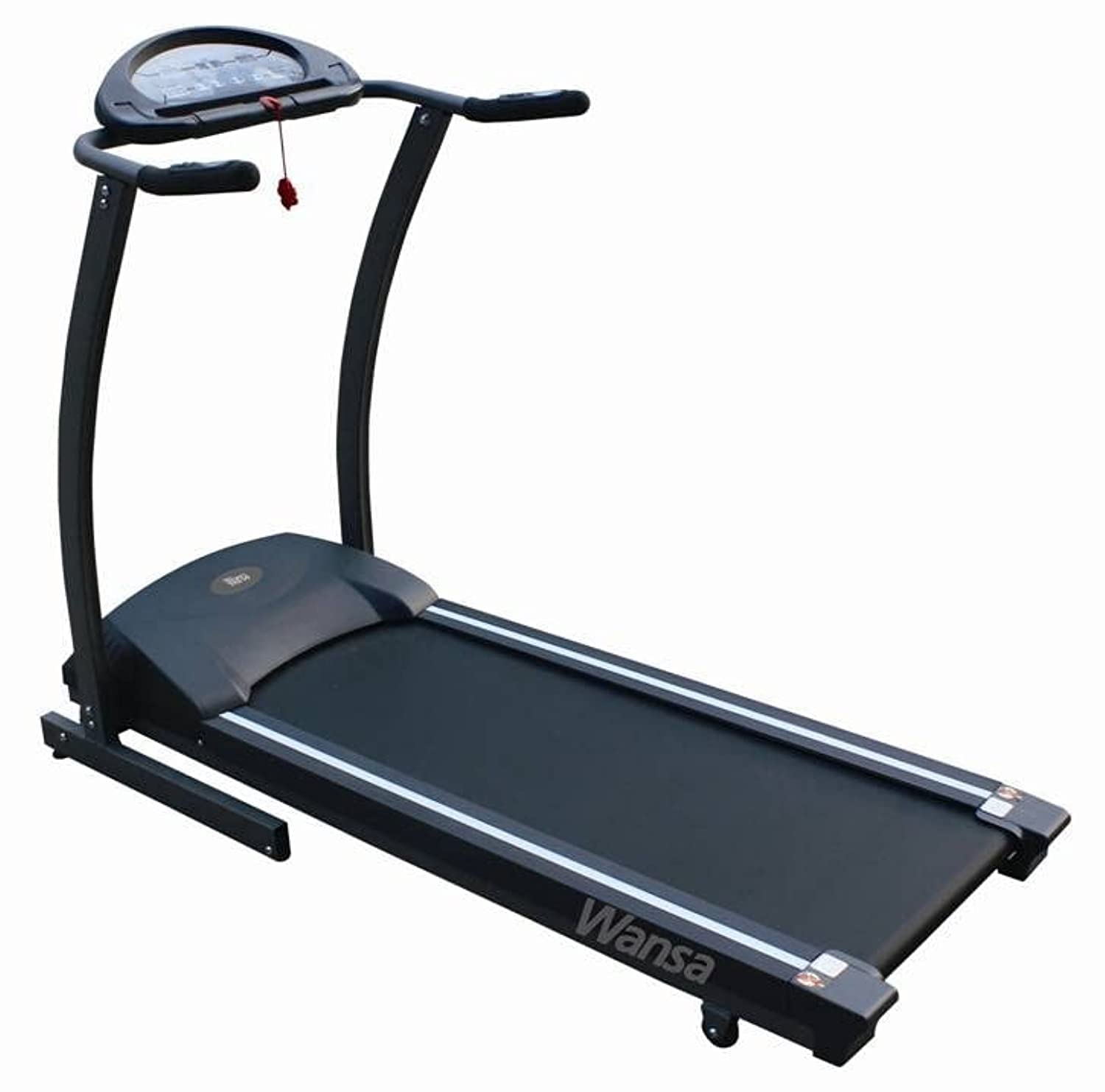
Image: The Wansa WF-2002 Home Treadmill, showcasing its compact design and control panel. This image provides a visual reference for the assembled product.
5. Operating Instructions
5.1 Powering On/Off
- To Power On: Ensure the power cable is connected. Insert the safety key into its designated slot on the console. The display will illuminate.
- To Power Off: Remove the safety key. The treadmill will stop, and the display will turn off after a few moments. You can also press the STOP button during operation.
5.2 Starting a Workout
- Stand on the side rails of the treadmill.
- Attach the safety key clip to your clothing.
- Press the START button. The belt will begin to move at a low speed (e.g., 0.8 km/h).
- Carefully step onto the moving belt and begin walking.
5.3 Adjusting Speed
- Use the SPEED + and SPEED - buttons on the console to increase or decrease the belt speed. The speed range is 0.8 km/h to 12 km/h.
- Some models may have quick speed buttons (e.g., 3, 6, 9 km/h) for rapid adjustments.
5.4 Using Programs
The WF-2002 treadmill includes 3 automatic workout programs. To select a program:
- From the standby mode, press the PROGRAM button to cycle through the available programs (P1, P2, P3).
- Once you have selected your desired program, press the START button to begin the workout. The treadmill will automatically adjust speed according to the program profile.
5.5 Display Functions
The console display shows various workout metrics, which may include:
- Speed: Current speed of the treadmill belt (km/h).
- Time: Duration of your workout.
- Distance: Total distance covered during your workout.
- Calories: Estimated calories burned.
6. Maintenance
Regular maintenance ensures the longevity and optimal performance of your treadmill.
6.1 Cleaning
- Always unplug the treadmill before cleaning.
- Wipe down the console and exterior surfaces with a soft, damp cloth. Avoid using abrasive cleaners or solvents.
- Periodically vacuum underneath the treadmill to prevent dust and debris buildup.
6.2 Belt Lubrication
The running belt requires periodic lubrication to reduce friction and extend its lifespan. Refer to the specific instructions provided with your treadmill's lubricant. Generally, lubrication is recommended every 3-6 months depending on usage.
6.3 Belt Adjustment
If the running belt starts to slip or drift to one side, it may need adjustment. Consult the detailed instructions in the full user manual for proper belt tensioning and centering procedures. Incorrect adjustment can damage the belt or motor.
7. Troubleshooting
If you encounter issues with your Wansa WF-2002 Treadmill, refer to the following common problems and solutions:
| Problem | Possible Cause | Solution |
|---|---|---|
| Treadmill does not power on. | Power cable not connected, safety key not inserted, circuit breaker tripped. | Ensure power cable is securely plugged in. Insert safety key fully. Check household circuit breaker. |
| Running belt slips. | Belt too loose, belt needs lubrication. | Adjust belt tension (refer to full manual). Lubricate the running belt. |
| Unusual noise during operation. | Loose components, motor issue, belt friction. | Check all bolts and screws for tightness. Lubricate belt if needed. If noise persists, contact customer support. |
| Display not working correctly. | Loose cable connection, console malfunction. | Check console cable connections. Power cycle the treadmill. If issue continues, contact customer support. |
For problems not listed here or if solutions do not resolve the issue, please contact Wansa customer support.
8. Specifications
Detailed technical specifications for the Wansa WF-2002 Home Treadmill:
- Brand: Wansa
- Model: WF-2002
- Color: Black
- Product Grade: Home Use
- Maximum Speed: 12 km/h
- Special Feature: Portable
- Target Audience: Adult, Youth
- Maximum Horsepower: 1.5 HP
- Assembly Required: Yes
- Power Source: Corded Electric
- Connectivity Technology: Power Cord
- Meter Type: Speed
- Power Input: 1000 Watt
- Number of Programs: 3
- Frame Material: Aluminum
- Included Components: User Manual, Power Cable, Motor Cover, Treadmill Base
- Part Number: 120691
9. Warranty and Support
For warranty information, please refer to the warranty card included with your product or contact Wansa customer service directly. Keep your purchase receipt as proof of purchase.
If you require technical assistance, spare parts, or have any questions regarding your Wansa WF-2002 Treadmill, please contact Wansa customer support through their official website or the contact details provided in your product packaging.


