
1. Introduction
Thank you for purchasing the Wansa Tk-903 5.1 Channel Multimedia Speaker System. This system is designed to provide a rich audio experience for your home entertainment. It features 130W output, Bluetooth connectivity, FM radio, and USB playback. Please read this manual carefully before using the product to ensure proper operation and to maximize its lifespan.
2. Safety Information
- Power Source: Ensure the power supply voltage matches the requirements specified on the unit. Use only the provided power cord.
- Placement: Place the speaker system on a stable, flat surface. Avoid direct sunlight, heat sources, and areas with high humidity or dust.
- Ventilation: Do not block ventilation openings. Allow adequate space around the unit for proper airflow.
- Water and Moisture: Do not expose the unit to rain, moisture, or dripping/splashing liquids. Do not place objects filled with liquids, such as vases, on the unit.
- Cleaning: Unplug the unit before cleaning. Use a soft, dry cloth. Do not use liquid cleaners or aerosol sprays.
- Servicing: Do not attempt to service this product yourself. Refer all servicing to qualified service personnel.
- Children: Keep out of reach of children. Small parts may be a choking hazard.
3. Package Contents
Please check the package for the following items:
- Main Subwoofer Unit
- Satellite Speakers (5 units)
- Remote Control
- Audio Input Cable
- User Manual
4. Product Overview
The Wansa Tk-903 system consists of a main subwoofer unit and five satellite speakers. The main unit houses the controls, input ports, and power supply.
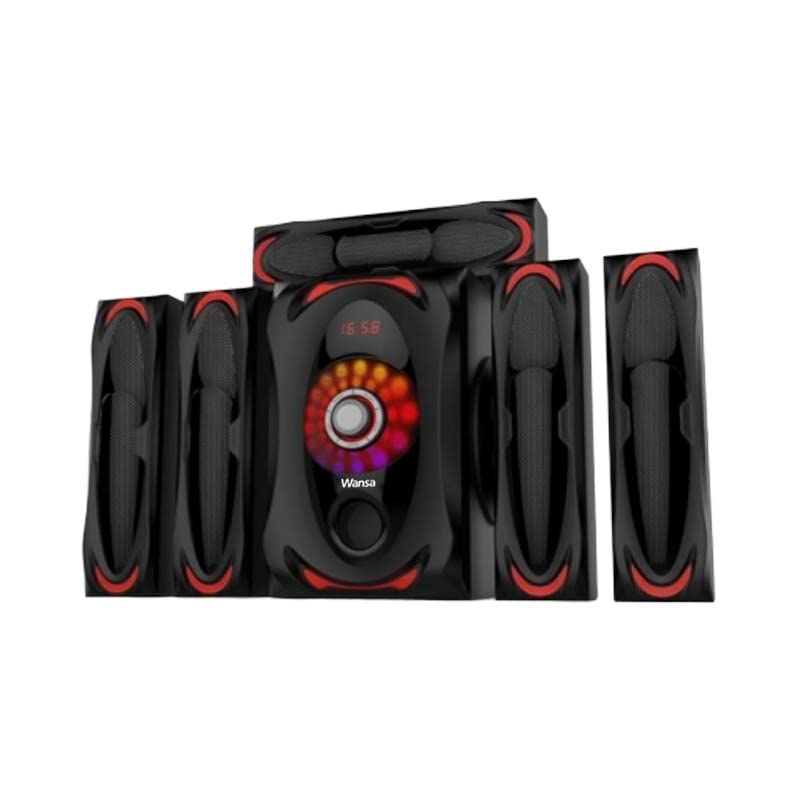
Figure 1: Main Subwoofer Unit of the Wansa Tk-903 system. This image displays the front panel with controls and the overall design of the central unit.
Main Unit Controls and Ports:
- Power Button: Turns the unit on or off.
- Mode Button: Switches between input modes (Bluetooth, FM, USB, AUX).
- Volume Control: Adjusts the overall volume level.
- USB Port: For playing audio files from a USB drive.
- FM Antenna: For receiving FM radio signals.
- Audio Input (AUX): Connect external audio devices using a 3.5mm or RCA cable.
- Speaker Output Terminals: Connect the satellite speakers.
5. Setup
Follow these steps to set up your Wansa Tk-903 speaker system:
- Placement: Position the main subwoofer unit centrally. Arrange the five satellite speakers around your listening area for optimal surround sound.
- Connect Satellite Speakers: Connect each satellite speaker to the corresponding output terminal on the main subwoofer unit. Ensure correct polarity (+ to + and - to -).
- Connect Audio Source (Optional): If using an external device via AUX, connect the audio cable from your device's audio output to the AUX input on the main unit.
- Connect Power: Plug the power cord into the main subwoofer unit, then plug the other end into a wall outlet.
- Power On: Press the Power button on the main unit or remote control to turn on the system.
6. Operating Instructions
6.1 Power On/Off
Press the POWER button on the front panel or the remote control to turn the system on or off.
6.2 Mode Selection
Press the MODE button on the front panel or the remote control to cycle through available input modes: Bluetooth, FM, USB, and AUX.
6.3 Bluetooth Operation
- Switch the system to Bluetooth mode using the MODE button. The display will indicate 'BT' or a similar Bluetooth icon.
- Enable Bluetooth on your mobile device (smartphone, tablet, etc.).
- Search for available devices. You should find 'Wansa Tk-903' or a similar name.
- Select the device to pair. Once paired, the system will confirm with an audible tone or display message.
- You can now play audio from your device through the speaker system.
6.4 USB Playback
- Insert a USB flash drive containing MP3 audio files into the USB port on the main unit.
- Switch the system to USB mode using the MODE button. The system will automatically detect and begin playing audio files.
- Use the remote control to navigate tracks (Play/Pause, Next, Previous).
6.5 FM Radio Operation
- Switch the system to FM mode using the MODE button.
- Extend the FM antenna for better reception.
- Press the SCAN button on the remote control to automatically scan and save available FM stations.
- Use the PREV/NEXT buttons on the remote to switch between saved stations.
6.6 Volume Control
Adjust the master volume using the VOLUME knob on the main unit or the VOL+/- buttons on the remote control.
7. Maintenance
- Cleaning: Wipe the surfaces of the main unit and speakers with a soft, dry, lint-free cloth. Do not use abrasive cleaners, waxes, or solvents.
- Storage: If not in use for an extended period, unplug the system and store it in a cool, dry place away from direct sunlight and extreme temperatures.
- Cables: Regularly check all cables for damage. Replace any damaged cables immediately.
8. Troubleshooting
| Problem | Possible Cause | Solution |
|---|---|---|
| No power | Power cord not connected; Power outlet faulty | Check power cord connection; Try a different outlet |
| No sound | Volume too low; Incorrect input mode; Audio cables loose | Increase volume; Select correct input mode; Check all audio cable connections |
| Bluetooth pairing fails | Device too far; Bluetooth not enabled on device; System not in Bluetooth mode | Move device closer; Enable Bluetooth; Switch system to Bluetooth mode |
| Poor FM reception | Antenna not extended; Weak signal | Extend FM antenna fully; Reposition antenna or unit |
| USB playback not working | USB drive not formatted correctly; Incompatible file format; USB drive faulty | Ensure USB is FAT32; Use MP3 files; Try a different USB drive |
9. Specifications
| Feature | Specification |
|---|---|
| Brand Name | Wansa |
| Model Name | Tk-903 |
| Maximum Speaker Output Power | 130 Watt |
| Connectivity Technology | USB, Bluetooth |
| Audio Output Mode | Surround |
| Mounting Type | Tabletop |
| Speaker Type | Multimedia |
| Special Features | Bluetooth, USB Charging |
| Recommended Uses | For Smartphones or Tablets, Gaming Consoles, Computers, Surround Sound Systems, Televisions, Music Players |
| Compatible Devices | Gaming Console, Home Theater, Laptop, MP3 Player, Smartphone, Tablet, Television |
| Waterproof | No |
| Speaker Size | 1 inch |
| Subwoofer Diameter | 1 inch |
| Specific Uses | Home Entertainment, Portable Audio |
| Power Source | Corded Electric |
| Surround Sound Channel Configuration | 5.1 |
| Wireless Communication Technology | Bluetooth |
| Audio Driver Type | Dynamic Driver |
10. Warranty and Support
This Wansa product is covered by a limited warranty. Please refer to the warranty card included in your package for details on warranty terms and conditions. For technical support, service, or inquiries, please contact your local Wansa authorized service center or retailer. Keep your purchase receipt as proof of purchase for warranty claims.


