
ZIK Black
ZIK Ergonomic Office Chair User Manual
Model: Black
Brand: ZIK
1. Introduction
Thank you for choosing the ZIK Ergonomic Office Chair. This manual provides detailed instructions for assembly, operation, maintenance, and troubleshooting to ensure you get the most out of your new chair. Designed for optimal comfort and support, this chair features adjustable lumbar support, reclining armrests, adjustable height, and an oscillating headrest to promote a healthy posture during long hours of use.

Figure 1.1: ZIK Ergonomic Office Chair (Black model).

Figure 1.2: The ZIK Ergonomic Office Chair seamlessly integrates into a modern office environment.
2. Safety Instructions
Please read and understand all safety instructions before assembling and using the chair. Keep this manual for future reference.
- Do not stand on the chair. Use it only for seating one person.
- Ensure all screws and bolts are securely tightened before use. Periodically check and re-tighten as necessary.
- Do not exceed the maximum weight capacity of 150 kg (330 lbs).
- Keep children and pets away from the chair during assembly.
- Avoid placing the chair near heat sources or in direct sunlight for prolonged periods to prevent material degradation.
- Use the chair on a flat, stable surface.
- Do not use abrasive cleaners or harsh chemicals on any part of the chair.
3. Components List
Before assembly, verify that all components are present and undamaged. If any parts are missing or damaged, please contact customer support.
- Chair Base (5-star base with wheel sockets)
- Casters (5 pieces)
- Gas Lift Cylinder (BIFMA Class 3)
- Gas Lift Cover
- Seat Cushion Assembly
- Backrest Assembly (with integrated lumbar support)
- Armrests (2 pieces, left and right)
- Headrest
- Mechanism Plate (attaches to seat)
- Hardware Kit (screws, washers, Allen key)

Figure 3.1: Detailed views of key chair components, including the padded armrests, breathable mesh backrest, durable casters, and thick seat cushion.
4. Assembly Instructions
Assembly is straightforward and typically takes about 20-30 minutes. Follow these steps carefully:
- Attach Casters to Base: Insert each of the five casters into the holes at the end of each leg of the chair base. Push firmly until they click into place.
- Insert Gas Lift: Place the gas lift cylinder into the center hole of the chair base. Cover it with the gas lift cover.
- Attach Mechanism Plate to Seat: Align the mechanism plate with the pre-drilled holes on the underside of the seat cushion. Secure it with the provided screws, ensuring the front of the mechanism faces the front of the seat.
- Connect Seat to Gas Lift: Carefully place the assembled seat onto the gas lift cylinder, ensuring the tapered end of the gas lift fits securely into the mechanism plate.
- Attach Armrests: Secure the armrests to the sides of the seat cushion using the designated screws. Pay attention to the left and right armrest orientation.
- Attach Backrest: Align the backrest with the mounting points on the seat and armrests. Secure it with the remaining screws.
- Install Headrest: Slide the headrest into the designated slot at the top of the backrest. Ensure it is securely seated.
- Final Check: Once assembled, sit on the chair to engage the gas lift and ensure all connections are stable. Check all screws for tightness.
5. Operating Instructions
The ZIK Ergonomic Office Chair offers several adjustment features to customize your seating experience:
5.1. Height Adjustment
To adjust the chair's height, locate the lever on the right side, beneath the seat.
- To raise the seat: Lift the lever while taking your weight off the seat. The chair will rise automatically.
- To lower the seat: Lift the lever while remaining seated. The chair will lower under your weight.
5.2. Lumbar Support Adjustment
The integrated lumbar support can be adjusted to provide optimal comfort for your lower back.
- Locate the adjustment knobs or levers on the sides of the backrest, near the lumbar area.
- Adjust the support inwards or outwards by turning the knobs or moving the levers to find your preferred depth (up to 2cm excursion).

Figure 5.1: The adjustable lumbar support provides personalized comfort for your lower back.
5.3. Reclining Armrests
The padded armrests are designed to recline 90 degrees, allowing you to push the chair closer to your desk or save space when not in use.
- To recline the armrests: Simply lift them upwards. They will pivot backward to a vertical position.
- To return them to the horizontal position: Pull them down until they lock into place.
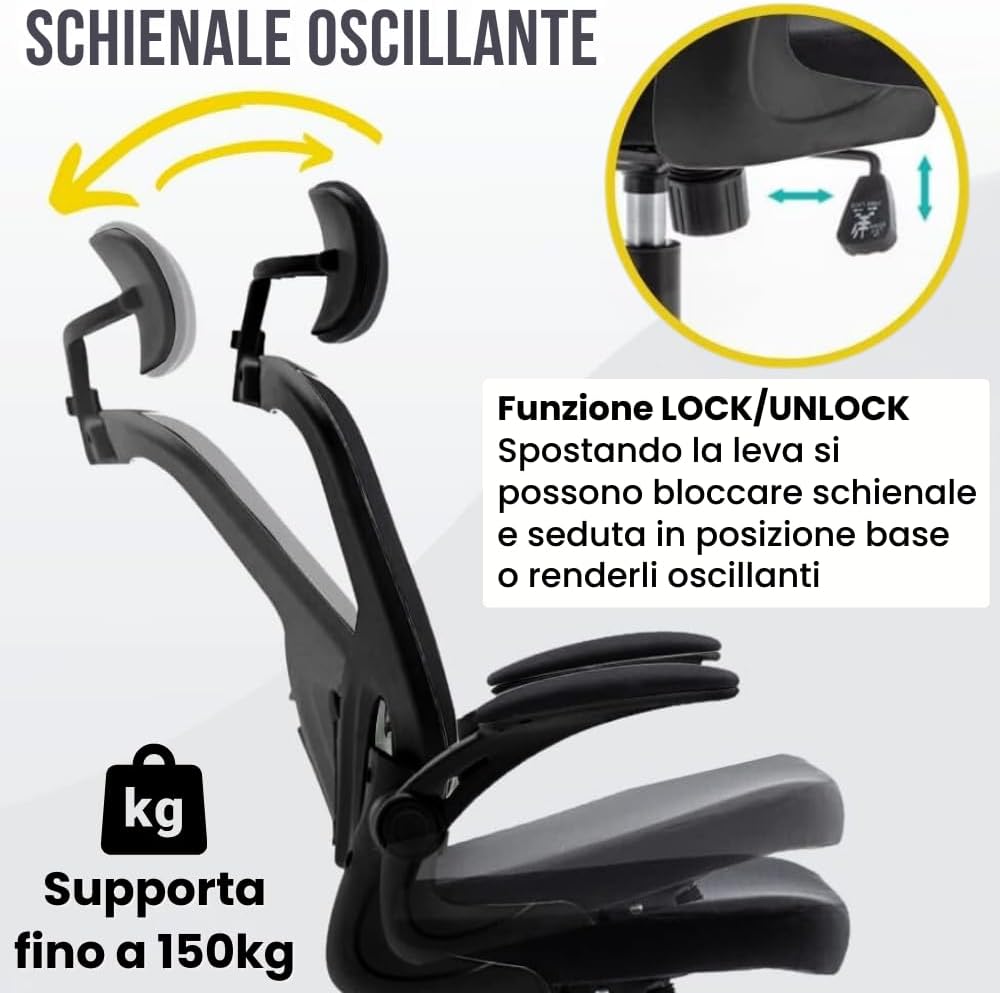
Figure 5.2: The armrests can be conveniently folded up by 90 degrees to optimize space.
5.4. Oscillating and Adjustable Headrest
The headrest provides comfortable neck support and can be adjusted for height and angle.
- To adjust height: Gently pull the headrest up or push it down to your desired position.
- To adjust angle (oscillating function): Tilt the headrest forward or backward to find the most comfortable angle for your neck.

Figure 5.3: The headrest offers both height and angle adjustments for personalized neck support.
5.5. Backrest Oscillation and Lock Function
The chair features an oscillation function for the backrest and seat, which can also be locked in an upright position.
- To enable oscillation: Pull the lever (usually the same one for height adjustment, or a separate one) outwards. This allows the backrest and seat to tilt freely.
- To lock the backrest: Push the lever inwards when the backrest is in your desired upright position.

Figure 5.4: The chair's backrest can oscillate or be locked in position using the lever, providing flexibility for various tasks.
6. Maintenance and Care
Proper maintenance will extend the life and appearance of your ZIK office chair.
- Cleaning Fabric/Mesh: For general cleaning, use a soft cloth dampened with mild soap and water. Blot spills immediately. Do not saturate the fabric. Allow to air dry completely.
- Cleaning Plastic/Metal Parts: Wipe with a soft, damp cloth. Avoid abrasive cleaners or solvents that could damage the finish.
- Caster Care: Periodically clean hair and debris from the casters to ensure smooth rolling. The rubberized wheels are suitable for all floor types, including parquet.
- Tighten Fasteners: Every few months, check all screws and bolts and re-tighten them to ensure the chair remains stable and secure.
- Avoid Direct Sunlight: Prolonged exposure to direct sunlight can cause fading and degradation of materials.

Figure 6.1: The ZIK chair utilizes high-quality, double-layer breathable mesh and high-density foam for durability and comfort, unlike chairs made with recycled plastics or low-density padding.
7. Troubleshooting
If you encounter any issues with your ZIK office chair, refer to the following common problems and solutions:
| Problem | Possible Cause | Solution |
|---|---|---|
| Chair does not adjust height. | Gas lift not engaged or faulty; lever not fully pulled. | Ensure the lever is fully pulled. If still not working, the gas lift may need replacement. Contact support. |
| Chair is wobbly or unstable. | Loose screws or improper assembly. | Check and tighten all assembly screws, especially those connecting the seat, backrest, and armrests. Ensure the gas lift is fully seated in the base. |
| Casters do not roll smoothly. | Debris (hair, lint) caught in casters; damaged casters. | Remove any debris from the caster wheels. If damaged, casters may need replacement. |
| Squeaking noises. | Loose connections; friction between parts. | Tighten all screws. Apply a small amount of silicone lubricant to moving parts if necessary, avoiding fabric. |
| Armrests do not recline properly. | Mechanism obstructed or damaged. | Check for any obstructions. Ensure the armrests are correctly installed. If damaged, contact support. |
8. Specifications
| Feature | Detail |
|---|---|
| Brand | ZIK |
| Model | Ergonomic Office Chair |
| Color | Black |
| Product Dimensions (L x W x H) | 63 x 62 x 129 cm (24.8 x 24.4 x 50.8 inches) |
| Item Weight | 13.34 kg (29.4 lbs) |
| Maximum Weight Capacity | 150 kg (330 lbs) |
| Gas Lift Class | BIFMA Class 3 |
| Special Features | Adjustable Height, Swivel, Ergonomic Design, Rubberized Wheels, Reclining Armrests (90°), Adjustable Lumbar Support (2cm), Oscillating Headrest |
| Seat Cushion Thickness | 8 cm (3.15 inches) high-density foam |

Figure 8.1: Detailed dimensions of the ZIK Ergonomic Office Chair.
9. Warranty and Support
The ZIK Ergonomic Office Chair comes with a 3-year warranty from the date of purchase, covering manufacturing defects and material flaws under normal use.
For warranty claims, technical assistance, or any questions regarding your product, please contact ZIK Home customer support. Please have your purchase receipt and product model information ready when contacting support.
Contact Information:
- Brand: ZIK
- Seller: ZIK Home
- Support: Italian assistance available. Please refer to your purchase platform for direct contact methods or visit the official ZIK Home store on Amazon: ZIK Store
Ask a question about this manual
Ask about setup, troubleshooting, compatibility, parts, safety, or missing instructions. Manuals+ will review the question and use this page’s manual context to help answer it.