
1. Introduction
Thank you for purchasing the STRIVEHUGTOSUCCESS 5014BT Car Audio System. This manual provides detailed instructions for the proper installation, operation, and maintenance of your new car audio player. Please read this manual thoroughly before using the product to ensure safe and optimal performance. Keep this manual for future reference.
2. Product Overview
The 5014BT is a versatile 1Din car audio system designed to enhance your in-car entertainment experience. It features a DVD/CD player, FM radio, Bluetooth connectivity for hands-free calls and audio streaming, USB and SD card playback, and an AUX input.

Figure 2.1: Front panel and chassis view of the 5014BT Car Audio System.
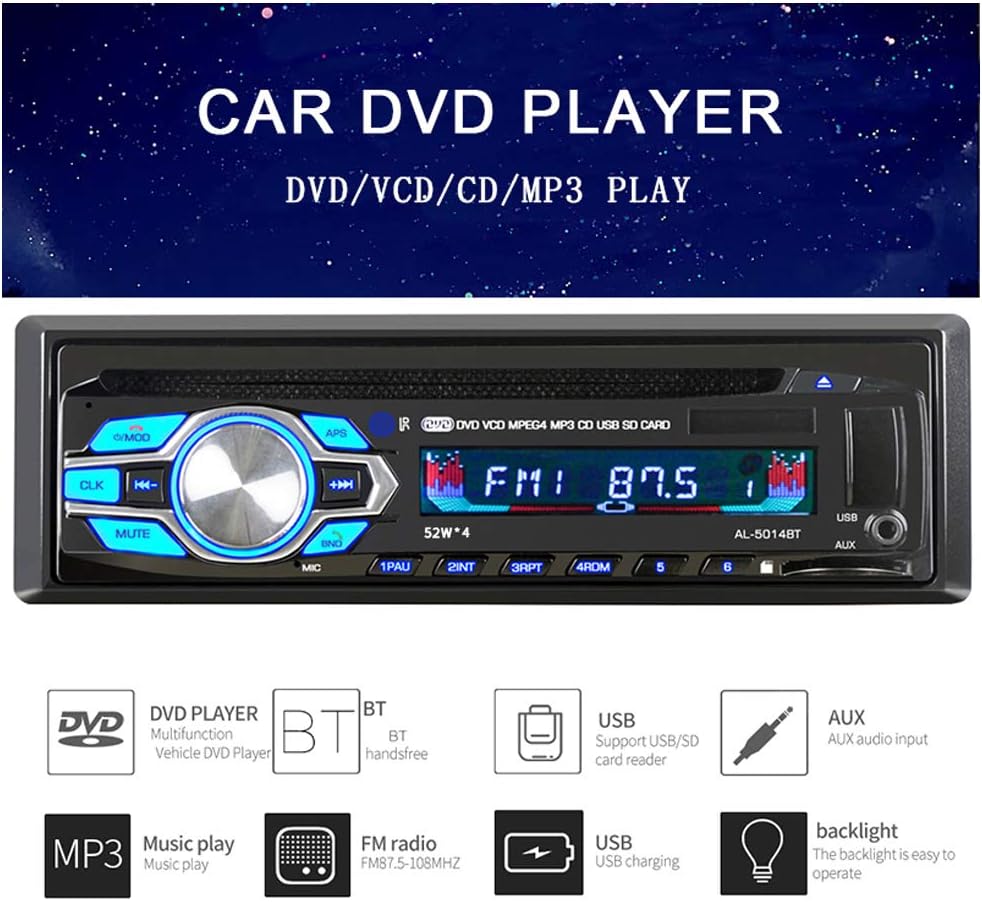
Figure 2.2: Key features of the 5014BT system, including DVD player, Bluetooth, USB, and AUX input.
2.1 Package Contents
Upon unpacking, please ensure all items listed below are present:
- 5014BT Car Audio System Unit
- Power and Speaker Wiring Harness
- Wireless Remote Control
- Installation Brackets and Screws
- User Manual
- Removal Tools

Figure 2.3: All components included in the 5014BT Car Audio System package.
3. Features
3.1 Bluetooth Hands-free Function
The built-in Bluetooth function allows for phone connection, hands-free calling, and Bluetooth music playback, significantly improving safety while driving by allowing you to manage calls without holding your phone.

Figure 3.1: The unit supports intelligent Bluetooth calls, allowing for convenient incoming call control.
3.2 USB and SD Card Playback
The system supports large capacity storage from USB drives, SD cards, and MMC cards. This feature allows you to download and play your favorite songs directly from these storage devices, offering great convenience. Please note that this unit does not support charging via USB.

Figure 3.2: The unit features dedicated slots for USB drives and SD cards for media playback.
3.3 USB 5V Charging (Output Only)
The USB interface provides 5V power output, allowing you to charge your cellphone while listening to music. This is a convenient feature for keeping your devices powered on the go.

Figure 3.3: The USB port supports 5V charging for compatible devices.
3.4 AUX Audio Input
The front terminal AUX audio input supports external devices such as GPS navigation systems, MP3 players, MP5 players, and mobile phones. Simply connect your device via a 3.5mm jack, and the audio will be output through the car's speakers.

Figure 3.4: The AUX input allows connection of external audio sources.
3.5 FM Radio Reception
Experience perfect radio reception with the high-quality digital stereo FM radio. It supports full automatic, semi-automatic, and precise tuning to search for channels. You can store 1 to 6 radio channels across three bands (FM1-FM2-FM3). The FM frequency range is 87.5-108MHz.

Figure 3.5: The unit features high-performance FM radio with automatic search and stable signal reception.
3.6 CD Player for Audio and Data CDs
The integrated CD player supports classic audio files, audio CDs, CD-R, CD+R, CD-RW, and CD+RW discs, including MP3 or WMA formats.
4. Specifications
Below are the technical specifications for the 5014BT Car Audio System:
| Feature | Specification |
|---|---|
| Brand | STRIVEHUGTOSUCCESS |
| Model Number | 5014BT |
| Item Weight | 1.4 Kilograms |
| Package Dimensions | 24.1 x 22.3 x 8.8 cm |
| Connectivity Technology | AUX, Bluetooth, USB |
| Special Features | Built-in Bluetooth, FM Tuner, Hands-free Calling |
| Compatible Devices | Speakers |
| Connector Type | 3.5mm Jack |
| Audio Output Mode | Stereo |
| Control Method | Touch, Remote |
| FM Frequency Range | 87.5-108MHz |

Figure 4.1: Visual representation of the unit alongside its key specifications.
5. Installation
Proper installation is crucial for the performance and longevity of your car audio system. It is highly recommended to have the unit installed by a qualified professional. Before installation, disconnect the vehicle's negative battery terminal to prevent electrical shorts.
5.1 Wiring Diagram
Refer to the wiring harness provided with the unit. Connect the power wires (yellow for constant 12V, red for accessory 12V, black for ground) and speaker wires according to your vehicle's wiring diagram. Ensure all connections are secure and properly insulated.
5.2 Mounting the Unit
The 5014BT is a 1Din unit. Use the provided mounting sleeve and brackets to secure the unit in your car's dashboard. Ensure the unit is firmly in place to prevent vibrations and damage.

Figure 5.1: Examples of the 5014BT unit seamlessly integrated into various car dashboards.

Figure 5.2: A wider view demonstrating the unit's fit within a car's interior.
6. Operation
6.1 Basic Controls
- Power Button: Press to turn the unit on/off.
- Volume Knob: Rotate to adjust volume. Press to mute/unmute.
- Mode Button: Press to cycle through available sources (FM, CD, DVD, USB, SD, AUX, Bluetooth).
- Track/Tune Buttons: Use to skip tracks or tune radio frequencies.
6.2 Bluetooth Pairing
- Ensure Bluetooth is enabled on your mobile device.
- Select 'Bluetooth' mode on the 5014BT unit.
- Search for available devices on your phone. The unit will appear as '5014BT' or similar.
- Select the unit to pair. If prompted for a password, enter '0000'.
- Once paired, you can make/receive calls and stream audio.
6.3 FM Radio Operation
- Select 'FM' mode.
- Use the tune buttons for manual tuning or press and hold for automatic station search.
- Press the 'BAND' button to switch between FM1, FM2, and FM3 bands.
- To save a station, tune to the desired frequency, then press and hold a preset number (1-6) until you hear a beep.
6.4 Media Playback (USB/SD/CD/DVD)
- Insert a USB drive into the USB port or an SD card into the SD slot. The unit will automatically switch to the respective mode and begin playback.
- Insert a CD or DVD into the disc slot. The unit will automatically detect the disc and begin playback.
- Use the track buttons to navigate between songs/chapters.
6.5 AUX Input Usage
- Connect your external audio device (e.g., smartphone, MP3 player) to the AUX-in port on the front panel using a 3.5mm audio cable.
- Select 'AUX' mode on the unit.
- Control playback and volume from your external device.
7. Troubleshooting
If you encounter issues with your 5014BT Car Audio System, please refer to the following common problems and solutions:
| Problem | Possible Cause | Solution |
|---|---|---|
| No power | Blown fuse; Incorrect wiring; Loose connection | Check vehicle's fuse box and unit's fuse; Verify wiring connections (yellow, red, black wires); Ensure all connections are secure. |
| No sound | Speaker wires disconnected; Volume too low; Mute function active; Incorrect source selected | Check speaker wire connections; Increase volume; Press MUTE button; Select correct audio source. |
| Bluetooth not connecting | Unit not in pairing mode; Bluetooth off on phone; Incorrect pairing code | Ensure unit is in Bluetooth mode; Turn phone's Bluetooth off/on; Re-attempt pairing, use '0000' if prompted. |
| USB/SD card not recognized | Unsupported file format; Corrupted media; Incorrectly inserted | Ensure media contains supported audio files (MP3/WMA); Try a different USB/SD card; Reinsert media correctly. |
| Disc error | Dirty or scratched disc; Unsupported disc type | Clean the disc with a soft cloth; Try a different disc; Ensure disc type is supported (CD/DVD). |
If the problem persists after trying these solutions, please contact customer support.
8. Maintenance
To ensure the longevity and optimal performance of your 5014BT Car Audio System, follow these maintenance guidelines:
- Cleaning: Use a soft, dry cloth to wipe the unit's front panel. For stubborn dirt, slightly dampen the cloth with water. Do not use abrasive cleaners or solvents.
- Disc Care: Handle discs by their edges. Keep them clean and free from scratches. Store discs in their cases when not in use.
- Ventilation: Ensure the unit's ventilation openings are not blocked to prevent overheating.
- Temperature: Avoid exposing the unit to extreme temperatures, both hot and cold, as this can affect its electronic components.
9. Warranty and Support
This product is covered by a standard manufacturer's warranty. Please refer to the warranty card included in your package for specific terms and conditions, including the warranty period and coverage details. Keep your purchase receipt as proof of purchase for warranty claims.
For technical support, troubleshooting assistance, or warranty inquiries, please contact the retailer or the manufacturer directly. Contact information can typically be found on the product packaging or the manufacturer's official website.
Please have your model number (5014BT) and purchase date ready when contacting support.