
Introduction
Thank you for choosing the Foryond K9 Wake Up Light Alarm Clock. This device is designed to enhance your waking and sleeping experience through simulated sunrise and sunset, natural sounds, and customizable light settings. Please read this manual carefully to ensure proper use and optimal performance.
Safety Instructions
- Ensure the device is placed on a stable, flat surface.
- Do not expose the device to water or excessive humidity.
- Use only the provided power adapter and USB cable.
- Keep out of reach of children.
- Do not attempt to disassemble or repair the device yourself. Contact qualified service personnel.
- Unplug the device during lightning storms or when unused for long periods.
Package Contents
Verify that all items are present in the package:
- Foryond K9 Wake Up Light Alarm Clock
- FM Radio Antenna (integrated or external cable)
- USB Cable
- Power Adapter
- User Manual (this document)
Product Overview
Familiarize yourself with the main components and controls of your Foryond K9 Wake Up Light Alarm Clock.

Figure 1: Front view of the Foryond K9 Wake Up Light Alarm Clock, showing the display and light panel.

Figure 2: Rear view of the Foryond K9 Wake Up Light Alarm Clock, illustrating the control buttons and ports for dual alarms.
Controls and Ports:
- Time Display: Digital clock display.
- Light Panel: Emits various light colors and intensities.
- Control Buttons: (Refer to Figure 2 for specific button locations)
- Time Set Button
- Alarm 1 Set Button
- Alarm 2 Set Button
- Brightness/Volume Rotary Switch
- FM Radio Button
- Light Mode Button
- Snooze Button
- USB Charging Port: For powering the device.
- FM Antenna Port: For connecting the FM antenna.
Setup
1. Power Connection
- Connect the USB cable to the charging port on the back of the device.
- Plug the other end of the USB cable into the provided power adapter.
- Plug the power adapter into a standard electrical outlet (230 Volts).
- The display will light up, indicating the device is powered on.
2. Initial Time Setting
- Press and hold the "Time Set" button (usually indicated by a clock icon).
- Use the rotary switch to adjust the hour, then press "Time Set" again to confirm.
- Use the rotary switch to adjust the minute, then press "Time Set" again to confirm.
- Select 12-hour or 24-hour format using the rotary switch, then press "Time Set" to finalize.
3. FM Antenna Connection (if applicable)
If your model includes an external FM antenna, connect it to the designated port on the back of the device for better radio reception.
Operating Instructions
1. Setting Alarms (Alarm 1 & Alarm 2)
The Foryond K9 supports two independent alarms, allowing for different schedules (e.g., weekday and weekend).
Figure 3: Illustration of dual alarm settings for different schedules.
- Press and hold the "Alarm 1 Set" button (or "Alarm 2 Set" button). The hour display will flash.
- Use the rotary switch to adjust the hour, then press the alarm set button again.
- Use the rotary switch to adjust the minute, then press the alarm set button again.
- Select the alarm sound (from 7 natural sounds or FM radio) using the rotary switch, then press the alarm set button.
- Adjust the alarm volume (1-16 levels) using the rotary switch, then press the alarm set button.
- Set the sunrise simulation duration (10-60 minutes) using the rotary switch, then press the alarm set button.
- Adjust the light brightness level (1-20 levels) for the alarm using the rotary switch, then press the alarm set button to confirm.
- To activate/deactivate an alarm, short press its respective alarm set button. An alarm icon will appear/disappear on the display.
2. Sunrise Simulation
The sunrise simulation gradually brightens the light before your alarm time, mimicking a natural dawn.

Figure 4: Visual representation of the sunrise and sunset simulation.
- During alarm setup, you can select a sunrise duration between 10 and 60 minutes.
- The light will gradually increase from 10% to 100% brightness over the set duration before your alarm sounds.
3. Sunset Simulation
The sunset simulation gradually dims the light, helping you relax and fall asleep naturally.
- To activate sunset mode, press the "Sunset" button (or a dedicated sleep aid button, if available).
- Set the duration for the sunset simulation (10-120 minutes) using the rotary switch.
- The light will gradually decrease from 100% to 0% brightness over the set duration.
- You can also choose a natural sound to play during the sunset simulation, which will gradually fade out.
4. Snooze Function
When an alarm sounds, you can activate the snooze function for an additional 9 minutes of sleep.

Figure 5: The snooze function allows for 9 extra minutes of sleep.
- When the alarm sounds, press the large "Snooze" button on the top of the device.
- The alarm will pause for 9 minutes and then sound again.
- You can typically snooze multiple times.
5. Adjusting Light Brightness
The device offers 20 levels of brightness for its light functions.

Figure 6: Comparison of brightness levels, highlighting the 20 adjustable levels of the Foryond K9.
- When the light is on (not in alarm mode), use the rotary switch to adjust the brightness.
- During alarm setup, you can pre-set the desired brightness level for the alarm light.
6. Natural Sounds
Choose from 7 natural sounds for your alarms or sleep aid functions, with 16 adjustable volume levels.
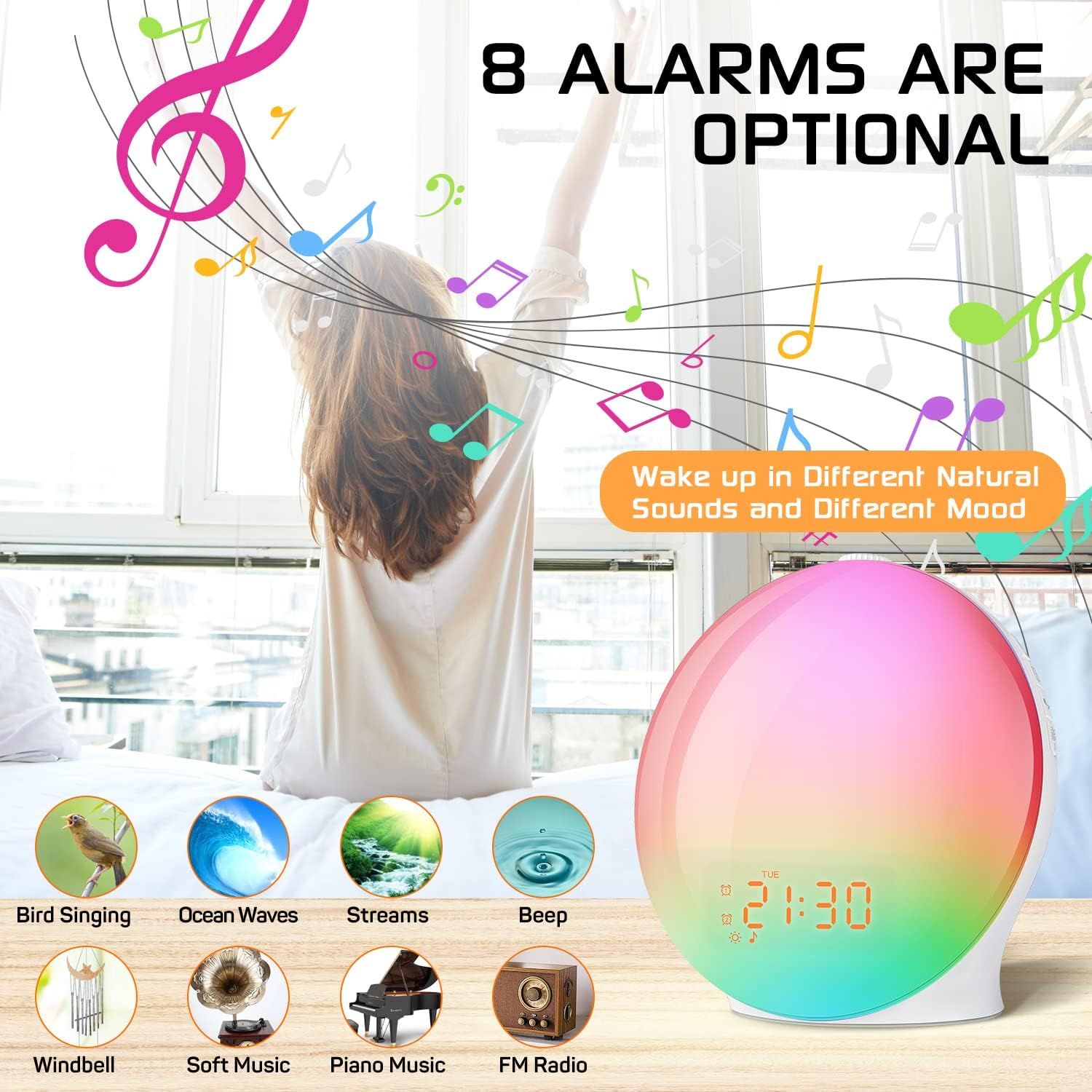
Figure 7: Display of available alarm sounds, including Bird Singing, Ocean Waves, Streams, Beep, Windbell, Soft Music, and Piano Music.
- Available sounds include: Bird Singing, Ocean Waves, Streams, Beep, Windbell, Soft Music, Piano Music.
- During alarm setup or sunset mode, use the rotary switch to cycle through and select your preferred sound.
- Adjust the volume using the rotary switch (1-16 levels).
7. FM Radio
The integrated FM radio allows you to wake up to your favorite station or listen casually.
- Press the "FM Radio" button to turn the radio on/off.
- Automatic Scan: Press and hold the "FM Radio" button to automatically scan and save available stations (up to 60 channels).
- Manual Tuning: Use the rotary switch to manually tune to a specific frequency.
- Volume Adjustment: Use the rotary switch to adjust the radio volume.
- You can select FM radio as an alarm sound during alarm setup.
8. LED Color Lights (Atmosphere Light)
The device features 7 main LED colors that can be used as an atmosphere light, reading light, or therapy light.

Figure 8: Various color options for the atmosphere light function.
- Press the "Light Mode" button to cycle through the available colors: Yellow, Red, Purple, Blue, Indigo, Green, Cyan.
- There may also be an automatic color-changing mode.
- Adjust the brightness of the color light using the rotary switch.
Maintenance
Cleaning
- Unplug the device before cleaning.
- Use a soft, dry cloth to wipe the surface of the device.
- Do not use abrasive cleaners, solvents, or harsh chemicals.
- Avoid getting moisture into any openings.
Storage
- Store the device in a cool, dry place when not in use for extended periods.
- Keep it away from direct sunlight and extreme temperatures.
Troubleshooting
| Problem | Possible Cause | Solution |
|---|---|---|
| Device does not power on. | Power cable not connected properly; power outlet malfunction. | Check power connections. Try a different outlet. |
| Alarm does not sound. | Alarm not activated; volume too low; incorrect time set. | Ensure alarm is enabled (icon visible). Increase alarm volume. Verify alarm time. |
| FM radio reception is poor. | Antenna not connected or positioned correctly; weak signal. | Adjust the position of the FM antenna. Perform an automatic scan. |
| Light does not change brightness/color. | Incorrect mode selected; rotary switch not functioning. | Ensure you are in the correct light adjustment mode. Try restarting the device. |
| Buttons are unresponsive. | Temporary software glitch; physical damage. | Unplug the device for a few minutes, then plug it back in. If the issue persists, contact support. |
Specifications
| Feature | Detail |
|---|---|
| Brand | Foryond |
| Model Number | K9 |
| Dimensions (L x W x H) | 18.4 x 17.9 x 9 cm |
| Weight | 490 grams |
| Material | Plastic (Acrylonitrile Butadiene Styrene base) |
| Input Voltage | 230 Volts |
| Light Source Type | LED |
| Brightness Levels | 20 |
| Natural Sounds | 7 (Bird Singing, Ocean Waves, Streams, Beep, Windbell, Soft Music, Piano Music) |
| Sound Volume Levels | 16 |
| FM Radio | Yes, with auto-scan and up to 60 saved channels |
| Sunrise Simulation Duration | 10-60 minutes |
| Sunset Simulation Duration | 10-120 minutes |
| Snooze Duration | 9 minutes |
| LED Color Lights | 7 main colors (Yellow, Red, Purple, Blue, Indigo, Green, Cyan) plus automatic modes. |
| Included Components | FM Radio, rotary switch, USB cable, power adapter |

Figure 9: Product data sheet providing detailed technical specifications. For more information, refer to the official EU EPREL database: https://eprel.ec.europa.eu/qr/1408293

Figure 10: Energy efficiency label for the Foryond K9, showing its energy class and consumption.
Warranty and Support
Foryond products are designed for reliability and performance. This product comes with a standard manufacturer's warranty against defects in materials and workmanship.
- Warranty Period: Please refer to your purchase documentation or the retailer's website for specific warranty duration.
- What is Covered: Defects in materials and workmanship under normal use.
- What is Not Covered: Damage caused by misuse, accident, unauthorized modification, or failure to follow instructions in this manual.
Customer Support
If you encounter any issues or have questions regarding your Foryond K9 Wake Up Light Alarm Clock, please contact our customer support team. Details for contacting support can typically be found on the retailer's website or on the product packaging.
Please have your model number (K9) and purchase information ready when contacting support.
