
Introduction
This manual provides essential instructions for setting up, operating, and maintaining your LH719 Smart Bracelet. This device is designed to monitor heart rate and blood pressure, track various sports activities, and provide notifications. It is compatible with both iOS and Android smartphones.
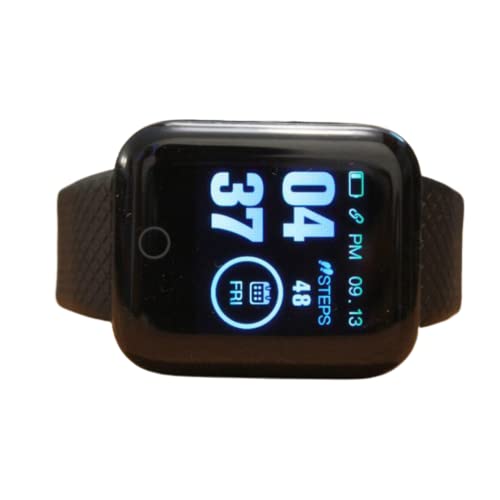
Figure 1: LH719 Smart Bracelet. The image displays the black smart bracelet with its display and silicone band.
Setup
1. Charging the Device
Before first use, fully charge the smart bracelet. Connect the charging cable to the designated charging port on the device and a USB power source. A full charge typically takes approximately 2 hours. A fully charged battery provides up to 2 days of continuous operation.
2. App Installation and Pairing
- Scan the QR code in the packaging or search for the companion app (e.g., 'GB Fit' or similar, refer to packaging for exact app name) in your smartphone's app store (Apple App Store for iOS, Google Play Store for Android).
- Install the app on your smartphone.
- Ensure Bluetooth is enabled on your smartphone.
- Open the app and follow the on-screen instructions to search for and pair with your LH719 Smart Bracelet. The device name should appear as 'LH719' or similar.
- Grant necessary permissions to the app for full functionality, such as notifications and location services (for GPS via phone).
Operating Instructions
Basic Navigation
The LH719 Smart Bracelet features a touch-sensitive display for navigation. Swipe left/right or up/down to browse through different functions and tap to select. Refer to the app for detailed gesture controls.
Health Monitoring
- Heart Rate: Navigate to the heart rate monitoring screen. The device will automatically begin measuring your heart rate. Ensure the sensor is in firm contact with your skin.
- Blood Pressure: Access the blood pressure monitoring function. Remain still during measurement for accurate readings.
- Sleep Tracking: Wear the bracelet while sleeping. The device will automatically track your sleep patterns. View detailed sleep data in the companion app.
Activity Tracking
The bracelet supports various sports modes including climbing, running, walking, long-distance walking, and cycling. Select your desired activity from the sports menu to track steps, distance, calories burned, and duration.
Notifications and Alerts
- Call and Message Alerts: Once paired with your smartphone, the bracelet will display incoming call notifications and messages.
- Social Media Notifications: Receive alerts from supported social media applications directly on your wrist.
- Alarm: Set alarms through the companion app, and the bracelet will vibrate to alert you.
Additional Features
- Find Device: Use the companion app to locate your bracelet if it is within Bluetooth range.
- Multi-language Support: The device and app support multiple languages. Adjust language settings in the app.
Maintenance
Water Resistance
The LH719 Smart Bracelet has an IP67 water resistance rating, meaning it is resistant to dust and can withstand immersion in water up to 1 meter for 30 minutes. It is suitable for daily activities such as hand washing and light rain. It is not recommended for prolonged swimming, diving, or exposure to high-pressure water.
Cleaning
Regularly clean the device and band with a soft, dry cloth. If necessary, use a slightly damp cloth with mild soap, then wipe dry. Avoid using harsh chemicals or abrasive materials.
Battery Care
To prolong battery life, avoid fully discharging the battery frequently. Charge the device when the battery level is low. Store the device in a cool, dry place when not in use for extended periods.
Troubleshooting
- Device not turning on: Ensure the device is fully charged. Connect it to the charger and wait a few minutes before attempting to turn it on.
- Unable to pair with smartphone:
- Ensure Bluetooth is enabled on your phone.
- Make sure the bracelet is charged and within range of your phone.
- Restart both the bracelet and your phone.
- Try resetting the bracelet to factory settings via the app (if available).
- Inaccurate health readings:
- Ensure the bracelet is worn snugly on your wrist, not too tight or too loose.
- Remain still during measurements.
- Clean the sensor on the back of the device.
- Note that this device is not a medical instrument and readings are for reference only.
- Notifications not appearing:
- Check app permissions on your phone to ensure notification access is granted.
- Verify that notifications are enabled within the companion app settings.
- Ensure the bracelet is connected via Bluetooth.
Specifications
| Feature | Detail |
|---|---|
| Model Number | LH719 |
| Brand Name | Generic |
| Target Audience | Adults (Unisex) |
| Operating System | Android Wear (Compatible with iOS and Android) |
| Connectivity Technology | Bluetooth |
| Wireless Communication Standard | Bluetooth |
| Screen Size | 1.3 inches |
| Display Type | LCD |
| Resolution | 240 x 240 |
| Control Type | Touch Control, Buttons |
| Special Features | Heart Rate Monitor, Blood Pressure Monitor, GPS (via smartphone) |
| Supported Application | Blood Pressure Monitor GB, Heart Rate Monitor |
| Sport Type | Climbing, Running, Walking, Long Distance Walking, Cycling |
| Water Resistance Level | Water Resistant (IP67) |
| Water Resistance Depth | 1 meter |
| Battery Capacity | 120 mAh |
| Battery Charging Time | 2 hours |
| Band Material Type | Silicone |
| Case Material Type | Stainless Steel |
| Color | Black |
| Memory Storage Capacity | 512 MB |


