
1. Product Overview
The YOWU SELKIRK-4 is an upgraded wireless and wired gaming headset featuring RGB cat ear lighting, an attachable HD microphone with active noise reduction, dual-channel stereo, and customizable lighting and sound effects via a dedicated application. Designed for an immersive audio experience, it offers versatile connectivity and long battery life.

Figure 1: YOWU SELKIRK-4 RGB Cat Ear Headphone 4 in pink, showcasing its design with illuminated cat ears and earcups, and the detachable microphone.
Video 1: An overview of the YOWU Upgraded RGB Cat Ear Headphone 4, highlighting its key features and aesthetic.
2. What's in the Box
Verify that all the following items are included in your product package:
- YOWU SELKIRK-4 RGB Cat Ear Headphone 4
- Protective Case
- User Manual
- 1.8m Type-C Charging Cable
- 3.5mm Audio Cable
- Attachable HD Microphone
- PS4/PS5 Dongle (USB/Type-C)

Figure 2: Contents of the YOWU SELKIRK-4 headphone box, including the pink headphones, protective case, user manual, charging cable, and 3.5mm audio cable.
3. Key Features
- Upgraded Sound System: Amazing 50mm driver unit and dual-channel stereo deliver significantly improved sound and a premium music experience.
- Magical YOWU APP Control: Customize millions of light colors, 5 light effects with a new rhythm mode, and sound effects for different scenarios.
- Attachable HD Microphone: New detachable microphone with active noise reduction for accurate recording, no interference, and clear communication.
- Wireless & Cable Connection: Wireless 5.0 supports aptX HD for low latency and stable transmission. Also connectable via 3.5mm audio cable.
- Battery Endurance: 1-hour fast charging provides 48 hours of playing time without lighting, or 2-10 hours with lighting.
4. Setup
4.1 Charging the Headset
Before first use, fully charge your YOWU SELKIRK-4 headphones. Use the provided Type-C charging cable and a 5V2A rated charger. A full charge takes approximately 1 hour.
- Connect the Type-C end of the charging cable to the charging port on the headset.
- Connect the USB-A end to a compatible USB power adapter (not included) or a powered USB port.
- The charging indicator light will show charging status (refer to the LED indicator section for details).
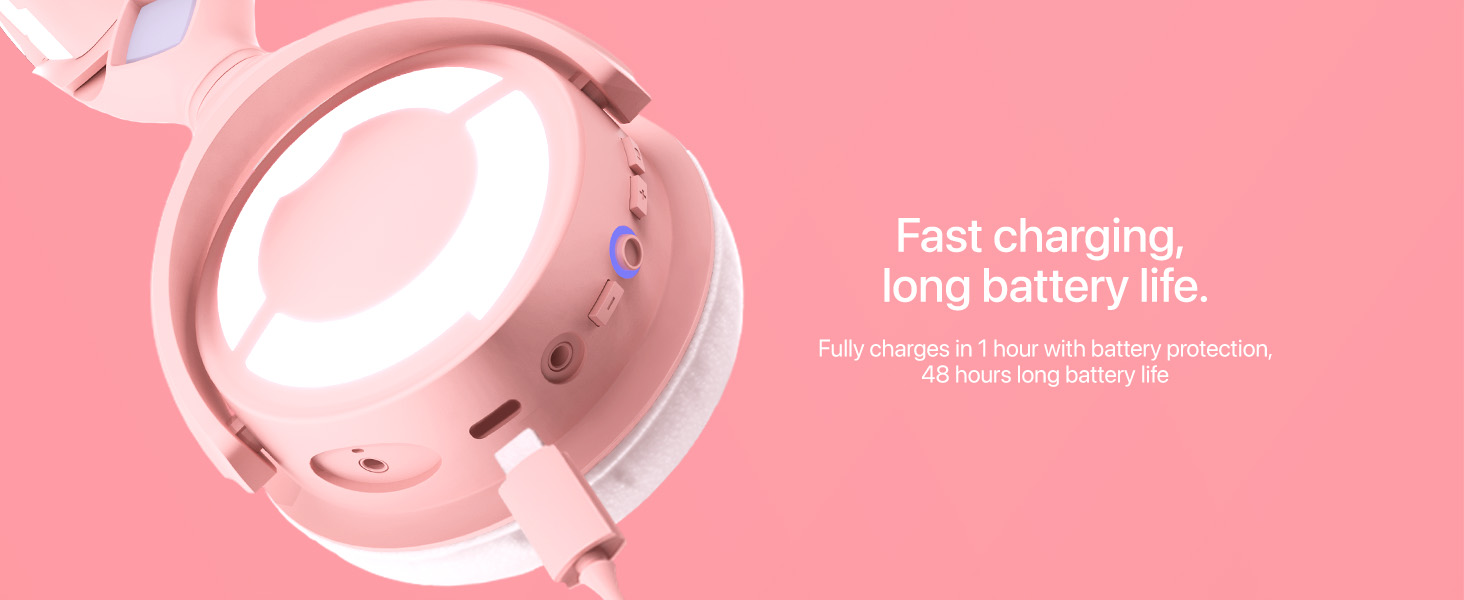
Figure 3: Close-up of the YOWU SELKIRK-4 headphone's charging port with a USB-C cable connected, illustrating the fast charging capability.
4.2 Attaching the Microphone
The HD microphone is detachable for convenience.
- Locate the microphone port on the left earcup.
- Align the microphone's connector with the port and gently push it in until it clicks into place.
- To detach, gently pull the microphone straight out from the port.

Figure 4: A model wearing the YOWU SELKIRK-4 headphones with the detachable HD microphone attached, highlighting its position for clear communication.
5. Operating Instructions
5.1 Power On/Off
- To power on: Press and hold the Power/Light Switch button (refer to Figure 6) for 3 seconds until the indicator light illuminates.
- To power off: Press and hold the Power/Light Switch button for 3 seconds until the indicator light turns off.
5.2 Wireless Connection (Bluetooth)
The headset supports Bluetooth 5.0 for wireless connectivity.
- Ensure the headset is powered on.
- Activate Bluetooth on your device (mobile, tablet, laptop, desktop).
- Search for "YOWU SELKIRK-4" in the list of available Bluetooth devices.
- Select the headset to pair. The indicator light will confirm successful pairing.
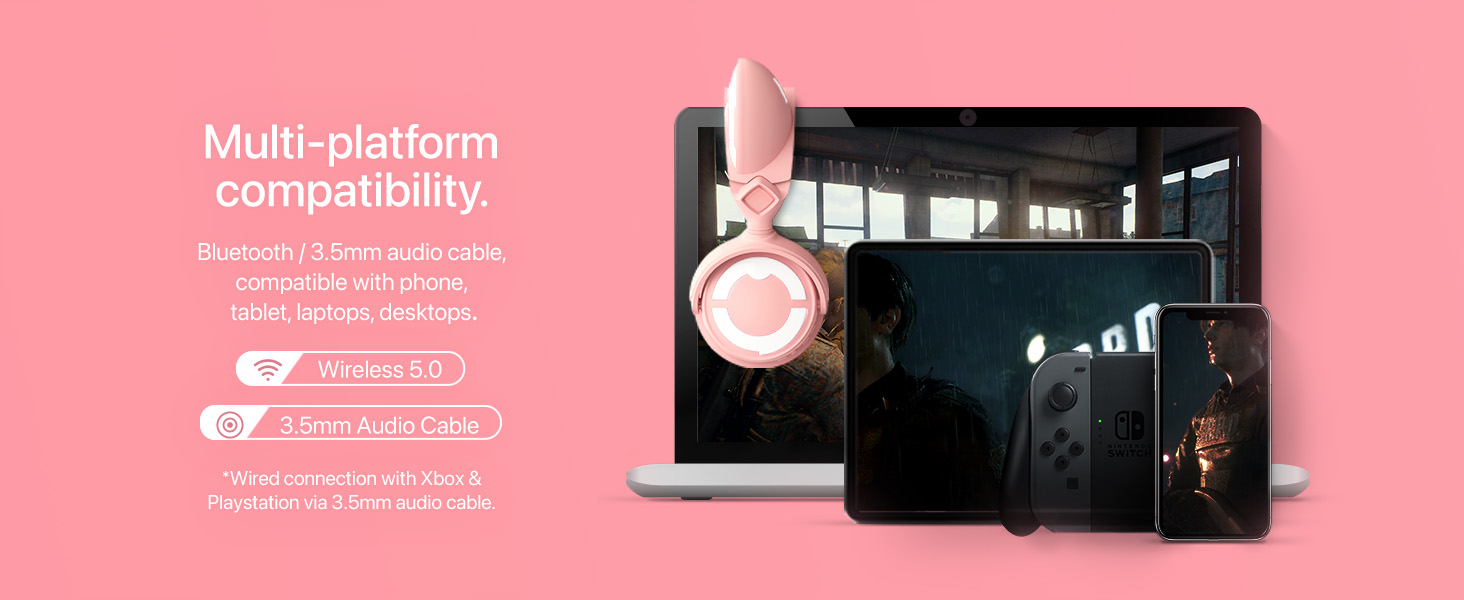
Figure 5: Image showing the YOWU SELKIRK-4 headphones connected wirelessly to various devices like a mobile phone, tablet, laptop, and desktop, demonstrating multi-platform compatibility.
5.3 Wired Connection
For wired use or when battery is low, use the 3.5mm audio cable.
- Connect one end of the 3.5mm audio cable to the audio input port on the headset.
- Connect the other end to the 3.5mm audio jack of your device.
- Note: Wired connection with Xbox & PlayStation may require a 3.5mm audio cable.
5.4 Microphone Usage
The detachable microphone features a mute button.
- To mute/unmute: Press the button located on the microphone itself.
5.5 On-Ear Controls
The right earcup features several control buttons:
- Vol +/-: Adjusts volume up or down.
- Play/Pause: Controls media playback.
- Power/Light Switch: Powers the headset on/off and controls lighting.
- Light Modes: Cycles through different lighting effects.
- Light Colors: Changes the color of the RGB lighting.

Figure 6: Detailed view of the YOWU SELKIRK-4 headphone's right earcup, showing the on-ear control buttons for volume, power, light modes, and light colors.
6. YOWU App Control
Enhance your experience by downloading the YOWU app to customize your headset's lighting and sound.
- Download the "YOWU" app from your device's app store.
- Ensure your headset is connected via Bluetooth.
- Open the app to access customization options for:
- Millions of light colors
- 5 light effects, including a new rhythm mode
- Various sound effects for different scenarios

Figure 7: A smartphone screen displaying the YOWU app interface with options to customize millions of light colors and various light effects for the headphones.
7. Enhanced Sound Experience
The YOWU SELKIRK-4 is engineered to deliver superior audio quality for both gaming and music.
- 50mm Driver Unit: Experience powerful and clear audio with the large 50mm dynamic drivers, designed to capture every detail.
- Dual-Channel Stereo: Enjoy an immersive soundstage that brings your games and music to life.
- Professional Tuning: The headphones are professionally tuned to provide balanced and rich audio across all frequencies.

Figure 8: An exploded view of the YOWU SELKIRK-4 headphone's earcup, highlighting the 50mm driver unit responsible for improved sound quality.

Figure 9: The YOWU SELKIRK-4 headphones with glowing earcups and cat ears, set against a background of sound waves, representing professional tuning for an immersive audio experience.
8. Maintenance
8.1 Cleaning
- Use a soft, dry cloth to wipe the exterior surfaces of the headphones.
- For ear cushions, gently wipe with a damp cloth and mild soap solution, then dry thoroughly.
- Do not use harsh chemicals or abrasive materials.
8.2 Storage
- When not in use, store the headphones in the provided protective case to prevent damage.
- Avoid storing in extreme temperatures or high humidity.
9. Troubleshooting
If you encounter any issues, refer to the table below for common problems and solutions.
| Problem | Possible Cause | Solution |
|---|---|---|
| No sound/Low volume | Headset not powered on, low battery, incorrect connection, device volume too low. | Ensure headset is powered on and charged. Check Bluetooth connection or 3.5mm cable. Increase headset and device volume. |
| Microphone not working | Microphone not properly attached, muted, or incorrect input device selected. | Ensure microphone is securely attached. Check if the microphone is muted. Verify correct microphone input is selected in device settings. |
| Lights not changing/working | Low battery, light function turned off, app connection issue. | Charge the headset. Press the Light Switch button. Reconnect to the YOWU app and check settings. |
| Bluetooth pairing failed | Headset not in pairing mode, device Bluetooth off, interference. | Ensure headset is powered on and discoverable. Turn device Bluetooth off/on. Move closer to the device. |
10. Technical Specifications
| Feature | Specification |
|---|---|
| Model Name | SELKIRK-4 |
| Brand | YOWU |
| Connectivity Technology | Wireless (Bluetooth 5.0), Wired (3.5mm Jack) |
| Wireless Communication Technology | Bluetooth |
| Noise Control | Sound Isolation, Active Noise Reduction (Microphone) |
| Audio Driver Type | Dynamic Driver |
| Audio Driver Size | 50mm |
| Impedance | 32 Ohms |
| Battery Life | 48 Hours (without lighting), 2-10 Hours (with lighting) |
| Charging Time | 1 Hour |
| Compatible Devices | Mobile, Tablets, Laptops, Desktops, Cellphones |
| Control Type | Call Control, App Control |
| Material | Plastic |
| Item Weight | 3.3 pounds (1.5 Kilograms) |
| Product Dimensions | 12.99 x 9.45 x 6.3 inches |
11. Warranty and Support
For warranty information, technical support, or further assistance, please refer to the official YOWU website or contact YOWU customer service. Keep your purchase receipt for warranty claims.