
Introduction
This manual provides essential instructions for the safe and effective use of your new 22 AH Battery Pack. This battery pack is designed as a direct replacement or upgrade for Drive Medical Spitfire Scout 3 and Scout 4 mobility scooters (models SFSCOUT). Please read this manual thoroughly before installation and operation to ensure proper function and longevity of your battery.
Important: This battery pack is classified as a hazardous material (hazmat) and is not returnable once purchased. Handle with care and follow all safety guidelines.
Safety Information
- Always wear appropriate personal protective equipment (PPE) such as gloves and eye protection when handling batteries.
- Do not short-circuit the battery terminals. This can cause severe burns, fire, or explosion.
- Do not expose the battery to open flames, excessive heat, or direct sunlight.
- Do not attempt to open, disassemble, or modify the battery pack. There are no user-serviceable parts inside.
- Keep the battery away from children and pets.
- Only use the charger specifically designed for your Drive Medical Scout scooter. Using an incompatible charger can damage the battery or cause a fire.
- If the battery casing is damaged, or if you notice any leaks, swelling, or unusual odors, discontinue use immediately and contact a qualified technician.
- Dispose of old batteries according to local regulations for hazardous waste. Do not dispose of in household trash.
Setup and Installation
This battery pack is designed for straightforward replacement in compatible Drive Medical Scout scooters. Ensure your scooter is turned off and disconnected from any power source before beginning installation.
- Prepare the Scooter: Turn off your Drive Medical Scout 3 or 4 scooter and remove the key. Ensure the scooter is on a stable, flat surface.
- Locate Battery Compartment: Refer to your scooter's original user manual to locate and open the battery compartment. This is typically under the seat or floorboard.
- Disconnect Old Battery: Carefully disconnect the cables from the old battery pack. Note the polarity (positive and negative connections) to ensure correct re-connection.
- Remove Old Battery: Lift the old battery pack out of the compartment. Be aware of its weight (approximately 31 pounds).
- Insert New Battery: Place the new 22 AH Battery Pack into the compartment. Ensure it sits securely.
- Connect New Battery: Connect the scooter's cables to the new battery pack, matching positive to positive and negative to negative terminals. Ensure connections are secure.
- Secure Compartment: Close and secure the battery compartment according to your scooter's design.
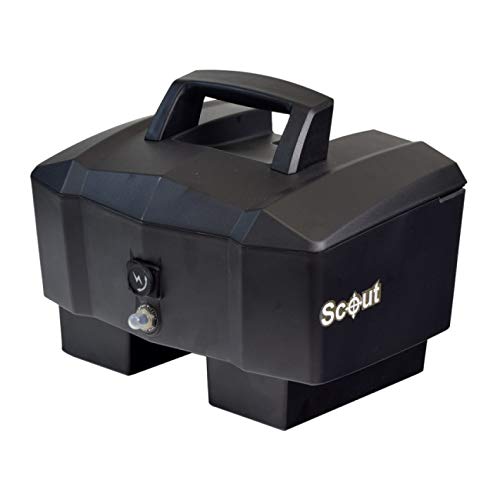
Image: The 22 AH Battery Pack, designed for Drive Medical Scout 3 and 4 mobility scooters. This image shows the compact design and terminal configuration of the battery.
After installation, perform an initial charge as described in the "Operating" section.
Operating
Initial Charging
Before first use, fully charge the battery pack. Connect your Drive Medical Scout scooter's standard charger (not included with this battery pack) to the scooter's charging port and then to a power outlet. Allow the battery to charge until the charger's indicator light shows a full charge, typically 8-12 hours for a completely depleted battery.
Daily Use and Charging
For optimal performance and battery life, it is recommended to charge the battery after each day of use, even if it has not been fully discharged. Avoid completely draining the battery whenever possible.
- The 22 AH battery pack provides an approximate range of 15+ miles, depending on terrain, user weight, and driving style.
- Always use the original or an approved replacement charger for your scooter.
- Do not interrupt the charging cycle unnecessarily.
- Charge the battery in a well-ventilated area.
Maintenance
Regular Care
- Keep the battery terminals clean and free of corrosion. If corrosion is present, clean with a wire brush and a mixture of baking soda and water. Rinse with clean water and dry thoroughly.
- Inspect the battery casing regularly for any signs of damage, cracks, or swelling.
- Ensure all cable connections are tight and secure.
Storage
If the scooter or battery pack will not be used for an extended period (more than two weeks), follow these storage guidelines:
- Fully charge the battery before storage.
- Store the battery in a cool, dry place, away from direct sunlight and extreme temperatures.
- Recharge the battery every 4-6 weeks to maintain its charge and prevent deep discharge, which can permanently damage the battery.
Troubleshooting
If you experience issues with your battery pack, consult the following common troubleshooting steps:
Battery Not Charging
- Check Charger Connection: Ensure the charger is securely plugged into both the scooter's charging port and a working wall outlet.
- Verify Power Outlet: Test the wall outlet with another appliance to confirm it has power.
- Inspect Charger: Check the charger's indicator lights. If they are not illuminating as expected, the charger itself may be faulty.
- Battery Connections: Ensure the battery terminals are clean and the connections are tight.
Reduced Range or Power
- Full Charge: Ensure the battery is fully charged before each use.
- Battery Age: All batteries have a finite lifespan. If the battery is several years old, its capacity may naturally decrease.
- Environmental Factors: Cold weather can temporarily reduce battery performance and range.
- Load: Heavy loads, steep inclines, and rough terrain will consume more power and reduce range.
If troubleshooting steps do not resolve the issue, contact customer support or a qualified service technician.
Specifications
| Feature | Detail |
|---|---|
| Battery Capacity | 22 Amp Hours (AH) |
| Voltage | 25 Volts |
| Battery Cell Composition | Sealed Lead Acid |
| Compatible Vehicle Type | Drive Medical Spitfire Scout 3, Scout 4 (models SFSCOUT) |
| Item Weight | 31 Pounds |
| Manufacturer Part Number | 260-1202XX-2 |
| UPC / GTIN | 681920717201 |
Warranty and Support
Warranty Information
This 22 AH Battery Pack comes with a one-year warranty from the date of purchase. This warranty covers manufacturing defects under normal use. It does not cover damage resulting from misuse, neglect, improper installation, unauthorized modifications, or normal wear and tear.
As this is a hazmat item, it is not returnable. Warranty claims will be handled through replacement or repair as determined by the manufacturer.
Customer Support
For technical assistance, warranty claims, or questions regarding your battery pack, please contact the seller, Living Well Stores, Inc., or refer to the contact information provided with your purchase documentation.
It is recommended to have your purchase details and the battery pack's model number (260-1202XX-2) available when contacting support.