
1. Important Safety Instructions
Before using this product, please read all safety instructions carefully and keep this manual for future reference. Failure to follow these instructions may result in electric shock, fire, or serious injury.
- This appliance can be used by children aged 8 years and above and persons with reduced physical, sensory or mental capabilities or lack of experience and knowledge if they have been given supervision or instruction concerning use of the appliance in a safe way and understand the hazards involved.
- Children shall not play with the appliance. Cleaning and user maintenance shall not be made by children without supervision.
- Only use the power adapter supplied with the product.
- Do not use the robot in environments with open flames or fragile objects.
- Ensure the robot is used on stable, level surfaces.
- Keep hair, loose clothing, fingers, and all parts of the body away from openings and moving parts.
- Do not pick up anything that is burning or smoking, such as cigarettes, matches, or hot ashes.
- Do not use without dust bin and/or filters in place.
- Unplug the charging dock from the outlet when not in use and before cleaning.
2. Product Overview
The Arnagar S8 is a Lidar navigation robot vacuum and mop combo designed for efficient cleaning of various floor types, including hard floors and carpets. It features powerful suction, multi-floor mapping, and smart control options.

Image: Arnagar S8 Robot Vacuum Cleaner and Mop Combo with key features highlighted.
Key Features:
- Lidar Navigation: Quickly and accurately maps your home for efficient cleaning routes.
- 3500Pa Suction: Powerful suction for deep cleaning on carpets and hard floors.
- Vacuum & Mop Combo: Integrated system for simultaneous vacuuming and mopping.
- Multi-floor Mapping: Saves up to 6 levels of maps, including No-Go Zones and No-Mop Zones.
- 220 Minutes Runtime: Long-lasting battery for extensive cleaning sessions.
- App & Voice Control: Control via Arnagar App, Amazon Alexa, or Google Assistant.
3. Package Contents
Verify that all items are present in the package:

Image: All components included in the Arnagar S8 Robot Vacuum Cleaner package.
- Robot Vacuum Cleaner (1)
- Charging Dock (1)
- 2-in-1 Water/Dust Tank (1)
- Charging Adapter (1)
- Side Brushes (2)
- Mop Cloth (1)
- Disposable Mops (10)
- Filter (1)
- Cleaning Tool (1)
- User Manual (1)
Video: What's inside the package?
Video: A detailed unboxing of the Arnagar S8 Robot Vacuum Cleaner, showing all included accessories and components.
4. Setup Guide
4.1 Initial Placement and Charging
Place the charging dock against a wall in an open area, ensuring there are no obstacles within 1 meter (3 feet) to either side and 1.5 meters (5 feet) in front. Connect the power adapter to the charging dock and plug it into a wall outlet. Ensure the robot is fully charged before its first use.

Image: The Arnagar S8 Robot Vacuum automatically returning to its charging dock.
4.2 Connecting to Wi-Fi and App Control
To unlock the full potential of your Arnagar S8, connect it to the Arnagar App. This allows for scheduling, setting suction levels, water flow, and defining cleaning areas.
- Download the "Arnagar" App from your smartphone's app store.
- Register or log in to your account.
- Add the robot in the App by selecting the Arnagar S8 model.
- Ensure the robot's Wi-Fi indicator is flashing slowly. If not, reset the Wi-Fi by pressing and holding the power button for 3 seconds until you hear a voice prompt.
- Connect your mobile device to the robot's AP hotspot (e.g., "Arnagar-XXX") in your phone's Wi-Fi settings.
- Return to the Arnagar App and follow the on-screen instructions to complete the connection.
- Only 2.4G WiFi is supported.
Video: How to connect Arnagar robot vacuum to wifi
Video: Step-by-step guide on connecting the Arnagar S8 Robot Vacuum to your home Wi-Fi network via the mobile application.
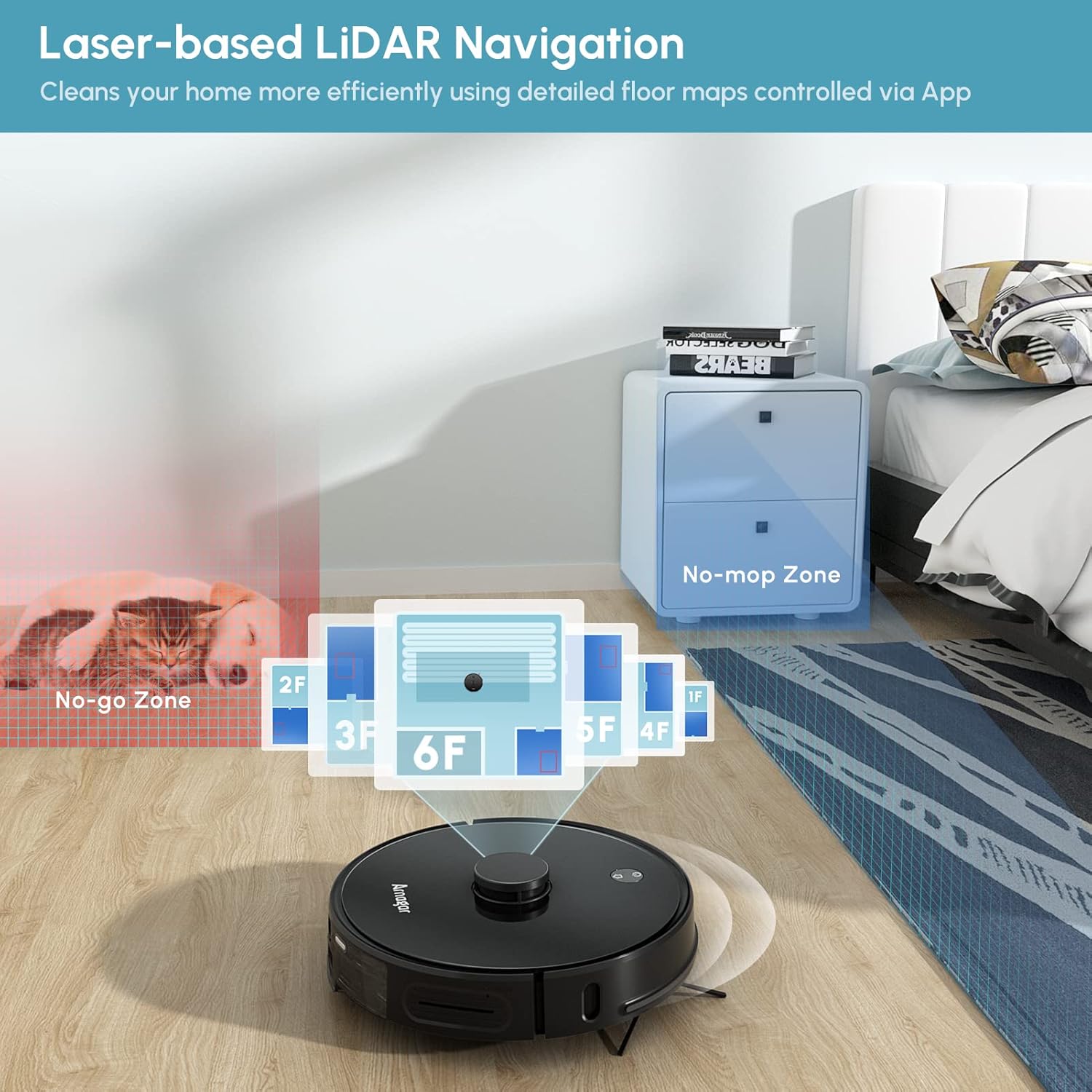
Image: The Arnagar S8 Robot Vacuum can be controlled via a smartphone app and voice commands through Google Assistant or Amazon Alexa.
5. Operating Instructions
5.1 Cleaning Modes and Navigation
The Arnagar S8 uses advanced Lidar navigation to create detailed maps of your home, ensuring efficient and thorough cleaning. It supports Z/Y-shape route navigation to minimize missed areas.
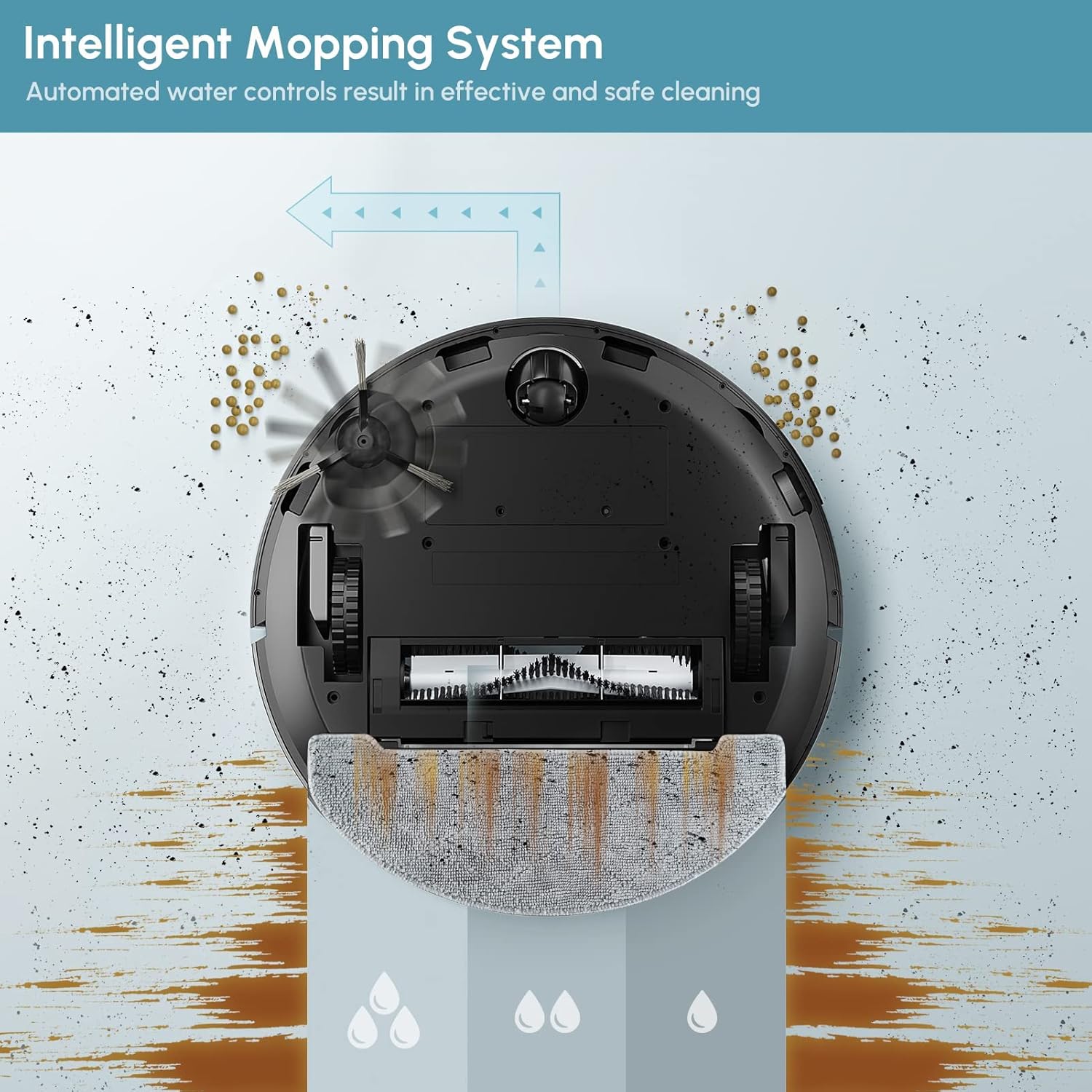
Image: The Arnagar S8 Robot Vacuum utilizing Lidar navigation to map multiple floors and define cleaning zones.

Image: The Arnagar S8 Robot Vacuum demonstrating advanced laser navigation for smart and efficient cleaning.
5.2 Vacuuming and Mopping
The S8 integrates vacuuming and mopping functions. It automatically adjusts suction power based on surface type and detects carpets to boost suction in vacuuming mode and avoid mopping in mopping mode.
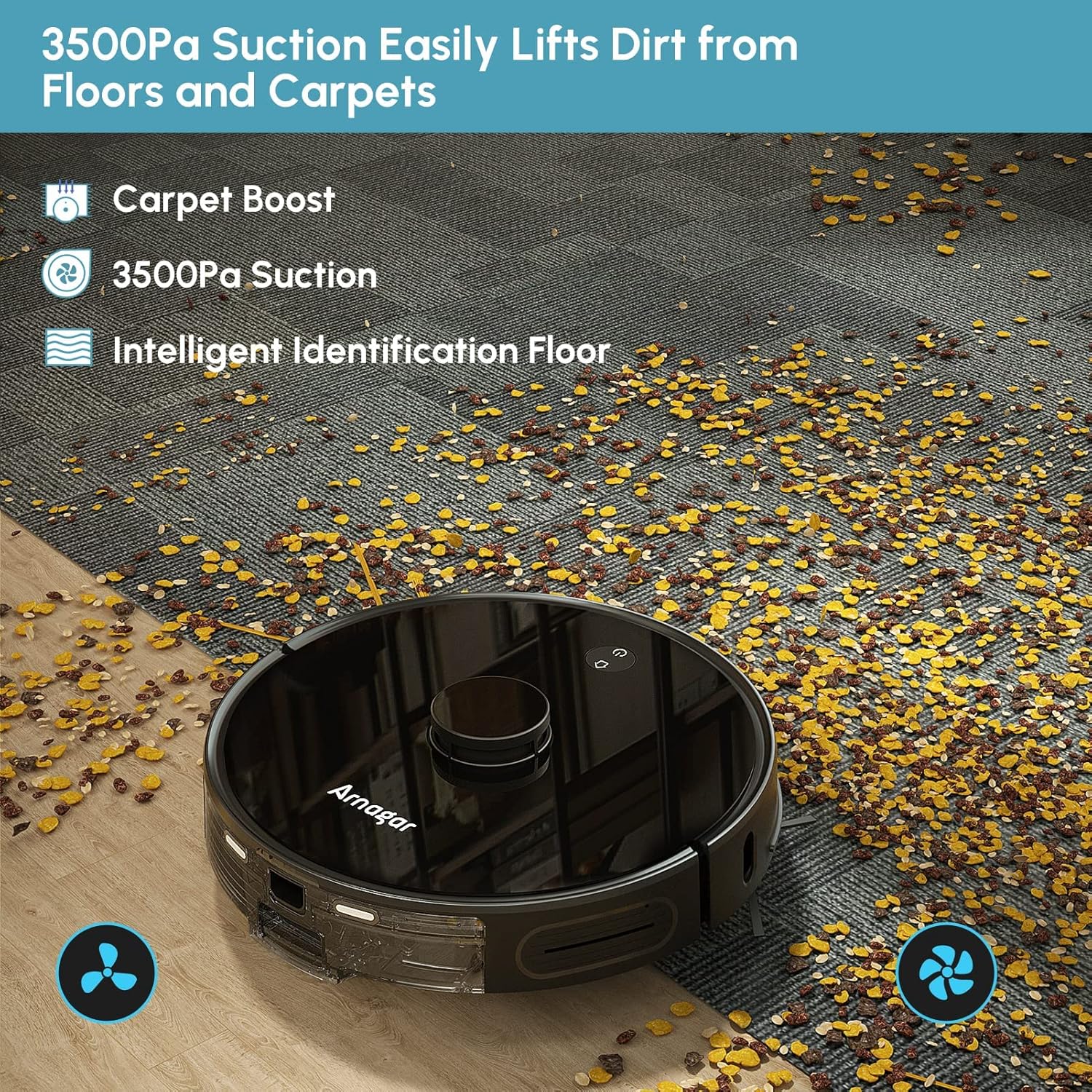
Image: The Arnagar S8 Robot Vacuum demonstrating its 3500Pa suction power on a dirty carpet.

Image: Visual representation of Arnagar S8's powerful suction, carpet boost, and long battery runtime.

Image: Underside view of the Arnagar S8 showing the intelligent mopping system with automated water control.
Video: What's the cleaner ability?
Video: Demonstration of the Arnagar S8 Robot Vacuum's cleaning capabilities on various types of debris.
6. Maintenance
Regular maintenance ensures optimal performance and extends the lifespan of your Arnagar S8. Always power off the robot before performing any maintenance.
6.1 Cleaning Charger, Sensors, and Radar
Wipe the charging contacts on the dock and the robot, as well as all sensors and the Lidar radar, with a clean, dry cloth to ensure proper function.
Video: How to care for the product (Cleaning Charger, Sensors, Radar)
Video: Instructions on cleaning the charging contacts, sensors, and Lidar radar of the Arnagar S8 Robot Vacuum.
6.2 Changing Brushroll
Periodically inspect and clean the main brushroll. If worn or damaged, replace it with a new one. Remove the brushroll cover, lift out the old brushroll, and insert the new one, ensuring it clicks into place.
Video: How to care for the product (Changing Brushroll)
Video: Instructions on how to remove and replace the main brushroll of the Arnagar S8 Robot Vacuum.
6.3 Changing Side Brush
The side brushes can collect hair and debris. Regularly clean them and replace if they become bent or damaged. Use a screwdriver to remove the screw holding the side brush, replace it, and secure with the screw.
Video: How to care for the product (Changing Side Brush)
Video: Instructions on how to remove and replace the side brushes of the Arnagar S8 Robot Vacuum.
6.4 Replacing Disposable Rag/Washable Cloth
For mopping, attach either a disposable rag or a washable mop cloth to the mop plate. Replace disposable rags after each use and wash reusable cloths regularly.
Video: How to care for the product (Replace Disposable Rag/Washable Cloth)
Video: Instructions on attaching and replacing the disposable rags or washable mop cloths for the Arnagar S8 Robot Vacuum's mopping function.
6.5 Replacing/Cleaning Dust Box and HEPA Filter
The 2-in-1 water/dust tank should be emptied and cleaned after each use. The HEPA filter should be cleaned regularly and replaced every 3-6 months depending on usage. Remove the dust box, open it, remove the filter, empty debris, and clean the filter. Ensure all components are dry before reassembling.
Video: How to care for the product (Replace/Clean Dust Box and HEPA)
Video: Instructions on how to remove, clean, and replace the dust box and HEPA filter of the Arnagar S8 Robot Vacuum.
6.6 Adding Water to Water Tank
To use the mopping function, fill the water tank with clean water. Open the rubber plug on the water tank, carefully pour water in, and securely close the plug.
Video: How to care for the product (Add Water to Water Tank)
Video: Instructions on how to fill the water tank for the mopping function of the Arnagar S8 Robot Vacuum.
7. Specifications
| Feature | Specification |
|---|---|
| Brand | Arnagar |
| Model Name | S8 |
| Special Features | 3D Obstacle Avoidance, 3500Pa Suction, LiDAR Navigation, Robotic Vacuums and Mop Combo, Mapping Technology |
| Product Dimensions | 13.8"L x 13.8"W x 3.8"H |
| Filter Type | Cartridge |
| Battery Life | 5 years (Lithium Ion) |
| Cleaning Path Width | 14 Inches |
| Dust Tank Capacity | 0.3 Liters |
| Water Tank Capacity | 0.25 Liters |
| Power Source | Battery Powered |
| Control Method | App, Remote, Touch, Voice (Alexa, Google Home) |
| Item Weight | 7 pounds |
| UPC | 768484773871 |
Video: Arnagar S8 Robot Vacuum -- battery and brushless motor
Video: An internal view of the Arnagar S8 Robot Vacuum, highlighting the BYD Lithium Iron Phosphate battery and Nidec brushless motor components.

Image: Illustration of the Arnagar S8's BYD Lithium Iron Phosphate Battery, emphasizing its long life and 220-minute runtime for up to 200m² cleaning area.
8. Troubleshooting
If you encounter issues with your Arnagar S8, please refer to the following common troubleshooting steps:
- Robot not charging: Ensure the charging dock is powered on and the robot's charging contacts are clean and properly aligned with the dock.
- Robot not connecting to Wi-Fi: Verify your Wi-Fi network is 2.4GHz. Ensure the robot is close to the router during setup. Try resetting the robot's Wi-Fi and repeating the app connection steps.
- Reduced suction power: Check and empty the dust bin. Clean or replace the HEPA filter. Inspect the main brushroll and side brushes for tangled hair or debris.
- Mopping not effective: Ensure the water tank is filled and the mop cloth is properly attached and wet. Clean the water outlet if it appears clogged.
- Robot getting stuck frequently: Clear obstacles from the cleaning path. Use the app to set No-Go Zones for areas where the robot frequently gets stuck. Clean cliff sensors.
9. Warranty and Support
The Arnagar S8 Robot Vacuum Cleaner comes with a 5-year battery life. For specific warranty details and support, please refer to the warranty card included in your package or contact Arnagar customer service directly.
For further assistance, please visit the official Arnagar website or contact their customer support team.