
Xmenha 88593269-45c0-4e6f-a9b4-e65d09401079
Xmenha Open Ear Bone Conduction Headphones
User Instruction Manual
Brand: Xmenha | Model: 88593269-45c0-4e6f-a9b4-e65d09401079
1. Introduction
Thank you for choosing the Xmenha Open Ear Bone Conduction Headphones. These innovative headphones are designed to provide a safe and comfortable listening experience by transmitting audio through your cheekbones, leaving your ears open to ambient sounds. Ideal for sports, workouts, and daily use, they ensure you stay aware of your surroundings while enjoying high-quality audio.

Image: Xmenha Open Ear Bone Conduction Headphones, showcasing the open-ear design.
2. Product Features
- Bone Conduction Technology: Transmits audio through the cheekbone, allowing you to hear ambient noise for enhanced safety during outdoor activities.
- IPX5 Waterproof: Designed to withstand sweat and rain, making them suitable for intense workouts and various weather conditions.
- Clear Call Quality: Built-in high-quality microphone with noise reduction ensures clear and smooth call experiences.
- Long Battery Life: Offers up to 15 hours of talk time or 10 hours of listening time, with 240 hours of standby time. Fully charges in 2 hours.
- Multi-Function Buttons: Easy control for music playback (play/pause, previous/next song), call management (answer/reject), and voice assistant activation.
- Universal Fit: Soft and flexible earhook design ensures a comfortable and secure fit for both left and right ears.

Image: Close-up view of the Xmenha Bone Conduction Headphone in red.
3. Package Contents
Please check the package for the following items:
- Xmenha Open Ear Bone Conduction Headphones
- USB Type-C Charging Cable
- User Manual
4. Setup Guide
4.1 Charging the Headphones
Before first use, fully charge the headphones. Connect the provided USB Type-C charging cable to the charging port on the headphones and to a USB power source. A full charge takes approximately 2 hours.

Image: Illustration of the headphones with battery life indicators.
4.2 Powering On/Off
To power on the headphones, long press the main button for 3 seconds until you hear a power-on prompt. To power off, long press the main button again until you hear a power-off prompt.
4.3 Bluetooth Pairing
- Ensure the headphones are powered off.
- Long press the main button for 3 seconds to power on. The indicator light will flash, indicating pairing mode.
- On your device (smartphone, tablet, laptop), enable Bluetooth and search for available devices.
- Select "M618" from the list of devices.
- Once connected, the indicator light will stop flashing, and you will hear a confirmation prompt.

Image: Demonstrates full compatibility with iOS, Android, and Windows systems.
4.4 Wearing the Headphones
The headphones feature an adjustable earhook for a secure and comfortable fit. They can be rotated 180 degrees to fit both the left and right ear. Position the bone conduction transducer on your cheekbone, just in front of your ear, for optimal sound transmission.

Image: Guide on how to wear the headphones on both left and right ears.

Image: Diagram illustrating how bone conduction technology works.
4.5 Setup and Usage Video Guide
Watch this official video for a visual guide on setting up and using your Xmenha headphones:
Video: Demonstrates key features and operational steps of the Xmenha Open Ear Bone Conduction Headphones, including charging, power on/off, Bluetooth pairing, music control, call handling, and voice assistant activation.
5. Operating Instructions
5.1 Music Control
- Play/Pause: Click the main button once.
- Volume Control: Use the dedicated volume buttons on the side of the headphones.
- Next Song: Double click the volume up button.
- Previous Song: Double click the volume down button.
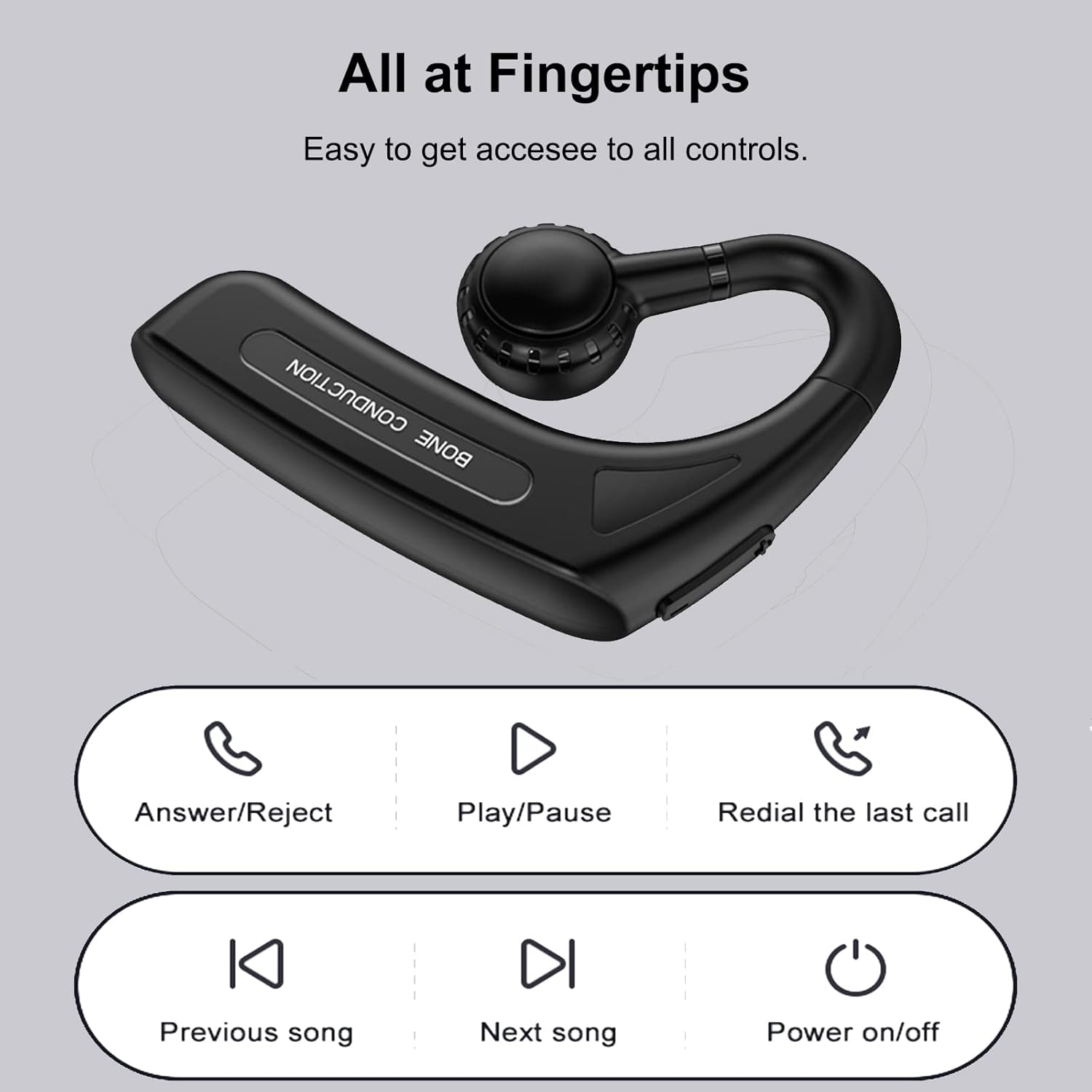
Image: Diagram showing the functions of the multi-function buttons.
5.2 Call Management
- Answer/End Call: Click the main button once.
- Reject Call: Long press the main button.
- Redial Last Call: Triple click the main button.

Image: Highlights the call reminder and talking headphones feature.
5.3 Voice Assistant
To activate your device's voice assistant (e.g., Siri, Google Assistant), long press the main button for 1.5 seconds.
5.4 Language Switching
To switch the voice prompt language, press the main button before powering on the headphones and while they are unpaired from any device.
6. Maintenance
- Cleaning: Wipe the headphones with a soft, damp cloth. Do not use harsh chemicals or abrasive materials.
- Water Resistance: The headphones are IPX5 waterproof, meaning they are resistant to splashes and sweat. Do not submerge them in water or expose them to strong jets of water.
- Storage: Store the headphones in a cool, dry place away from direct sunlight and extreme temperatures.
- Battery Care: To prolong battery life, avoid fully discharging the headphones frequently. Charge them regularly, even if not in use for extended periods.
7. Troubleshooting
| Problem | Solution |
|---|---|
| Headphones won't power on. | Ensure the headphones are fully charged. Long press the main button for 3 seconds. |
| Cannot pair with device. | Make sure Bluetooth is enabled on your device and the headphones are in pairing mode (flashing indicator light). Forget "M618" from your device's Bluetooth list and try pairing again. Ensure no other devices are connected to the headphones. |
| No sound or low volume. | Check the volume level on both the headphones and your connected device. Ensure the headphones are properly positioned on your cheekbones. Recharge the headphones if the battery is low. |
| Call quality is poor. | Ensure the microphone is not obstructed. Move closer to your connected device to improve signal strength. |
8. Specifications
| Feature | Detail |
|---|---|
| Model Name | language _ tag (Internal Model: 88593269-45c0-4e6f-a9b4-e65d09401079) |
| Connectivity Technology | Wireless (Bluetooth 4.0) |
| Bluetooth Range | 15 Meters |
| Water Resistance Level | IPX5 Waterproof |
| Battery Life | Up to 15 Hours (Talk Time), 10 Hours (Listening Time) |
| Standby Time | 240 Hours |
| Charging Time | 2 Hours (Type-C) |
| Audio Driver Type | Bone Conduction Driver |
| Frequency Range | 200 Hz - 2000 Hz |
| Item Weight | 1.87 ounces |
| Product Dimensions | 3.5 x 1 x 6.3 inches |
| Ear Placement | Open Ear |
| Control Method | Touch / Physical Buttons |
9. Warranty and Support
Xmenha products are manufactured to the highest quality standards. For warranty information, technical support, or customer service inquiries, please refer to the contact information provided on the product packaging or visit the official Xmenha website. Please retain your proof of purchase for warranty claims.
Ask a question about this manual
Ask about setup, troubleshooting, compatibility, parts, safety, or missing instructions. Manuals+ will review the question and use this page’s manual context to help answer it.