
1. Product Overview
The SURAIELEC 200W Low Voltage Landscape Transformer (Model ULTL20A) is designed to power your outdoor landscape lighting systems. It converts standard 120V AC household current to a safe 12V AC or 15V AC low voltage, suitable for pathway lights, spotlights, and other landscape lighting fixtures. This transformer features a photocell sensor for automatic dusk-to-dawn operation, a countdown timer, and two independently controlled output zones for versatile lighting management.

Figure 1: SURAIELEC 200W Low Voltage Landscape Transformer with power cord.
2. Safety Information
Please read and understand all instructions before installing or operating this transformer. Failure to follow these instructions may result in electric shock, fire, or serious injury.
- Electrical Safety: Always disconnect power at the circuit breaker before installing or servicing the transformer. Ensure all connections are secure and properly insulated.
- Outdoor Use: This transformer is designed for outdoor, weatherproof use. However, ensure it is mounted in a location that minimizes direct exposure to heavy rain or standing water.
- Overload Protection: The transformer is equipped with an automatic circuit breaker that will cut off power in case of an overload. Do not exceed the maximum wattage rating of 200W.
- Grounding: Ensure the transformer is properly grounded as per local electrical codes.
- Cable Management: Route low voltage cables in a manner that prevents tripping hazards and protects them from damage.

Figure 2: Internal safety mechanisms including over-voltage, over-current, grounded, short-circuit, and overload protection.
3. Package Contents
Verify that all components are present and undamaged upon opening the package:
- 1x SURAIELEC 200W Low Voltage Landscape Transformer (Model ULTL20A)
4. Specifications
| Feature | Specification |
|---|---|
| Model Number | ULTL20A |
| Power Source | Corded Electric |
| Input Voltage | 120V AC |
| Output Voltage | 12V AC / 15V AC |
| Maximum Wattage | 200W |
| Maximum Frequency | 60 Hz |
| Product Dimensions | 3"D x 5"W x 8.3"H (7.03 Pounds) |
| Mounting Type | Wall Mount |
| Special Features | Photocell Sensor, Countdown Timer, 2 Independent Zones, Memory Function, Overload Protection |
5. Setup and Installation
Follow these steps for proper installation of your landscape transformer:
- Choose a Location: Select a suitable outdoor location near a 120V AC GFCI outlet. The transformer is wall-mountable and designed for all-weather durability. Ensure the photocell sensor is not obstructed and receives adequate natural light.
- Mount the Transformer: Use appropriate screws and anchors (not included) to securely mount the transformer to a wall or sturdy surface using the two mounting holes on the back.
- Connect Low Voltage Cables:
- Strip approximately 1/2 inch of insulation from the ends of your low voltage landscape lighting cables.
- Connect the cables to the appropriate terminals on the transformer. The transformer offers 12V AC and 15V AC output options. Use 15V AC for longer cable runs (100ft-150ft) to compensate for voltage drops, and 12V AC for shorter runs or nearby lights.
- Ensure all wire connections are tight and secure to prevent loose connections and potential hazards.
- Plug In: Once all low voltage connections are made and secured, plug the transformer's 120V AC cord into a GFCI protected outdoor outlet.

Figure 3: Connection points for 120V input and 12V/15V AC low voltage output.

Figure 4: The transformer's dimensions and all-weather durability for outdoor installation.
6. Operating Instructions
The SURAIELEC transformer offers multiple operating modes for flexible control of your landscape lighting.
6.1 Control Modes
The transformer features three primary lighting modes, easily selectable via the control panel:
- Manual ON/OFF: Lights can be manually turned on or off at any time.
- Auto ON/OFF (Photocell Sensor): The built-in photocell sensor automatically turns lights on at sunset and off at sunrise.
- Sunset with Countdown Timer: Lights turn on at dusk (detected by the photocell) and automatically turn off after a set duration of 4, 6, or 10 hours.

Figure 5: One-button operation for selecting lighting modes.
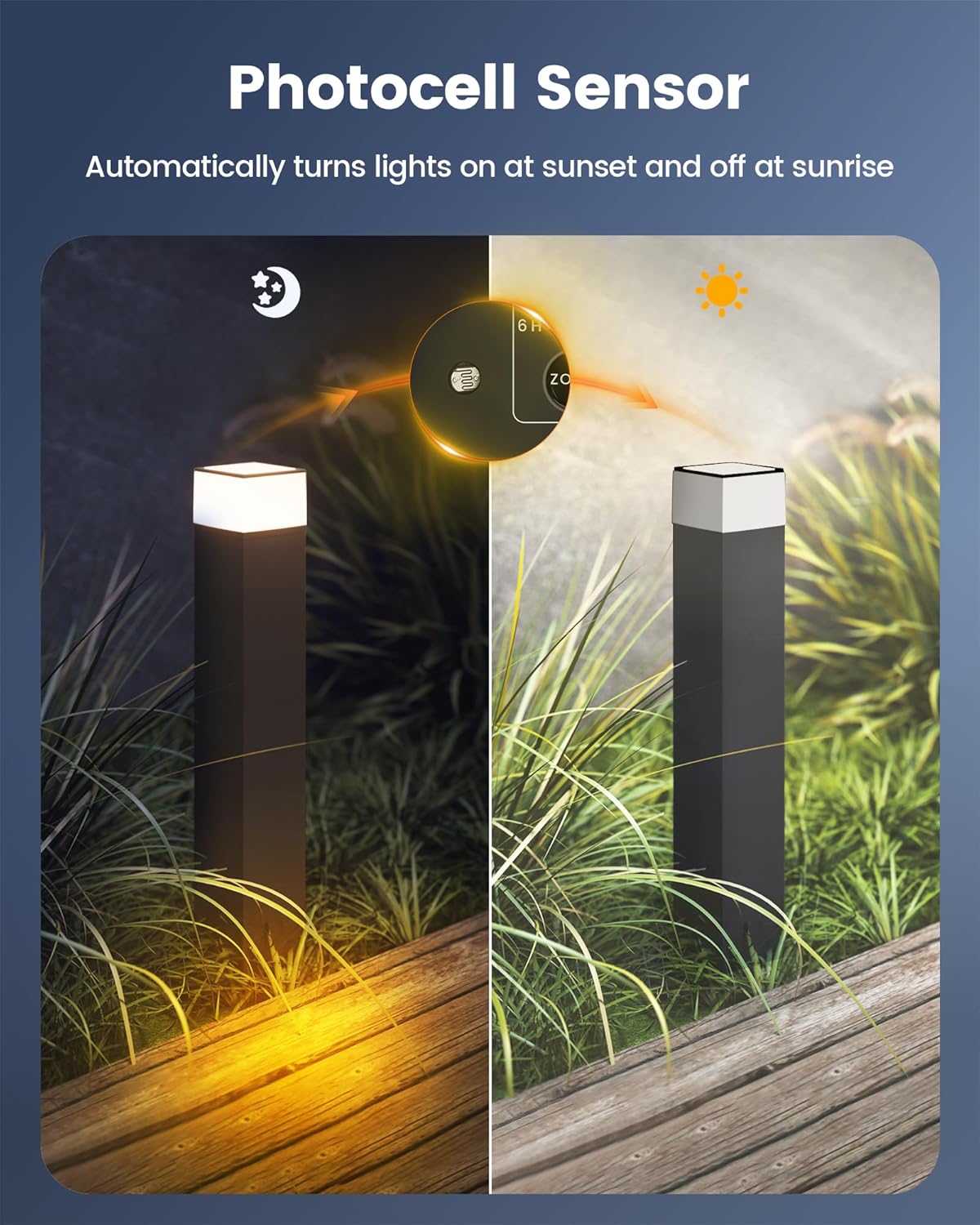
Figure 6: Photocell sensor functionality for automatic dusk-to-dawn operation.
6.2 Independent Zone Control
This 200W transformer features two independently controlled output zones (Zone 1 and Zone 2). This allows you to manage different outdoor lighting systems separately from a single transformer. For example, you can set your front yard lights to one schedule and your backyard lights to another.
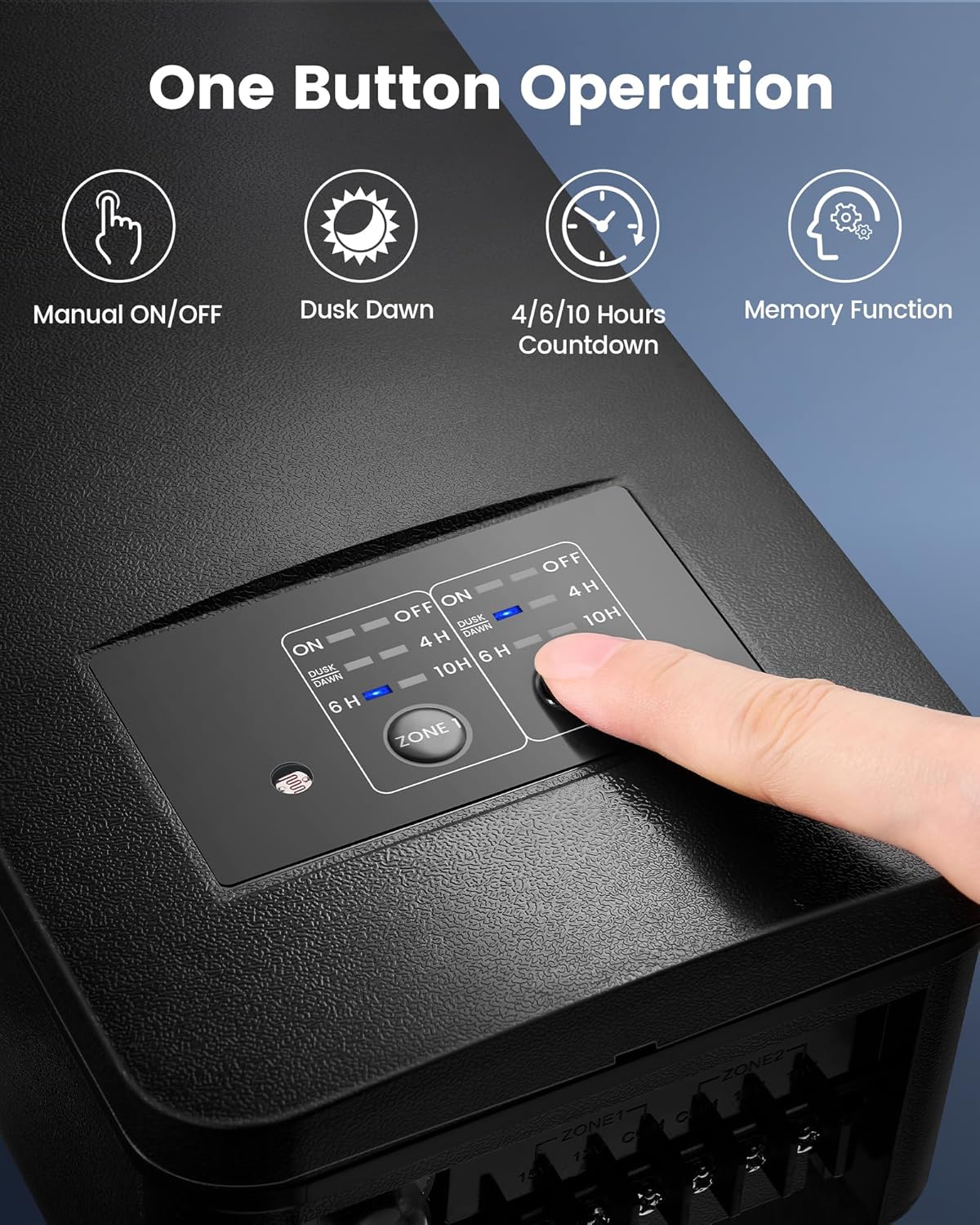
Figure 7: Customizing lighting with two independent zones.
6.3 Memory Function
The transformer is equipped with a memory function that retains your preset modes even after power outages, ensuring consistent operation without needing to reconfigure settings.
6.4 Smart Plug Compatibility
For enhanced control, the transformer is compatible with smart plugs and external timers. This allows for integration into smart home systems for remote control and advanced scheduling options.
7. Maintenance
To ensure optimal performance and longevity of your SURAIELEC landscape transformer, follow these simple maintenance guidelines:
- Regular Cleaning: Periodically wipe down the exterior of the transformer with a damp cloth to remove dirt, dust, and debris. Ensure the photocell sensor is clean and unobstructed.
- Inspect Wiring: Annually inspect all low voltage wiring for any signs of damage, fraying, or loose connections. Repair or replace damaged wires immediately.
- Check Mounting: Ensure the transformer remains securely mounted to its surface. Tighten any loose screws if necessary.
- Avoid Obstructions: Keep the area around the transformer clear of vegetation or other objects that could block the photocell sensor or impede ventilation.
8. Troubleshooting
If you encounter issues with your transformer, refer to the following common problems and solutions:
| Problem | Possible Cause | Solution |
|---|---|---|
| Lights not turning on | No power to transformer Photocell obstructed/dirty Incorrect mode setting Overload protection tripped Loose wire connections | Check GFCI outlet and circuit breaker Clean photocell; ensure no obstructions Verify correct operating mode (Auto, Timer, Manual ON) Reduce load; unplug transformer for 5 minutes to reset Check and tighten all low voltage wire connections |
| Lights flickering or dim | Voltage drop due to long cable run Loose connections Too many lights (overload) | Use 15V AC output for longer runs; use thicker gauge wire Check and tighten all connections Reduce number of lights or use a higher wattage transformer |
| Lights stay on constantly | Photocell sensor malfunction or constant light exposure | Ensure photocell is not exposed to artificial light at night Contact customer support if photocell is faulty |
| Timer not working correctly | Incorrect timer setting Power interruption | Review operating instructions for timer setup Memory function should retain settings, but re-verify after prolonged outage |
If problems persist after attempting these solutions, please contact SURAIELEC customer support.
9. Warranty and Support
SURAIELEC products are manufactured to high-quality standards. For warranty information, technical support, or replacement parts, please refer to the contact information provided on the product packaging or visit the official SURAIELEC website. Keep your purchase receipt as proof of purchase for warranty claims.