
Introduction
This manual provides instructions for the MediaRange Wired Keyboard MROS109-GR. This keyboard is designed for general use with personal computers, offering a QWERTY (GR) layout, USB 2.0 connectivity, and a splash-proof design. Please read this manual thoroughly before using the product to ensure proper operation and maintenance.
Package Contents
- MediaRange Wired Keyboard MROS109-GR
- Integrated USB Cable
Setup
- Unpack the Keyboard: Carefully remove the keyboard from its packaging.
- Connect to Computer: Locate an available USB 2.0 port on your computer. Insert the USB connector of the keyboard into the USB port.
- System Recognition: The keyboard is Plug & Play compatible. Your operating system (Windows, macOS, Linux) should automatically detect and install the necessary drivers. No additional software installation is typically required.
- Adjust Height (Optional): The keyboard features adjustable feet on the underside. Flip out the feet to raise the rear of the keyboard for a more comfortable typing angle.
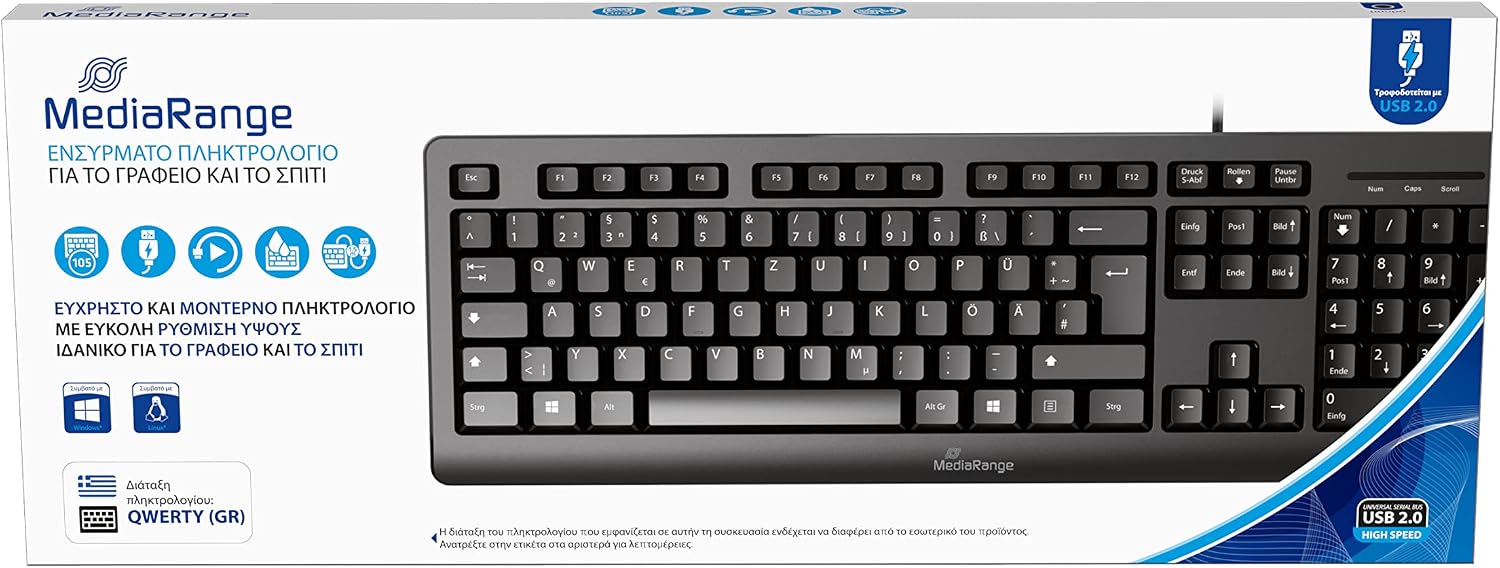
Image: The MediaRange Wired Keyboard, illustrating its QWERTY (GR) layout and USB 2.0 connection. This image shows the overall design and key arrangement.

Image: Illustration of the keyboard's height adjustment feature and its splash-proof design, highlighting its suitability for office or home use and comfortable, efficient work.
Operating Instructions
The MediaRange Wired Keyboard functions as a standard input device. Once connected, it is ready for use.
- Typing: Use the keys for text input and command execution.
- Number Pad: The dedicated number pad on the right side allows for efficient numerical data entry. Ensure 'Num Lock' is active if numbers are not registering.
- Function Keys (F1-F12): These keys perform various functions depending on the software or operating system in use.
- Multimedia Keys (if present): Some keyboards include dedicated multimedia keys for volume control, playback, etc. Refer to your operating system's documentation for specific functionality.

Image: Details on the keyboard's compatibility with various operating systems (Windows, Mac, Linux), its 105 flat keys, and a durability rating of 5 million keystrokes, emphasizing its Plug & Play functionality.
Maintenance
- Cleaning: Disconnect the keyboard from the computer before cleaning. Use a soft, damp cloth to wipe the surface. For dust between keys, use compressed air. Avoid harsh chemicals or abrasive cleaners.
- Splash Protection: The keyboard is splash-proof, meaning it can withstand minor liquid spills. However, it is not waterproof. Avoid submerging the keyboard in liquids or exposing it to heavy splashes. If a spill occurs, disconnect immediately and allow it to dry completely before reconnecting.
- Storage: Store the keyboard in a dry, cool environment away from direct sunlight and extreme temperatures.
Troubleshooting
| Problem | Possible Cause | Solution |
|---|---|---|
| Keyboard not responding | Loose USB connection, faulty USB port, system driver issue. |
|
| Keys not typing correctly (e.g., numbers instead of letters) | Incorrect keyboard layout selected in operating system, 'Num Lock' or 'Caps Lock' status. |
|
| Sticky keys or unresponsive keys | Dirt or debris under the keys, liquid damage. |
|
Specifications
| Feature | Detail |
|---|---|
| Model Number | MROS109-GR |
| Brand | MediaRange |
| Connectivity | Wired USB 2.0 |
| Keyboard Layout | QWERTY (GR) |
| Number of Keys | 105 |
| Special Features | Splash-proof, Height-adjustable, Plug & Play |
| Durability | Over 5 million keystrokes |
| Compatible Devices | PC (Windows, macOS, Linux) |
| Material | Plastic |
| Color | Black |
| Item Weight | 500 Grams |
Warranty and Support
For warranty information and technical support, please refer to the documentation provided with your purchase or visit the official MediaRange website. Keep your proof of purchase for warranty claims.
Manufacturer: MediaRange GmbH


