
1. Important Safety Information
Please read all instructions carefully before assembly and use. Keep this manual for future reference.
- Do not use on extremely uneven surfaces. Always ensure the desk is on a stable, level surface to prevent tipping and injury.
- Ensure all screws and bolts are tightened securely before use. Periodically check and re-tighten as necessary.
- Keep children and pets away from the desk during height adjustment to prevent accidents.
- Do not overload the desk. The maximum weight capacity is 110 lbs (50 kg).
- Avoid placing liquids directly on the desk surface without proper coasters to prevent damage.
2. Product Overview
The COSTWAY Crank Standing Desk Frame provides an ergonomic solution for your workspace, allowing you to easily switch between sitting and standing positions. This manual hand crank workstation base is designed for stability and user convenience.

Image 2.1: The COSTWAY Crank Standing Desk Frame, shown in grey.
Key Features:
- Height Adjustable Design: Easily switch between sitting and standing modes with a height range of 27.6" to 45.3".
- Manual Hand Crank System: Smooth and quiet height adjustment. The crank handle is foldable to prevent bumping and can be installed on either the left or right side.
- Sturdy Construction: Made from thickened, powder-coated steel for durability and a weight capacity of 110 lbs (50 kg).
- Adjustable Foot Pads: Ensures stability on uneven surfaces.
- Cable Management Rack: Helps organize wires for a tidy workspace.
- Accessory Hook: Conveniently hang headphones or bags.

Image 2.2: Illustration of the desk frame accommodating both sitting and standing postures.
3. Package Contents
Verify that all components are present before beginning assembly. If any parts are missing or damaged, please contact customer service.

Image 3.1: Visual representation of the standing desk frame and its included accessories.
- 1 x Standing Desk Frame (main components)
- 1 x Hook
- 1 x Cable Rack
- 1 x Crank Handle
- 1 x Instruction Manual (this document)
- Hardware pack (screws, bolts, tools if included)
4. Specifications
| Feature | Detail |
|---|---|
| Brand | COSTWAY |
| Model Number | 67624-CYWH |
| Material | Steel (Powder Coated) |
| Overall Dimensions (L x W x H) | 43.5" x 23" x 27.6"-45.3" (110cm x 58.5cm x 70-115cm) |
| Height Adjustment Range | 27.6" to 45.3" |
| Adjustment Speed | 0.05 inch/Turn (Crank) |
| Weight Capacity | 110 lbs (50 kg) |
| Recommended Tabletop Size | Approximately 48" x 24" (L x W) |
| Net Weight | 36 lbs (16.23 kg) |
| Color | Grey |
5. Setup and Assembly Instructions
Follow these steps to assemble your COSTWAY Crank Standing Desk Frame. It is recommended to have two people for assembly.

Image 5.1: Exploded diagram showing the main parts of the desk frame for assembly reference.
- Unpack Components: Carefully remove all parts from the packaging and lay them out on a clean, soft surface to prevent scratches. Verify all parts are present against the package contents list.
- Attach Feet to Legs: Securely attach the base feet to the bottom of the desk legs using the provided screws and tools. Ensure they are oriented correctly for stability.
- Assemble Frame Crossbar: Connect the horizontal crossbar components between the two vertical legs. Tighten all fasteners to ensure a rigid frame.
- Install Crank Mechanism: Insert the crank shaft into the designated opening on one of the desk legs. Attach the crank handle. The crank can be installed on either the left or right side based on your preference.
- Attach Tabletop (User-Provided): Carefully place your chosen tabletop (recommended size 48" x 24") onto the assembled frame. Align it as desired and secure it to the frame using appropriate screws (not included, as tabletops vary).
- Install Cable Management Rack and Hook: Attach the cable management rack to the underside of the desk frame and the accessory hook to a convenient location on the frame, as shown in the diagrams.
- Final Check: Ensure all connections are tight and the desk is stable. Adjust the foot pads if necessary to level the desk on uneven floors.
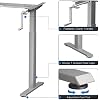
Image 5.2: Close-up of the foldable crank handle and the adjustable foot pads for leveling.
6. Operating Instructions
This section details how to adjust the height of your standing desk frame using the manual crank.

Image 6.1: Demonstrates the use of the hand crank for height adjustment.
- Unfold the Crank Handle: If the crank handle is folded, gently pull it out until it locks into the operating position.
- Adjust Height: Turn the crank handle clockwise to raise the desk and counter-clockwise to lower the desk. The desk height can be adjusted smoothly between 27.6 inches and 45.3 inches.
- Fold the Crank Handle: Once the desired height is reached, push the crank handle back into its folded position to prevent accidental bumping or obstruction.
- Switching Sides: The crank handle mechanism allows for installation on either the left or right side of the desk frame to suit user preference.
7. Maintenance
Regular maintenance ensures the longevity and smooth operation of your standing desk frame.
- Cleaning: Wipe the metal surfaces with a soft, damp cloth. Avoid abrasive cleaners or harsh chemicals that could damage the finish.
- Check Fasteners: Periodically inspect all screws and bolts to ensure they are tight. Re-tighten if any feel loose.
- Crank Mechanism: The crank mechanism is designed for low maintenance. If you notice any stiffness, ensure no debris is obstructing its movement. Do not apply excessive force.
- Weight Distribution: Distribute weight evenly on the tabletop to prevent undue stress on the frame.
8. Troubleshooting
If you encounter any issues with your COSTWAY Crank Standing Desk Frame, refer to the following common problems and solutions.
| Problem | Possible Cause | Solution |
|---|---|---|
| Desk is unstable or wobbly. | Uneven floor; loose fasteners; overloaded desk. | Adjust the foot pads to level the desk. Check and tighten all assembly screws. Ensure the desk is not exceeding its 110 lbs weight capacity. |
| Crank handle is stiff or difficult to turn. | Obstruction in the mechanism; crank not fully unfolded; excessive weight. | Check for any foreign objects obstructing the crank path. Ensure the crank handle is fully extended. Reduce the weight on the desk. |
| Desk does not adjust height. | Crank handle not properly engaged; internal mechanism issue. | Ensure the crank handle is fully unfolded and properly inserted. If the issue persists, contact customer support. |
9. Warranty and Support
The COSTWAY Crank Standing Desk Frame comes with a Limited Warranty. Please refer to the warranty documentation provided with your purchase for specific terms and conditions.
For further assistance, missing parts, or warranty claims, please contact COSTWAY customer support through their official website or the retailer where the product was purchased. Have your model number (67624-CYWH) and purchase information ready when contacting support.