
1. Introduction
This manual provides comprehensive instructions for the installation, operation, and maintenance of your 2NLF 28 LEDs HD 1080P Wireless IP Security Camera. Please read this manual carefully before using the product to ensure proper setup and functionality. Keep this manual for future reference.
2. Product Overview
2.1 Key Features
- Full HD 1080P Resolution: Provides clear and detailed video surveillance.
- Wireless Connectivity (Wi-Fi): Easy setup and flexible placement without extensive cabling.
- IP66 Waterproof Rating: Designed for outdoor use, resistant to water and dust.
- Pan-Tilt-Zoom (PTZ) Rotation: Remotely control camera direction (up, down, left, right) via mobile app.
- Two-Way Audio: Built-in microphone and speaker for remote communication.
- Smart Motion Detection & Mobile Alarm Push: Receive instant alerts on your mobile device when motion is detected.
- Advanced Night Vision: Features 28 LEDs (12 IR LEDs + 16 White LEDs) for multiple night vision modes including infrared, full-color, and smart dual-light vigilance.
- Local Storage: Supports memory card storage for recorded video playback.
- Bulb Lighting Function: White LEDs can function as auxiliary lighting.
2.2 Package Contents
Verify that all items are present in your package:
- 2NLF Wireless IP Security Camera
- Power Adapter + USB Cable
- Mounting Screws
- User Handbook (Quick Operation Manual)

Figure 2.2.1: Package contents including the camera, power adapter, USB cable, mounting screws, and the quick operation manual.

Figure 2.2.2: Visual representation of the camera's main features and capabilities.
3. Setup
3.1 Physical Installation
- Choose a Location: Select an outdoor location with a clear view of the area you wish to monitor. Ensure the location is within range of your Wi-Fi network.
- Mount the Camera: Use the provided mounting screws to securely attach the camera to a wall or ceiling. Ensure the camera is positioned to cover the desired surveillance area.
- Connect Power: Connect the power adapter to the camera's power input and plug it into a suitable power outlet. The camera will power on and initiate its startup sequence.

Figure 3.1.1: Camera mounted outdoors, demonstrating its lighting capability and connection to a mobile device.
3.2 App Installation and Network Connection
- Download the App: Search for the recommended mobile application (e.g., V380Pro as indicated in the handbook image) on your smartphone's app store (Android or iOS). Download and install the app.
- Register/Log In: Open the app and follow the on-screen instructions to register a new account or log in if you already have one.
- Add Device: In the app, select the option to add a new device. Follow the prompts to connect your camera to your Wi-Fi network. This typically involves scanning a QR code on the camera or entering your Wi-Fi credentials.
- Configuration: Once connected, you can configure basic settings such as device name, time zone, and initial alarm settings.
4. Operating Instructions
4.1 Live View
Open the mobile app and select your camera from the device list to access the live video feed. You can view real-time footage from your camera.
4.2 Two-Way Audio
While in live view, tap the microphone icon in the app to speak through the camera's speaker. Tap the speaker icon to listen to audio from the camera's surroundings. This allows for remote communication with visitors or to deter intruders.
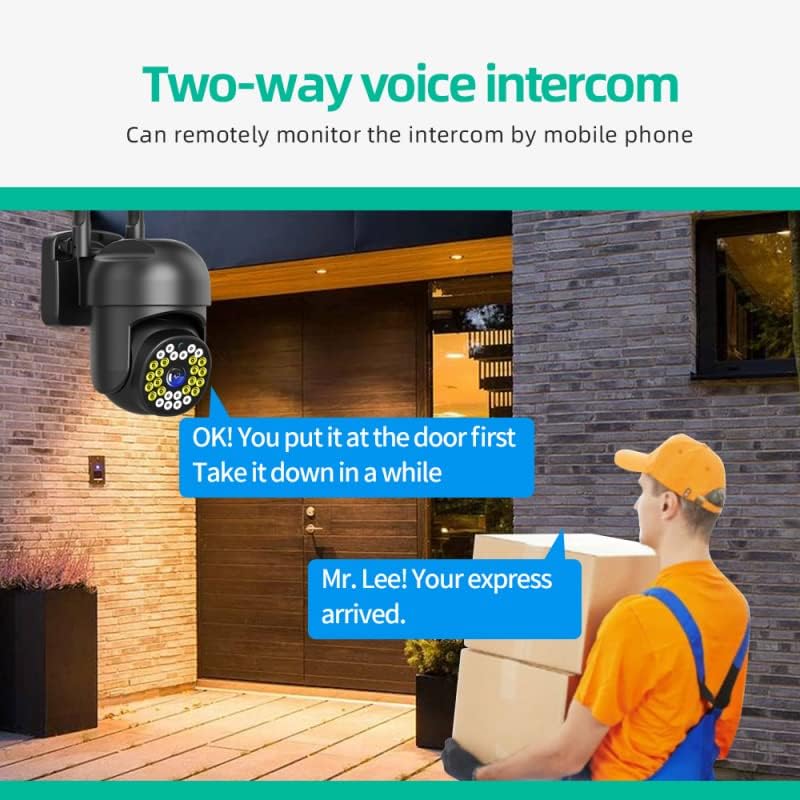
Figure 4.2.1: Demonstrating the two-way voice intercom functionality.
4.3 PTZ Rotation
From the live view interface in the app, use the directional controls (arrows) to remotely pan (left/right) and tilt (up/down) the camera lens to adjust its viewing angle.

Figure 4.3.1: Remote PTZ rotation control via mobile application.
4.4 Motion Detection and Alarm Push
Enable motion detection in the app settings. When motion is detected within the camera's monitoring range, the camera will send an instant alarm notification to your mobile phone.

Figure 4.4.1: Mobile alarm push notification upon motion detection.
4.5 Night Vision Modes
The camera supports three night vision modes, which can be configured via the mobile app:
- Infrared Night Vision: Uses 12 IR LEDs for black and white video in low light conditions.
- Full-Color Night Vision: Uses 16 White LEDs to provide full-color video even in darkness.
- Smart Dual-Light Vigilance: The camera operates in infrared mode, but switches to full-color mode and activates white LEDs when motion is detected, acting as a deterrent.

Figure 4.5.1: Different night vision modes available.
4.6 Video Playback and Storage
If a memory card is installed, recorded footage can be accessed and played back through the mobile app. Navigate to the playback section in the app to view historical recordings.
5. Maintenance
5.1 Cleaning
Regularly clean the camera lens and housing with a soft, dry cloth to ensure clear image quality. Do not use harsh chemicals or abrasive materials.
5.2 Weather Protection
The camera has an IP66 rating, indicating it is protected against dust ingress and powerful water jets. While designed for outdoor use, avoid directing high-pressure water streams directly at the camera. Ensure all connections are sealed properly to maintain its waterproof integrity.

Figure 5.2.1: IP66 protection features of the camera.
6. Troubleshooting
- Camera Not Connecting to Wi-Fi:
- Ensure the camera is within range of your Wi-Fi router.
- Verify that the Wi-Fi password entered in the app is correct.
- Restart the camera and your Wi-Fi router.
- Check if your router is operating on a 2.4GHz network, as most IP cameras do not support 5GHz.
- Poor Image Quality:
- Clean the camera lens.
- Ensure adequate lighting in the surveillance area, especially for full-color night vision.
- Check your internet connection speed.
- Motion Detection Not Working:
- Ensure motion detection is enabled in the app settings.
- Adjust the motion detection sensitivity.
- Check the notification settings on your mobile phone to ensure the app is allowed to send alerts.
- No Two-Way Audio:
- Ensure the microphone and speaker functions are enabled in the app.
- Check the volume settings on your mobile device.
- Verify network connectivity.
7. Specifications
| Feature | Specification |
|---|---|
| Brand | 2NLF |
| Connectivity Technology | Wireless (Wi-Fi) |
| Special Feature | Night Vision, Motion Detection, Two-Way Audio, PTZ |
| Indoor/Outdoor Use | Outdoor |
| Control Type | Android, iOS (Mobile App) |
| Form Factor | Dome |
| Material | Metal |
| Alert Type | Motion Only |
| Light Source | Infrared, LED |
| International Protection Rating | IP66 |
| Voltage | 12 Volts |
| Video Capture Resolution | 1080p |
| Night Vision Range | 10 Meters |
| Night Vision Type | Color Night Vision (Dual-Light) |
| Number of Channels | 4 |
| UPC | 733835542277 |
| ASIN | B09W2LHCB5 |
8. Warranty and Support
For warranty information and technical support, please refer to the contact details provided in the product packaging or the official 2NLF website. Keep your purchase receipt as proof of purchase for warranty claims.