
CHINLY QJ-L020
CHINLY Starlight Headliner Kit QJ-L020 Instruction Manual
Model: QJ-L020
1. Introduction
This manual provides detailed instructions for the installation, operation, and maintenance of your CHINLY Starlight Headliner Kit QJ-L020. This kit is designed to create a realistic starry sky effect using fiber optic technology, suitable for car headliners, home theaters, and other indoor applications. Please read this manual thoroughly before installation and use to ensure proper function and safety.
2. Package Contents
Verify that all components are present in your package:
- 1x 20W Twinkle Light Engine (Light Source)
- 1x Fiber Optic Bundle (1000pcs, 0.03in diameter, 13.1ft length)
- 10x Crystals (for enhanced light effects)
- 1x AC Power Adapter
- 1x Car Use Power Cord
- 1x Remote Control

Image: Overview of the CHINLY Starlight Headliner Kit components.
3. Safety Information
- The light engine is not waterproof. Avoid exposure to water or high humidity.
- Ensure proper ventilation for the light engine to prevent overheating.
- Do not look directly into the light source when operating.
- Keep out of reach of children.
- Use only the provided power adapters.
- Fiber optic cables are delicate; handle with care to prevent damage.
- Working temperature range: -58°F to 167°F (-50°C to 75°C).
4. Setup and Installation
Installation requires careful planning and execution. It is recommended to test the kit before permanent installation.
4.1 Preparing the Surface
For car headliners or home ceilings, the surface where the fibers will be installed needs to be accessible. This may involve removing the headliner from a vehicle or preparing ceiling panels.
4.2 Drilling Holes
Mark the desired pattern for your stars on the back of the headliner or ceiling panel. Use a small drill bit (appropriate for the fiber diameter, e.g., 0.03in) to create holes. The number and density of holes will determine the star effect.
4.3 Inserting Fiber Optic Cables
Carefully insert each fiber optic cable through the drilled holes from the back of the panel to the front. Group fibers into smaller bundles to manage tangling. Secure the fibers in place, typically with adhesive or by knotting the end of the fiber on the back side if the hole is small enough. Trim excess fiber on the front side to be flush with the surface.
4.4 Connecting to the Light Engine
Gather all fiber optic cables and insert them into the light engine's connector ports. Ensure a secure connection. The light engine should be placed in a discreet, well-ventilated location, such as behind a car's headrest or within a ceiling cavity.
4.5 Power Connection
Connect the appropriate power cord (AC adapter for home use or car use power cord for vehicles) to the light engine and then to a power source.

Image: Installation diagrams for ceiling and car headliner.
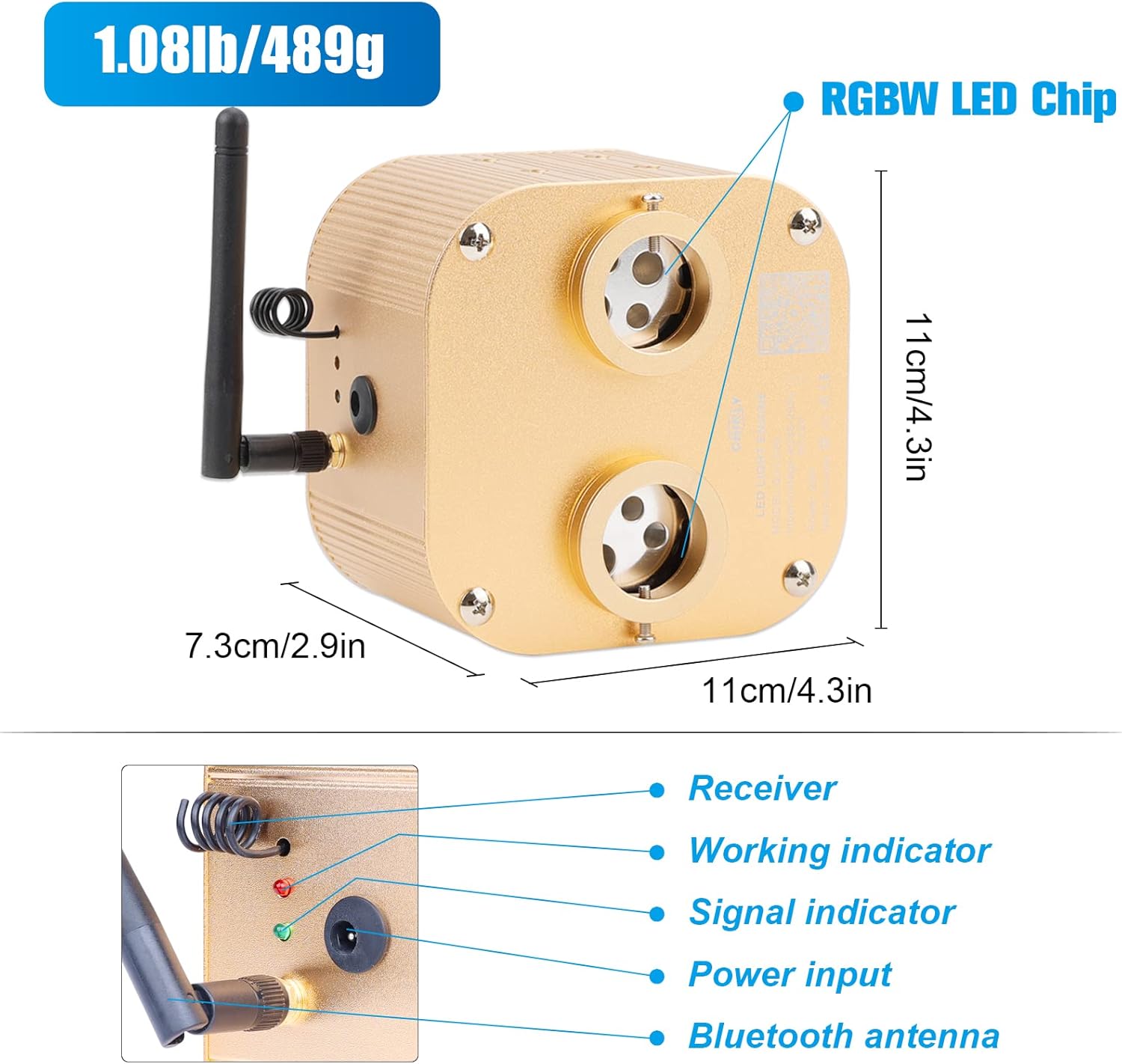
Image: Light engine components and dimensions.
5. Operating Instructions
The CHINLY Starlight Headliner Kit can be controlled via a Bluetooth mobile application or the included remote control.
5.1 Bluetooth APP Control
- Download the designated APP (refer to the QR code on the light engine or packaging for the correct app).
- Ensure Bluetooth is enabled on your mobile device.
- Open the APP and connect to the light engine.
- Use the APP interface to adjust color, mode, speed, and brightness. The APP also supports a sound-activated mode.
5.2 Remote Control Operation
The remote control provides direct access to various functions:
- Power On/Off: Turn the light kit on or off.
- Color Selection: Choose from a range of static colors (RGBW).
- Mode Selection: Cycle through various dynamic modes (e.g., jump, fade).
- Speed Adjustment: Increase or decrease the speed of dynamic modes.
- Brightness Control: Adjust the intensity of the lights.
- Sound Mode: Activate the sound-activated feature, where lights respond to music or ambient sound.
- Twinkle Effect: Enable or disable the twinkling star effect.

Image: Mobile application and remote control interfaces.
5.3 Twinkle and Sound-Activated Features
The built-in RGBW LED and twinkle function create a realistic starry sky. In sound mode, the ceiling starlight follows the beat of music, enhancing the ambiance.
Video: Demonstration of the CHINLY 20W Twinkle Fiber Optic light kit's light effects, including color changes and twinkling.
6. Maintenance
- Cleaning: Gently wipe the light engine and exposed fiber ends with a soft, dry cloth. Do not use abrasive cleaners or solvents.
- Environment: Ensure the light engine is kept in a dry, well-ventilated area, away from direct heat sources or extreme cold.
- Fiber Care: Avoid bending or sharply creasing the fiber optic cables, as this can damage them and reduce light transmission.
7. Troubleshooting
- No Light Output:
- Check if the power adapter is securely connected to both the light engine and the power outlet.
- Ensure the light engine is powered on.
- Verify that the remote control battery is not depleted.
- Remote Control Not Responding:
- Replace the remote control battery.
- Ensure there are no obstructions between the remote and the light engine's receiver.
- APP Connection Issues:
- Ensure Bluetooth is enabled on your mobile device.
- Restart the APP and try connecting again.
- Ensure the light engine is within Bluetooth range.
- Inconsistent Twinkle Effect:
- Check for any physical obstructions or damage to the twinkle wheel mechanism inside the light engine.
- Ensure the light engine is stable and not vibrating excessively.
8. Specifications
| Feature | Detail |
|---|---|
| Model Number | QJ-L020 |
| Light Source Type | RGBW LED |
| Light Source Wattage | 20 Watts |
| Voltage | 12 Volts (DC) |
| Fiber Quantity | 1000 pieces |
| Fiber Diameter | 0.03 inches |
| Fiber Length | 13.1 feet |
| Light Engine Material | Aluminum |
| Fiber Material | PMMA Plastic |
| Control Methods | Bluetooth APP, Remote Control |
| Special Features | Twinkle Effect, Sound-Activated Mode |
| Working Temperature | -58°F - 167°F (-50°C - 75°C) |
| Item Weight | 1.08 pounds |
| UPC | 767065654400 |
9. Warranty Information
This CHINLY product comes with a 2-year service warranty. In the event that the product is found to be faulty or broken due to manufacturing defects, CHINLY is committed to providing a replacement or a refund. Please retain your proof of purchase for warranty claims.
10. Customer Support
For any questions, technical assistance, or warranty claims, please contact CHINLY customer support. Refer to the product packaging or the official CHINLY website for the most current contact information.
Ask a question about this manual
Ask about setup, troubleshooting, compatibility, parts, safety, or missing instructions. Manuals+ will review the question and use this page’s manual context to help answer it.