
1. Introduction
Thank you for choosing the Karaca BakeXL Bread Maker. This versatile appliance is designed to simplify your baking experience, allowing you to prepare fresh bread, knead dough, make jam, and even yogurt with ease. Your bread maker also comes with a booklet containing 45 different recipes to get you started. Please read this manual thoroughly before first use to ensure safe operation and optimal performance. Keep this manual for future reference.
2. Important Safety Instructions
- Always ensure the appliance is unplugged before cleaning or when not in use.
- Do not immerse the appliance, cord, or plug in water or any other liquid.
- Keep hands and utensils away from moving parts during operation to prevent injury.
- Do not touch hot surfaces. Use oven mitts when removing the bread pan or handling hot bread.
- This appliance is for household use only. Do not use outdoors.
- Ensure the appliance is placed on a stable, heat-resistant surface, away from flammable materials.
- Close supervision is necessary when any appliance is used by or near children.
- Do not operate any appliance with a damaged cord or plug, or after the appliance malfunctions or has been damaged in any manner.
- Do not use accessories not recommended by the manufacturer, as this may cause injuries.
3. Product Overview
Familiarize yourself with the components of your Karaca BakeXL Bread Maker:

Figure 3.1: Exterior view of the Karaca BakeXL Bread Maker. This image shows the sleek black and silver design of the appliance from an angled perspective, highlighting its compact form.

Figure 3.2: Bread Maker with lid open. This view reveals the interior cavity where the bread pan is placed, along with the heating element and the mechanism for the kneading paddles.

Figure 3.3: Bread Maker with the bread pan removed. This image displays the main unit alongside the removable bread pan, illustrating how it detaches for easy cleaning and ingredient loading.
Control Panel Functions:

Figure 3.4: Close-up of the control panel. This image provides a clear view of the digital display and various buttons for program selection, loaf size, crust color, and start/stop functions.
- MENU: Selects the desired program (e.g., Basic Bread, Whole Wheat, Jam, Yogurt).
- LOAF SIZE: Adjusts the loaf weight (e.g., 1000g, 1250g, 1500g).
- COLOUR: Sets the crust darkness (Light, Medium, Dark).
- DELAY TIMER (+/-): Sets a delayed start time for baking.
- START/STOP: Initiates or cancels the selected program.
4. Setup and First Use
- Unpack the bread maker and all accessories. Remove any packaging materials.
- Wipe the exterior of the appliance with a damp cloth.
- Wash the bread pan and kneading paddles with warm, soapy water. Rinse thoroughly and dry completely.
- Insert the kneading paddles onto the shafts at the bottom of the bread pan.
- Place the bread pan into the baking chamber, ensuring it clicks securely into place.
- Position the bread maker on a stable, flat, and heat-resistant surface, ensuring adequate ventilation around the unit.
- For the first use, it is recommended to run the "Bake" program (usually program 12 or similar) for 10 minutes without ingredients to burn off any manufacturing residues. Allow the unit to cool completely afterward.
5. Operating Instructions
General Baking Steps:
- Ensure the kneading paddles are correctly installed in the bread pan.
- Add liquid ingredients first, followed by dry ingredients. Make sure yeast is added last and does not come into direct contact with liquid or salt. Refer to your recipe booklet for precise ingredient order.
- Place the bread pan into the bread maker and close the lid.
- Plug in the appliance. The default program will display.
- Press the MENU button to select your desired program.
- Press the LOAF SIZE button to select the desired loaf weight (e.g., 1000g, 1250g, 1500g).
- Press the COLOUR button to select your preferred crust darkness (Light, Medium, Dark).
- If desired, use the DELAY TIMER buttons to set a delayed start.
- Press the START/STOP button to begin the program. The machine will beep, and the timer will start counting down.
- Once the program is complete, the machine will beep multiple times. Unplug the appliance.
- Using oven mitts, carefully remove the bread pan by twisting and lifting it out.
- Invert the pan onto a wire rack to release the bread. If the kneading paddles remain in the bread, remove them carefully with a non-metallic utensil.
- Allow the bread to cool on a wire rack for at least 20-30 minutes before slicing.

Figure 5.1: A user selecting settings on the control panel. This image shows a hand pressing one of the control buttons, demonstrating the interactive nature of the bread maker's interface.
Specific Program Notes:
- Bread Programs (Basic, French, Whole Wheat, Sweet, Rapid): These programs handle the entire process from kneading to baking. Follow the recipe booklet for specific ingredient ratios.
- Dough Program: This program kneads and allows the dough to rise, but does not bake it. Ideal for pizza dough, rolls, or pastries that will be baked in a conventional oven.
- Jam Program: Use this program for making homemade jams. Ensure fruits are chopped and sugar is added according to a suitable recipe.
- Yogurt Program: This program maintains a consistent temperature for fermenting yogurt. Follow specific yogurt recipes for best results.
6. Maintenance and Cleaning
Regular cleaning ensures the longevity and hygiene of your bread maker.
- Always unplug the appliance and allow it to cool completely before cleaning.
- Bread Pan and Kneading Paddles: Remove the bread pan and paddles. Wash them with warm, soapy water using a soft sponge. Do not use abrasive cleaners or metal scouring pads, as this can damage the non-stick coating. Rinse and dry thoroughly.
- Exterior: Wipe the exterior of the bread maker with a soft, damp cloth. Do not use harsh chemicals or abrasive cleaners.
- Lid: The lid can be wiped clean with a damp cloth. Ensure no water enters the ventilation slots.
- Baking Chamber: Use a soft, damp cloth to wipe the inside of the baking chamber. Remove any crumbs or residue.
- Never immerse the main unit in water or any other liquid.
7. Troubleshooting
| Problem | Possible Cause | Solution |
|---|---|---|
| Bread does not rise. | Expired yeast, incorrect water temperature, too much salt/sugar, yeast in direct contact with liquid/salt. | Check yeast expiry. Use lukewarm water (38-43°C). Ensure ingredients are added in the correct order as per recipe. |
| Bread is too dense. | Too much flour, too little liquid, insufficient kneading. | Measure ingredients precisely. Ensure correct program is selected. |
| Bread collapses in the middle. | Too much liquid, too much yeast, high humidity. | Reduce liquid slightly. Ensure correct yeast amount. |
| Kneading paddles stuck in bread. | Common occurrence. | Remove carefully with a non-metallic utensil after bread has cooled. |
| Machine does not start. | Not plugged in, lid not closed properly, program not selected. | Check power connection. Ensure lid is fully closed. Select a program and press START/STOP. |
8. Specifications
- Brand: KARACA
- Model Number: 000001000018219001
- Color: Black
- Product Dimensions: 30 cm (Depth) x 36 cm (Width) x 46 cm (Height)
- Weight: 7.22 Kilograms
- Capacity: 1500 grams
- Power/Wattage: 850 watts
- Material: Plastic
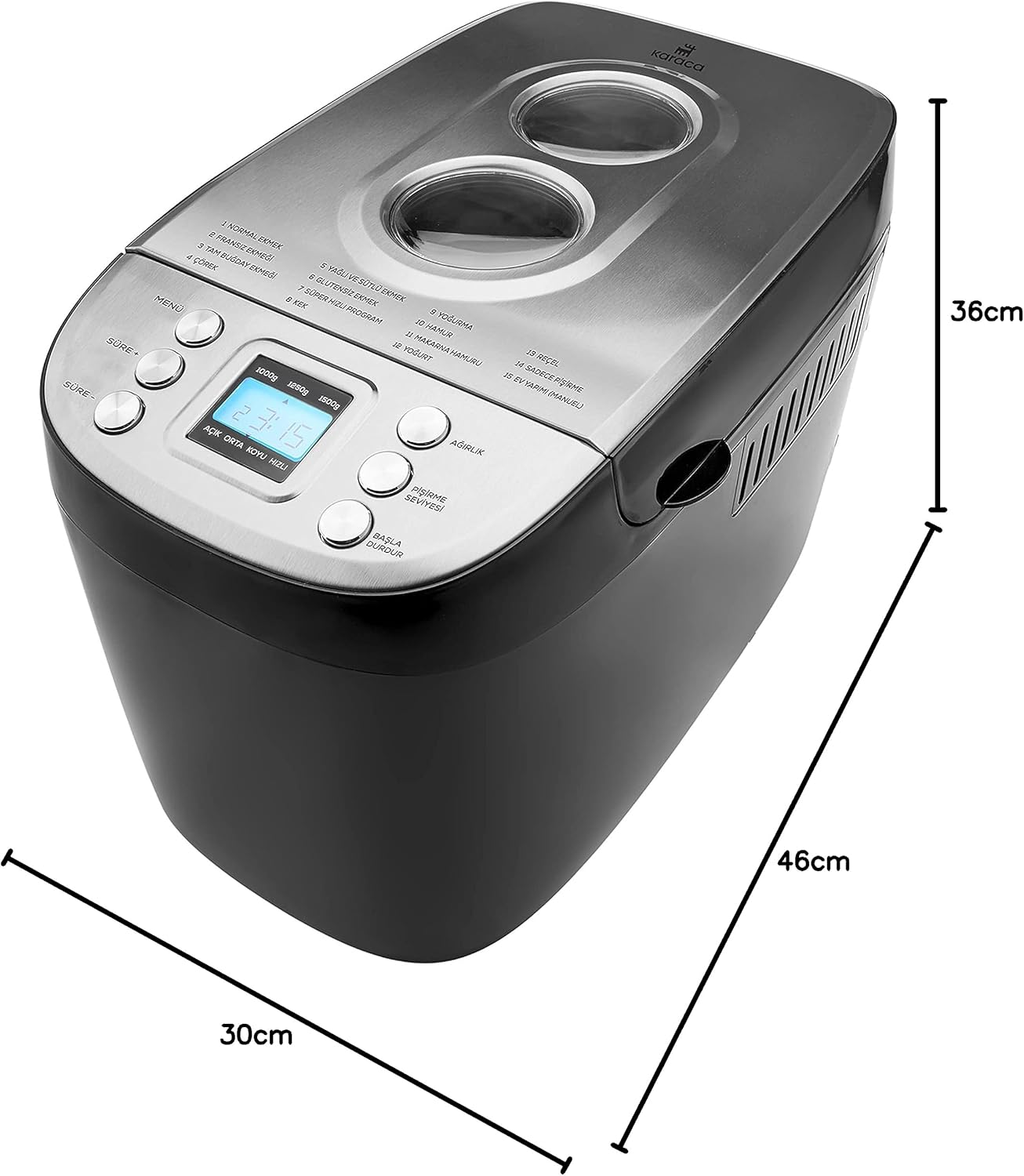
Figure 8.1: Dimensions of the Karaca BakeXL Bread Maker. This image visually represents the depth (30cm), width (36cm), and height (46cm) of the appliance.
9. Warranty and Support
For warranty information, technical support, or service inquiries, please refer to the warranty card included with your product or visit the official KARACA website. Do not attempt to repair the appliance yourself, as this will void the warranty and may pose safety risks.
You can find more information and contact details on the KARACA Store on Amazon.