
1. Introduction
This manual provides detailed instructions for the installation, configuration, and operation of your HAKRC F722 AIO Flight Controller with integrated 40A BLHeli_S ESC and external USB. Please read this manual thoroughly before use to ensure proper functionality and safety.
2. Product Overview
2.1 Key Features
- Integrated F722 Flight Controller and 40A BLHeli_S ESC.
- Supports 2-6S LiPo input voltage.
- Continuous current: 40A, Peak current: 50A.
- External Type-C USB board for convenient configuration.
- High-performance STM32F722RET6 CPU.
- Integrated MPU6000 IMU and AT7456E OSD.
- Built-in current sensor and barometer.
- BEC Output: 5V/3A.
- 5 UART ports available.
- Supports various receiver protocols: CRSF, Frsky, Futaba, Flysky, TBS Crossfire, DSMX/DSM2.
- High-quality PCB with 8-layer 2oz thick copper for enhanced current capability and heat dissipation.
- Compact size: 32x32mm, Mounting Pattern: 25.5mm-26.5mm.
- Lightweight design: 7g net weight.
2.2 Package Contents
- 1x HAKRC AIO Board - Brushless F722 FC + 40A 2-6S BLHeli_S ESC
- 1x 180mm External Type-C USB Board
- 1x SH1.0/7P Single-Head Cable
- 4x Shock-Absorbing Ball
- 1x 270uf/35V Capacitor
- 1x XT30 Power Cord

3. Specifications
| Component | Specification |
| CPU | STM32F722RET6 |
| IMU | MPU6000 |
| OSD | AT7456E |
| Barometer | Integrated |
| Current Sensor | Built-in |
| BEC Output | 5V/3A |
| UART Ports | 5 |
| LED Support | WS2812 and other programmable LEDs |
| Receiver Support | CRSF, Frsky, Futaba, Flysky, TBS Crossfire, DSMX/DSM2 |
| Flight Control Firmware | HAKRC F722D (Betaflight compatible) |
| ESC Specifications | |
| Input Voltage | 2S-6S Lipo |
| Continuous Current | 40A |
| Peak Current | 50A |
| ESC Firmware | BLHELI_S (G-H-30) |
| Protocol Support | PWM, Oneshot125, Oneshot42, Multishot, Dshot150, Dshot300, Dshot600 |
| Current Meter Proportional Value | 450 |
| Physical Specifications | |
| Dimensions | 32x32mm |
| Mounting Pattern | 25.5mm-26.5mm |
| Net Weight | 7g |
4. Setup
4.1 Physical Installation
Carefully mount the HAKRC F722 AIO board onto your drone frame. Use the provided shock-absorbing balls to minimize vibrations, which can affect flight performance. Ensure the board is oriented correctly according to your flight controller software's settings.

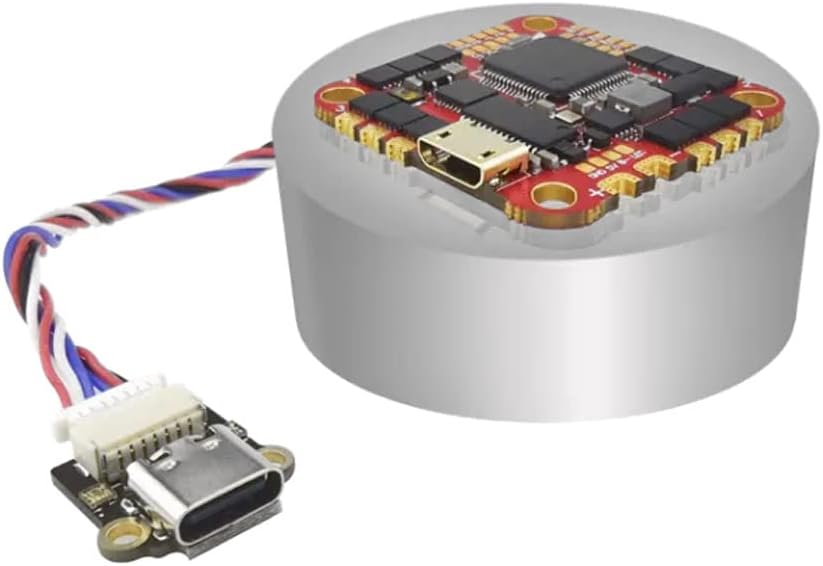
The board features a 25.5mm-26.5mm mounting pattern, suitable for various micro and toothpick drone frames. Connect the external Type-C USB board using the provided SH1.0/7P cable for easy access to the flight controller's configuration port without needing to disassemble your drone.
4.2 Wiring Diagram
Refer to the following diagrams for proper wiring connections. Ensure all connections are secure and correctly polarized to prevent damage.

- Power Input (BAT): Connect your 2S-6S LiPo battery via the XT30 power cord to the designated BAT+ and BAT- pads. Ensure correct polarity.
- Motors: Solder motor wires to the M1-M4 pads. The ESC supports Dshot600 and other protocols.
- Receiver: Connect your receiver (e.g., CRSF, SBUS, DSMX) to the appropriate UART pads (e.g., R2, T2, R3, T3, R4, T4). Refer to the specific receiver's manual for its wiring.
- Camera: Connect your FPV camera to the CAM and GND pads.
- Video Transmitter (VTX): Connect your VTX to the VTX and GND pads.
- LEDs: Programmable LEDs (WS2812) can be connected to the LED pad.

4.3 Software Configuration
The HAKRC F722 AIO Flight Controller runs Betaflight firmware (HAKRC F722D target). The integrated ESC uses BLHeli_S firmware (G-H-30).
- Install Betaflight Configurator: Download and install the latest Betaflight Configurator application on your computer from the official Betaflight website (betaflight.com).
- Connect to PC: Connect the external Type-C USB board to your computer using a USB cable.
- Flash Firmware (Optional): If necessary, flash the latest stable Betaflight firmware for the HAKRC F722D target. Follow the instructions within the Betaflight Configurator.
- Initial Setup:
- Calibrate Accelerometer.
- Configure UARTs for your receiver, VTX, GPS (if applicable).
- Set up your receiver protocol (e.g., Serial-based receiver for CRSF/SBUS).
- Configure ESC protocols (Dshot600 is recommended).
- Adjust PID settings and rates according to your preference and drone setup.
- Enable OSD features as desired.
- BLHeli_S Configuration: Use the BLHeliSuite32 or Betaflight Passthrough to configure ESC settings if needed. Ensure motor direction is correct.
- Test Motors: With propellers removed, test motor functionality in the Motors tab of Betaflight Configurator.
5. Operating Instructions
Once the flight controller and ESC are properly installed and configured, follow these general steps for operation:
- Pre-Flight Check: Ensure all connections are secure, propellers are correctly installed (if flying), and battery is fully charged.
- Power On: Connect the LiPo battery to the XT30 connector. The flight controller will power up, and LEDs will indicate its status.
- Arming: Arm the drone using your transmitter's assigned arming switch. Ensure you are in a safe environment with sufficient space.
- Flight: Operate your drone using your radio transmitter. Start with gentle movements to familiarize yourself with its response.
- Disarming: Disarm the drone using your transmitter's disarming switch after landing or in an emergency.
- Power Off: Disconnect the LiPo battery immediately after disarming and before handling the drone.
Safety Warning: Always remove propellers before connecting the battery for configuration or testing motors. Operate drones responsibly and in accordance with local regulations.
6. Maintenance
Regular maintenance helps ensure the longevity and reliable performance of your HAKRC F722 AIO board.
- Inspection: Periodically inspect the board for any signs of physical damage, loose connections, or corrosion.
- Cleaning: Gently clean the board with isopropyl alcohol and a soft brush if dust or debris accumulates. Ensure the board is completely dry before powering on.
- Firmware Updates: Check the official Betaflight website for new firmware releases for the HAKRC F722D target. Updating firmware can provide new features, performance improvements, and bug fixes.
- Capacitor Check: Ensure the included 270uF/35V capacitor is properly installed on the main power leads to filter electrical noise, especially with higher cell count batteries.
7. Troubleshooting
If you encounter issues, refer to the following common troubleshooting steps:
- No Power:
- Check battery connection and voltage.
- Inspect power leads for shorts or breaks.
- Verify correct polarity of power input.
- Motors Not Spinning:
- Ensure the drone is armed.
- Check motor wiring for correct soldering and continuity.
- Verify ESC calibration and motor direction in Betaflight/BLHeliSuite.
- Check for bent motor shafts or obstructions.
- No Connection to Betaflight Configurator:
- Ensure USB drivers are installed (e.g., STM32 Virtual COM Port Driver, Zadig for DFU mode).
- Try a different USB cable or port.
- Ensure the external USB board is correctly connected to the AIO board.
- If in DFU mode, ensure the correct bootloader drivers are installed.
- Unstable Flight:
- Check for vibrations; ensure shock-absorbing balls are properly installed.
- Review PID tuning settings.
- Ensure propellers are balanced and undamaged.
- Verify flight controller orientation in Betaflight.
For further assistance, consult online resources, community forums, or contact HAKRC support.
8. Warranty and Support
HAKRC products are designed for reliability and performance. For warranty information and technical support, please refer to the official HAKRC website or contact your retailer. Keep your proof of purchase for any warranty claims.
For general inquiries or troubleshooting, you may also find valuable information and community support on popular FPV forums and online groups.