
JWX JWX-DNB15
JWX DDB Gaming Pegboard Standing Shelf Unit User Manual
Model: JWX-DNB15
1. Introduction
Thank you for choosing the JWX DDB Gaming Pegboard Standing Shelf Unit. This modular system is designed to enhance organization and display capabilities in various environments, including home offices, gaming rooms, garages, and kitchens. Its free-standing design eliminates the need for wall drilling, offering flexibility and stability for your items.

Image: The JWX DDB Gaming Pegboard Standing Shelf Unit integrated into a gaming setup, showcasing its organizational potential.
2. Important Safety Information
- Weight Capacity: Do not overload the shelf beyond 70 pounds per shelf. Exceeding this limit may cause damage to the unit or personal injury.
- Assembly: Always assemble the product strictly according to the instructions provided in this manual to ensure safe and stable use.
- Stability: While designed to be free-standing, for enhanced stability, especially in areas with heavy traffic or for heavier items, consider securing the unit to a wall using the provided wall fixers.
- Placement: Ensure the unit is placed on a flat, stable surface. Adjust the leveling feet (H-4) if the ground is uneven.
3. Package Contents
Please verify that all components listed below are present before beginning assembly. If any parts are missing or damaged, please contact customer support.
- Pegboard (8 pieces)
- Pegboard storage tools (15 pieces)
- Removable bookshelves (6 pieces)
- Standing Shelf Unit frame components

Image: A visual representation of all parts included in the package, labeled for easy identification.
4. Assembly Instructions
Follow these steps carefully to assemble your JWX DDB Gaming Pegboard Standing Shelf Unit. It is recommended to have two people for certain steps to ensure ease and safety during assembly.
4.1. Frame Assembly
Begin by assembling the main frame of the standing shelf unit. Refer to the installation video for a detailed visual guide.
Video: Detailed installation guide for the JWX DDB Shelf Unit, demonstrating each step of the assembly process.
4.2. Pegboard Installation
Install the pegboard panels from bottom to top, ensuring they securely slot into the frame. Once the pegboards are in place, attach the removable bookshelves (G) at your desired heights.

Image: Visual guide for installing the pegboard panels and attaching the shelf brackets (G) to the main frame.
4.3. Attaching Shelves and Accessories
Place the removable shelves (A) onto the installed brackets (G). Then, customize your pegboard with the 15 included storage accessories (I-1 to I-9), such as hooks, baskets, and holders, to suit your organizational needs.

Image: A close-up view of the pegboard showcasing the variety of included accessories and their placement.
4.4. Optional Wall Mounting
For additional stability, especially if the unit will hold heavy items or is in a high-traffic area, use the provided wall fixers (H-10, H-12) to secure the unit to a wall. Ensure you use appropriate wall anchors for your wall type.

Image: A visual comparison illustrating the benefits of free-standing versus fixed wall installation for the pegboard unit.
5. Operating Instructions
The JWX DDB Gaming Pegboard Standing Shelf Unit is designed for versatile organization. Here’s how to maximize its use:
- Adjusting Shelves: The removable bookshelves can be easily repositioned to different heights on the pegboard to accommodate items of various sizes. Simply lift and re-slot the brackets (G) into the desired pegboard holes.
- Customizing with Accessories: Utilize the 15 included storage accessories to organize tools, gaming accessories, office supplies, or display collectibles. Experiment with different arrangements to find the most efficient setup for your space.
- Modular Design: The modular nature of the pegboard allows for dynamic changes to your storage and display. Feel free to rearrange components as your needs evolve.
Video: A fan's DIY customization of the JWX Pegboard Standing Shelf, demonstrating how to add LED light strips and arrange various items and accessories.
6. Maintenance
To keep your JWX DDB Gaming Pegboard Standing Shelf Unit in optimal condition:
- Cleaning: Wipe the unit with a dry cloth to remove dust and debris. Avoid using harsh chemicals or abrasive cleaners, as they may damage the powder-coated finish.
- Regular Checks: Periodically check all screws and connections to ensure they remain tight. Re-tighten if necessary to maintain stability.
7. Troubleshooting
- Unit Wobbles: If the unit feels unstable, ensure all screws are tightened. Verify that the unit is placed on a level surface; adjust the leveling feet (H-4) as needed. For maximum stability, consider using the optional wall-mounting feature.
- Missing Parts: If any parts were missing upon delivery, please contact JWX customer support immediately for assistance.
8. Specifications
| Model Name | JWX-DNB15 |
| Brand | JWX |
| Material | Metal |
| Color | Frosted Black |
| Product Dimensions (D x W x H) | 14.5"D x 57.5"W x 74"H |
| Item Weight | 66 Pounds |
| Weight Capacity (Maximum) | 70 Pounds per shelf |
| Number of Shelves | 6 |
| Mounting Type | Floor Mount (Freestanding) with optional wall fixation |
| Included Components | 8 Pegboards, 15 Pegboard storage tools, 6 Removable bookshelves, Standing Shelf Unit frame |
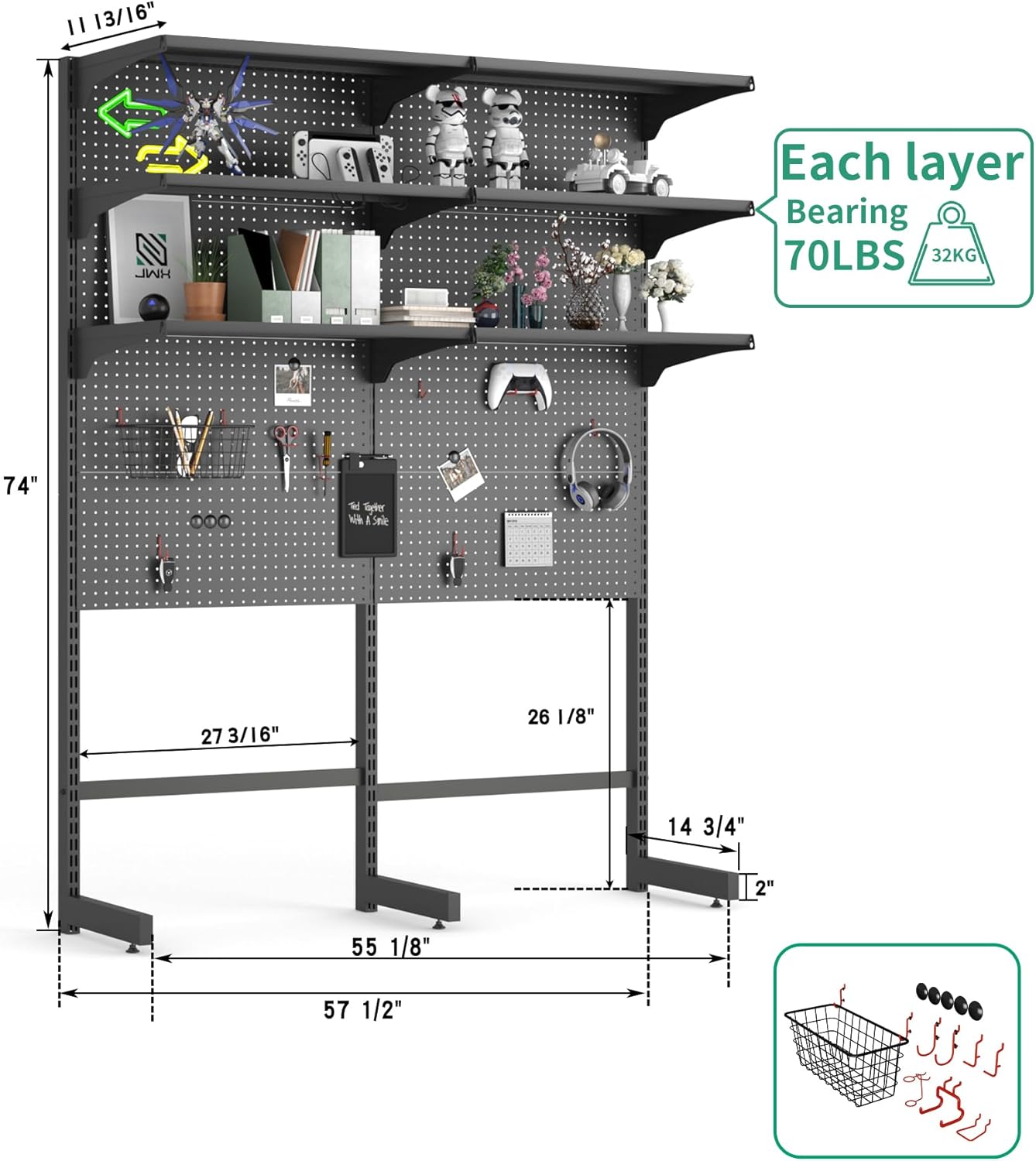
Image: Technical drawing illustrating the dimensions of the assembled unit.
9. Warranty and Support
JWX stands behind the quality of its products. While specific warranty details are not provided in this manual, the product is typically covered by a 30-day easy return policy through Amazon. For any product-related inquiries, missing parts, or support needs, please contact JWX customer service via the Amazon platform where the product was purchased.
The manufacturer is committed to customer satisfaction and promptly addresses concerns regarding product quality and missing components.
Ask a question about this manual
Ask about setup, troubleshooting, compatibility, parts, safety, or missing instructions. Manuals+ will review the question and use this page’s manual context to help answer it.