
MTG B09VXB5BHY
MTG Basic Wired Keyboard Instruction Manual
Model: B09VXB5BHY
Introduction
This manual provides instructions for the setup, operation, and maintenance of your MTG Basic Wired Computer Keyboard. This full-size keyboard features 104 keys, a 5ft USB-A cable, and foldable legs for ergonomic comfort. It is designed for reliable performance with Windows PCs and laptops.
Setup
The MTG Basic Wired Keyboard is designed for plug-and-play functionality, requiring no additional software or drivers for installation.
Connecting the Keyboard
- Locate an available USB-A port on your computer (desktop PC, laptop, or AIO desktop).
- Insert the USB-A cable from the keyboard into the USB-A port on your device.
- The operating system will automatically detect and install the necessary drivers. The keyboard will be ready for use within a few seconds.

This keyboard is compatible with Windows 7, 8, 10, and 11 operating systems, ensuring broad device support.
Operating Instructions
Basic Typing and Key Layout
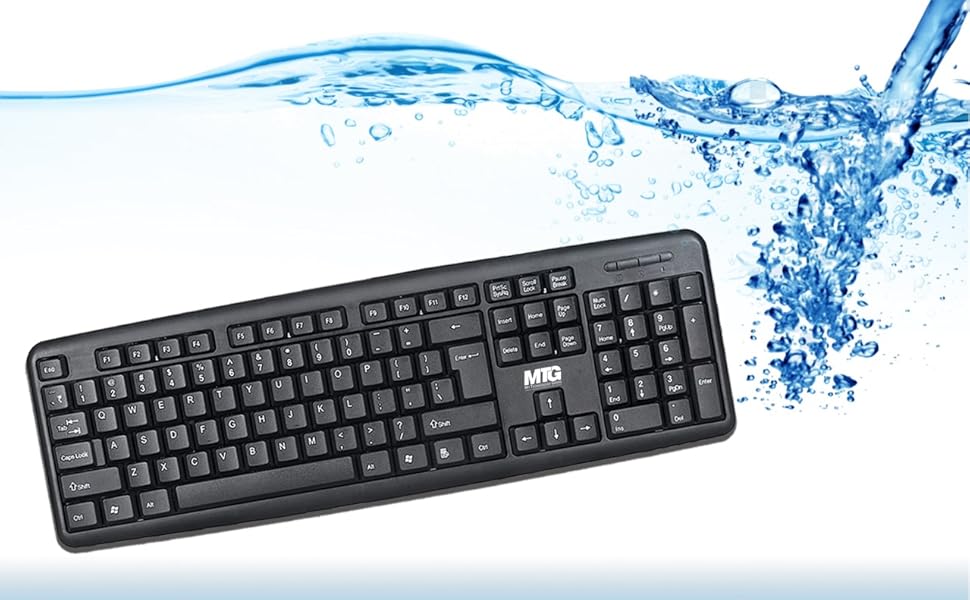
The keyboard features a full-size 104-key layout, providing a complete set of alphanumeric keys, function keys (F1-F12), a numeric keypad, and navigation keys. The keys are designed for a quiet typing experience.

Indicator Lights
Three LED indicator lights are located above the numeric keypad to show the status of specific functions:
- Number Lock (Num Lock): Illuminates when the numeric keypad is active.
- Caps Lock: Illuminates when uppercase letters are enabled.
- Scroll Lock: Illuminates when Scroll Lock is active (functionality varies by application).

Numeric Keypad
The dedicated numeric keypad provides quick data entry for numbers and mathematical operations. Ensure the Number Lock indicator is illuminated for the numeric keys to function as numbers.

Ergonomic Design
The keyboard features foldable legs on the underside, allowing you to adjust the typing angle for improved comfort and reduced strain during prolonged use.

Maintenance
To ensure the longevity and optimal performance of your MTG keyboard, follow these maintenance guidelines:
- Cleaning: Disconnect the keyboard from your computer before cleaning. Use a soft, damp cloth to wipe the surface. For stubborn dirt between keys, use compressed air or a soft brush. Avoid harsh chemicals or abrasive cleaners.
- Spill Resistance: The keyboard is designed with spill resistance. In case of accidental spills, immediately disconnect the keyboard, invert it to drain liquid, and allow it to dry completely before reconnecting.
- Storage: Store the keyboard in a clean, dry environment away from extreme temperatures and direct sunlight when not in use for extended periods.
Troubleshooting
If you encounter issues with your MTG Basic Wired Keyboard, refer to the following common solutions:
- Keyboard Not Responding:
- Ensure the USB-A cable is securely plugged into a working USB port on your computer.
- Try plugging the keyboard into a different USB port.
- Restart your computer.
- Test the keyboard on another computer to determine if the issue is with the keyboard or the computer.
- Keys Not Working or Sticking:
- Check for any debris or foreign objects lodged under the keys. Use compressed air to clear them.
- Clean the keyboard as described in the Maintenance section.
- Indicator Lights Not Functioning:
- Ensure the keyboard is properly connected.
- Press the respective lock keys (Num Lock, Caps Lock, Scroll Lock) to toggle their status.
Specifications
| Feature | Detail |
|---|---|
| Brand | MTG MY TECHNOLOGY GEEKS TRUSTED TECHNOLOGY PARTNERS |
| Model Number | B09VXB5BHY |
| Connectivity Technology | USB (Wired) |
| Cable Length | 5ft (approximately 1.5 meters) |
| Number of Keys | 104 |
| Special Features | Ergonomic, Foldable Legs, Quiet Typing, Spill-Resistant |
| Operating System Compatibility | Windows 7/8/10/11 |
| Compatible Devices | Laptop, PC (Desktop, AIO) |
| Color | Black |
| GTIN / UPC | 655479696386 |
Warranty and Support
For warranty information or technical support, please refer to the product packaging or contact MTG customer service through their official website or the retailer where the product was purchased. Keep your purchase receipt for warranty claims.
Ask a question about this manual
Ask about setup, troubleshooting, compatibility, parts, safety, or missing instructions. Manuals+ will review the question and use this page’s manual context to help answer it.