
1. Introduction
Thank you for choosing the G-Homa Wireless Wi-Fi Surveillance Camera. This manual provides detailed instructions for setting up, operating, and maintaining your camera to ensure optimal performance and security for your home, garden, garage, or courtyard. This camera is designed for both indoor and outdoor use, offering advanced features like 2K resolution, AI human detection, two-way audio, and color night vision.

Image 1.1: G-Homa Wireless Wi-Fi Surveillance Camera with live view on smartphone.
The G-Homa camera is shown mounted on a wall, demonstrating its outdoor capability even in wet conditions. A smartphone in the foreground displays a live feed from the camera, highlighting its remote monitoring feature.
2. Product Overview
2.1 Key Features
- 2K 3MP HD Resolution: Provides clear and detailed video footage.
- AI Human Detection: Advanced algorithms for accurate human recognition, reducing false alarms.
- Two-Way Audio: Allows for real-time communication through the camera.
- Color Night Vision: Equipped with dual spotlights for clear, full-color video in low-light conditions.
- Siren and Spotlight Alarm: Deters intruders with audible and visual alerts.
- 100% Wireless & Rechargeable Battery: Offers flexible placement with long battery life (3-6 months based on usage).
- IP66 Weatherproof: Durable design ensures operation in various weather conditions.
- Customizable Detection Zones: Focuses monitoring on specific areas of interest.
- Multiple Storage Options: Supports local SD card storage (up to 128GB) and cloud storage.
- Multi-User Sharing: Allows sharing camera access with family members.
2.2 Included Components
- G-Homa Surveillance Camera (1 unit)
- USB Cable
- Mounting Bracket
- Mounting Kit (screws, wall anchors)

Image 2.1: IP66 Weatherproof Design.
This image illustrates the camera's robust IP66 rating, showing it functioning reliably in both heavy rain and snowy conditions, ensuring continuous protection regardless of the weather.
3. Setup
3.1 Physical Installation
- Choose a Location: Select a suitable location for your camera, ensuring it has a clear view of the area you wish to monitor. The camera is 100% wireless, offering flexibility for placement indoors or outdoors.
- Mount the Bracket: Use the provided mounting kit to securely attach the bracket to a wall or desired surface.
- Attach the Camera: Securely attach the camera to the mounted bracket. Adjust the camera angle to cover the desired surveillance area.
3.2 App Setup and Network Connection
- Download the App: Search for the official G-Homa app on your smartphone's app store (iOS or Android) and download it.
- Create an Account: Open the app and follow the on-screen instructions to create a new user account.
- Add Device: Power on your G-Homa camera. In the app, select the option to add a new device. Follow the prompts to connect the camera to your 2.4 GHz Wi-Fi network. Ensure your camera is within range of your Wi-Fi router.
- Configuration: Once connected, you can name your camera and configure initial settings such as time zone and notification preferences.
4. Operating Instructions
4.1 Live View and Playback
Access the live video feed from your camera anytime, anywhere via the G-Homa app. You can also review recorded footage stored on the SD card or cloud service.
4.2 Motion Detection & Alerts
The camera features advanced PIR motion detection with AI human recognition. This allows the camera to distinguish between humans and other moving objects (like pets or swaying branches), sending more accurate notifications to your phone.
- AI Human Detection: Enable this feature in the app to receive alerts only when a human is detected.
- Custom Detection Zones: Define specific areas within the camera's view where you want motion detection to be active. This helps reduce unwanted alerts from high-traffic areas outside your property.

Image 4.1: PIR Human Detection in action.
This image demonstrates the camera's ability to accurately identify human figures while disregarding non-human movements, such as a dog, thereby minimizing false alarms.

Image 4.2: Setting Custom Motion Detection Zones.
The image shows a user defining specific areas on a smartphone screen for motion detection, allowing the camera to focus on critical zones and ignore irrelevant movements.
4.3 Two-Way Audio
The built-in microphone and speaker allow you to listen in and speak through the camera. This is useful for communicating with visitors, delivery personnel, or deterring unwanted guests.

Image 4.3: Two-Way Audio Communication.
This image depicts a scenario where the camera's two-way audio feature is used to communicate with someone in the camera's vicinity, such as calling a child for dinner.
4.4 Night Vision
The G-Homa camera provides clear vision even in complete darkness. With its dual spotlights, it can activate 2K color night vision, offering more detailed and identifiable footage than traditional black-and-white infrared night vision.
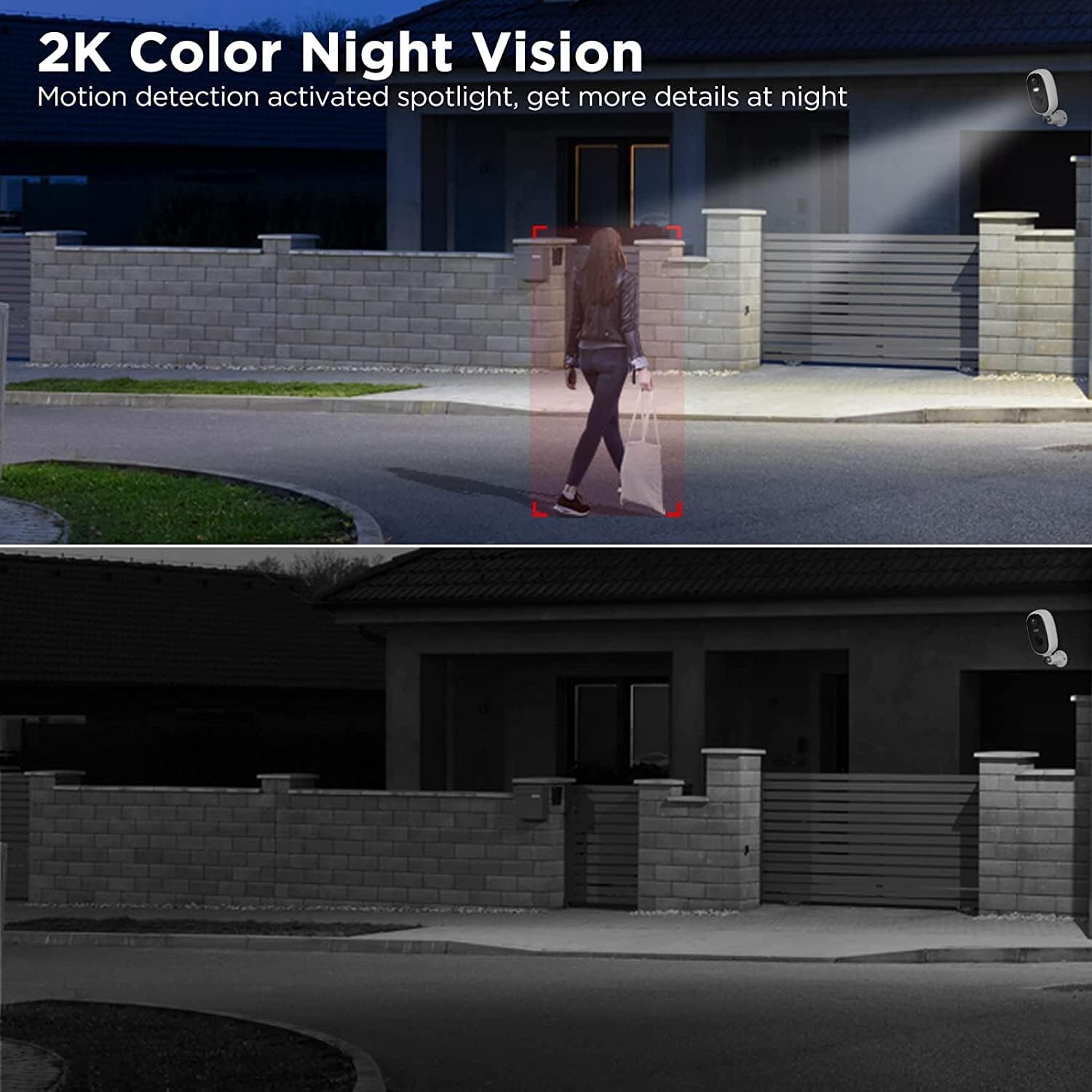
Image 4.4: 2K Color Night Vision.
The top panel shows the camera's 2K color night vision, where a spotlight illuminates a person, providing clear, colored details. The bottom panel shows a typical black-and-white infrared night vision for comparison, highlighting the advantage of color night vision.
4.5 Storage Options
Your camera supports two methods for video storage:
- SD Card Storage: Insert a microSD card (up to 128GB, not included) into the camera's designated slot for local recording.
- Cloud Storage: Subscribe to the optional cloud storage service through the app for secure, remote storage of your video footage.

Image 4.5: Cloud and SD Card Storage Options.
This graphic illustrates the dual storage capabilities of the camera, showing both cloud-based storage and local SD card storage as options for saving video recordings.
4.6 Multi-User Sharing
You can share access to your camera's live feed and recordings with multiple family members or trusted individuals through the app. This allows everyone in your household to monitor the property.

Image 4.6: Multi-User Sharing Feature.
The image shows a smartphone displaying a live camera feed, surrounded by multiple user icons, symbolizing the ability to share camera access with various family members or authorized users.
4.7 Spotlight and Siren Alarm
The camera is equipped with a siren and dual spotlights that can be activated automatically upon motion detection or manually via the app to deter suspicious activity.
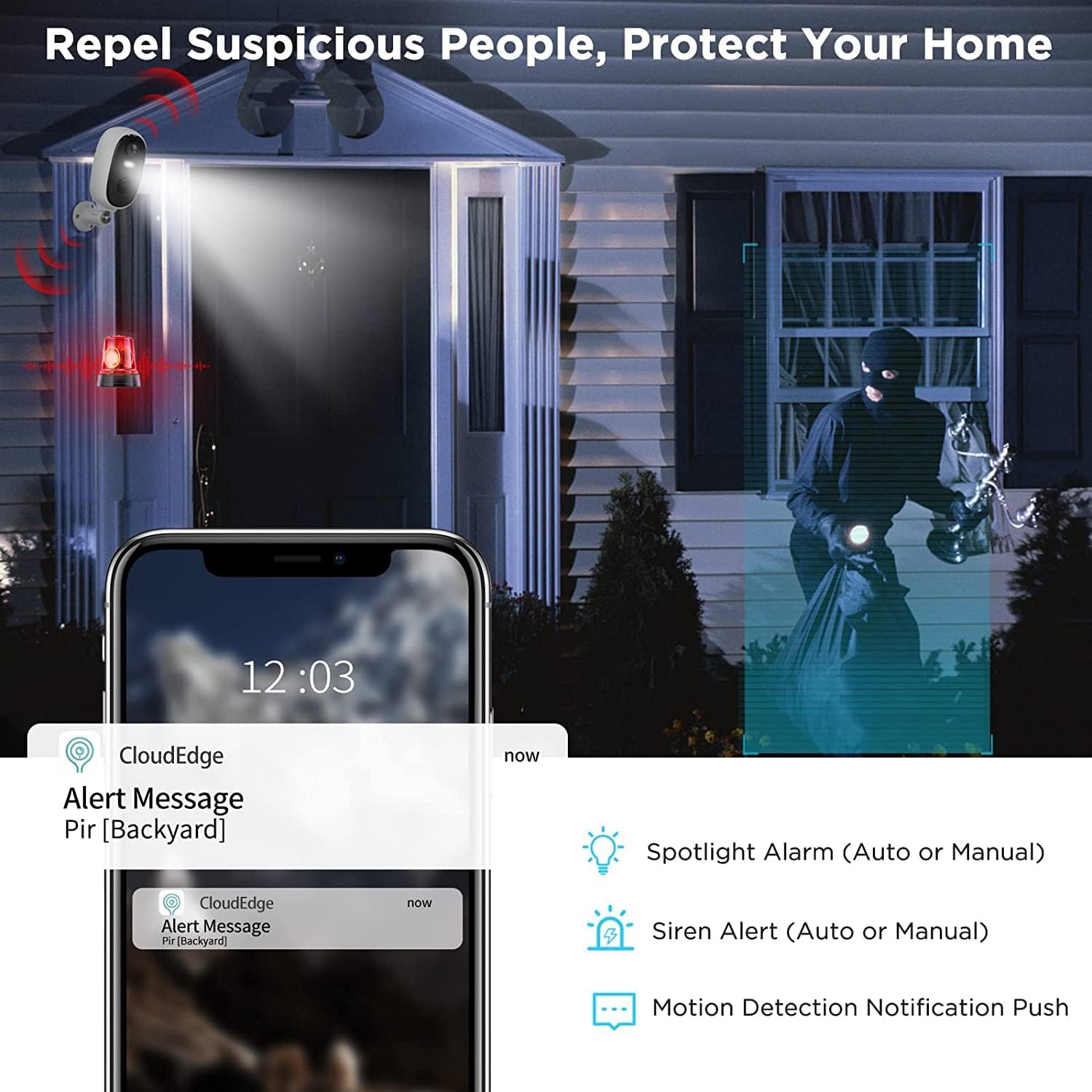
Image 4.7: Deterring Intruders with Spotlight and Siren.
This image illustrates the camera's active deterrence capabilities, showing a spotlight illuminating a suspicious figure and a siren icon, alongside a smartphone displaying an alert notification.
5. Maintenance
5.1 Battery Charging
The camera is powered by a rechargeable lithium-ion battery. When the battery level is low, you will receive a notification via the app. Use the provided USB cable to charge the camera. A full charge can last 3 to 6 months depending on the frequency of events and recordings.

Image 5.1: Battery Life Overview.
This image provides a visual representation of the camera's internal battery and a table outlining estimated battery life based on the number of daily recorded events, demonstrating its long-lasting performance.
5.2 Cleaning
To ensure clear image quality, periodically clean the camera lens with a soft, dry cloth. Avoid using harsh chemicals or abrasive materials that could damage the lens or camera body.
6. Troubleshooting
- Camera Offline: Check your Wi-Fi connection and ensure the camera is within range. Restart your router and the camera.
- No Motion Detection: Verify that motion detection is enabled in the app and that detection zones are correctly configured. Ensure the camera lens is clean.
- Poor Image Quality: Clean the camera lens. Check your Wi-Fi signal strength, as a weak signal can affect streaming quality.
- Battery Drains Quickly: Reduce the sensitivity of motion detection or the frequency of recordings. Ensure the camera is not in an area with constant motion.
- Cannot Connect to Wi-Fi: Ensure you are connecting to a 2.4 GHz Wi-Fi network. Double-check your Wi-Fi password.
7. Specifications
| Feature | Specification |
|---|---|
| Brand | G-Homa |
| Model | B09VTH8QRC |
| Wireless Technology | Wi-Fi |
| Effective Video Resolution | 3 Megapixels (2K) |
| Viewing Angle | 130 degrees |
| Material | Plastic |
| Voltage | 5 Volts (DC) |
| Power | 5 Watts |
| Dimensions (LxWxH) | 11 x 5 x 2 centimeters |
| Special Features | Night Vision, AI Motion Detection, 2-Way Audio, Spotlight, Siren |
| Battery Composition | Lithium-ion |
| Rechargeable Battery | Yes (2 included) |
| IP Rating | IP66 |
| Recommended Uses | Outdoor, Indoor, House, Home, Garden, Garage, Courtyard |
| Compatible Devices | Smartphone |
| Power Source | Battery Powered |
| Mounting Type | Wall Mount |
| Color | White |
8. Warranty and Support
Information regarding specific warranty details and customer support contact methods is not available in the provided product data. Please refer to the product packaging or the manufacturer's official website for warranty claims and technical assistance.