
Introduction
The NEEWER NW420-N Mini TTL Speedlite Flash is a compact yet powerful lighting solution designed for Nikon cameras. It features an optimized flash head and fresnel lens for brilliant light gathering and even distribution. With a GN36 guide number (ISO100, 105mm) and stable 5600K (±200K) color temperature, it provides consistent flash outputs. The focal length is automatically or manually adjustable from 24mm to 105mm.
This speedlite offers multiple flash control modes including TTL, manual (M), and stroboscopic (Multi) modes, along with 1/8000s High Speed Sync (HSS), front & rear curtain sync, and S1/S2 optical control modes. It integrates with the 2.4GHz Wireless Q System, allowing it to function as a master or slave unit within a 98.4'/30m range. The flexible flash head can rotate 270° and tilt 7° down/90° up for versatile bouncing angles. It is powered by 2x 2500mAh NiMH batteries (sold separately) and supports firmware updates via a micro USB port.

What's in the Box
Upon opening your NEEWER NW420-N package, you should find the following components:
- 1 x NW420-N Speedlite
- 1 x Mini Stand
- 1 x Diffuser
- 1 x Protective Case
- 1 x User Manual
Setup
1. Battery Installation
The NW420-N Speedlite requires 2x 2500mAh NiMH batteries (not included). To install the batteries:
- Locate the battery compartment on the side of the flash unit.
- Slide the battery compartment cover open.
- Insert two AA-sized NiMH batteries, ensuring correct polarity (+/-) as indicated inside the compartment.
- Close the battery compartment cover securely until it clicks into place.

Note: Always use high-quality NiMH rechargeable batteries for optimal performance and recycling times. Alkaline batteries can also be used but may result in slower recycling and fewer flashes.
2. Mounting the Speedlite to Your Camera
The NW420-N is designed to mount directly onto your camera's hot shoe.
- Ensure your camera is turned off.
- Slide the speedlite's hot shoe foot into your camera's hot shoe slot.
- Rotate the locking ring clockwise until the speedlite is securely fastened to the camera. Do not overtighten.

3. Initial Power On
After installing batteries and mounting the flash, press the ON/OFF button to power on the unit. The LCD screen will illuminate, indicating the flash is ready for use. Allow a few seconds for the flash to recycle before its first use.
Operating Instructions
Flash Control Modes
The NW420-N Speedlite offers versatile flash control modes to suit various photographic needs. Use the MODE button to cycle through the available modes.
TTL (Through-The-Lens) Automatic Flash Mode
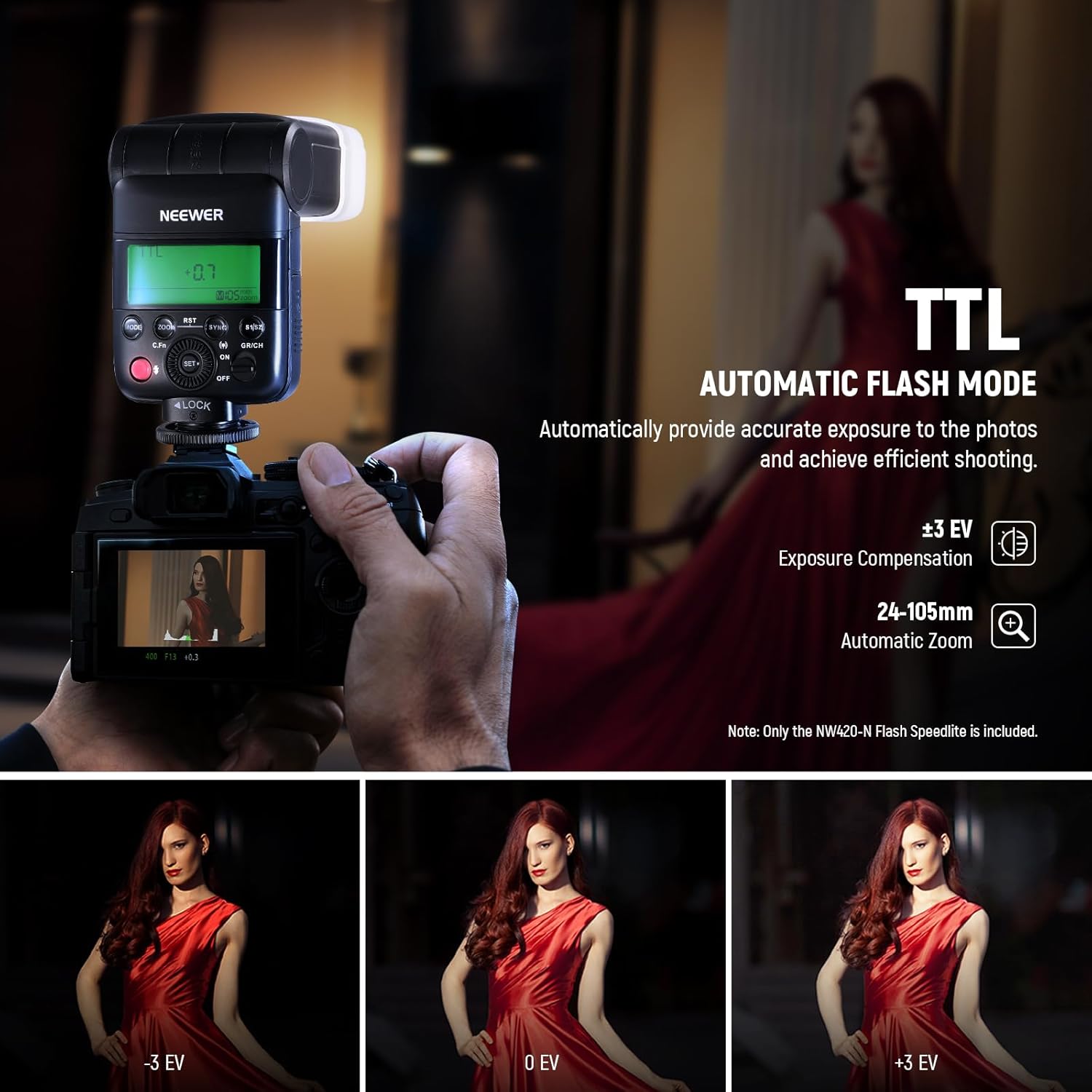
In TTL mode, the speedlite automatically determines the appropriate flash output by measuring the light through the camera's lens. This mode is ideal for quick and accurate exposure in changing light conditions.
- Exposure Compensation: Adjust flash output with ±3 EV in 1/3 stop increments.
- Automatic Zoom: The flash head zoom automatically adjusts to match the lens's focal length (24-105mm).
Manual (M) Flash Mode
Manual mode allows you to precisely control the flash output from 1/1 (full power) down to 1/128. This mode is suitable for situations where consistent lighting is required, or for creative lighting effects.
- Flash Output: Adjustable from 1/128 to 1/1.
- Manual Zoom: Focal length can be manually set from 24mm to 105mm.

Stroboscopic (Multi) Flash Mode
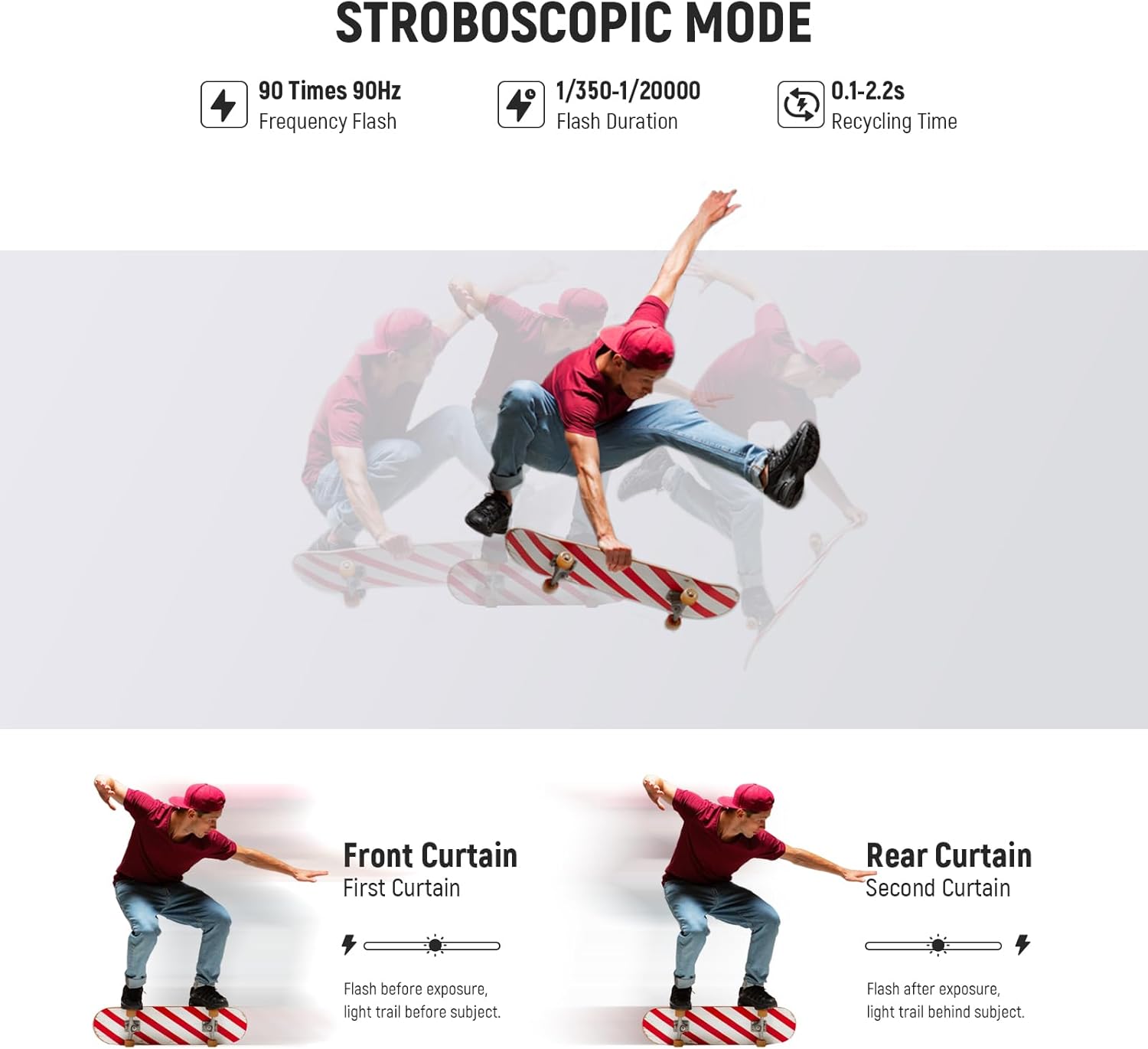
Stroboscopic mode fires a series of rapid flashes during a single exposure, creating a sequence of movements in one image. The maximum number of stroboscopic flashes is 90 at 90Hz.
- Frequency Flash: Up to 90 times at 90Hz.
- Flash Duration: 1/350s – 1/20000s.
- Recycling Time: 0.1s – 2.2s.
High Speed Sync (HSS)
The NW420-N supports High Speed Sync (HSS) up to 1/8000s. This feature allows you to use flash at shutter speeds faster than your camera's native flash sync speed, enabling you to control ambient light, especially in bright outdoor environments, and use wider apertures for shallow depth of field.
Front & Rear Curtain Sync
The speedlite supports both front and rear curtain sync. Front curtain sync fires the flash at the beginning of the exposure, while rear curtain sync fires it just before the shutter closes. Rear curtain sync is often used to create motion blur effects where the blur trails behind the moving subject.
S1/S2 Optical Control Modes
The S1 and S2 optical slave modes allow the NW420-N to be triggered by another flash. S1 mode triggers the flash when it detects the first flash from a master unit. S2 mode ignores the pre-flash of a TTL master flash and triggers on the main flash, making it compatible with TTL systems when used as an optical slave.
2.4GHz Wireless Q System
The built-in 2.4GHz Wireless Q System allows the NW420-N to function as a master or slave unit, controlling or being controlled by other compatible NEEWER Q system flashes (e.g., QPro-N TTL transmitters, not included). This system offers 3 groups (A/B/C), 32 channels (1-32), and 99 IDs (1-99) for reliable wireless communication up to 98.4'/30m (unobstructed).

Adjustable Bouncing Angles
The flash head offers significant flexibility for bouncing light, allowing for softer and more natural illumination. It can rotate 270° horizontally and tilt 7° downwards to 90° upwards.
- Horizontal Rotation: 270° (e.g., 0°, 90°, 180°, 270°).
- Vertical Tilt: -7° (downwards) to 90° (upwards).

The built-in diffuser, wide-angle diffuser panel, and reflector can be used to further soften and spread the flash light, making eyes sparkle in portrait photography.

Firmware Update
The NW420-N Speedlite supports firmware updates via its micro USB port. Visit the official NEEWER website for the latest firmware and update instructions.
Maintenance
To ensure the longevity and optimal performance of your NEEWER NW420-N Speedlite, follow these maintenance guidelines:
- Cleaning: Use a soft, dry cloth to clean the exterior of the flash. For stubborn dirt, a slightly damp cloth can be used, but ensure no moisture enters the unit. Do not use strong detergents or solvents.
- Lens Care: Gently clean the flash lens and optical sensor with a lens cleaning cloth or brush. Avoid touching these surfaces with your fingers.
- Storage: When not in use for extended periods, remove the batteries to prevent leakage, which can damage the unit. Store the speedlite in its protective case in a cool, dry place, away from direct sunlight and extreme temperatures.
- Handling: Avoid dropping or subjecting the flash to strong impacts, as this can damage internal components.
Troubleshooting
If you encounter issues with your NW420-N Speedlite, refer to the following common troubleshooting steps:
| Problem | Possible Cause | Solution |
|---|---|---|
| Flash does not fire. |
|
|
| Slow recycling time or low number of flashes. |
|
|
| Inconsistent flash output. |
|
|
| Battery compartment cover is loose or broken. | Physical damage. | Contact NEEWER customer support for repair or replacement options. |
If the problem persists after trying these solutions, please contact NEEWER customer support for further assistance.
Specifications
Below are the detailed specifications for the NEEWER NW420-N Mini TTL Speedlite Flash:
| Feature | Detail |
|---|---|
| Model | NW420-N |
| Guide Number | GN36 (M / ISO100, 105mm) |
| Flash Cover Range | 24-105mm (auto zoom, manual zoom) |
| Stroboscopic Flash | Up to 90 times, 90Hz |
| Wireless Flash Functions | Master, Slave, Off |
| Receiving Groups | 3 (A, B, C) |
| Channels | 32 (1-32) |
| ID | OFF, 01-99 |
| Transmission Range | Up to 30m (98.4ft) |
| Flash Duration | 1/350s - 1/20000s |
| Recycle Time | About 0.1s - 2.2s |
| Exposure Control System | TTL, M, Multi |
| Triggering Mode | Hot shoe, S1/S2, Radio 2.4G |
| AA Battery | Ni-MH Batteries / 2 x LR6 Alkaline Batteries (not included) |
| Full Power Flash Times | Approx. 210 |
| Dimensions | 5.9" x 2.5" x 1.5" / 150 x 64 x 39mm |
| Net Weight (without battery) | 200g (7.05 oz) |
| Compatible Mountings | Nikon |

Warranty and Support
For warranty information, technical support, or any inquiries regarding your NEEWER NW420-N Mini TTL Speedlite Flash, please visit the official NEEWER website or contact their customer service department. Keep your purchase receipt as proof of purchase for warranty claims.
NEEWER Official Website: www.neewer.com