
Cuisinart 14-Cup Central Programmable Coffeemaker
Cuisinart 14-Cup Brew Central Programmable Coffeemaker
Model: 14-Cup Central Programmable Coffeemaker
Introduction
The Cuisinart Brew Central 14-Cup Programmable Coffeemaker is designed to deliver a perfect brew with convenience and advanced features. This manual provides detailed instructions for setting up, operating, maintaining, and troubleshooting your coffeemaker to ensure optimal performance and longevity.

Image: Front view of the Cuisinart 14-Cup Brew Central Programmable Coffeemaker, showcasing its stainless steel and black design with the digital display and control buttons.
Setup
- Unpacking: Carefully remove all packaging materials and dispose of them properly. Ensure all components are present: coffeemaker unit, glass carafe, filter basket, and charcoal water filter holder.
- Cleaning Before First Use: Wash the carafe, filter basket, and carafe lid in warm, soapy water. Rinse thoroughly. Wipe the exterior of the coffeemaker with a damp cloth.
- Charcoal Water Filter Installation:
- Remove the charcoal water filter from its polybag and soak it in cold tap water for 15 minutes.
- Insert the charcoal filter into the filter holder.
- Place the filter holder into the water reservoir, pressing it down to secure it.
- First Brew Cycle (Cleaning Cycle):
- Fill the water reservoir to the 14-cup mark with fresh, cold water.
- Place the filter basket (empty) and carafe in position.
- Press the Brew/Off button to start a full brewing cycle without coffee.
- Once complete, discard the water from the carafe. Your coffeemaker is now ready for use.
Operating Instructions
Setting the Clock
- Press the Clock button. The hour digits will flash.
- Press the Hr button to set the hour. Pay attention to the AM/PM indicator.
- Press the Min button to set the minutes.
- Press the Clock button again to confirm the time.
Brewing Coffee
- Fill Water Reservoir: Open the top lid and fill the water reservoir with the desired amount of fresh, cold water using the clear-view water window as a guide (1 to 14 cups).
- Add Ground Coffee: Place a paper filter (cone-style) or the permanent gold-tone filter into the filter basket. Add the desired amount of ground coffee. For best results, use 1 scoop (1 tablespoon) of ground coffee per cup.
- Position Carafe: Ensure the glass carafe with its lid is properly placed on the heating plate.
- Select Brew Strength: Press the Bold button for a stronger coffee flavor, or leave it off for regular strength.
- Start Brewing: Press the Brew/Off button. The blue indicator light will illuminate, and brewing will begin.
- Brew Pause Feature: You can remove the carafe during the brewing cycle to pour a cup. The flow of coffee will automatically stop. Return the carafe to the heating plate within 20 seconds to prevent overflow.
Programmable Features
24-Hour Brew Start (Program Function)
- Prepare the coffeemaker for brewing as described above (water, coffee, carafe in place).
- Press the Prog button. The green indicator light will flash, and the program time will appear.
- Use the Hr and Min buttons to set your desired brew start time.
- Press the Prog button again to activate the programmed brew time. The green indicator light will remain on, indicating the program is set.
Adjustable Auto-Off
The coffeemaker is designed to automatically shut off after brewing is complete. You can adjust this duration:
- Press the Auto Off button. The default auto-off time (e.g., 2 hours) will flash.
- Use the Hr and Min buttons to adjust the auto-off time from 0 to 4 hours.
- Press the Auto Off button again to confirm.
Carafe Plate Temperature (Temp)
You can adjust the temperature of the heating plate to keep your coffee warm at your preferred setting:
- Press the Temp button.
- Each press will cycle through High, Medium, and Low settings. Select your desired temperature.
Ready Tone (Tone)
The coffeemaker emits an audible tone when brewing is complete. You can turn this feature on or off:
- Press the Tone button to toggle the ready tone on or off.
Maintenance
Daily Cleaning
- Always unplug the coffeemaker from the electrical outlet before cleaning.
- Wash the glass carafe, carafe lid, and filter basket in warm, soapy water after each use. These parts are also top-rack dishwasher safe.
- Wipe the heating plate and the exterior of the coffeemaker with a soft, damp cloth. Do not use abrasive cleansers or scouring pads.
Decalcification (Cleaning Cycle)
Mineral deposits (calcium) can build up in your coffeemaker and affect its performance. The Clean indicator light will illuminate when it's time to decalcify the unit.
- Prepare Solution: Fill the water reservoir with a mixture of ⅓ white vinegar and ⅔ water.
- Start Cleaning Cycle: Press the Clean button. The blue indicator light will illuminate.
- Completion: When the cycle is complete, the coffeemaker will beep five times and shut off. The Clean light will turn off.
- Rinse Cycles: Run two to three full cycles with fresh, cold water to flush out any remaining vinegar solution.
Charcoal Water Filter Replacement
The charcoal water filter should be replaced every 60 days or after 60 uses, more often if you have hard water.
- Remove the old filter from the filter holder.
- Soak a new charcoal filter in cold tap water for 15 minutes.
- Insert the new filter into the filter holder and place it back into the water reservoir.
Troubleshooting
| Problem | Possible Cause | Solution |
|---|---|---|
| Coffeemaker does not turn on. | Not plugged in; power outage; circuit breaker tripped. | Ensure unit is securely plugged into a working outlet. Check household circuit breaker. |
| Coffee not brewing. | Water reservoir empty; carafe not properly seated; brew cycle not initiated. | Fill water reservoir. Ensure carafe is fully pushed onto the heating plate. Press the Brew/Off button. |
| Coffee tastes weak. | Not enough coffee grounds; coffee too coarsely ground; charcoal filter needs replacement. | Increase coffee grounds. Use finer grind. Replace charcoal filter. Use Bold setting. |
| Coffee overflows from filter basket. | Too much coffee grounds; filter basket clogged; carafe removed for too long. | Reduce coffee grounds. Clean filter basket. Return carafe to heating plate within 20 seconds. |
| "Clean" light is on. | Unit needs decalcification. | Perform the decalcification process as described in the Maintenance section. |
Specifications
- Brand: Cuisinart
- Model: 14-Cup Central Programmable Coffeemaker
- Capacity: 14 Cups
- Dimensions (DxWxH): 9.1"D x 7.9"W x 14.7"H
- Weight: 7.62 pounds
- Special Features: Programmable, 24-hour advance start, adjustable auto shutoff, Brew Pause, Self-cleaning with time-to-clean alert, adjustable carafe plate temperature, ready tone.
- Filter Type: Reusable (Gold-tone) and Charcoal Water Filter
- Power: Standard household electrical outlet (voltage not specified in input, but implied by product type).
- UPC: 086279177322
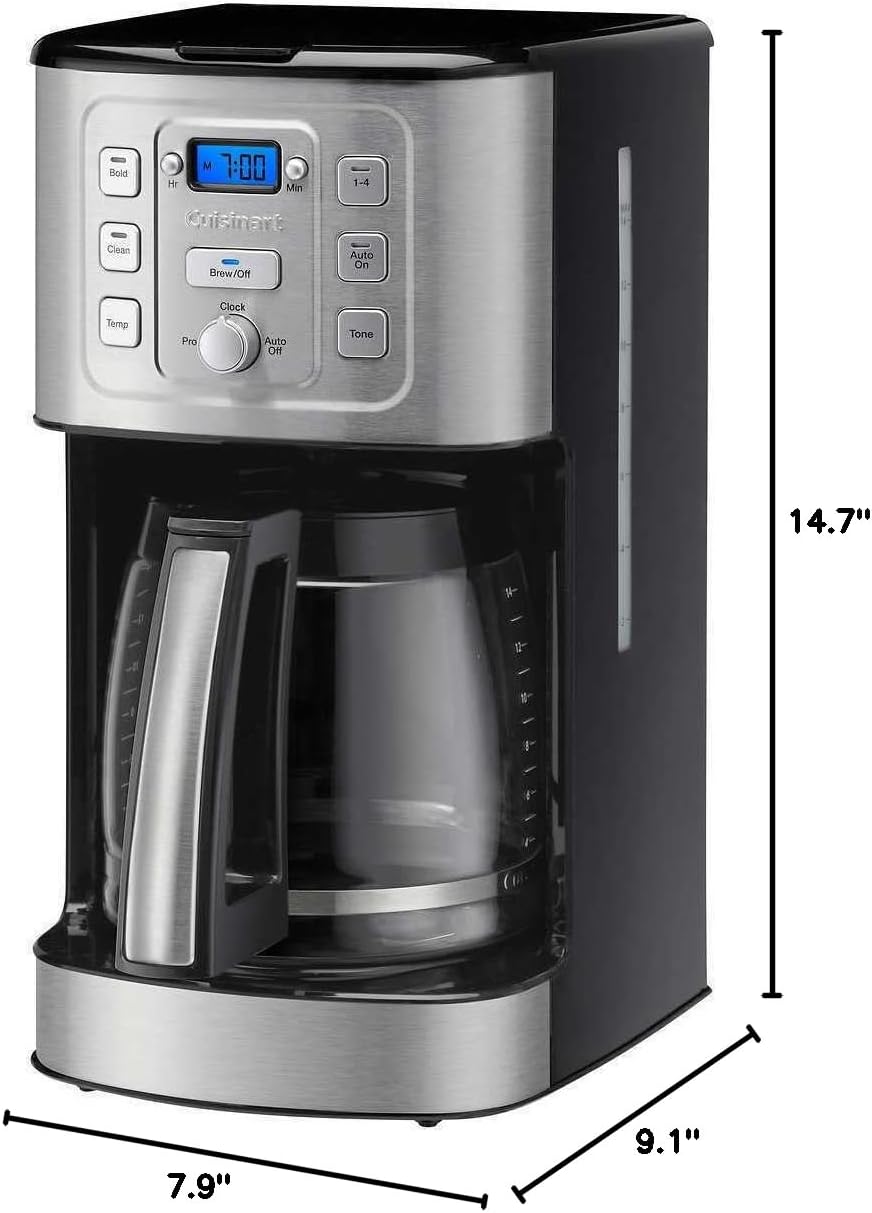
Image: Diagram showing the dimensions of the Cuisinart 14-Cup Brew Central Programmable Coffeemaker: 14.7 inches high, 7.9 inches wide, and 9.1 inches deep.
Warranty & Support
For warranty information and customer support, please refer to the warranty card included with your product or visit the official Cuisinart website. Keep your purchase receipt as proof of purchase for any warranty claims.
You can also find additional support and FAQs on the Cuisinart Store on Amazon.
Related documents14-Cup Central Programmable Coffeemaker


Ask a question about this manual
Ask about setup, troubleshooting, compatibility, parts, safety, or missing instructions. Manuals+ will review the question and use this page’s manual context to help answer it.