
Introduction
The BeamZ PLP14 is a compact and versatile LED blacklight PAR designed for various lighting applications. It features 6 powerful 1-watt UV LEDs, providing a strong blacklight effect. Equipped with a built-in rechargeable battery, the PLP14 offers portability and can be used in locations without direct power access. Charging is convenient via a standard USB cable. The included remote control allows for easy operation and mode selection.
Safety Instructions
Please read these safety instructions carefully before using the BeamZ PLP14 blacklight. Keep this manual for future reference.
- Indoor Use Only: This device is designed for indoor use. Do not expose it to rain or moisture.
- Power Source: Only use the specified 5V USB power source for charging. Ensure the power adapter (not included) meets safety standards.
- Avoid Direct Eye Exposure: Do not look directly into the UV LEDs when the device is operating, as prolonged exposure can be harmful to eyes.
- Ventilation: Ensure adequate ventilation around the unit to prevent overheating. Do not cover the device.
- Cleaning: Disconnect from power before cleaning. Use a soft, dry cloth. Do not use liquid cleaners.
- Repairs: Do not attempt to repair the device yourself. Refer all servicing to qualified personnel.
- Battery Safety: Do not expose the battery to extreme temperatures or dispose of it in fire. If the battery shows signs of damage, discontinue use.
Package Contents
Carefully unpack your BeamZ PLP14 and check that all items are present and in good condition:
- BeamZ PLP14 Blacklight Unit
- Remote Control
- USB Charging Cable
- Mounting Bracket (pre-attached or included)
- User Manual (this document)

Image: Contents of the BeamZ PLP14 package, including the blacklight, remote, and USB cable.
Product Overview
The BeamZ PLP14 is a lightweight and portable blacklight unit with several key features:
- 6 powerful 1W UV LEDs for strong blacklight effects.
- Built-in rechargeable battery for wireless operation.
- USB charging capability (5V).
- Multiple operating modes: Automatic and Sound-activated.
- Strobe effect function.
- Compact and durable ABS plastic housing.
- Includes a remote control for convenient operation.

Image: Front view of the BeamZ PLP14, highlighting its 6x 1W UV LEDs and strobe effect.

Image: Rear view of the BeamZ PLP14, indicating the mode switch for sound and auto modes.
Setup
- Initial Charge: Before first use, fully charge the blacklight unit. Connect the supplied USB cable to the charging port on the unit and to a 5V USB power source (e.g., computer USB port, smartphone charger, or power bank). The charging indicator light will show the charging status.
- Placement: Position the blacklight on a stable surface or use the integrated mounting bracket to hang it. Ensure the light is directed towards the desired area.
- Power On: Locate the power switch on the rear of the unit and switch it to the 'ON' position.

Image: The BeamZ PLP14 is portable and battery-powered, offering up to 10 hours of operation on a full charge.
Charging the Battery
The BeamZ PLP14 features a built-in 3.7V / 2.2Ah rechargeable Lithium-ion battery. To charge the unit:
- Connect the small end of the USB charging cable to the charging port on the blacklight unit.
- Connect the standard USB-A end of the cable to a 5V USB power source. This can be a computer's USB port, a USB wall adapter (not included), or a power bank.
- The charging indicator light (usually red) will illuminate during charging and typically turn off or change color when fully charged.
- A full charge can take several hours. Disconnect the charger once the battery is full to prolong its lifespan.
Note: Battery life can vary depending on the operating mode and intensity. A full charge typically provides up to 10 hours of operation.
Operating Modes
The PLP14 offers several operating modes, selectable via the mode switch on the rear of the unit or the included remote control.
1. Mode Switch (Rear of Unit)
On the back of the unit, there is a switch to select between basic operating modes:
- AUTO: The unit will cycle through its pre-programmed light patterns automatically.
- SOUND: The unit will react to ambient sound, changing patterns or intensity based on the music or noise detected by its integrated microphone.
2. Remote Control Operation
The included IR remote control provides more detailed control over the blacklight's functions.

Image: Detailed view of the remote control for the BeamZ PLP14 blacklight.
Remote Control Functions
The remote control allows you to access various features:
- ON/OFF: Powers the unit on or off.
- AUTO: Activates automatic program mode.
- JUMP: Switches between different light patterns abruptly.
- FADE: Transitions smoothly between light patterns.
- STROBE: Activates the strobe effect (flashing light).
- SOUND: Activates sound-activated mode.
- SPEED (+/-): Adjusts the speed of automatic programs, jump, fade, or strobe effects.
- DMX ON/OFF: (Note: This unit does not support DMX. This button may be non-functional or for other models.)
- Color Buttons (RED, GREEN, BLUE, ROSE, AMBER, CYAN, WHITE): (Note: This unit is a single-color UV blacklight. These buttons may be non-functional or for other models.)
Please note that some buttons on the universal remote control may not be applicable to the single-color UV PLP14 model.
Mounting and Placement
The BeamZ PLP14 is designed for flexible placement:
- Surface Placement: Due to its compact size and lightweight ABS housing, the unit can be placed on any stable, flat surface.
- Hanging: Use the integrated mounting bracket to hang the unit from a truss, ceiling, or wall. Ensure the mounting point is secure and can support the weight of the fixture. Always use appropriate clamps or screws (not included) for hanging.
- Multiple Units: For larger areas or more intense effects, multiple PLP14 units can be set up to create a broader blacklight coverage.

Image: Multiple BeamZ PLP14 units can be set up to create an amazing effect.
Maintenance
To ensure the longevity and optimal performance of your BeamZ PLP14 blacklight, follow these maintenance guidelines:
- Cleaning: Periodically clean the exterior of the unit and the LED lenses with a soft, dry, lint-free cloth. Do not use abrasive cleaners or solvents. Ensure the unit is powered off and disconnected from any charging source before cleaning.
- Storage: When not in use for extended periods, store the unit in a cool, dry place, away from direct sunlight and extreme temperatures. It is recommended to charge the battery every 3-6 months to maintain its health.
- Battery Care: Avoid completely draining the battery frequently. Recharge the unit when the battery level is low.
Troubleshooting
If you encounter issues with your BeamZ PLP14, refer to the following common problems and solutions:
| Problem | Possible Cause | Solution |
|---|---|---|
| Unit does not turn on. | Battery is depleted. Power switch is off. | Charge the unit using the USB cable. Ensure the power switch on the rear is in the 'ON' position. |
| Remote control is not working. | Remote battery is dead. Obstruction between remote and unit. Remote is too far from the unit. | Replace the remote control battery. Ensure a clear line of sight to the unit's IR receiver. Move closer to the unit. |
| Short battery life. | Battery not fully charged. Battery degradation over time. Operating in high-intensity modes. | Ensure the unit is fully charged before use. Battery capacity naturally decreases over time. Consider using lower intensity modes if available, or keep the unit connected to power for extended use. |
| Sound-activated mode not responding. | No sound detected. Microphone sensitivity too low. | Ensure there is sufficient sound near the unit. (Note: This unit may not have adjustable microphone sensitivity. Ensure sound is loud enough.) |
Specifications
| Model | PLP14 |
| Light Source | 6x 1W UV LEDs (Single Colour) |
| Beam Angle | 55° |
| Strobe Speed | 1 - 8 flashes per second (fps) |
| Battery | 3.7V / 2.2Ah Lithium-ion |
| Charging Voltage | 5V via USB |
| Housing Material | ABS Plastic |
| Dimensions (L x W x H) | 120 x 140 x 50 mm (4.7 x 5.5 x 2 inches) |
| Weight | 0.3 kg (0.66 lbs) |
| Power Source | Rechargeable Battery Powered |
| Mounting Type | Wall Mount (via bracket) |
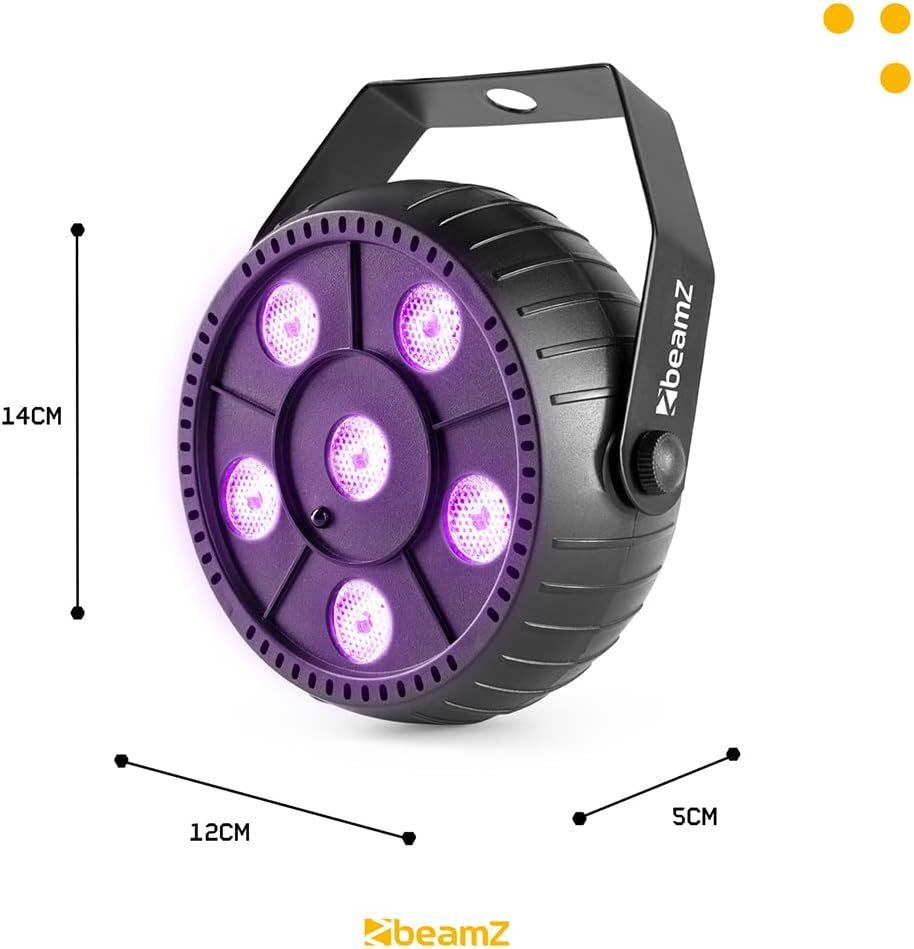
Image: Physical dimensions of the BeamZ PLP14 blacklight unit.
Warranty and Support
For warranty information or technical support, please refer to the documentation provided with your purchase or contact the manufacturer, Tronios B.V., or your retailer directly. Keep your proof of purchase for any warranty claims.
In the EU, spare parts availability is typically 2 years from the date of purchase.


