1. Introduction
Thank you for purchasing the CASO AirFry Chef 1700 Air Fryer Oven. This appliance is designed to provide a healthier way to cook your favorite foods, utilizing hot air circulation for crispy results with little to no oil. This manual contains important information regarding the safe operation, installation, maintenance, and troubleshooting of your new appliance. Please read it thoroughly before first use and keep it for future reference.
2. Important Safety Instructions
When using electrical appliances, basic safety precautions should always be followed to reduce the risk of fire, electric shock, and injury to persons, including the following:
- Read all instructions before operating the appliance.
- Do not touch hot surfaces. Use handles or knobs.
- To protect against electric shock, do not immerse the cord, plugs, or the main unit in water or other liquid.
- Close supervision is necessary when any appliance is used by or near children.
- Unplug from outlet when not in use and before cleaning. Allow to cool before putting on or taking off parts.
- Do not operate any appliance with a damaged cord or plug, or after the appliance malfunctions or has been damaged in any manner. Contact customer service for examination, repair, or adjustment.
- The use of accessory attachments not recommended by the appliance manufacturer may cause injuries.
- Do not use outdoors.
- Do not let the cord hang over the edge of a table or counter, or touch hot surfaces.
- Do not place on or near a hot gas or electric burner, or in a heated oven.
- Extreme caution must be used when moving an appliance containing hot oil or other hot liquids.
- Always attach plug to appliance first, then plug cord into the wall outlet. To disconnect, turn any control to "off", then remove plug from wall outlet.
- Do not use the appliance for other than intended use.
- Ensure the appliance is placed on a stable, heat-resistant surface, away from walls or other appliances to allow for proper ventilation.
- Do not block any ventilation openings.
- Do not place food directly on the heating elements. Always use the provided accessories.
3. Product Overview
3.1 Main Unit and Control Panel
The CASO AirFry Chef 1700 features a sleek design with an intuitive touch control panel and a rotary dial for precise adjustments.

Figure 1: Front view of the CASO AirFry Chef 1700 Air Fryer Oven, showcasing the digital display and control panel.

Figure 2: Close-up of the control panel, showing the digital display, preset program options, and the rotary dial for temperature and time adjustments.
3.2 Included Accessories
Your AirFry Chef 1700 comes with several accessories to enhance your cooking experience:
- Rotating Basket: Ideal for fries, nuts, and other small items that require even cooking.
- Rotisserie Spit: For roasting whole chickens or other large cuts of meat.
- Wire Rack: For baking, grilling, or placing dishes.
- Baking Tray/Drip Tray: Collects drips and can be used for baking.
- Accessory Handle: For safely inserting and removing the rotating basket or rotisserie spit.

Figure 3: A collection of accessories including the rotating basket, rotisserie spit, wire rack, baking tray, and accessory handle.
4. Setup and First Use
4.1 Unpacking
Carefully remove the appliance and all accessories from the packaging. Retain the packaging for future storage or transport if needed. Remove any protective films or stickers from the appliance.
4.2 Placement
Place the air fryer oven on a stable, level, and heat-resistant surface. Ensure there is adequate space (at least 10 cm) around all sides of the appliance for proper air circulation. Do not place it near flammable materials or under wall cabinets.
4.3 Initial Cleaning
Before first use, clean the interior of the oven and all accessories with a damp cloth and mild detergent. Wipe dry thoroughly. Do not immerse the main unit in water.
4.4 First Use (Burn-Off)
It is recommended to perform a "burn-off" cycle before cooking food. This helps to eliminate any manufacturing odors.
- Plug the appliance into a grounded power outlet.
- Set the temperature to 200°C and the timer to 15 minutes.
- Allow the appliance to run without any food inside. A slight odor or smoke may be present; this is normal.
- After the cycle, unplug the appliance and let it cool completely.
- Wipe the interior with a clean, damp cloth.
5. Operating Instructions
5.1 Basic Operation
- Power On: Plug the appliance into a grounded power outlet. The display will illuminate.
- Select Program: Use the touch controls to select one of the 12 preset programs (e.g., Air Fry, Bake, Roast, Pizza, Dry Fruit). The default temperature and time for the selected program will appear on the display.
- Adjust Settings: Use the rotary dial to adjust the temperature (40°C to 230°C in 5°C increments) and cooking time (1 to 120 minutes, up to 240 minutes for Dry Fruit mode). Press the dial to switch between temperature and time adjustment.
- Start Cooking: Press the Start/Pause button to begin the cooking cycle.
- Pause/Stop: Press the Start/Pause button to temporarily pause cooking. Press it again to resume. To stop cooking, press and hold the Start/Pause button.
Note: The CASO AirFry Chef 1700 is designed for quick heating and often does not require preheating for many dishes. However, for optimal results with certain recipes, a short preheat cycle may be beneficial.
5.2 Using the Rotating Basket
The rotating basket is perfect for achieving even crispiness on items like French fries, chicken nuggets, or roasted vegetables.
- Place food inside the rotating basket. Do not overfill.
- Insert the rotating basket into the oven using the accessory handle, ensuring it is securely seated on the rotisserie supports.
- Select the "Air Fry" program or adjust temperature and time manually. Activate the rotation function (if available via a dedicated button or program setting).
- Monitor cooking through the viewing window.
- Once cooking is complete, use the accessory handle to carefully remove the hot basket.

Figure 4: The air fryer oven in operation, showing the rotating basket with fries inside, ensuring even cooking.

Figure 5: Interior view of the oven with the rotating basket securely placed on its supports.
5.3 Using the Rotisserie Spit
The rotisserie function allows for perfectly roasted meats with a crispy exterior.
- Secure the meat onto the rotisserie spit using the forks provided. Ensure it is balanced.
- Insert the rotisserie spit into the oven, engaging the ends with the rotisserie drive and support.
- Select the "Roast" program or adjust temperature and time manually. Activate the rotation function.
- Place the drip tray at the bottom to catch any juices.
- Once cooking is complete, use the accessory handle to carefully remove the hot rotisserie spit.
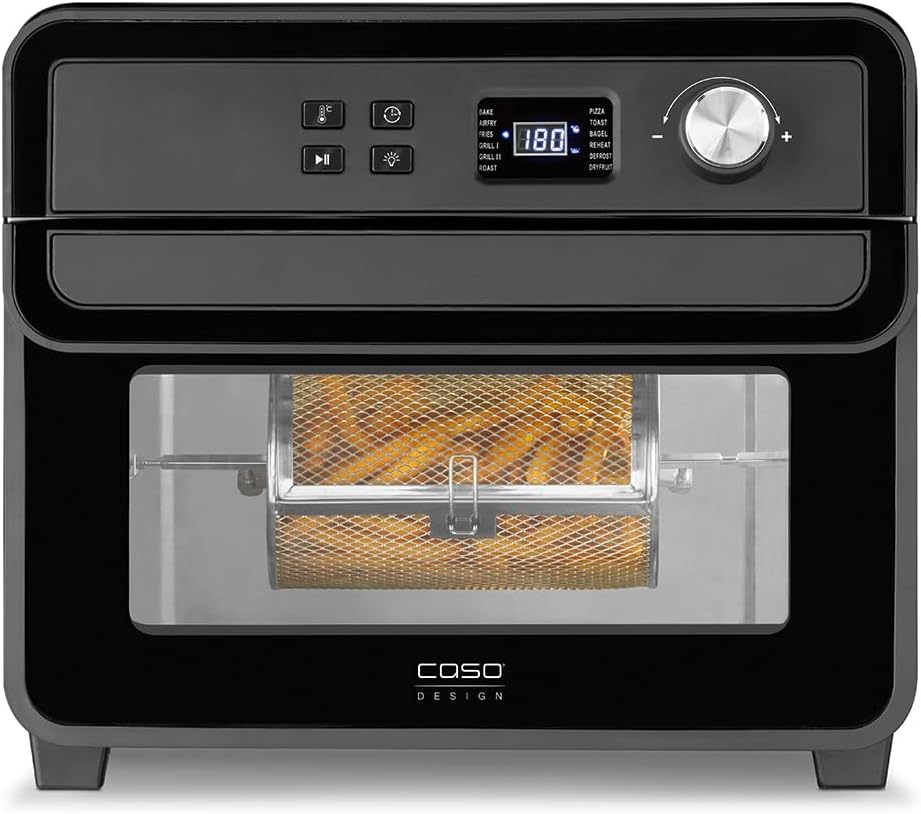
Figure 6: A whole chicken being roasted on the rotisserie spit inside the air fryer oven.
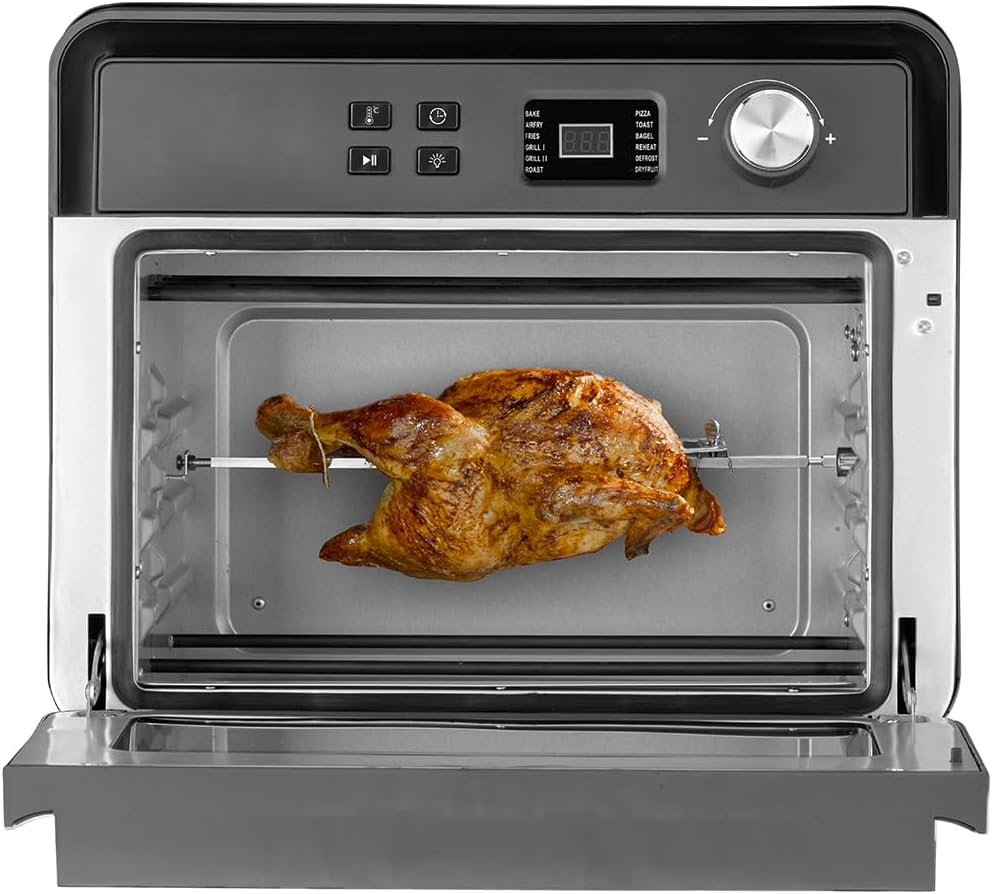
Figure 7: The rotisserie function in action, ensuring even browning of the chicken.
5.4 Using the Wire Rack and Baking Tray
These accessories are versatile for baking, grilling, or simply holding food items.
- Place the wire rack or baking tray onto the desired support rails inside the oven.
- Place food directly on the wire rack (for grilling/roasting) or in a suitable baking dish on the rack/tray.
- Select the appropriate program (e.g., Bake, Grill) and adjust settings.
- Always use oven mitts when removing hot accessories.

Figure 8: Bread rolls baking on a tray inside the oven, demonstrating the baking function.
6. Cooking Tips
- Oil Usage: While air frying requires little to no oil, a small amount of oil (e.g., 1 tablespoon) can enhance crispiness and flavor for some foods.
- Even Cooking: For best results, shake or turn food halfway through the cooking process, especially for items in the rotating basket or on the wire rack.
- Batch Cooking: Avoid overcrowding the oven. Cook in smaller batches if necessary to ensure even air circulation and crispiness.
- Frozen Foods: Most frozen foods can be cooked directly in the air fryer. Refer to package instructions for recommended temperatures and times, then adjust as needed.
- Dehydration: The "Dry Fruit" program allows for dehydration at lower temperatures over longer periods.
7. Maintenance and Cleaning
Regular cleaning will ensure the longevity and optimal performance of your appliance.
- Always unplug the appliance and allow it to cool completely before cleaning.
- Exterior: Wipe the exterior with a soft, damp cloth. Do not use abrasive cleaners or scouring pads.
- Interior: Clean the interior walls with a damp cloth and mild detergent. For stubborn food residue, a non-abrasive sponge can be used. Ensure the interior is dry before next use.
- Accessories: Wash all removable accessories (rotating basket, rotisserie spit, wire rack, baking tray, handle) in warm, soapy water. Rinse thoroughly and dry completely. Note: These accessories are not dishwasher safe.
- Heating Elements: Gently wipe the heating elements with a dry cloth if necessary, ensuring the appliance is unplugged and cool. Do not use water or cleaning solutions directly on the heating elements.
8. Troubleshooting
| Problem | Possible Cause | Solution |
|---|---|---|
| Appliance does not turn on. | Not plugged in; power outlet malfunction. | Ensure the power cord is securely plugged into a grounded outlet. Test the outlet with another appliance. |
| Food is not cooked evenly. | Overcrowding; insufficient shaking/turning. | Cook in smaller batches. Shake or turn food halfway through cooking. |
| White smoke coming from the appliance. | Grease residue; fatty foods. | Clean the interior and accessories thoroughly. For fatty foods, ensure the drip tray is in place. This is usually harmless. |
| Appliance emits a burning smell. | Food residue on heating elements; new appliance odor. | Perform a burn-off cycle if new. Clean heating elements carefully. If smell persists or is accompanied by dark smoke, unplug immediately and contact support. |
| Food is not crispy. | Too much moisture; not enough oil (for certain foods); overcrowding. | Pat food dry before cooking. Lightly coat with oil if desired. Do not overcrowd. Increase cooking time or temperature slightly. |
9. Specifications
| Feature | Detail |
|---|---|
| Brand | CASO |
| Model Name | AirFry Chef 1700 |
| Model Number | 3000 |
| Color | Black |
| Capacity | 22 Liters |
| Power / Wattage | 1700 Watts |
| Voltage | 220 Volts |
| Material | Stainless Steel |
| Dimensions (D x W x H) | 39 x 40.5 x 35 cm |
| Item Weight | 6.9 Kilograms |
| Temperature Control | 40°C to 230°C (in 5°C increments) |
| Timer Range | 1 to 120 minutes (up to 240 minutes for Dry Fruit mode) |
| Control Method | Touch Screen & Rotary Dial |
| Special Features | Temperature Control, 12 Automatic Programs, No Preheating required for many dishes, Rotisserie Function, Dehydration Function. |
| Dishwasher Safe Parts | No |
10. Warranty and Support
For warranty information and customer support, please refer to the warranty card included with your product or visit the official CASO website. If you encounter any issues not covered in the troubleshooting section, please contact CASO customer service for assistance.
Note: Some regions may have specific warranty limitations or service center availability. Please check your local CASO distributor or website for details.