
1. Introduction
Thank you for choosing the Xmenha MS-T40 Wireless Earbuds. This manual provides detailed instructions on how to set up, operate, and maintain your earbuds to ensure optimal performance and longevity. Please read this manual carefully before use and retain it for future reference.
2. Package Contents
- Xmenha MS-T40 Wireless Earbuds (Left and Right)
- Charging Case
- USB Type-C Charging Cable
- Silicone Ear Tips (S/M/L sizes)
- Detachable Earhooks (2 pairs)
- User Manual

Image: Contents of the Xmenha MS-T40 Earbuds package, showing the earbuds, charging case, various ear tips, detachable earhooks, and a USB-C charging cable.
3. Product Overview
Earbud Components
- Earbud Body: Contains the speaker, microphone, and touch control area.
- Ear Tips: Silicone tips for in-ear comfort and sound isolation (S/M/L).
- Detachable Earhooks: Provide a secure fit for active use.
- Charging Contacts: Located on the earbuds for charging within the case.
Charging Case Components
- Charging Slots: For placing earbuds to charge.
- LED Indicators: Show charging status of the case and earbuds.
- USB Type-C Port: For charging the case.

Image: The Xmenha MS-T40 Wireless Earbuds resting in their open charging case, showing the design of the earbuds and the case interior.
Sound Quality
The earbuds feature advanced acoustic components designed to produce Hi-Fi stereo sound with deep bass and clear treble, enhancing your audio experience.

Image: A visual representation of the earbud's internal sound driver components and sound wave patterns, illustrating Hi-Fi stereo sound technology.
4. Setup
4.1 Initial Charging
Before first use, fully charge the earbuds and the charging case. Connect the provided USB Type-C cable to the charging port on the case and a power source. The LED indicators on the case will show the charging status. Once fully charged, the indicators will change or turn off.
4.2 Bluetooth Pairing
- Ensure the charging case has power.
- Open the charging case and take out both earbuds. They will automatically power on and enter pairing mode.
- On your device (smartphone, tablet, etc.), enable Bluetooth.
- Search for available Bluetooth devices and select "MS-T40" from the list.
- Once connected, you will hear a confirmation tone, and the earbuds' indicator lights will change.
The earbuds will automatically reconnect to the last paired device when taken out of the case, if Bluetooth is enabled on the device.
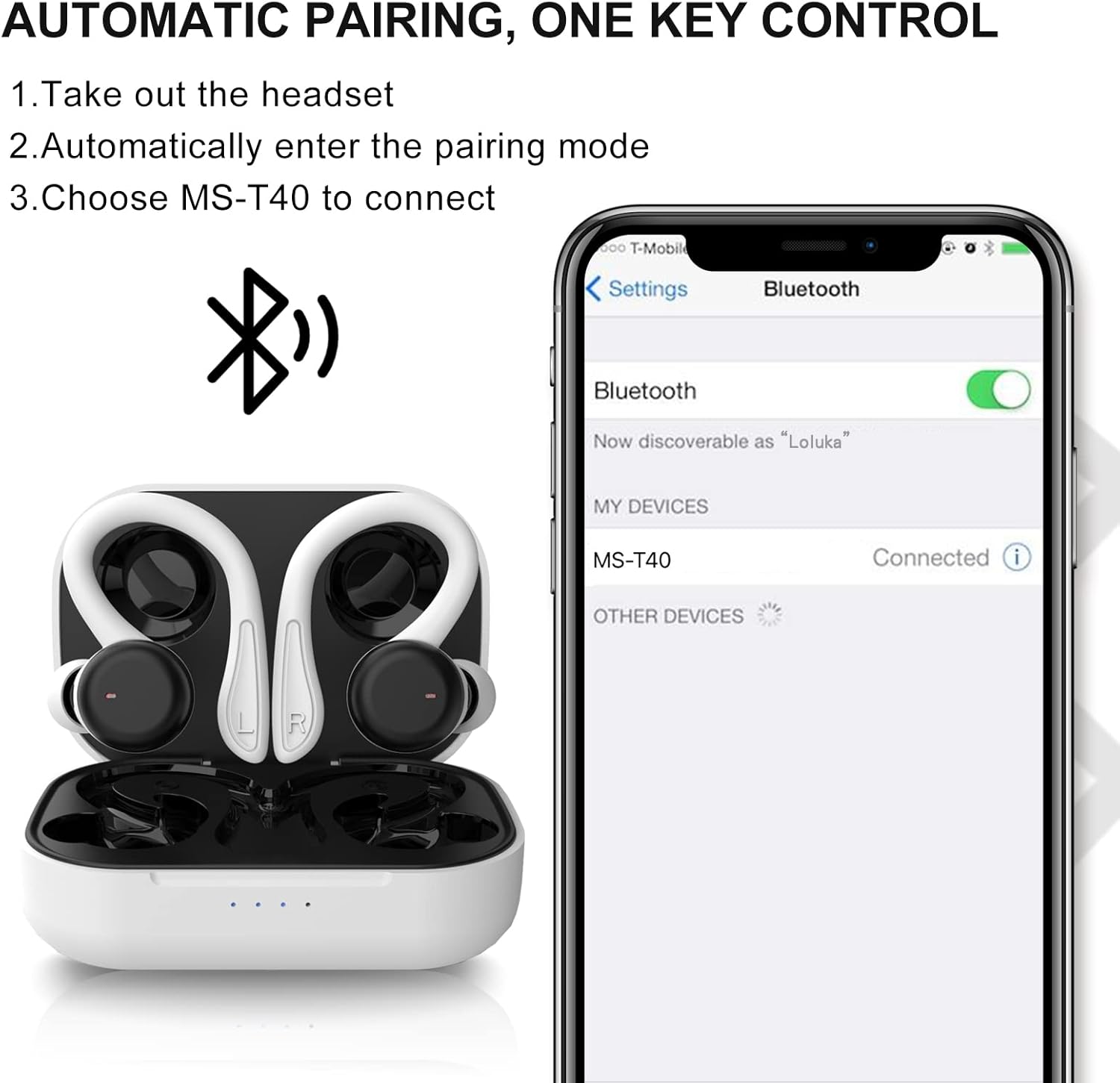
Image: A visual guide demonstrating the automatic pairing process for the MS-T40 earbuds, showing the earbuds in their case, a Bluetooth symbol, and a smartphone screen with 'MS-T40' listed as a connected device.
5. Operating Instructions
5.1 Wearing the Earbuds
The MS-T40 earbuds offer two wearing styles: standard in-ear or with detachable earhooks for a more secure fit during activities.
- Standard In-Ear: Choose the silicone ear tips (S/M/L) that provide the best seal and comfort for your ears. Insert the earbuds gently into your ear canal.
- With Earhooks: Attach the earhooks to the earbuds. Place the earbud in your ear and position the earhook over the top of your ear for added stability. This is ideal for sports or intense workouts.

Image: A diagram illustrating two methods of wearing the earbuds: a casual in-ear style and a secure fit with earhooks for sports, along with images of users engaging in these activities.
5.2 Basic Controls (Touch Sensitive)
The earbuds feature touch-sensitive controls. Specific functions may vary slightly by device or application.
- Play/Pause: Single tap on either earbud.
- Next Track: Double tap on the right earbud.
- Previous Track: Double tap on the left earbud.
- Answer/End Call: Single tap on either earbud.
- Reject Call: Press and hold either earbud for 2 seconds.
- Activate Voice Assistant: Triple tap on either earbud.
5.3 Power On/Off
- Power On: Take the earbuds out of the charging case.
- Power Off: Place the earbuds back into the charging case. They will automatically disconnect and begin charging.
5.4 Water Resistance (IPX6)
The earbuds are rated IPX6 waterproof, meaning they are protected against high-pressure water jets from any direction. This makes them suitable for use during intense workouts, in the rain, or when exposed to sweat. They are not designed for submersion in water.

Image: The Xmenha MS-T40 earbuds in their charging case, surrounded by water droplets, visually representing their IPX6 waterproof capability.
6. Maintenance
6.1 Cleaning
- Regularly clean the earbuds, ear tips, and charging contacts with a soft, dry, lint-free cloth.
- Do not use harsh chemicals, cleaning solvents, or strong detergents.
- Ensure the earbuds are completely dry before placing them back in the charging case.
6.2 Storage
- When not in use, store the earbuds in their charging case to protect them and keep them charged.
- Store in a cool, dry place, away from extreme temperatures and direct sunlight.
7. Troubleshooting
- Earbuds not pairing: Ensure both earbuds are out of the case and fully charged. Turn off and on your device's Bluetooth, then try pairing again.
- Only one earbud working: Place both earbuds back in the charging case, close the lid, wait a few seconds, then take them out again. This often re-syncs them.
- No sound: Check the volume level on your device and ensure the earbuds are properly connected.
- Charging issues: Ensure the charging cable is securely connected to both the case and the power source. Clean the charging contacts on the earbuds and inside the case.
- Poor call quality: Ensure the earbuds are clean and positioned correctly. Move closer to your paired device to avoid interference.
8. Specifications
| Model | MS-T40 |
| Bluetooth Version | 5.1 |
| Wireless Range | Up to 10 meters (33 feet) |
| Earbud Battery Life | Up to 6 hours (single charge) |
| Total Playtime (with charging case) | Up to 18-24 hours (depending on usage) |
| Charging Port | USB Type-C |
| Charging Time (Case) | Approx. 1-2 hours |
| Waterproof Rating | IPX6 |
| Microphone | Built-in with Environmental Noise Reduction |
| Earbud Weight | Approx. 0.19 oz (per earbud) |

Image: The Xmenha MS-T40 earbuds and charging case next to a smartphone playing music, illustrating the 18-hour hybrid endurance and Type-C charging capability.
9. Warranty Information
Xmenha products are covered by a limited warranty against manufacturing defects from the date of purchase. Please refer to the warranty card included in your package or contact customer support for specific terms and conditions. This warranty does not cover damage caused by misuse, accidents, unauthorized modifications, or normal wear and tear.
10. Support
If you encounter any issues or have questions regarding your Xmenha MS-T40 Wireless Earbuds, please contact our customer support team. For the fastest assistance, please have your product model and purchase information ready.
- Email: [Insert Customer Support Email Here]
- Website: [Insert Brand Website Here]