
Bosch Thermotechnik Tronic Comfort Plus 21/24/27 EB
Bosch TR5001R 21/24/27 kW Electronic Instantaneous Water Heater
Model: Tronic Comfort Plus 21/24/27 EB
Brand: Bosch Thermotechnik
Product Overview
The Bosch TR5001R 21/24/27 kW Electronic Instantaneous Water Heater is designed to provide efficient and convenient hot water for your household. Its advanced electronic control ensures precise temperature regulation, while the innovative CLICKFIX 2.0 mounting technology simplifies installation. This unit is capable of supplying hot water to multiple tapping points simultaneously, making it ideal for various domestic applications.

Figure 1: Front view of the Bosch TR5001R Electronic Instantaneous Water Heater.
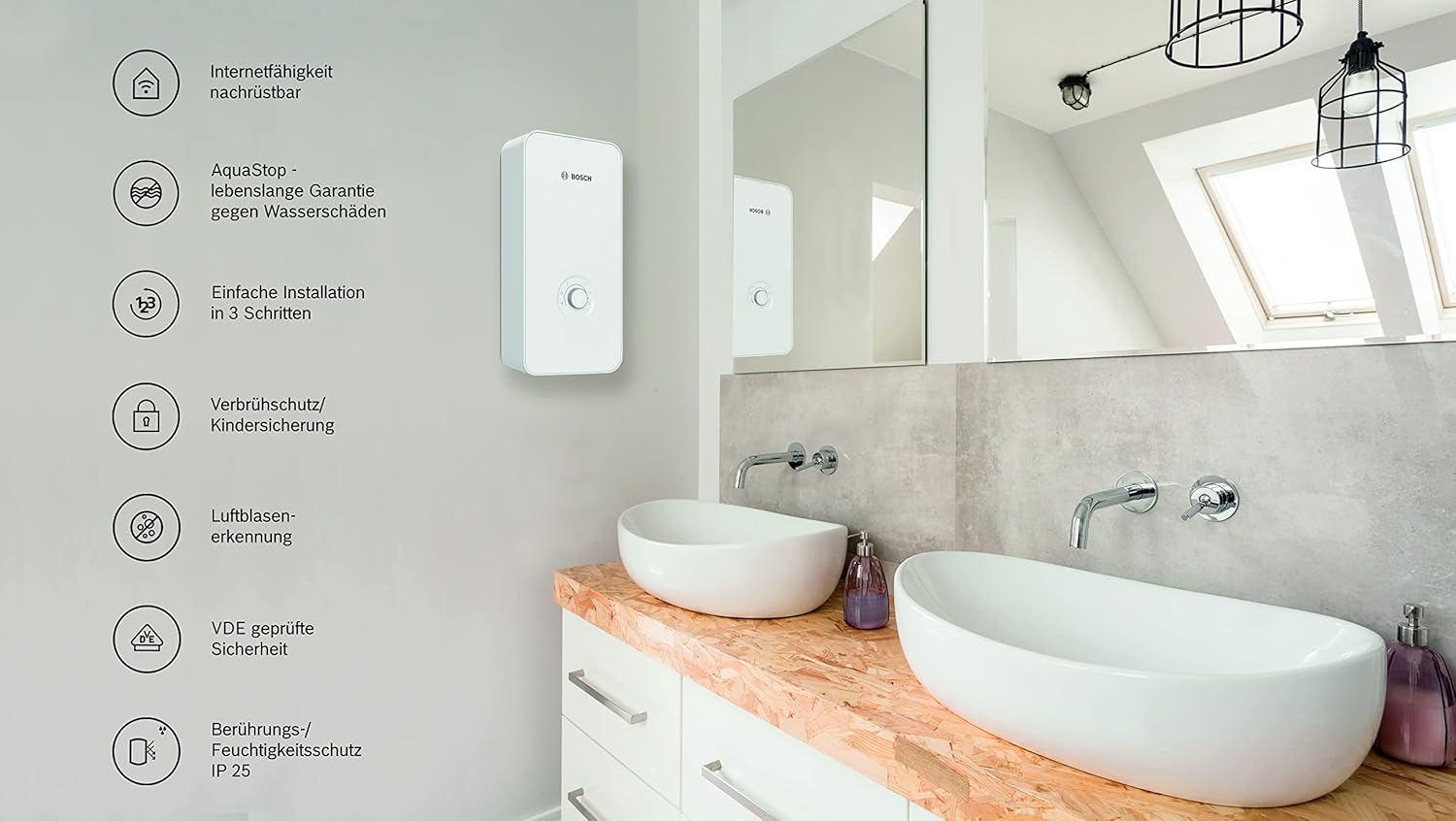
Figure 2: The Bosch TR5001R installed in a bathroom, illustrating key features such as internet capability, AquaStop warranty, easy installation, scald protection/child safety, air bubble detection, VDE tested safety, and touch/moisture protection (IP 25).
Setup and Installation
The Bosch TR5001R features CLICKFIX 2.0 mounting technology for straightforward installation. However, due to the electrical nature of this appliance, installation must be performed by a qualified professional in accordance with local regulations and safety standards.
Pre-Installation Checks:
- Ensure the electrical supply meets the unit's requirements (400 Volt, 27 kW).
- Verify water connections are compatible and secure.
- Inspect the unit for any signs of damage from shipping before installation.
Installation Steps (Overview):
The installation process typically involves three main steps:
- Mounting the backplate to the wall.
- Connecting the water and electrical lines to the internal components.
- Securing the outer casing to the mounted unit.

Figure 3: Overview of the three-step installation process for the Bosch TR5001R.

Figure 4: Internal view of the Bosch TR5001R, showing the electrical and water connections. This view is for professional reference during installation.

Figure 5: The Bosch TR5001R unit displayed with its accompanying installation accessories, including mounting hardware and connection components.
Operating Instructions
The Bosch TR5001R features an intuitive control knob for easy temperature selection and operating mode adjustment. The unit allows for stepless temperature regulation from 20 °C to 60 °C.
Control Dial Functions:

Figure 6: Close-up of the control dial, indicating various settings and indicators.
- 1. Operation Status LED: Indicates the current operational status of the unit.
- 2. Shower Mode: Optimized setting for showering.
- 3. Handwash Mode: Optimized setting for handwashing.
- 4. Minimum Temperature: Sets the lowest desired water temperature.
- 5. Bathtub Mode: Optimized setting for filling a bathtub.
- 6. Dishwashing Mode: Optimized setting for dishwashing.
- 7. Maximum Temperature: Sets the highest desired water temperature.
- 8. Temperature Selection Knob / Operating Modes: Main knob for adjusting temperature and selecting operating modes.
To operate, simply turn the knob to your desired temperature or select a specific operating mode. The unit will then heat the water to the set temperature as it flows through.
Maintenance
Regular maintenance ensures the longevity and efficient operation of your Bosch instantaneous water heater. It is recommended to have the unit inspected by a qualified professional periodically.
General Maintenance Tips:
- Keep the exterior of the unit clean with a soft, damp cloth. Avoid abrasive cleaners.
- Ensure proper ventilation around the unit.
- Check for any visible leaks or unusual noises during operation.
For detailed maintenance procedures, please refer to the comprehensive technical documentation provided with the product or consult a certified technician.
Troubleshooting
This section addresses common issues you might encounter with your instantaneous water heater. For complex problems, always contact a qualified service technician.
Common Issues and Solutions:
- Delayed Hot Water: Some users may experience a slight delay (approx. 2 seconds) before hot water begins to flow after turning on the tap. This is a characteristic of the unit's design and is considered normal operation.
- No Hot Water / Insufficient Heating:
- Check if the power supply to the unit is active.
- Ensure the temperature setting is appropriate.
- Verify water flow is sufficient; low flow can prevent heating.
- Physical Damage: If the unit arrives with visible damage (e.g., cracks on the casing or mounting bracket), do not install it. Contact your retailer or Bosch Thermotechnik customer service immediately for a replacement.
If the problem persists after attempting these solutions, please contact customer support.
Specifications
Detailed technical specifications for the Bosch TR5001R 21/24/27 kW Electronic Instantaneous Water Heater.

Figure 7: The Bosch TR5001R unit with its physical dimensions: 484 mm height, 236 mm width, and 106 mm depth.
| Attribute | Value |
|---|---|
| Brand | Bosch Thermotechnik |
| Model | Tronic Comfort Plus 21/24/27 EB |
| Color | White |
| Product Dimensions | 48.4 x 23.6 x 10.6 cm |
| Item Weight | 3.32 Kilograms |
| Wattage | 27 KW |
| Voltage | 400 Volt |
| Energy Efficiency Class | A+ to F |
| Special Features | Temperature selection |
| ASIN | B09VLFTK38 |
| First Available Date | April 17, 2022 |

Figure 8: Product Fiche (Energy Label) for the Bosch TR5001R, detailing energy efficiency class (A), declared load profile (S), and annual energy consumption (476 kWh).
Warranty and Support
For detailed information regarding the product warranty, including terms, conditions, and registration, please refer to the official documentation included with your Bosch TR5001R or visit the Bosch Thermotechnik official website.
Should you require technical assistance, service, or have any questions not covered in this manual, please contact Bosch Thermotechnik customer service. Contact details can typically be found on the manufacturer's website or in the product packaging.
You can visit the Bosch Thermotechnik store on Amazon for more information: Bosch Thermotechnik Store
Ask a question about this manual
Ask about setup, troubleshooting, compatibility, parts, safety, or missing instructions. Manuals+ will review the question and use this page’s manual context to help answer it.