
MAGICON US-49KEY NEW
MAGICON 49 Key Roll Up Electronic Digital Music Piano User Manual
Model: US-49KEY NEW
Introduction
Thank you for choosing the MAGICON 49 Key Roll Up Electronic Digital Music Piano. This portable and versatile instrument is designed for beginners and enthusiasts alike, offering a realistic piano experience with its 49 simulation keys, multiple tones, demo songs, and recording capabilities. Its roll-up design ensures easy storage and portability, allowing you to enjoy music anywhere.
Please read this manual thoroughly before using the product to ensure proper operation and to maximize your musical experience.
Product Overview
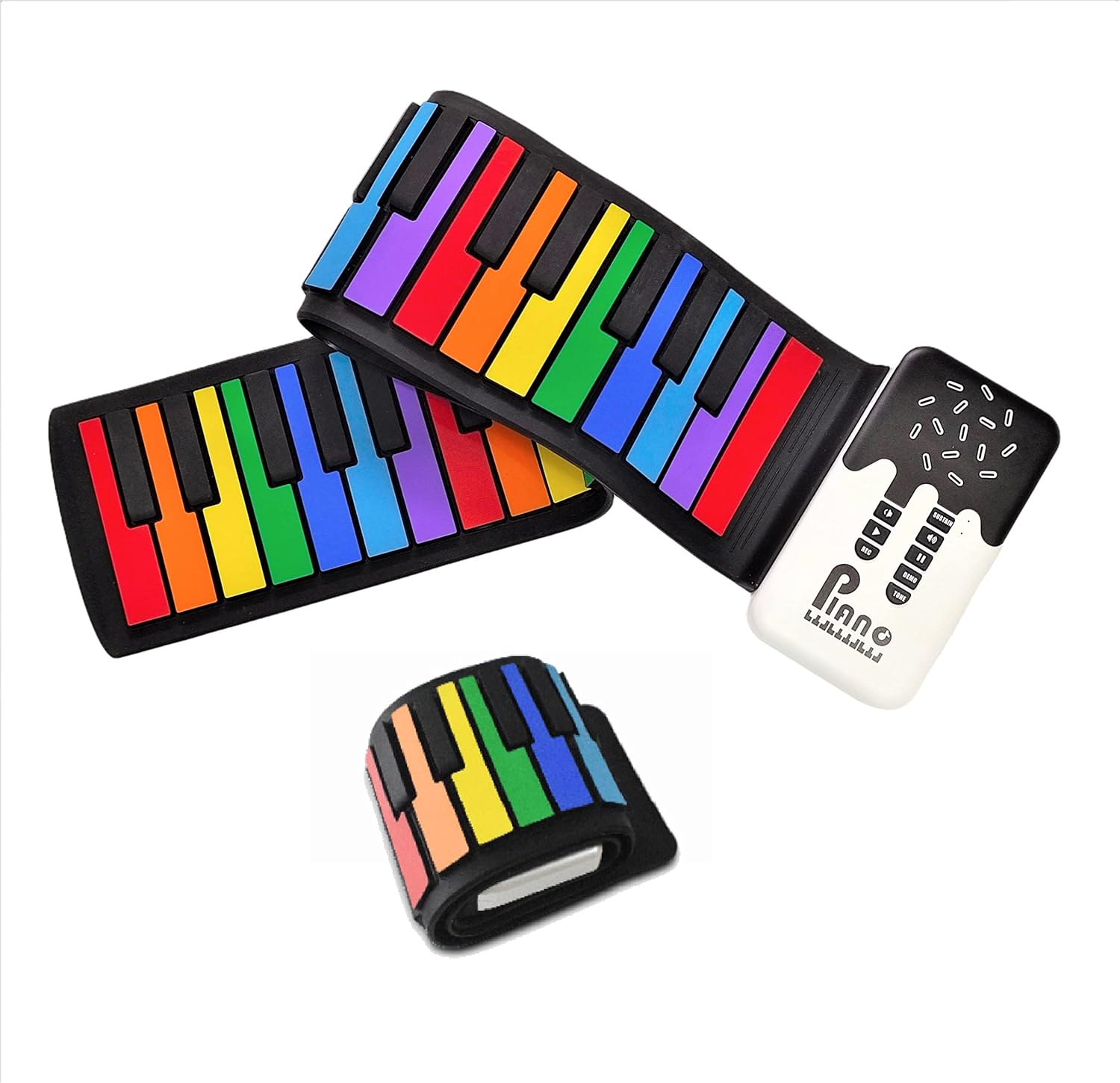
Figure 1: The MAGICON 49 Key Roll Up Electronic Digital Music Piano unrolled, showing the colorful keys and the integrated control panel.
The MAGICON 49 Key Roll Up Electronic Digital Music Piano features a flexible silicone keyboard that can be easily rolled up for storage and transport. The main control unit houses the speaker, power switch, charging port, and various function buttons.
Setup
- Unpacking: Carefully remove the piano from its packaging. Ensure all components are present: the roll-up piano, USB charging cable, and user manual.
- Charging: Before first use, fully charge the piano. Connect the provided USB cable to the "Power position" (USB port) on the control unit and to a standard USB power adapter (not included). A full charge takes approximately 2.5 hours and provides up to 4 hours of continuous play.
- Power On/Off: Locate the ON/OFF switch on the side of the control unit. Slide it to the "ON" position to power on the device. Slide it to "OFF" when not in use to conserve battery.
- Placement: Unroll the piano on a flat, stable surface. Ensure the silicone keys are laid out smoothly for optimal playability.

Figure 2: Included components: roll-up piano, USB charging cable, and user manual.
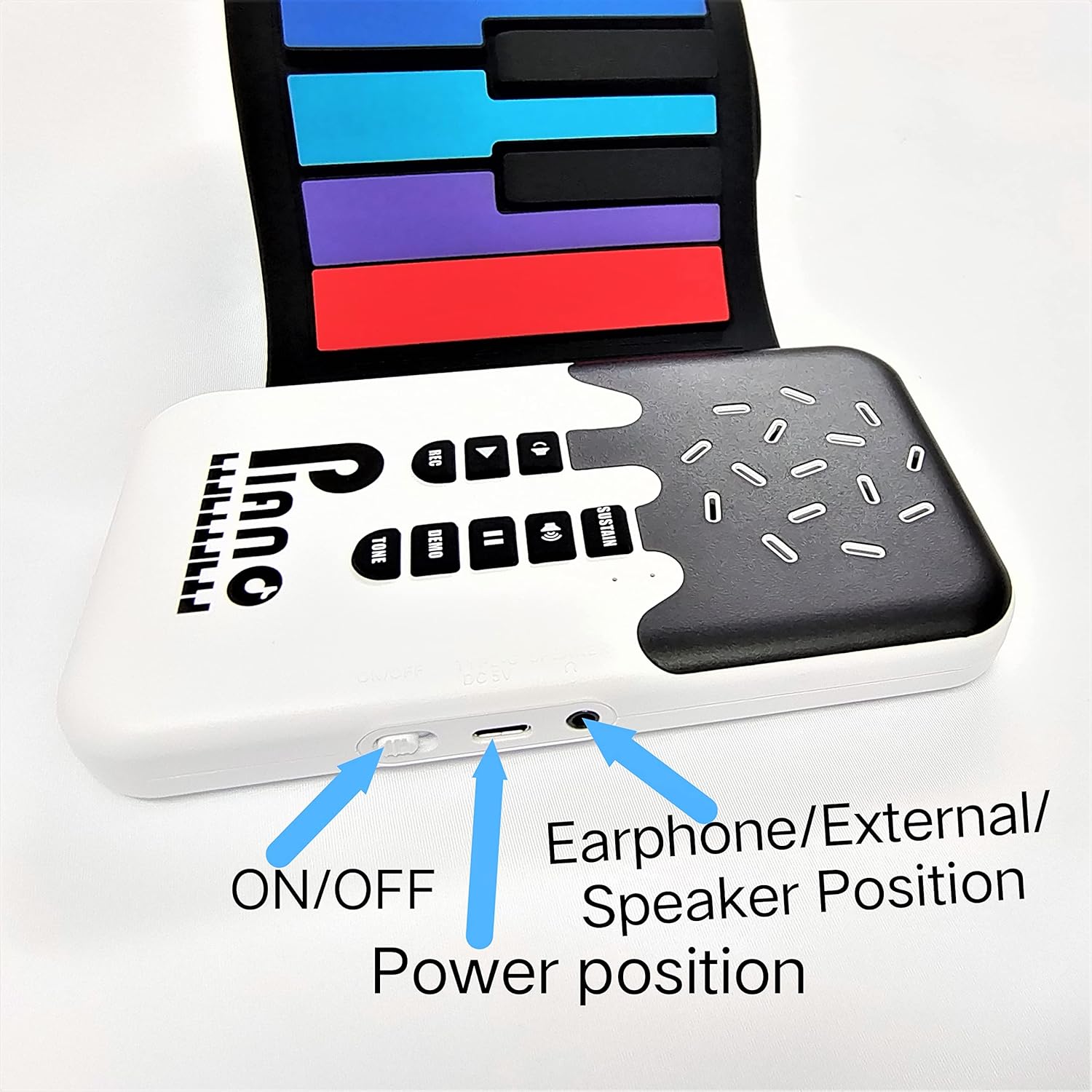
Figure 3: Location of the ON/OFF switch, USB power port, and earphone/external speaker jack on the control unit.

Figure 4: The piano unrolled, illustrating its dimensions for proper placement.
Operating Instructions
The control panel provides access to various functions of the piano. Familiarize yourself with the buttons:

Figure 5: Control panel buttons for various functions.
- Keys: The piano features 49 simulation keys. Pressing a key will produce a sound.
- Volume Control: Use the Volume Up and Volume Down buttons to adjust the sound output level.
- Tone Selection: Press the TONE button to cycle through the 8 available timbres (instrument sounds).
- Demo Songs: Press the DEMO button to play one of the 6 built-in demo songs. Press again to cycle through them. Press Play/Pause to pause or resume.
- Recording Feature:
- Press the REC button to start recording your performance.
- Play your desired melody.
- Press the Play/Pause button to stop recording and play back your recorded piece.
- Sustain Function: Press the SUSTAIN button to activate the sustain effect, allowing notes to ring out longer. Press again to deactivate.
- External Connections:
- Earphone/External Speaker: Connect headphones or an external speaker to the 3.5mm jack for private practice or amplified sound.
- USB: The USB port is primarily for charging.

Figure 6: Playing the colorful silicone keys.
Video 1: Official product video demonstrating the MAGICON 49 Key Roll Up Electronic Digital Music Piano in use.
Maintenance
- Cleaning: Wipe the silicone keyboard and control unit with a soft, dry cloth. For stubborn dirt, a slightly damp cloth can be used, but ensure no moisture enters the control unit or ports. Do not use harsh chemicals or abrasive cleaners.
- Storage: When not in use, roll up the piano gently. Avoid sharp folds or creases. Store in a cool, dry place away from direct sunlight and extreme temperatures.
- Battery Care: To prolong battery life, avoid fully discharging the battery frequently. Charge the device regularly, even if not in constant use.

Figure 7: The piano rolled up for easy storage.
Troubleshooting
| Problem | Possible Cause | Solution |
|---|---|---|
| No sound when keys are pressed. |
|
|
| Piano does not turn on. |
|
|
| Keys produce multiple notes or no sound inconsistently. |
|
|
| Charging indicator not working or piano not charging. |
|
|
Specifications
| Brand | MAGICON |
| Model Name | US-49KEY NEW |
| Number of Keys | 49 |
| Skill Level | Beginner |
| Special Feature | Roll Up |
| Connector Type | USB |
| Power Source | Battery Powered |
| Headphones Jack | 3.5mm Jack |
| Item Dimensions (L x W x H) | 31.73 x 6.3 x 0.79 inches (approx. 80.6 x 16 x 2 cm) |
| Weight | 0.6 KG (approx. 1.32 lbs) |
| Charging Time | 2.5 hours |
| Playing Time | 4 hours (continuous) |
| Included Components | Roll-up piano, USB charging cable, User Manual |
Warranty and Support
This MAGICON product comes with a 1-year warranty from the date of purchase, covering manufacturing defects. Please retain your proof of purchase for warranty claims.
For technical support, troubleshooting assistance, or warranty inquiries, please contact MAGICON customer service through the retailer where the product was purchased or visit the official MAGICON store on Amazon: MAGICON Store.
Ask a question about this manual
Ask about setup, troubleshooting, compatibility, parts, safety, or missing instructions. Manuals+ will review the question and use this page’s manual context to help answer it.