
1. Introduction
This manual provides detailed instructions for the installation, operation, and maintenance of your Maxim Trio 89909FTBK 3-Blade Ceiling Fan with Light Kit. The fan features a contemporary design with a Satin Nickel finish, reversible fan blades (Black/Silver), and an integrated light kit with clear glass bulb covers. It is designed for indoor use and includes an LED JA8 compliant lighting system and a wall control for convenient operation. Please read this manual thoroughly before beginning installation or use to ensure safe and proper functioning of the product.
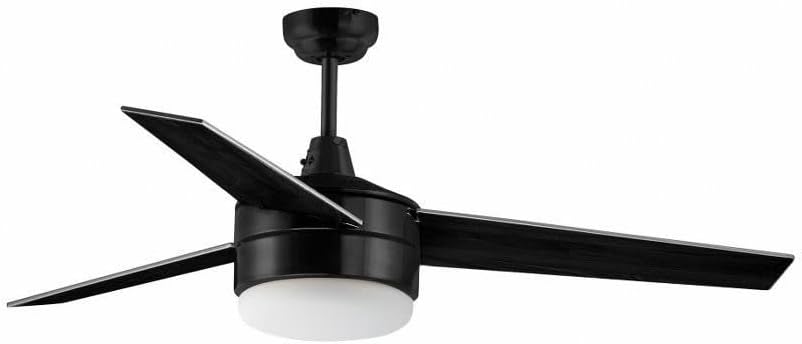
Figure 1: Maxim Trio 89909FTBK Ceiling Fan with Light Kit. This image shows the overall design of the fan, featuring three black blades, a central motor housing, and a light kit with clear glass shades.
2. Safety Information
To reduce the risk of electric shock, fire, or personal injury, always follow these basic safety precautions:
- Read all instructions carefully before beginning installation.
- Ensure the power supply is disconnected at the circuit breaker or fuse box before installation, maintenance, or cleaning.
- All electrical wiring must be performed by a qualified electrician and conform to all national and local electrical codes.
- The fan must be mounted to a structurally sound ceiling joist or outlet box capable of supporting the fan's weight (6.6 lbs).
- Do not bend the blade holders when installing, balancing, or cleaning the fan.
- Keep hands, tools, and other objects clear of the rotating fan blades.
- This product is intended for indoor use only.
3. Package Contents
Verify that all components listed below are included in your package:
- Ceiling Fan Motor Assembly
- Fan Blades (3)
- Light Kit Assembly
- Clear Glass Bulb Covers (2)
- LED JA8 Compliant Bulbs (2)
- Wall Control (or Pull Chain, depending on model variant)
- Mounting Hardware Kit
- Instruction Manual
4. Setup and Installation
Follow these general steps for installing your ceiling fan. Refer to the detailed diagrams in the included instruction manual for specific wiring and mounting procedures.
- Prepare for Installation: Turn off power at the circuit breaker. Clear the work area.
- Mount the Hanging Bracket: Secure the mounting bracket to the ceiling outlet box and ceiling joist. Ensure it is firmly attached and can support the fan's weight.
- Assemble the Downrod (if applicable): Attach the downrod to the motor assembly.
- Perform Electrical Connections: Connect the fan's electrical wires to the household wiring according to local electrical codes. Use wire nuts to secure connections.
- Secure the Fan to the Mounting Bracket: Carefully lift the fan motor assembly and hang it on the mounting bracket.
- Install Fan Blades: Attach the three fan blades to the motor housing using the provided screws. Ensure blades are securely fastened. The blades are reversible, offering a choice between black and silver finishes.
- Install the Light Kit: Connect the light kit wiring to the fan motor assembly. Secure the light kit to the bottom of the fan.
- Insert Bulbs and Glass Covers: Screw in the two LED JA8 compliant bulbs (E26 Medium base). Attach the clear glass bulb covers to the light kit.
- Install Wall Control (if applicable): Follow instructions for wiring and installing the wall control unit.
- Restore Power: Turn power back on at the circuit breaker.

Figure 2: Maxim Trio Ceiling Fan installed in a living space. This image provides a visual reference of the fan's appearance once fully installed on a ceiling.
5. Operating Instructions
Your Maxim Trio ceiling fan can be operated using the included wall control or, if applicable, the pull chains.
5.1 Wall Control Operation
The wall control allows you to adjust the fan speed and turn the light on or off.
- Fan Speed: Use the fan speed buttons to cycle through different speed settings (e.g., Low, Medium, High) or to turn the fan off.
- Light Control: Use the light button to turn the integrated light kit on or off.
5.2 Pull Chain Operation (if applicable)
If your model includes pull chains, they provide an alternative method for control.
- Fan Pull Chain: Pull the chain to cycle through fan speeds (High, Medium, Low, Off).
- Light Pull Chain: Pull the chain to turn the light on or off.
6. Maintenance
Regular maintenance ensures the longevity and optimal performance of your ceiling fan. Always disconnect power before performing any maintenance.
6.1 Cleaning
- Fan Blades: Use a soft, lint-free cloth to gently wipe dust from the fan blades. Do not use abrasive cleaners or solvents.
- Motor Housing: Wipe the motor housing with a soft, damp cloth. Avoid getting moisture into the motor.
- Glass Covers: Remove the glass bulb covers and wash them in warm, soapy water. Rinse thoroughly and dry completely before reattaching.
6.2 Bulb Replacement
This fan uses two LED JA8 compliant bulbs with an E26 Medium base.
- Turn off power to the fan at the circuit breaker.
- Carefully remove the glass bulb cover.
- Unscrew the old bulb and screw in the new E26 Medium base LED bulb.
- Reattach the glass bulb cover.
- Restore power.
7. Troubleshooting
If you experience issues with your fan, consult the following troubleshooting guide.
| Problem | Possible Cause | Solution |
|---|---|---|
| Fan does not start. | No power to the fan; loose wire connections; incorrect wiring. | Check circuit breaker/fuse. Ensure all wire connections are secure. Verify wiring matches instructions. |
| Light does not work. | Loose bulb; faulty bulb; incorrect wiring; light switch off. | Tighten or replace bulbs. Check light kit wiring. Ensure wall control/pull chain is in the 'on' position. |
| Fan wobbles excessively. | Loose blades; unbalanced blades; loose mounting bracket. | Ensure all blade screws are tight. Check for bent blade holders. Verify mounting bracket is securely fastened. Use a balancing kit if necessary. |
| Noisy operation. | Loose screws; motor hum; blades hitting an obstruction. | Check all screws for tightness. Ensure no objects are in the path of the blades. A slight motor hum is normal. |
8. Specifications
| Feature | Detail |
|---|---|
| Brand | Maxim |
| Model Number | 89909FTBK |
| Dimensions (L x W x H) | 52"L x 52"W x 19"H |
| Item Weight | 6.6 Pounds |
| Material | Alloy Steel (Fan Body), Glass (Shade) |
| Color | Black (Fan Body), White (Shade) |
| Control Method | Remote Control, Pull Chain |
| Light Source | E26 Medium Base LED Bulbs (2) |
| Voltage | 120 Volts |
| Wattage (Light) | 9 watts (per bulb) |
| Brightness (Light) | 1800 Lumens (total) |
| Color Temperature (Light) | 3000 Kelvin (Warm White) |
| Mounting Type | Ceiling Mount, Semi Flush Mount |
| Indoor/Outdoor Usage | Indoor |
| Required Assembly | Yes |
| Specification Met | Energy Star, JA8 Compliant (LED bulbs) |
9. Warranty and Support
9.1 Manufacturer's Warranty
This Maxim Trio ceiling fan is covered by a 1-year manufacturer's warranty from the date of purchase. This warranty covers defects in materials and workmanship under normal use. It does not cover damage resulting from improper installation, accident, misuse, abuse, or unauthorized modifications.
9.2 Customer Support
For technical assistance, warranty claims, or replacement parts, please contact Maxim Lighting customer service. Refer to the contact information provided with your purchase documentation or visit the official Maxim Lighting website for support details.