
1. Introduction
Thank you for choosing the Weyfinko W1 Body Worn Camera. This compact and durable device is designed for reliable audio and video recording in various environments, including cycling, meetings, home use, and outdoor activities. It features 1080P HD video, 48MP photos, infrared night vision, and a long battery life, making it an ideal tool for capturing important moments and ensuring personal security.
What's in the Box
The package includes the following components:
- Weyfinko W1 Body Worn Camera
- Long Clip (for versatile attachment)
- Short Clip (for compact attachment)
- Charger
- USB Cable (Type-C)
- User Manual
- 64GB Micro SD Card (pre-installed in the camera)

Image: All components included in the Weyfinko W1 Body Worn Camera package, showing the camera, two clips, charger, USB cable, manual, and 64GB SD card.
2. Product Overview and Features
The Weyfinko W1 Body Worn Camera is designed for ease of use and durability, featuring a compact, lightweight, and anti-slip design. It weighs approximately 99 grams, making it highly portable.

Image: The Weyfinko W1 Body Worn Camera shown from front and back, alongside its 64GB SD card, USB cable, long clip, short clip, and charger.
Key Features:
- 1080P HD Video & 48MP Photos: Captures clear footage and high-resolution images with a 140° wide-angle lens.
- Infrared Night Vision: Equipped with 6 high-intensity infrared LEDs for clear recording in low-light conditions.
- Long Battery Life: A 2100mAh rechargeable battery provides over 12 hours of continuous recording (1080P, IR Off, Screen Off).
- Expandable Storage: Supports external Micro SD cards up to 512GB (64GB card included).
- Durable Design: Extremely sturdy and durable with an anti-slip groove, designed to withstand drops from 2 meters.
- Easy Operation: Silicone material buttons for intuitive control, including pre-recording, post-recording, separate voice recording, one-click fast video recording, and file protection.
- Versatile Attachment: Includes two 180° rotatable clips for mounting on backpack straps, polo shirts, or belts.
Indicator Lights
The camera features 10 different color indicator lights on the top to clearly communicate its current status:
- Green: Standby mode
- Yellow: Sound recording mode
- Red: Video recording mode
- Blue: When charging
- Red Flash Light & Alarm Sound: Indicates a specific alert or emergency.
- Blue Flash Light & Alarm Sound: Indicates a specific alert or emergency.

Image: A detailed view of the top of the camera highlighting the various indicator lights and their corresponding statuses.
Battery Life
The W1 camera is equipped with a powerful high-capacity polymer lithium battery, offering extended recording times. A full charge takes approximately 5 hours and provides over 12 hours of video duration when recording at 1080P with infrared and screen off.
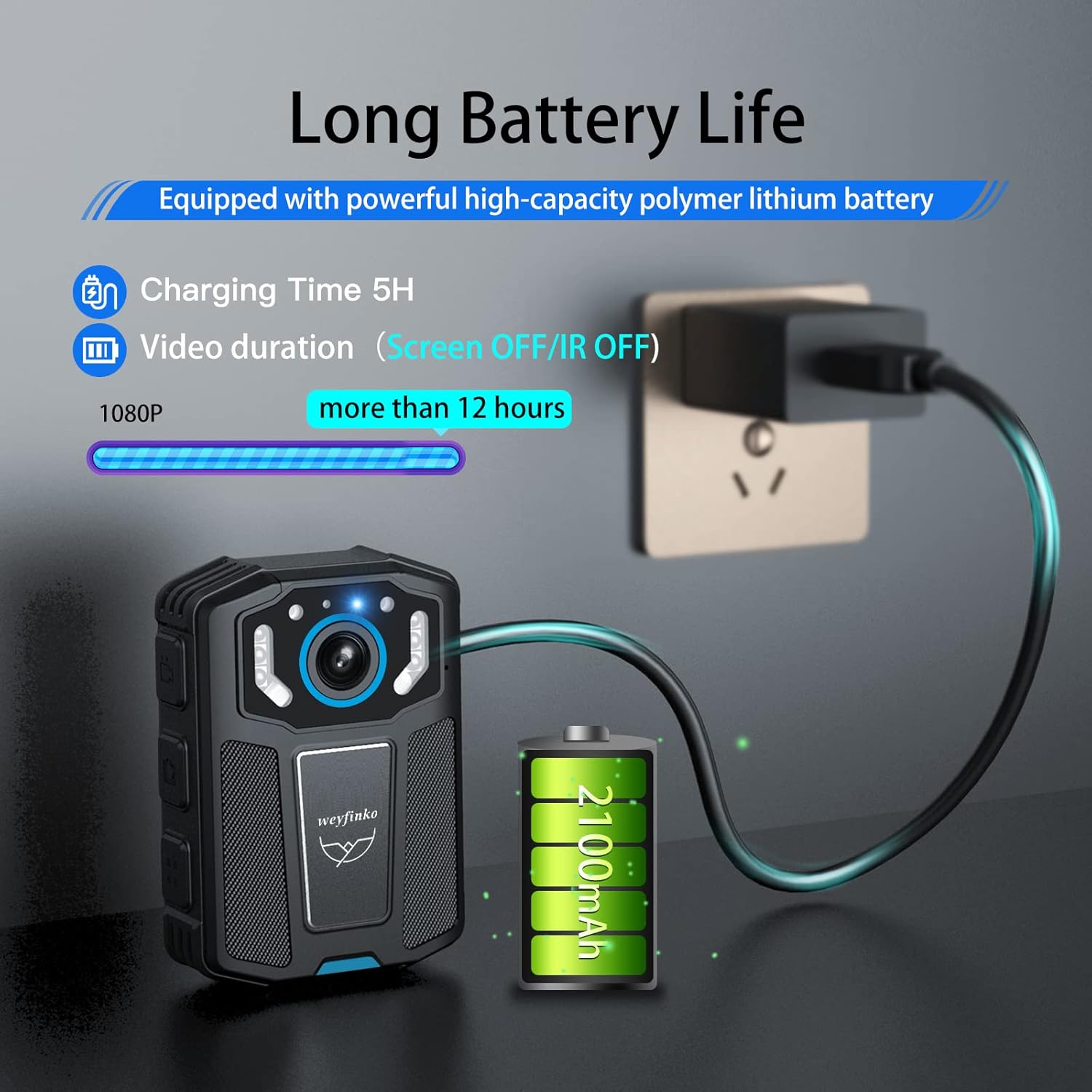
Image: The camera connected to a charger, with an illustration of a battery showing 2100mAh capacity and a bar indicating over 12 hours of 1080P video duration.
IR Night Vision
The built-in 6 high-definition infrared LEDs enable clear night vision recording, ensuring visibility even in complete darkness.

Image: The camera's screen showing a black and white image of a bridge at night, demonstrating its infrared night vision capability.
Compact and Portable Design
Weighing only 99g, the W1 camera is lightweight and features a non-slip contour design with four corners for easy and secure holding.

Image: A scale comparing the camera's weight (99g) to a 100g weight, emphasizing its lightweight and portable design.

Image: A hand holding the compact Weyfinko W1 Body Worn Camera, illustrating its small size and ergonomic design.
Multiple Functions
The W1 camera offers a range of functions to meet diverse recording needs:
- 1080p HD video recording
- Up to 12 hours of continuous recording
- Expandable memory card support up to 512GB
- 2.0-inch HD screen for playback
- 140-degree wide-angle lens for professional-grade coverage
- Two modes of attachment (long and short clips)

Image: An infographic showcasing the camera's various features, including 1080p HD video, 12-hour recording, 512GB expandable storage, 2.0 HD screen, 140-degree wide angle, and two attachment modes.
Professional Design and Development
The Weyfinko R&D team meticulously designs and refines the body camera, paying close attention to every detail, from appearance and 3D structure to electronic device selection, PCBA, and program design. This includes optimizing the lens angle, night vision clarity, product color matching, and simulating user scenarios to ensure a high-quality product.
Video: This video demonstrates the professional design and development process undertaken by the Weyfinko R&D team for their mini body cameras, highlighting attention to detail in structure, electronics, and user experience.
3. Setup
Charging the Camera
- Connect the provided USB Type-C cable to the camera's charging port.
- Connect the other end of the USB cable to the included charger.
- Plug the charger into a standard wall outlet.
- The indicator light will turn blue during charging and turn off when fully charged. A full charge takes approximately 5 hours.
Inserting/Replacing the Micro SD Card
The camera comes with a 64GB Micro SD card pre-installed. If you need to replace it or use a higher capacity card (up to 512GB), follow these steps:
- Ensure the camera is powered off.
- Locate the Micro SD card slot on the side of the camera.
- Gently push the existing card to eject it, or insert the new card with the gold contacts facing down until it clicks into place.
- Always use a genuine memory card with U1 (C10) level or above. For optimal performance, U3 level high-speed memory cards are recommended.

Image: A visual guide demonstrating how to easily replace the memory card and access data, highlighting support for expansion up to 512GB.
Attaching the Camera
The camera comes with two rotatable clips for flexible attachment:
- Long Clip: Offers 180-degree adjustment up and down, suitable for backpack straps or thicker clothing.
- Short Clip: Provides 360-degree rotation, ideal for polo shirts, belts, or other compact attachments.
Choose the clip that best suits your intended use and securely attach it to your clothing or gear.

Image: A collage showing the camera being used in different scenarios like driving, law enforcement, walking, and cycling, illustrating the versatility of the 360-degree rotatable short clip and 180-degree adjustable long clip.
4. Operating Instructions
Power On/Off
- To power on: Press and hold the Power button until the screen lights up.
- To power off: Press and hold the Power button until the camera shuts down.
Video Recording
- From standby mode, press the Video Record button once to start recording. The indicator light will turn red.
- Press the Video Record button again to stop recording.
- The camera supports automatic file overwriting (dashcam function) for continuous recording when the memory card is full.
Photo Capture
- From standby or recording mode, press the Photo button to take a still image.
Audio Recording
- From standby mode, press the Audio Record button to start separate voice recording. The indicator light will turn yellow.
- Press the Audio Record button again to stop audio recording.

Image: A close-up of the camera highlighting the button for one-key emergency recording, showing a microphone icon on the screen.
Night Vision Activation
- The camera automatically activates infrared night vision in low-light conditions due to its photosensitive lamp.
- Ensure the IR LEDs are not obstructed for optimal performance.
Emergency Functions
- One-click Emergency Video: Press the dedicated emergency button to quickly start recording critical incidents.
- File Protection: Files recorded during emergency mode or manually protected will not be overwritten by the dashcam function.
- Red and Blue Light Reminder Mode: Activate this mode for visual alerts or signaling.

Image: A close-up of the camera highlighting the button for one-click emergency video, showing a timestamp on the screen.

Image: A close-up of the camera highlighting the button to activate the one-button red and blue light reminder mode, showing the red and blue lights illuminated.
Playback
- Use the 2-inch display screen to review recorded videos and photos directly on the device.
- Navigate through files using the control buttons below the screen.
Connecting to a Computer
- Connect the camera to your computer using the provided USB Type-C cable.
- The camera will appear as a removable storage device, allowing you to transfer files.
5. Maintenance
- Cleaning: Use a soft, dry cloth to clean the camera body and lens. Avoid abrasive materials or harsh chemicals.
- Storage: Store the camera in a cool, dry place away from direct sunlight and extreme temperatures.
- Battery Care: For long-term storage, charge the battery to about 50% every few months to maintain its health.
- Firmware Updates: Check the official Weyfinko website periodically for any available firmware updates to ensure optimal performance and new features.
6. Troubleshooting
Common Issues and Solutions:
- Camera not turning on: Ensure the battery is charged. Connect the camera to the charger and wait a few minutes before attempting to power on again.
- Recording issues (e.g., corrupted files, camera freezing):
- Ensure a genuine, high-speed Micro SD card (U1/C10 or above, preferably U3) is used.
- Format the Micro SD card regularly (this will erase all data, so back up first).
- Avoid placing the camera near strong magnets or objects emitting strong radio waves, as this can cause product failure or data corruption.
- Poor night vision quality: Ensure the lens and IR LEDs are clean and unobstructed.
- Camera not recognized by computer: Try a different USB port or cable. Ensure the camera is powered on when connected.

Image: A visual representation of the camera's anti-fall design, showing it dropping and highlighting its durable construction.
7. Specifications
| Feature | Detail |
|---|---|
| Brand | weyfinko |
| Model Number | W1Blue 64GB |
| Item Weight | 3.49 ounces (approx. 99g) |
| Product Dimensions | 3.07 x 2.17 x 1.1 inches |
| Color | Black and Blue |
| Video Capture Resolution | 1080p |
| Photo Sensor Technology | CMOS |
| Maximum Focal Length | 30 Millimeters |
| Maximum Aperture | 2.2 Millimeters |
| Flash Memory Type | Micro SD |
| Screen Size | 2 Inches (5.08 cm diagonal) |
| Connectivity Technology | USB |
| Battery Type | 1 Lithium Polymer battery (included) |
| Special Features | Audio recording, black-and-white, compact, date imprint, infrared |

Image: A diagram showing the precise dimensions of the Weyfinko W1 Body Worn Camera: 3.06 inches in height, 2.15 inches in width, and 1 inch in depth.
8. Warranty and Support
For detailed warranty information and customer support, please refer to the official user guide PDF provided with your product or visit the Weyfinko store on Amazon. You can access the digital user guide here.
Important Disclaimer:
- This body camera is designed for daily life use and is only waterproof for general daily exposure, not for snorkeling or submersion.
- Avoid placing the camera near strong magnets or objects that emit strong radio waves, as these can cause product malfunction or damage to recorded data.
- Weyfinko is not responsible for data loss on the product's memory card. Please back up your recorded videos and other data before seeking repair or service.