
Introduction
This instruction manual provides detailed guidance for the installation, usage, and care of your LZYDD anti-slip mouse paste. This product is designed to enhance grip and control for specific ROCCAT Kain gaming mouse models. Please read these instructions carefully before application to ensure optimal performance and longevity of the product.
Product Compatibility
The LZYDD anti-slip mouse paste is specifically designed for the following PC gaming mouse models:
- ROCCAT Kain 100 Aimo RGB
- ROCCAT Kain 120 Aimo RGB
- ROCCAT Kain 122 Aimo RGB
- ROCCAT Kain 200
- ROCCAT Kain 202
Note: This product includes one set of anti-slip paste only. The mouse is not included.
Setup and Installation
Follow these steps to properly apply the anti-slip paste to your compatible ROCCAT Kain gaming mouse.
- Prepare the Mouse Surface: Ensure the surface of your ROCCAT Kain mouse is clean, dry, and free from dust, oils, or any residues. Use a mild cleaning solution and a microfiber cloth if necessary, then allow the mouse to dry completely.
- Identify Paste Pieces: The anti-slip paste set typically includes multiple pre-cut pieces designed to fit specific areas of your mouse, such as the left/right click buttons and side grips.

Image: The LZYDD anti-slip mouse paste pieces, still on their backing paper, ready for application. These pieces are pre-cut to fit specific areas of compatible ROCCAT Kain mice.
- Peel and Align: Carefully peel one piece of the anti-slip paste from its backing paper. Avoid touching the adhesive side with your fingers to maintain its stickiness.
- Apply to Mouse: Align the paste piece with the corresponding area on your mouse. Start by placing one edge down and slowly press the rest of the paste onto the surface, smoothing out any air bubbles as you go.
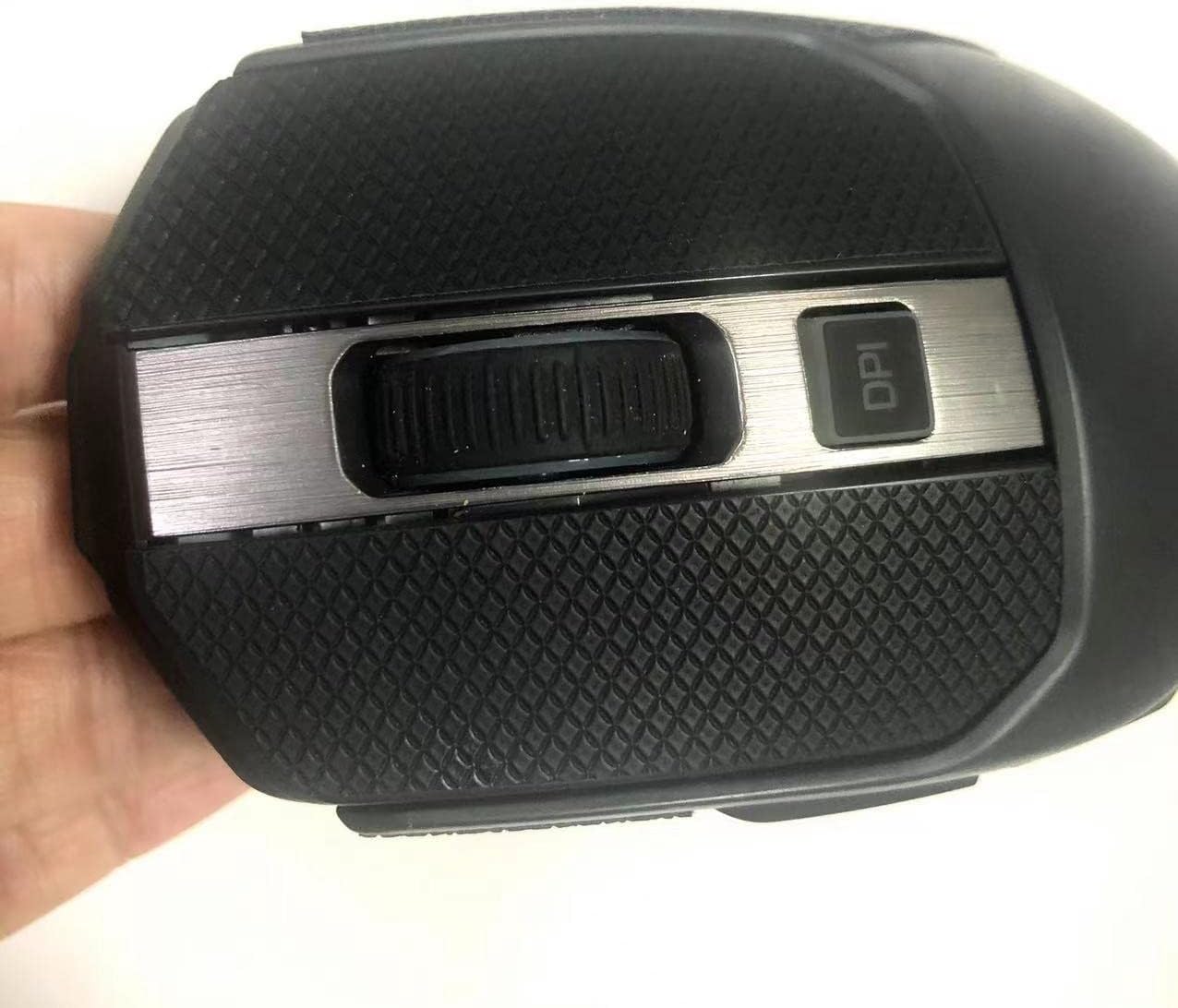
Image: A close-up view of the anti-slip paste applied to the main click buttons and scroll wheel area of a ROCCAT Kain mouse. The textured surface of the paste is visible.

Image: A side profile of a ROCCAT Kain mouse with the anti-slip paste applied to the main click buttons and side grip areas, demonstrating the enhanced tactile surface.
- Secure Adhesion: Once all pieces are applied, gently press down on them for a few seconds to ensure firm adhesion to the mouse surface.
Usage and Benefits
The LZYDD anti-slip mouse paste provides several benefits once applied:
- Enhanced Grip: The textured surface of the paste improves grip, reducing slippage during intense gaming sessions.
- Improved Control: Better grip translates to more precise mouse movements and control.
- Comfort: The material can provide a more comfortable tactile experience.
- Durability: Designed to be waterproof and resistant to wear from regular use.

Image: A ROCCAT Kain mouse, possibly a white model, with the black anti-slip paste applied to its primary contact points, illustrating the aesthetic integration and functional enhancement.
Maintenance
To maintain the performance and appearance of your anti-slip mouse paste:
- Cleaning: Gently wipe the paste surface with a damp cloth to remove dust or grime. Avoid harsh chemicals or abrasive materials, as these can damage the texture and adhesive.
- Avoid Excessive Heat: Prolonged exposure to high temperatures may affect the adhesive properties of the paste.
- Storage: If removing the paste, ensure the mouse surface is clean before storing or reapplying.
Troubleshooting
- Paste Not Sticking Properly:
Ensure the mouse surface was thoroughly cleaned and dry before application. Oils or dust can prevent proper adhesion. Re-clean the surface and reapply if possible, or consider replacing the paste if the adhesive is compromised.
- Air Bubbles Under Paste:
During application, slowly press the paste from one end to the other to minimize air bubbles. If bubbles appear, gently lift the edge closest to the bubble and re-smooth it down.
- Paste Peeling at Edges:
This can occur if the edges were not pressed down firmly during installation or if the mouse surface was not clean. Ensure all edges are securely adhered. Avoid picking at the edges during use.
Specifications
| Product Type | Anti-Slip Mouse Paste |
| Compatibility | ROCCAT Kain 100/120/122 Aimo RGB, ROCCAT Kain 200/202 PC Gaming Mice |
| Material Features | Anti-Slip, Waterproof |
| Color | Black (as per product images) |
| Package Dimensions | 3.86 x 2.91 x 0.28 inches |
| Item Weight | 0.634 ounces |
| Manufacturer | LEASUN |
| Brand | LZYDD |
Disclaimer
LZYDD is not affiliated with ROCCAT. This product is an aftermarket accessory designed for compatibility with specified ROCCAT mouse models. Any damage to the mouse during installation or removal of the paste is the sole responsibility of the user.