
1. Introduction
The BOYADKA PG-107 Home Security Alarm System is a comprehensive DIY wireless security solution designed to protect your home or office. Featuring a 4.3-inch IPS touch screen panel, this system offers intuitive control and seamless integration with smart home platforms. It operates on both 2G GSM and WiFi networks, providing reliable connectivity and alerts without requiring monthly fees or contracts.
Key features include:
- 4.3-inch IPS Touch Screen: Colorful display with a wide viewing angle for easy operation.
- Dual Network Connectivity: Supports 2G GSM and 2.4GHz WiFi networks for robust communication.
- APP & Voice Control: Compatible with Tuya Smart and Smart Life apps, and integrates with Alexa and Google Assistant for voice commands.
- Expandable System: Supports up to 100 defense zones for additional sensors and accessories.
- Emergency Alerts: Features an auto-dialer and siren for immediate notification during break-ins or emergencies.
- No Monthly Fees: Enjoy full control of your security system without recurring costs.
2. Package Contents
Upon unboxing, please verify that all the following components are included:
- 1x Alarm Panel with built-in 4.3-inch display
- 1x Hard-wired Siren
- 1x Wireless PIR Motion Detector
- 4x Wireless Door/Window Sensors
- 2x Wireless Remote Controllers
- 2x RFID Tags
- Power Adapter and USB Cable
- Installation Screws and Anchors
- User Manual

Image: All components included in the BOYADKA PG-107 kit.
3. Setup Guide
3.1 Powering the Alarm Panel
- Connect the power adapter to the alarm panel's power input port.
- Plug the power adapter into a standard electrical outlet. The panel will power on automatically.
- Ensure the panel has a stable power supply. The built-in backup battery provides approximately 8.5 hours of standby power during outages.
Video: Demonstrates powering on the alarm panel and connecting the hard-wired siren.
3.2 App Installation and WiFi Connection
- Download the 'Smart Life' or 'Tuya Smart' app from your smartphone's app store (iOS or Android).
- Register for an account or log in if you already have one.
- On the alarm panel, navigate to the WiFi settings.
- In the app, select 'Add Device' and follow the on-screen instructions to connect the alarm panel to your 2.4GHz WiFi network.

Image: Alarm panel showing network connectivity and smart assistant compatibility.
3.3 Installing Sensors
Each accessory is equipped with adhesive or screws for easy installation.
- Door/Window Sensors: Attach the two parts of the sensor to a door or window frame and the moving part, ensuring they are aligned and close to each other when the door/window is closed.
- PIR Motion Detector: Mount the motion detector in a corner or on a wall where it can cover the desired area. Avoid placing it near heat sources or direct sunlight.
- Hard-wired Siren: Connect the siren to the designated port on the alarm panel. Mount it in a secure location.
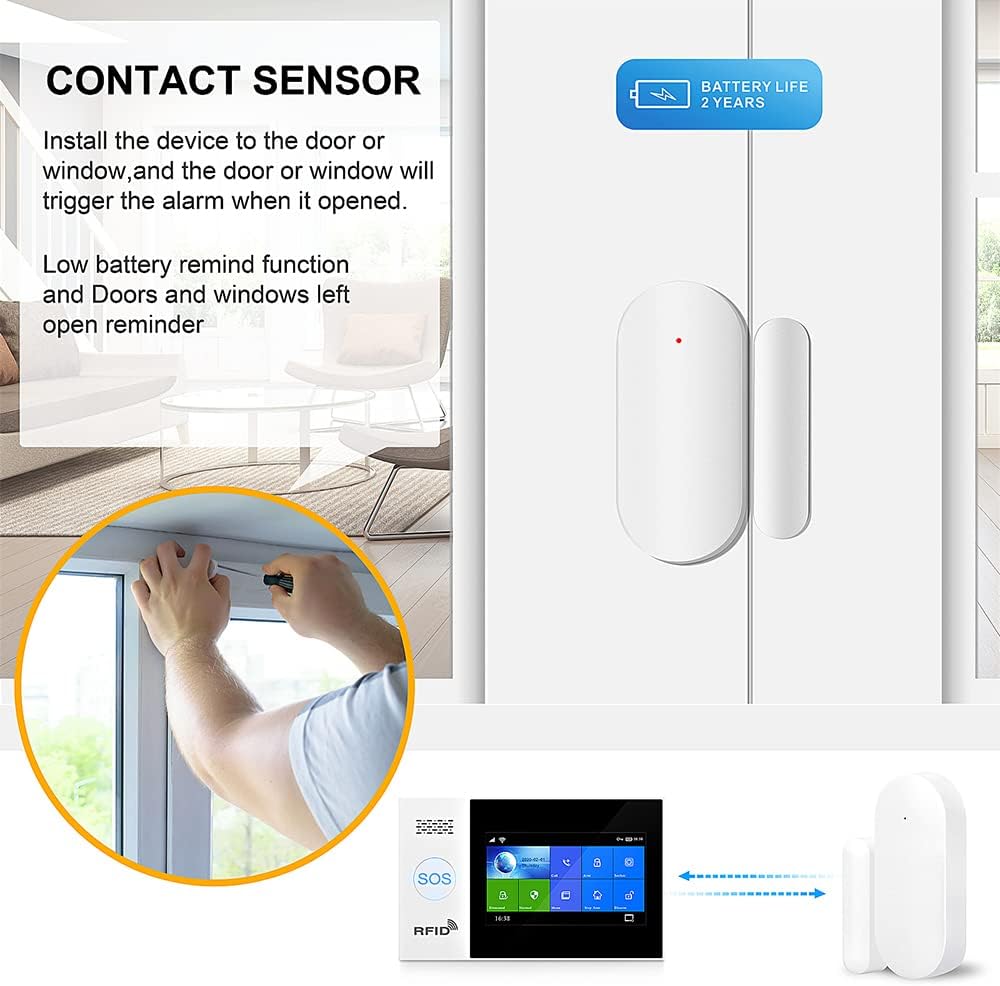
Image: Installation of a door/window contact sensor.

Image: Visual guide for sensor setup and installation.
4. Operating the System
4.1 Arming and Disarming
The system can be armed and disarmed using multiple methods:
- Alarm Panel: Use the touch screen interface to select 'Arm' or 'Disarm'.
- Remote Controllers: Press the designated arm/disarm buttons on the provided remote controls.
- RFID Tags: Tap an RFID tag on the panel's RFID reader to quickly disarm the system.
- Smart Life/Tuya Smart App: Control the system remotely via the mobile application.
- Voice Control: Use voice commands through connected Alexa or Google Assistant devices (e.g., "Alexa, arm the security system").

Image: Various methods for arming and disarming the system.

Image: Voice control integration with smart assistants.
4.2 Emergency Features
- SOS Button: Press the SOS button on the panel or remote to trigger an immediate alarm and notify pre-set emergency contacts.
- Auto Dialer: In case of an alarm, the system can automatically dial pre-programmed phone numbers and send SMS messages.
- Remote Intercom Monitoring: Monitor your home remotely and use the intercom function to deter intruders.

Image: Remote intercom monitoring in action.

Image: Remote monitoring and alerts via smartphone app.
4.3 Customization
- Zone Customization: Customize and rename up to 100 defense zones for easy identification of triggered sensors.
- Entry/Exit Delay: Adjust entry and exit delay timers to suit your needs. Setting entry delay to 0 seconds will trigger the alarm immediately upon detection.
- Language Options: The system supports 10 languages and multinational voice prompts.
5. Maintenance
- Battery Backup: The alarm panel has a built-in lithium polymer battery that provides up to 8.5 hours of standby power in case of external power loss.
- Low Battery Reminders: Sensors will provide low battery reminders, prompting you to replace their batteries.
- Regular Cleaning: Wipe the touch screen and sensor surfaces with a soft, dry cloth. Avoid abrasive cleaners.
- Firmware Updates: Check the Smart Life/Tuya Smart app periodically for any available firmware updates for the alarm panel to ensure optimal performance and security.

Image: System's built-in backup battery feature.
6. Troubleshooting
- WiFi Connection Issues: Ensure your WiFi network is 2.4GHz. The system does not support 5GHz networks. Verify your WiFi password and signal strength.
- SIM Card Not Working: Only 2G T-mobile SIM cards are supported. Ensure the SIM card is correctly inserted and activated.
- Sensors Not Triggering: Check sensor battery levels. Ensure sensors are properly aligned and within range of the alarm panel.
- False Alarms: Adjust motion detector sensitivity if necessary. Ensure door/window sensors are securely mounted and not easily dislodged.
- App Connectivity: Ensure your phone has an active internet connection and the Smart Life/Tuya Smart app is up to date.
7. Specifications
| Feature | Detail |
|---|---|
| Brand | BOYADKA |
| Model Number | PG-107 |
| Color | White |
| Power Source | Corded Electric |
| Compatible Devices | Smartphone (Alexa, Google Assistant) |
| Dimensions (L x W x H) | 5.91 x 3.94 x 1.18 inches |
| Connectivity Technology | Wireless, WiFi (2.4GHz only), GSM (2G T-mobile SIM only) |
| Installation Type | Screw-In |
| Alert Type | Motion |
| Control Method | App, Touch Screen, Remote, RFID |
| Recommended Uses | Home Security |
| Sensor Technology | Wireless |
| Item Weight | 1.5 pounds |
| Batteries | 1 Lithium Polymer battery (included) |
8. Warranty and Support
For warranty information and technical support, please refer to the documentation included in your product packaging or visit the official BOYADKA website. You can also contact customer service through the Smart Life or Tuya Smart app for assistance.