
Introduction
The Lococo UHF Wireless Headset Microphone System is designed for clear and stable audio transmission in various applications such as teaching, tour guiding, fitness instruction, and public address systems. This versatile microphone offers both headset and handheld functionality, an LED digital display for easy monitoring, and a long-lasting rechargeable battery.
What's in the Box

Image: All components included in the product packaging.
- Transmitter with Microphone (Headset) x 1
- 6.35mm Receiver x 1
- 3.5mm Adapter x 1
- USB Charging Cable x 1
- User Manual x 1
Product Features
LED Digital Display

Image: The LED screen on the microphone transmitter displays current frequency, volume level, and remaining battery charge.
The integrated LED digital display provides real-time information on frequency, volume, and battery status. This allows for timely adjustments to prevent interference, control audio output, and monitor power levels.
UHF Wireless Technology & Range

Image: Illustration of the microphone's effective wireless range, extending up to 165 feet (50 meters) in open environments.
Utilizing UHF frequency conversion technology, the system ensures a stable wireless connection up to 165 feet (50 meters) in open areas. It supports up to 40 sets of microphones operating simultaneously on different frequency bands without interference.
Headset & Handheld 2-in-1 Design

Image: The microphone can be used as a traditional headset or easily converted into a handheld microphone by detaching it from the head bracket.
This microphone offers dual functionality, allowing it to be used as a comfortable headset or converted into a handheld microphone by removing it from the head bracket. It features a high-sensitivity condenser microphone for clear sound quality.
Rechargeable Battery & Charging

Image: The system features a built-in 400 mAh rechargeable lithium-ion battery, offering 5-6 hours of working time after a 2-hour charge.
Equipped with a 400 mAh rechargeable lithium-ion battery, the microphone provides approximately 5-6 hours of working time on a full charge. The included dual-interface USB charging cable allows both the transmitter and receiver to be charged simultaneously, with a full charge achieved in about 2 hours.
Compatibility

Image: The microphone system is compatible with various audio equipment including loudspeakers, amplifier equipment, and PA sound systems. It is not compatible with mobile phones, Macbooks, or laptops.
The system includes 3.5mm to 6.35mm adapters, making it compatible with a wide range of audio equipment such as loudspeakers, amplifier equipment, and PA sound systems. Note: This system does not support mobile phones, Macbooks, or laptops.
Setup Guide
Assembly
Video: Unboxing and assembly of the Lococo UHF Wireless Headset Microphone System, demonstrating how to attach the microphone transmitter to the headset frame.
- Align the microphone transmitter with the buckle on the headset frame.
- Push the transmitter firmly into place until it clicks, ensuring a secure connection.
Initial Pairing and Connection
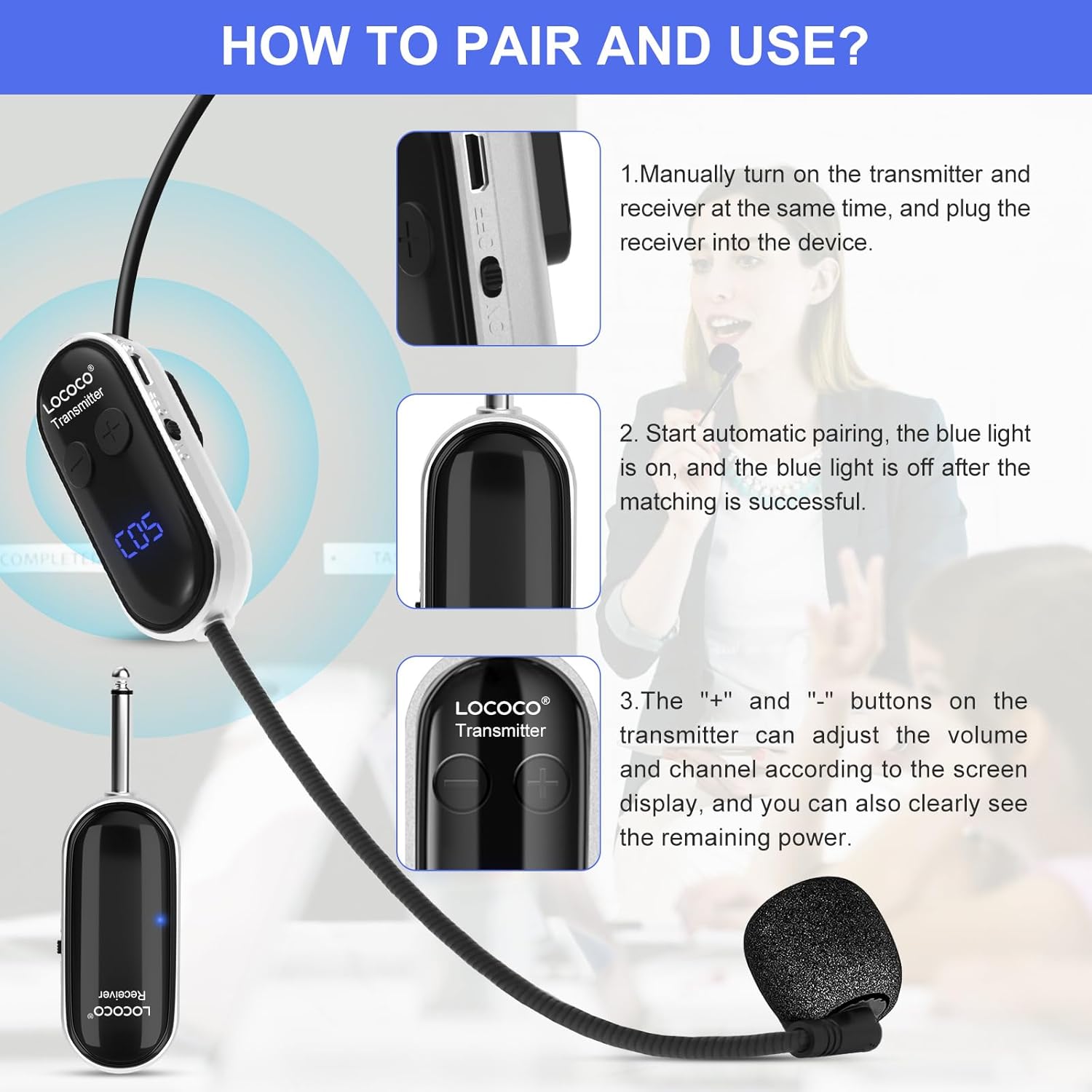
Image: Visual instructions for the automatic pairing process between the microphone transmitter and receiver.
- Ensure both the microphone transmitter and receiver are fully charged.
- Turn on the microphone transmitter and the receiver simultaneously.
- The devices will automatically attempt to connect. The blue light on both units will flash during pairing and become solid once a successful connection is established.
- Plug the receiver into the appropriate input jack (3.5mm or 6.35mm using the adapter) of your audio device (e.g., PA system, amplifier).
Operating Instructions
Power On/Off
To power on or off the microphone transmitter and receiver, locate the power switch on each unit and slide it to the ON or OFF position. It is recommended to turn off the devices after use to conserve battery life.
Adjusting Volume and Frequency
The microphone transmitter features '+' and '-' buttons. These buttons allow you to adjust the microphone's volume level and change the operating frequency. The current volume (indicated by 'U' followed by a number) and frequency (indicated by 'C' followed by a number) are displayed on the LED screen.
Switching Between Headset and Handheld Modes
To switch from headset to handheld mode, gently detach the microphone transmitter from the headset frame. To reattach, align the transmitter with the buckle and push until it secures into place.
Maintenance
- Cleaning: Use a soft, dry cloth to clean the microphone and receiver. Avoid using abrasive cleaners or solvents.
- Storage: Store the system in a cool, dry place away from direct sunlight and extreme temperatures.
- Battery Care: To prolong battery life, avoid fully discharging the battery frequently. Charge the device regularly, even if not in use for extended periods.
- Handling: Handle the microphone and receiver with care to prevent damage from drops or impacts.
Troubleshooting
No Sound or Intermittent Audio
- Reconnection: If the devices do not connect successfully, try the following steps:
- Turn off both the receiver and transmitter.
- Turn on the transmitter. The blue light will be on. Long press the '+' button until the blue light flashes.
- Immediately turn on the receiver and wait for the connection.
- The blue lights on both the transmitter and receiver will stop flashing, indicating a successful connection.
- Battery Level: Ensure both the transmitter and receiver are sufficiently charged. Low battery can cause connection issues or poor audio quality.
- Distance/Obstacles: Maintain the microphone within the effective range (up to 165 ft/50m in open areas) and minimize obstacles between the transmitter and receiver.
- Interference: If experiencing interference, try changing the frequency using the '+' or '-' buttons on the transmitter.
- Volume Settings: Check the volume level on both the microphone transmitter and the connected audio device.
- Compatibility: Verify that your audio device is compatible with the microphone system. Remember, it does not support mobile phones, Macbooks, or laptops.
Distorted Sound
- Volume Too High: Reduce the volume on the microphone transmitter or the connected audio device.
- Proximity to Speaker: Avoid placing the microphone too close to the speaker to prevent feedback.
Specifications
| Feature | Specification |
|---|---|
| Model Number | LC-U13A |
| Power Source | Battery Powered |
| Battery Type | 1 Lithium Polymer battery (400 mAh) |
| Charging Time | Approx. 2 hours |
| Working Time | Approx. 5-6 hours |
| Connectivity Technology | UHF Wireless |
| Frequency Range | 550.5MHz-589.5Mhz |
| Number of Channels | 40 |
| Wireless Range | 165 ft (50m) in open area |
| Noise Level | 105 dB |
| Microphone Form Factor | Handheld/Headset |
| Polar Pattern | Unidirectional |
| Material | Plastic |
| Item Weight | 5.3 ounces |
| Product Dimensions | 6.97 x 5.5 x 1.54 inches |
Warranty and Support
All Lococo products come with a one-year warranty. Should you encounter any quality concerns or require assistance with your product, please contact the Lococo after-sales team for timely support and help. Contact information can typically be found on the product packaging or the official Lococo website.
Additional Resources
Video: A brief overview of the UHF Wireless Headset Microphone System, highlighting its key features and applications.