Nakamichi TW1128 True Wireless Earbuds User Manual
Model: TW1128
Introduction
Thank you for choosing the Nakamichi TW1128 True Wireless Earbuds. This manual provides essential information for setting up, operating, and maintaining your new earbuds. Please read it thoroughly before use to ensure optimal performance and longevity of your device.
Safety Information
General Safety Guidelines
Do not disassemble or modify the earbuds or charging case.
Keep the device away from extreme temperatures, humidity, and liquids.
Avoid prolonged exposure to high volume levels to prevent hearing damage.
Clean the earbuds and charging case with a soft, dry cloth only.
Dispose of the device responsibly according to local regulations.
Package Contents
Verify that all items are present in the package:
Nakamichi TW1128 True Wireless Earbuds (Left and Right)
Charging Case
USB Charging Cable
Ear Cushions (various sizes)
User Manual (this document)
Product Overview
Familiarize yourself with the components of your Nakamichi TW1128 earbuds and charging case.
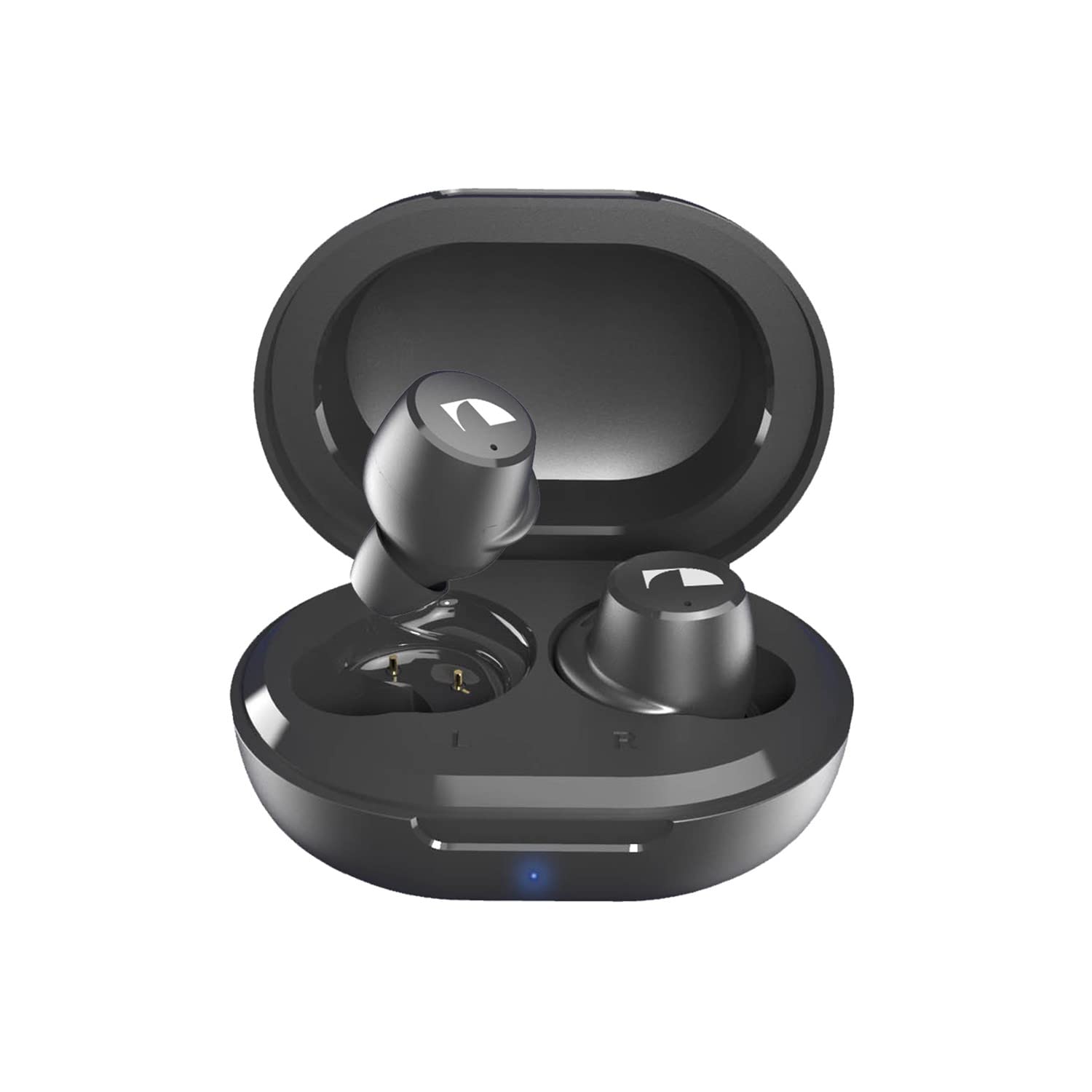
Image 1: Nakamichi TW1128 True Wireless Earbuds and Charging Case. The image displays the black earbuds placed inside their compact black charging case, with the lid open, showcasing their in-ear design.
Earbud Components
Touch Control Area: For managing playback, calls, and voice assistant.
LED Indicator: Shows pairing status, battery level, and charging status.
Microphone: For calls and voice commands.
Ear Tip: Replaceable silicone tips for comfort and sound isolation.
Visual aid: An illustration or photograph showing the individual earbud with labels pointing to the touch control area, LED indicator, microphone, and ear tip would be beneficial here.
Charging Case Components
Charging Port: USB-C port for charging the case.
Case LED Indicators: Shows the charging status and battery level of the case.
Earbud Charging Slots: Magnetic slots to hold and charge the earbuds.
Visual aid: An illustration or photograph showing the charging case with labels pointing to the charging port, LED indicators, and earbud charging slots would be beneficial here.
Setup
1. Charging the Earbuds and Case
Initial Charge: Before first use, fully charge both the earbuds and the charging case.
Charging the Case: Connect the provided USB charging cable to the charging port on the case and to a USB power source (e.g., computer, wall adapter). The case LED indicators will show charging progress.
Charging the Earbuds: Place the earbuds into their respective charging slots inside the case. Ensure they are correctly seated. The earbud LED indicators will light up to confirm charging. The earbuds will charge automatically when placed in the case, provided the case has power.
Visual aid: An illustration showing the charging case connected to a power source and earbuds placed inside the case would be helpful.
2. Pairing with a Bluetooth Device
Power On: Open the charging case. The earbuds will automatically power on and enter pairing mode. The LED indicator on one earbud will flash, indicating it is ready to pair.
Activate Bluetooth: On your device (smartphone, tablet, laptop), enable Bluetooth.
Select Device: In your device's Bluetooth settings, search for available devices. Select "Nakamichi TW1128" from the list.
Confirm Pairing: Once connected, the earbud LED indicators will stop flashing or change to a steady light (refer to specific LED behavior in the specifications section if available). You will hear an audible confirmation.
Reconnect: After initial pairing, the earbuds will automatically connect to the last paired device when removed from the charging case and Bluetooth is enabled on the device.
Visual aid: A diagram illustrating the Bluetooth pairing process on a smartphone screen would be helpful.
Operating Instructions
Wearing the Earbuds
Choose the ear tips that provide the best fit and seal for optimal sound quality and comfort. Gently insert each earbud into your ear canal and rotate slightly until it feels secure.
Visual aid: An illustration demonstrating the correct way to wear the earbuds would be helpful.
Touch Controls
The Nakamichi TW1128 earbuds feature touch-sensitive controls on each earbud. The functions may vary slightly between the left and right earbud.
Action
Function
Single Tap (Left/Right)
Play/Pause Music, Answer/End Call
Double Tap (Right)
Next Track
Double Tap (Left)
Previous Track
Triple Tap (Right)
Volume Up
Triple Tap (Left)
Volume Down
Long Press (2 seconds)
Reject Call, Activate Voice Assistant
Visual aid: A diagram showing the touch control area on an earbud and illustrating the different tap gestures would be helpful.
Power On/Off
Power On: The earbuds automatically power on when removed from the charging case.
Power Off: Place the earbuds back into the charging case and close the lid. They will automatically power off and begin charging.
Manual Power Off (if needed): If not in the case, long press the touch control area on both earbuds for approximately 5 seconds until the LED indicator turns off.
Maintenance
Cleaning
Use a soft, dry, lint-free cloth to clean the earbuds and charging case.
Do not use abrasive cleaners, alcohol, or chemical solvents.
Gently remove any earwax or debris from the ear tips and speaker grilles using a small, clean brush or cotton swab.
Storage
When not in use, always store the earbuds in their charging case to protect them and keep them charged.
Store the device in a cool, dry place, away from direct sunlight and extreme temperatures.
Battery Care
To prolong battery life, avoid fully discharging the earbuds and charging case frequently.
Charge the device regularly, even if not used for extended periods.
Troubleshooting
If you encounter issues with your Nakamichi TW1128 earbuds, refer to the following common solutions:
Earbuds Not Pairing / Only One Earbud Playing
Ensure both earbuds are charged.
Place both earbuds back into the charging case, close the lid, wait a few seconds, then open the lid and remove them.
On your device, forget or unpair "Nakamichi TW1128" from the Bluetooth settings.
Turn off Bluetooth on your device, then turn it back on.
Repeat the pairing process as described in the "Pairing with a Bluetooth Device" section.
No Sound
Check the volume level on both your connected device and the earbuds.
Ensure the earbuds are properly connected to your device via Bluetooth.
Try playing audio from a different application or source.
Charging Issues
Verify that the charging cable is securely connected to both the case and the power source.
Ensure the power source is active.
Check for any debris in the charging port of the case or on the charging contacts of the earbuds.
Try using a different USB charging cable or power adapter.
Specifications
The following are the technical specifications for the Nakamichi TW1128 True Wireless Earbuds:
Feature
Detail
Model Name
TW1128
Brand
Nakamichi
Connectivity Technology
Wireless (Bluetooth)
Ear Placement
In Ear
Form Factor
In Ear
Control Type
Touch Control
Audio Driver Type
Dynamic Driver
Compatible Devices
Laptops, Smart Speakers, Smartphones, Tablets
Additional Features
Touch Control, Wireless, Multipoint Pairing
Warranty and Support
Nakamichi products are designed for reliability and performance. For warranty information and customer support, please refer to the warranty card included in your package or visit the official Nakamichi website. Keep your proof of purchase for warranty claims.
Note: Specific warranty terms and conditions may vary by region.
Documents - Nakamichi – TW1128
no relevant documents
Ask a question about this manual
Ask about setup, troubleshooting, compatibility, parts, safety, or missing instructions. Manuals+ will review the question and use this page’s manual context to help answer it.