
1. Introduction
This manual provides essential instructions for the proper installation, operation, maintenance, and troubleshooting of your ELOMILE HA40101V4-D26C-999 40mm Cooling Fan. This fan is designed to provide efficient cooling for compatible desktop computer systems and other electronic devices requiring a 12V, 0.8W cooling solution. Please read this manual thoroughly before use to ensure safe and optimal performance.
2. Safety Instructions
- Electrical Safety: Ensure the power source matches the fan's specified voltage (12V). Incorrect voltage can damage the fan or connected equipment.
- Power Disconnection: Always disconnect power to the device before installing, removing, or performing any maintenance on the fan.
- Handling: Handle the fan by its frame. Avoid touching the fan blades directly, especially when it is powered on, to prevent injury or damage to the blades.
- Installation Environment: Install the fan in a dry environment, away from liquids and excessive dust.
- Ventilation: Ensure proper airflow around the fan to prevent overheating of the fan itself and the components it is cooling.
- Children and Pets: Keep the fan and its components out of reach of children and pets.
3. Setup and Installation
Follow these steps to properly install your cooling fan:
- Prepare the Installation Area: Ensure the device where the fan will be installed is powered off and disconnected from its power source. Identify the mounting location for the 40x40x10mm fan.
- Mount the Fan: Align the fan's mounting holes with the corresponding holes on your device's chassis or component. Secure the fan using appropriate screws (not included) through the four corner holes. Ensure the fan is oriented correctly for desired airflow (intake or exhaust).
- Connect Power: Locate the 3-pin power connector on the fan. Connect this connector to a compatible 3-pin fan header on your device's motherboard or power supply. Ensure the connector is fully seated and correctly oriented to avoid damage.
- Verify Connections: Double-check all connections to ensure they are secure before restoring power to the device.
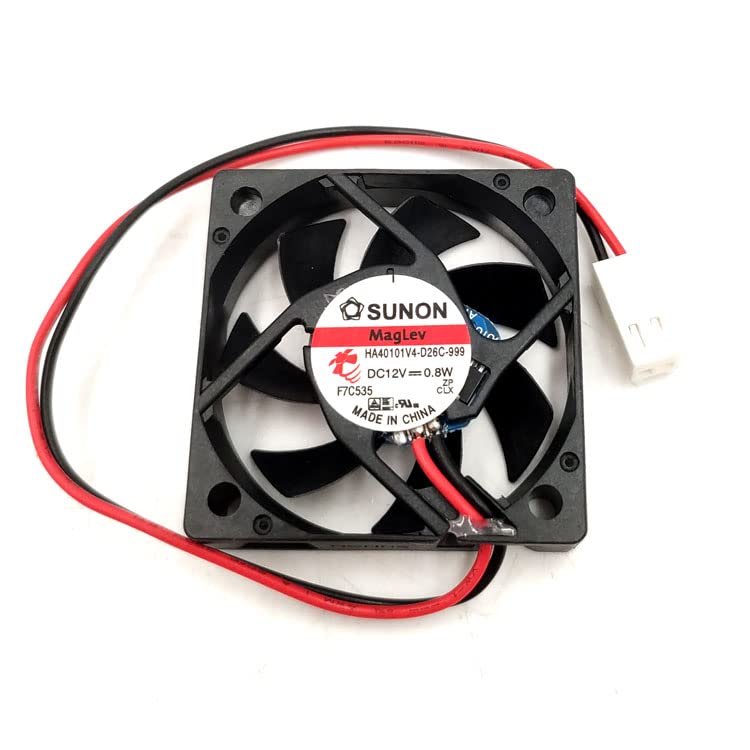
Image 1: The ELOMILE HA40101V4-D26C-999 40mm cooling fan, showing its black frame, blades, and the red and black wires leading to a white 3-pin connector. This image illustrates the fan's physical appearance and its power connection interface.
4. Operating Instructions
Once properly installed and connected, the ELOMILE HA40101V4-D26C-999 cooling fan operates automatically when power is supplied to its 3-pin header. The fan is designed for continuous operation to maintain optimal temperatures within your system.
- Power On: After installation, power on your device. The fan should begin spinning immediately, providing airflow.
- Monitoring: Periodically check that the fan is spinning and providing adequate airflow. Listen for any unusual noises that might indicate an issue.
- Airflow Direction: The fan typically has an arrow on its side indicating the direction of airflow. Ensure this matches your cooling requirements.
5. Maintenance
Regular maintenance helps ensure the longevity and efficiency of your cooling fan.
- Dust Removal: Over time, dust can accumulate on the fan blades and frame, reducing cooling efficiency and potentially causing noise. Periodically, with the power disconnected, use compressed air or a soft brush to gently remove dust from the fan blades and motor housing.
- Inspection: Regularly inspect the fan for any signs of damage, such as cracked blades or loose wiring. Ensure the fan is securely mounted.
- Lubrication: This fan is designed to be maintenance-free regarding lubrication. Do not attempt to lubricate the fan bearings.
6. Troubleshooting
If you encounter issues with your cooling fan, refer to the following common problems and solutions:
| Problem | Possible Cause | Solution |
|---|---|---|
| Fan does not spin | No power, incorrect connection, faulty fan header, or fan failure. | Ensure power is supplied to the device. Check that the 3-pin connector is securely and correctly plugged into the fan header. Try connecting the fan to a different fan header if available. If the issue persists, the fan may be faulty. |
| Fan makes unusual noise | Dust accumulation, obstruction, loose mounting, or bearing wear. | Disconnect power and clean the fan blades and housing. Check for any cables or objects obstructing the blades. Ensure the fan is securely mounted. If the noise persists and is a grinding sound, the bearings may be worn, indicating a need for replacement. |
| Insufficient cooling | Blocked airflow, incorrect fan orientation, or dust accumulation. | Ensure there are no obstructions blocking the fan's intake or exhaust. Verify the fan is oriented to push air in the desired direction. Clean any dust from the fan and surrounding components. |
7. Specifications
| Feature | Detail |
|---|---|
| Model | HA40101V4-D26C-999 |
| Brand | ELOMILE |
| Dimensions (L x W x H) | 40mm x 40mm x 10mm (1.57"L x 0.39"W x 1.57"H) |
| Voltage | 12 Volts |
| Power | 0.8 Watts |
| Power Connector Type | 3-Pin |
| Cooling Method | Forced Air |
| Compatible Devices | Desktop |
| Material | Copper (internal components) |
| UPC | 768637018712 |
| Manufacturer | shanxiboruiguangnashangmaoyouxiangongsi |
8. Warranty Information
Specific warranty terms and conditions for the ELOMILE HA40101V4-D26C-999 cooling fan are typically provided by the retailer or manufacturer at the time of purchase. Please retain your proof of purchase for any warranty claims. For detailed warranty information, refer to the documentation included with your purchase or contact the seller directly.
9. Customer Support
If you have any questions, require assistance with installation, or encounter issues not covered in this manual, please contact your seller or the manufacturer's customer support. They are equipped to provide further guidance and support.
For general inquiries, you may refer to the contact information provided by your point of purchase.