
Introduction
Thank you for purchasing the Furniture of America Almly Modern Metal Gaming Desk. This manual provides detailed instructions for assembly, operation, maintenance, and troubleshooting to ensure safe and optimal use of your new desk. Please read this manual thoroughly before beginning assembly and retain it for future reference.
Safety Information
WARNING: Failure to follow these safety instructions could result in injury or damage to the product.
- Always assemble the desk on a soft, clean surface to prevent scratches.
- Ensure all parts are present before assembly. If any parts are missing or damaged, do not proceed with assembly. Contact customer support.
- Do not overtighten screws during assembly, as this may damage the threads or components.
- Keep small parts away from children and pets to prevent choking hazards.
- Do not stand or sit on the desk. The desk is designed for holding computer equipment and accessories.
- Distribute weight evenly across the desktop. Do not exceed the maximum weight capacity of 150 lbs.
- Periodically check all connections and fasteners to ensure they remain tight.
- This product contains chemicals known to the State of California to cause cancer and birth defects or other reproductive harm (Proposition 65 Warning).
Package Contents
Carefully unpack all components and verify that you have received the following items:
- 1 x Gaming Desk Frame and Desktop Components
- 1 x PC Mouse Pad (removable)
- 1 x Game Handle Rack with USB Ports
- 1 x Rotatable Cup-holder
- Assembly Hardware (screws, bolts, Allen wrench, etc.)
- Assembly Guide (separate document, if applicable)

Image: Overview of the Furniture of America Almly Modern Metal Gaming Desk components before assembly.
Setup and Assembly
Assembly of the Almly Gaming Desk requires two adults and approximately 60 minutes. Please follow the steps below carefully. Refer to the separate assembly guide included in your package for detailed diagrams.
- Prepare the Area: Clear a spacious, flat area. Lay down a blanket or cardboard to protect the desk components and your floor from scratches.
- Assemble the Frame: Attach the horizontal support beams to the vertical leg frames using the provided hardware. Ensure all connections are secure but do not fully tighten until the entire frame is assembled.
- Attach the Desktop: Carefully place the desktop onto the assembled frame. Align the pre-drilled holes on the desktop with the holes on the frame. Secure the desktop using the appropriate screws. Now, fully tighten all screws on the frame and desktop.
- Install Accessories:
- Attach the game handle rack with USB ports to the designated area on the desk.
- Install the rotatable cup-holder into its slot.
- Place the removable PC mouse pad onto the desktop.
- Final Check: Ensure all screws are tightened, and the desk is stable. Adjust the leveling feet on the bottom of the legs if necessary to prevent wobbling.
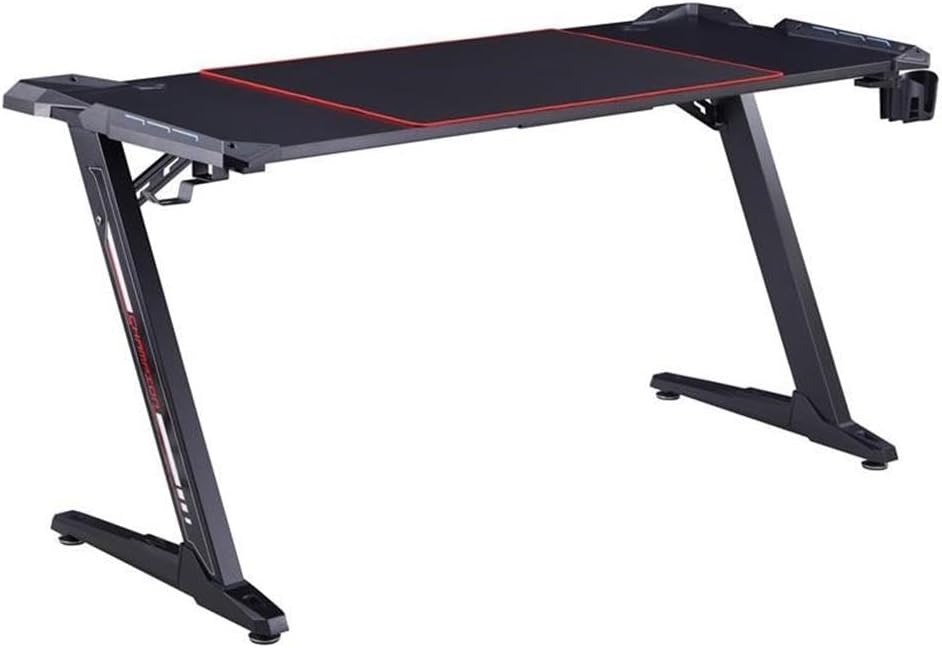
Image: The fully assembled Furniture of America Almly Modern Metal Gaming Desk, ready for use.
Operating Instructions
Your Almly Gaming Desk is designed for convenience and functionality. Here’s how to use its key features:
- PC Mouse Pad: The large, removable mouse pad covers a significant portion of the desktop, providing a smooth surface for mouse movement and protecting the desk from wear. It can be removed for cleaning or if not desired.
- Game Handle Rack with USB Ports: This rack provides a convenient storage solution for your gaming controllers and includes integrated USB ports for charging devices or connecting peripherals. Connect the desk's power cable to a wall outlet to activate the USB ports.
- Rotatable Cup-holder: The cup-holder can be rotated to extend out from under the desk for use or tucked away when not needed, saving space and preventing accidental spills on your equipment.
Maintenance
Proper care will extend the life and appearance of your gaming desk:
- Cleaning: Wipe the desk surfaces with a soft, damp cloth. Avoid harsh chemicals or abrasive cleaners, which can damage the finish. For the mouse pad, follow its specific cleaning instructions, typically a gentle hand wash.
- Hardware Check: Periodically (every 3-6 months) inspect all screws and bolts to ensure they are tight. Retighten if necessary to maintain stability.
- Spills: Immediately wipe up any spills to prevent damage to the desktop or electrical components.
Troubleshooting
If you encounter any issues with your desk, refer to the following common problems and solutions:
| Problem | Possible Cause | Solution |
|---|---|---|
| Desk is wobbly. | Loose screws or uneven floor. | Ensure all assembly screws are tightened. Adjust the leveling feet on the bottom of the desk legs to compensate for uneven flooring. |
| USB ports are not working. | Desk not connected to power, or faulty connection. | Verify that the desk's power cable is securely plugged into a functional wall outlet. Check the connection between the USB hub and the desk's power source. |
| Parts do not fit during assembly. | Incorrect orientation or manufacturing defect. | Double-check the assembly guide for correct part orientation. Do not force parts. If parts are genuinely defective, contact customer support for replacements. |
Specifications
| Feature | Detail |
|---|---|
| Model Number | IDF-7032-BK |
| Brand | Furniture of America |
| Dimensions (W x D x H) | 67.52" x 25.28" x 30.91" |
| Weight Capacity | 150 lbs (68 kg) |
| Product Weight | 55 lbs (25 kg) |
| Materials | Steel frame, Metal top |
| Color | Black |
| Assembly Required | Yes |
| Special Features | Integrated USB ports, Rotatable cup-holder, Large removable mouse pad |

Image: Detailed dimensions of the Almly Modern Metal Gaming Desk.
Warranty and Support
Warranty: This Furniture of America Almly Modern Metal Gaming Desk is covered by a 1-Year Manufacturer Limited Replacement Parts Warranty from the date of purchase. This warranty covers manufacturing defects in materials and workmanship. It does not cover damage resulting from improper assembly, misuse, abuse, accident, or normal wear and tear.
Customer Support: For warranty claims, missing parts, or any questions regarding your product, please contact Furniture of America customer service. Refer to the contact information provided in your purchase documentation or visit the official Furniture of America website for support details.
For more information, visit the Furniture of America Store.