
1. Safety Instructions
Please read these instructions carefully before using the product and retain them for future reference. Improper use may result in electric shock, fire, or other hazards.
- Do not expose the lamp to rain or moisture.
- Do not disassemble or modify the product.
- Use only the specified power adapter (5V).
- Keep the product away from heat sources and direct sunlight.
- Ensure the lamp is placed on a stable, flat surface.
- Avoid placing metal objects on the wireless charging pad, as this may cause overheating.
2. Product Overview
The Wanjiaone WR08 is a versatile bedside lamp featuring adjustable lighting, a 10W wireless charging pad, a USB charging port, and an integrated time display.

Figure 2.1: Wanjiaone WR08 Bedside Lamp with a smartphone wirelessly charging.
Key Features:
- Touch Control Lamp: Easily adjust brightness and color temperature.
- 10W Wireless Charger: Conveniently charge compatible smartphones.
- USB Charging Port: Additional charging option for other devices.
- Time Display: Integrated digital clock for convenience.
- 3 Color Modes: Switch between cool white (6000K), natural white (4500K), and warm white (3000K).
- Stepless Dimming: Adjust brightness from 10% to 100%.

Figure 2.2: Overview of the lamp's main functionalities including wireless charging, USB port, touch control, clock, dimming, eye protection, and color modes.
3. Setup
3.1 Unpacking
Carefully remove all components from the packaging. Ensure all parts are present: the lamp unit and power adapter.
3.2 Connecting Power
- Connect the power adapter cable to the DC input port on the back of the lamp base.
- Plug the power adapter into a standard wall outlet.
- The time display will illuminate, indicating the lamp is powered on.
3.3 Setting the Time
The lamp features a digital clock display. To set the time:

Figure 3.1: Time display and adjustment buttons.
- Locate the two small buttons next to the time display on the lamp base.
- Press the top button (labeled 'Stunde anpassen' in Figure 3.1) to adjust the hour. Each press advances the hour by one.
- Press the bottom button (labeled 'Minute einstellen' in Figure 3.1) to adjust the minute. Each press advances the minute by one.
- The clock operates in a 24-hour format.
4. Operating Instructions
4.1 Lamp Operation (Touch Control)
The lamp is controlled by a touch-sensitive area on the lamp arm.
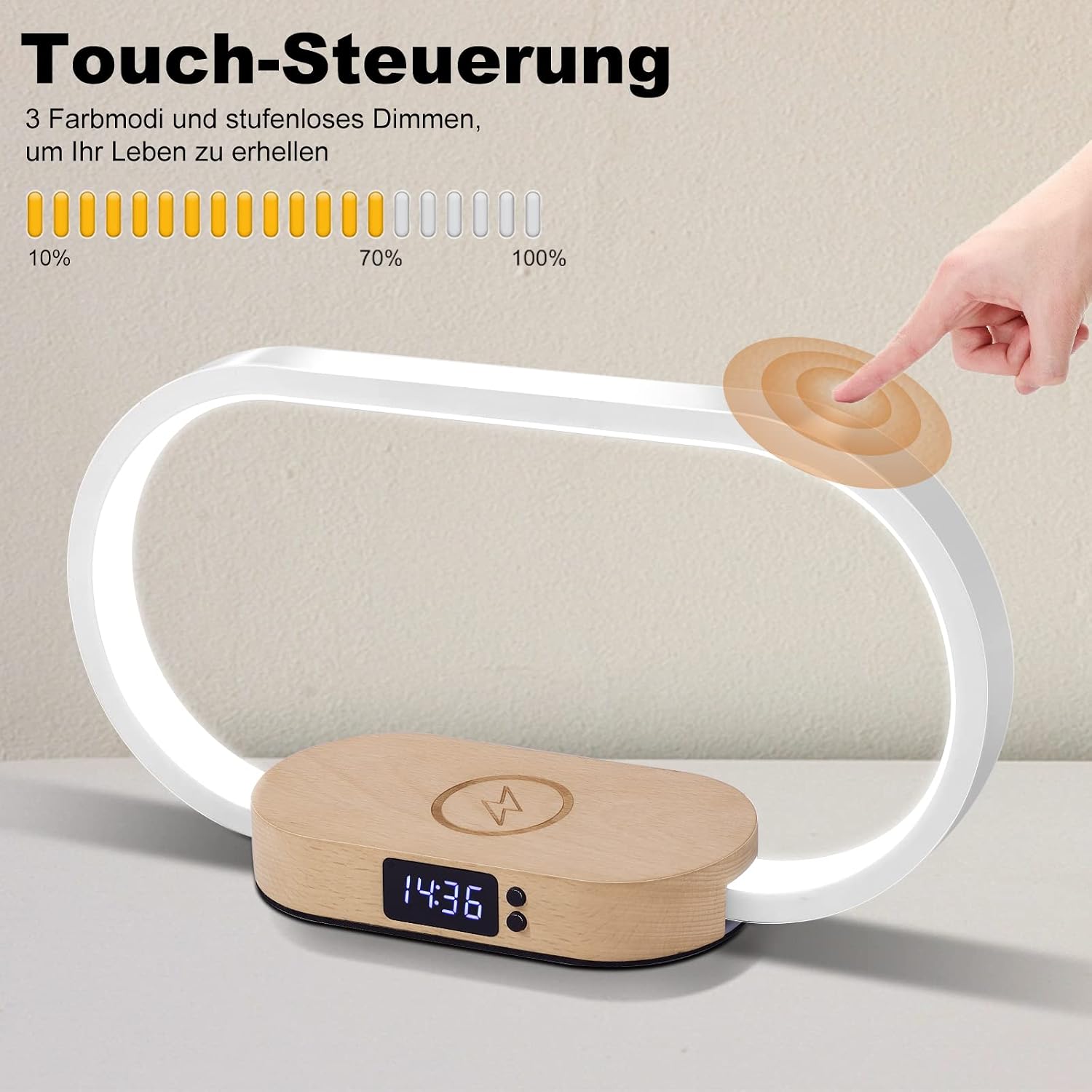
Figure 4.1: Touch control area on the lamp arm.
- Turn On/Off: Lightly touch the lamp arm once to turn the lamp on or off.
- Change Color Mode: With the lamp on, lightly touch the lamp arm repeatedly to cycle through the three color modes: cool white (6000K), natural white (4500K), and warm white (3000K).
- Stepless Dimming: With the lamp on, press and hold the touch-sensitive area on the lamp arm to continuously adjust the brightness from 10% to 100%. Release your finger when the desired brightness is reached.

Figure 4.2: The lamp offers three distinct color temperature modes.
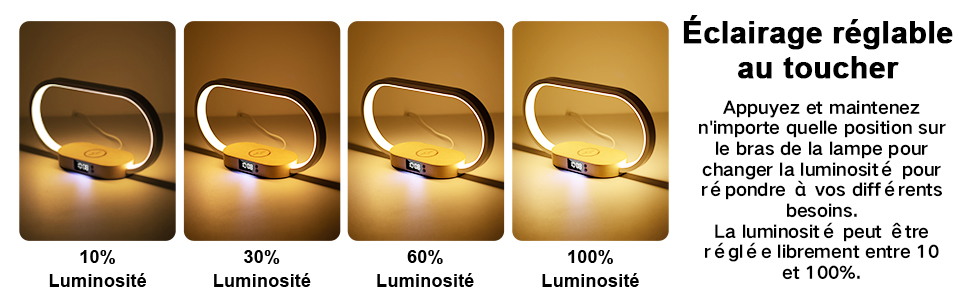
Figure 4.3: Brightness can be adjusted continuously from 10% to 100%.
4.2 Wireless Charging
The lamp base includes a 10W wireless charging pad for Qi-compatible devices.
- Place your Qi-compatible smartphone directly onto the wireless charging pad located on the lamp base.
- Ensure the phone is centered on the charging pad for optimal charging.
- A charging indicator (if present on your phone) will confirm charging has begun.
- Remove any metal objects or thick cases from your phone before charging wirelessly.

Figure 4.4: A smartphone being charged wirelessly on the lamp base.
4.3 USB Charging
A USB-A port is provided on the back of the lamp base for charging devices via a cable.

Figure 4.5: A smartphone charging via the integrated USB port.
- Connect your device's USB charging cable to the USB-A port on the lamp.
- Connect the other end of the cable to your device.
- Charging will begin automatically.
5. Maintenance
5.1 Cleaning
To clean the lamp, ensure it is unplugged from the power outlet.
- Use a soft, dry cloth to wipe the surfaces of the lamp.
- Do not use abrasive cleaners, solvents, or harsh chemicals, as these may damage the finish.
- Avoid getting moisture into any openings.
5.2 Storage
If storing the lamp for an extended period, unplug it and store it in a cool, dry place away from direct sunlight and extreme temperatures.
6. Troubleshooting
- Lamp does not turn on:
- Ensure the power adapter is securely plugged into both the lamp and the wall outlet.
- Check if the wall outlet is functioning correctly.
- Verify that the touch control area is being properly engaged.
- Wireless charging is not working:
- Confirm your device is Qi-compatible.
- Ensure your phone is centered on the charging pad.
- Remove any thick phone cases or metal objects from your phone.
- Check if the lamp is receiving power.
- USB charging is not working:
- Ensure the USB cable is securely connected to both the lamp and your device.
- Try a different USB cable to rule out cable malfunction.
- Check if the lamp is receiving power.
- Time display is incorrect:
- Refer to Section 3.3 "Setting the Time" to re-adjust the clock.
7. Specifications
| Feature | Specification |
|---|---|
| Brand | Wanjiaone |
| Model Number | WR08 |
| Dimensions (L x W x H) | 30 x 8 x 16 cm |
| Weight | 410 g |
| Power Output (Lamp) | 10 Watts |
| Voltage | 5 Volts |
| Light Source | LED |
| Color Temperature | 3000K, 4500K, 6000K |
| Dimming Range | 10% - 100% Stepless |
| Wireless Charging Output | 10W |
| USB Charging Port | Standard USB-A |
| Base Material | Wood |
| Shade Color | White |

Figure 7.1: Energy efficiency label. For more details, visit eprel.ec.europa.eu/qr/1401599.
8. Warranty and Support
This product comes with a standard manufacturer's warranty. For warranty claims or technical support, please contact your retailer or the manufacturer directly. Please retain your proof of purchase for warranty purposes.