
Introduction
This manual provides essential information for the safe and efficient operation of your GRUNDIG VCP 9131 Cordless 2-in-1 Stick Vacuum Cleaner. Please read these instructions carefully before use and retain them for future reference.
Important Safety Instructions
- Read all instructions before using the appliance.
- Do not use outdoors or on wet surfaces.
- Do not allow to be used as a toy. Close attention is necessary when used by or near children.
- Use only as described in this manual. Use only manufacturer's recommended attachments.
- Do not use with damaged cord or plug. If appliance is not working as it should, has been dropped, damaged, left outdoors, or dropped into water, return it to a service center.
- Do not pull or carry by cord, use cord as a handle, close a door on cord, or pull cord around sharp edges or corners. Do not run appliance over cord. Keep cord away from heated surfaces.
- Do not unplug by pulling on cord. To unplug, grasp the plug, not the cord.
- Do not handle plug or appliance with wet hands.
- Do not put any object into openings. Do not use with any opening blocked; keep free of dust, lint, hair, and anything that may reduce air flow.
- Keep hair, loose clothing, fingers, and all parts of body away from openings and moving parts.
- Do not pick up anything that is burning or smoking, such as cigarettes, matches, or hot ashes.
- Do not use without dust bag and/or filters in place.
- Turn off all controls before unplugging.
- Use extra care when cleaning on stairs.
- Do not use to pick up flammable or combustible liquids, such as gasoline, or use in areas where they may be present.
- Store your appliance indoors in a cool, dry area.
- Recharge only with the charger specified by the manufacturer.
- Do not modify the battery or appliance.
- Do not expose the battery or appliance to fire or excessive temperature.
Product Overview
Key Features
- 550 W BLDC Motor with 210 W Suction Power
- 3 Suction Power Levels with Turbo Mode
- Up to 60 minutes runtime, 4-5 hours charging time
- Smart Floor Nozzle: Automatically detects floor type and adjusts suction power
- 5 LED lights and Actiflex™ (foldable tube) for comfortable cleaning under furniture
- 900 ml Dust Collection Volume
- Includes various accessories
Components
The GRUNDIG VCP 9131 is a versatile 2-in-1 cordless vacuum cleaner, functioning as both a stick vacuum and a handheld unit. It features a powerful BLDC motor and a 28.8V Li-ion battery. The main unit includes the motor, dustbin, and control panel with an LCD display showing remaining runtime, charge status, power level, and blockage indicators.
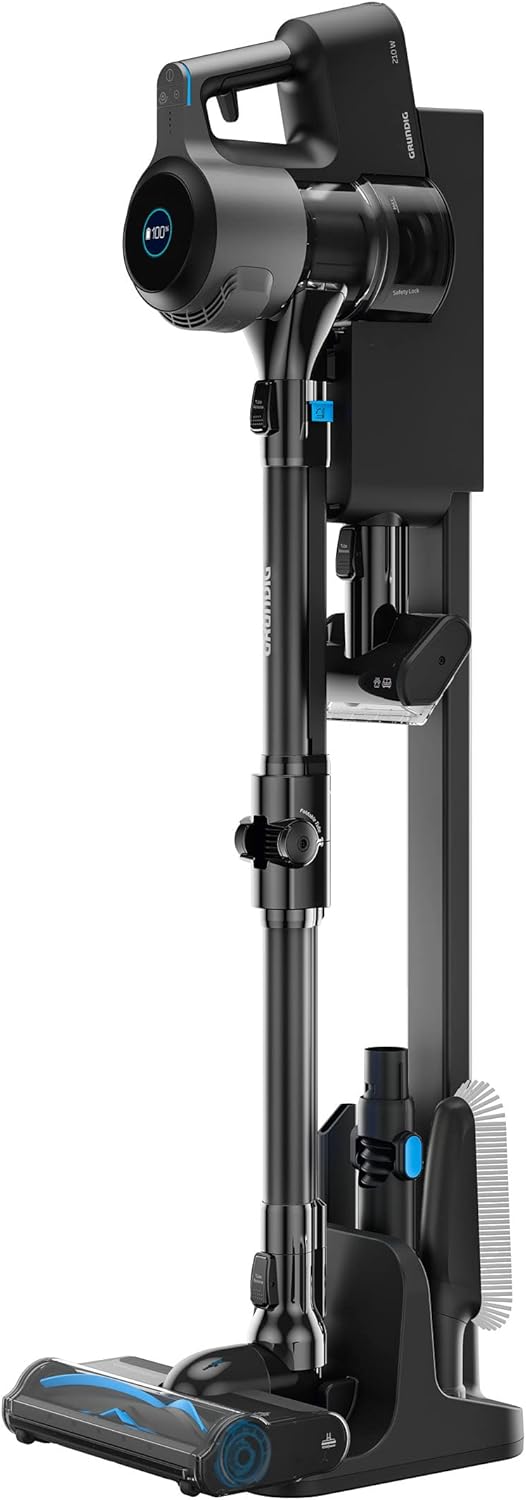
Image: The GRUNDIG VCP 9131 Cordless Stick Vacuum Cleaner shown with its charging station and various attachments. The main unit is black and grey, with a blue accent on the release button.
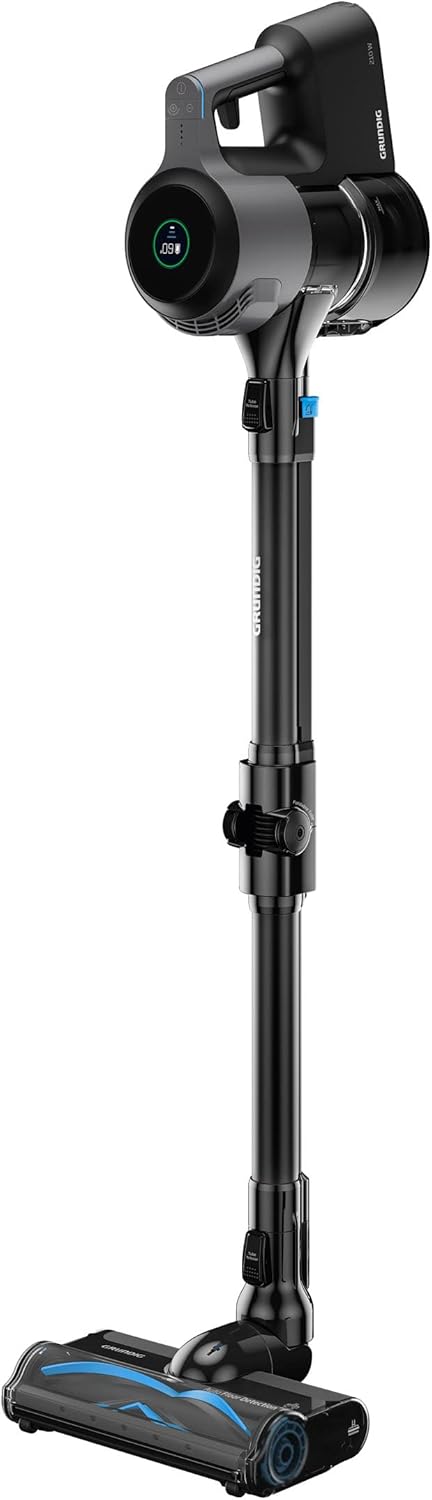
Image: The GRUNDIG VCP 9131 Cordless Stick Vacuum Cleaner assembled in its full stick vacuum configuration, standing upright. The main body is black and grey, with an LCD display visible on the top.
Accessories Included
The following accessories are included to enhance your cleaning experience:
- Crevice Nozzle: Ideal for narrow gaps, joints, and hard-to-reach crevices.
- Mini Turbo Brush: Excellent for removing pet hair from upholstery.
- Soft Dusting Brush: Suitable for sensitive surfaces.
- Flexible Angle Attachment (Actiflex): Allows the suction tube to bend for cleaning under furniture.
- Additional Floor Roller for carpets.
- Charging Station: Can be used individually or as a wall mount with accessory holder.

Image: A collection of accessories for the GRUNDIG VCP 9131 vacuum cleaner, including a crevice tool, mini turbo brush, dusting brush, and an additional floor roller, laid out on a white background.
Setup
Assembly
- Attach the Extension Tube: Connect the extension tube to the main motor unit until it clicks into place.
- Attach the Floor Nozzle: Connect the floor nozzle to the other end of the extension tube until it clicks.
- Handheld Configuration: For handheld use, detach the extension tube and floor nozzle, then attach desired accessories directly to the main motor unit.
Charging the Battery
The appliance is equipped with a 28.8V Li-ion battery. Before first use, fully charge the battery.
- Charging Station: Place the vacuum cleaner on the charging station. Ensure the charging contacts align.
- Wall Mount: Alternatively, mount the charging station to a wall and place the vacuum cleaner on it.
- Charging Indicator: The LCD display will show the charging status. A full charge takes approximately 4-5 hours.
- Battery Removal: The battery is removable and replaceable. To remove, press the battery release button and slide it out.
Operating Instructions
Power On/Off
Press the power button on the main unit to turn the vacuum cleaner on or off.
Suction Power Levels
The GRUNDIG VCP 9131 offers 3 suction power levels, including a turbo mode for enhanced cleaning. Use the mode selection button to cycle through the power settings.
Automatic Floor Detection
The smart floor nozzle automatically detects the floor covering type (e.g., hard floor, carpet) and adjusts the suction power accordingly for optimal cleaning efficiency.

Image: The floor nozzle of the GRUNDIG VCP 9131 vacuum cleaner in action, with its 5 LED lights illuminating dust particles on a dark wooden floor, demonstrating its ability to clean in dimly lit areas.
Actiflex™ Feature
The Actiflex™ foldable tube allows the vacuum to bend, making it easier to clean under low furniture without excessive bending. Activate this feature by pressing the release button on the tube joint.

Image: The GRUNDIG VCP 9131 Cordless Stick Vacuum Cleaner with its Actiflex™ tube bent at an angle, illustrating its capability to reach under furniture and in tight spaces.
LCD Display
The integrated LCD display provides real-time information on:
- Remaining runtime
- Charge status
- Current power level
- Blockage indicators

Image: A close-up view of the GRUNDIG VCP 9131 vacuum cleaner's main unit, highlighting the circular LCD display which shows '60' minutes of remaining battery life and other status icons.
Maintenance
Emptying the Dustbin
The dustbin has a capacity of 900 ml. Empty it regularly to maintain optimal suction performance.
- Ensure the vacuum cleaner is turned off.
- Locate the dustbin release button, usually near the main unit.
- Press the button to detach the dustbin.
- Open the dustbin lid and empty contents into a waste bin.
- Reattach the dustbin until it clicks securely.

Image: An internal cutaway view of the GRUNDIG VCP 9131 vacuum cleaner's main unit, showing the dust collection chamber, cyclone system, and motor components, illustrating the airflow path.
Cleaning the Filters
The vacuum cleaner uses a HEPA filter. Regular cleaning of the filters is crucial for maintaining suction power and air quality.
- Turn off and unplug the appliance.
- Remove the dustbin as described above.
- Carefully remove the filters from the dustbin.
- Tap the filters gently over a waste bin to remove loose dust.
- If necessary, rinse the filters under cold running water. Ensure they are completely dry before reinserting.
- Reassemble the filters and dustbin.
Cleaning the Brush Roll
Periodically check the brush roll in the floor nozzle for tangled hair or debris. Use scissors to cut away any tangled material and remove it.
Troubleshooting
| Problem | Possible Cause | Solution |
|---|---|---|
| Vacuum does not turn on. | Battery is not charged or not properly inserted. | Ensure battery is fully charged and correctly inserted. |
| Reduced suction power. | Dustbin is full, filters are clogged, or nozzle/tube is blocked. | Empty dustbin, clean filters, check for blockages in the nozzle and tube. |
| Battery runtime is shorter than expected. | Battery not fully charged, or operating in high power/turbo mode continuously. | Fully charge the battery. Use lower power modes for longer runtime. Battery life naturally decreases over time. |
| Unusual noise during operation. | Blockage in the brush roll or air path. | Turn off and inspect the brush roll and air paths for any obstructions. |
| LCD display shows an error or blockage indicator. | System blockage or malfunction. | Refer to the specific indicator on the display and clear any detected blockages. If the issue persists, contact customer support. |
Specifications
| Feature | Detail |
|---|---|
| Brand | Grundig |
| Model Number | VCP 9131 |
| Color | Dark Grey/Black |
| Product Dimensions (L x W x H) | 27 x 32 x 112 cm |
| Weight | 3.15 Kilograms |
| Dustbin Capacity | 900 Milliliters |
| Power | 210 Watts (Suction Power), 550 W (Motor) |
| Voltage | 240 Volts (Charger Input), 28.8 Volts (Battery) |
| Number of Speeds | 3 |
| Noise Level | 83 Decibels |
| Runtime | Up to 1 hour (60 minutes) |
| Charging Time | 4-5 hours |
| Special Features | Compact, Lightweight, Portable, Bagless, Actiflex™, Automatic Floor Detection, LED Lights |
| Filter Type | HEPA Filter |
| Power Source | Battery Powered |
| Battery Type | 1 Lithium-ion (included) |
Warranty and Support
For warranty information and customer support, please refer to the documentation provided with your purchase or visit the official Grundig website. Keep your proof of purchase for any warranty claims.
Spare parts availability information is not provided in this manual. Please contact Grundig customer service for inquiries regarding spare parts.