
TOUCAN RC HOBBY HH-140436
TOUCAN RC HOBBY 1/14 RC 3-Axle Highline DIY Tractor Truck Trailer KIT - Instruction Manual
1. Introduction
This instruction manual provides essential information for the assembly, operation, and maintenance of your TOUCAN RC HOBBY 1/14 RC 3-Axle Highline DIY Tractor Truck Trailer KIT (Model: HH-140436). This product is a KIT version, meaning it requires significant assembly and additional components to become a fully functional remote-controlled vehicle. It is designed for experienced hobbyists.
Please read this manual thoroughly before beginning assembly to ensure proper understanding and safe handling of all components.
2. Package Contents
The TOUCAN RC HOBBY 1/14 RC 3-Axle Highline DIY Tractor Truck Trailer KIT includes the following components:
- 1PC High Top Tractor Truck (several hundreds of unassembled parts)
- One brushed 35T motor
- English manual book (for reference, note that some content may be confusing or contain inaccuracies as per manufacturer)
Please verify all parts are present upon unboxing. If any components are missing or damaged, contact your retailer or TOUCAN RC HOBBY customer support.
3. Required Components (Not Included)
To complete and operate your RC Tractor Truck, the following items are required but not included in this KIT version:
- Electronic Speed Controller (ESC), e.g., 1060A ESC
- Steering Servo (digital servo recommended)
- Shifting Servo (digital servo recommended, may require adjustment for proper fit)
- Battery, e.g., 7.4V NIMH Battery
- RC Radio System (Transmitter and Receiver), e.g., FS-i6S+iA6B Radio
- Corresponding Battery Charger
- Tools for assembly (e.g., screwdrivers, pliers, hobby knife, glue)
- Paint (if desired, as the kit is unpainted)
4. Assembly (Setup)
This RC truck is a highly detailed KIT that requires extensive assembly. Due to the complexity and number of parts, this kit is recommended for experienced hobbyists. The included English manual book provides guidance, but some sections may be confusing or contain inaccuracies. Patience and attention to detail are crucial for successful assembly.
4.1 General Assembly Steps
- Unpack and Organize: Carefully unpack all components. It is highly recommended to sort parts by type and size to facilitate assembly. Refer to the parts list in the included manual.
- Chassis Assembly: Begin with the main chassis frame. Follow the manual's instructions for attaching cross members, suspension components, and axles.
- Drivetrain Installation: Install the 35T brushed motor and connect it to the gearbox and driveshafts. Ensure all gears mesh smoothly.
- Steering and Shifting Servo Installation: Mount the steering servo and connect it to the steering linkage. Install the shifting servo and connect it to the transmission mechanism. Adjust linkages for proper throw and alignment.
- Cab and Body Assembly: Assemble the cab structure, including interior details if provided. Attach the cab to the chassis.
- Wheel and Tire Installation: Mount the wheels and tires onto the axles. Ensure they are securely fastened.
- Electronics Installation: Install the ESC, receiver, and battery in their designated locations. Secure all wiring to prevent interference or damage.
- Final Checks: Before initial power-up, double-check all screws, connections, and moving parts for proper assembly and freedom of movement.
4.2 Visual Reference for Assembled Model
The following images provide a visual reference of the fully assembled TOUCAN RC HOBBY 1/14 RC 3-Axle Highline DIY Tractor Truck. These can assist in understanding the final configuration of various components.

Figure 4.2.1: Front view of the assembled tractor truck, showcasing the detailed grille, headlights, and roof-mounted light bar.

Figure 4.2.2: Front three-quarter view, highlighting the cab design and the triple-axle configuration at the rear.

Figure 4.2.3: Side profile of the truck, showing the long chassis and the arrangement of the three rear axles.
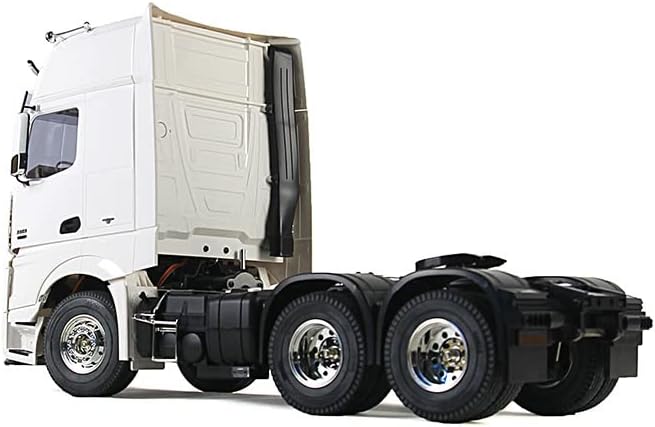
Figure 4.2.4: Rear three-quarter view, emphasizing the detailed rear suspension and wheel hubs.

Figure 4.2.5: Rear view of the truck, showing the detailed chassis and the connection point for a trailer.
5. Operating Instructions
Once your TOUCAN RC HOBBY Tractor Truck is fully assembled and all necessary electronic components (ESC, servos, battery, RC system) are installed and configured, you can proceed with operation.
5.1 Pre-Operation Checklist
- Ensure the battery is fully charged.
- Verify all electrical connections are secure and insulated.
- Confirm the RC transmitter and receiver are properly bound and calibrated.
- Check that steering and shifting servos respond correctly to transmitter inputs.
- Inspect all moving parts for obstructions or binding.
5.2 Basic Operation
- Power On: Turn on your RC transmitter first, then connect the battery to the ESC on the truck.
- Throttle Control: Use the throttle stick/trigger on your transmitter to control forward and reverse movement. Gradually increase throttle for smooth acceleration.
- Steering Control: Use the steering wheel/stick on your transmitter to control left and right turns.
- Gear Shifting: If your RC system supports it and you have installed a shifting servo, use the designated channel on your transmitter to change gears.
- Power Off: Always disconnect the battery from the truck first, then turn off your RC transmitter.
Operate the truck in a safe, open area, away from people, pets, and obstacles. Avoid operating in wet conditions or extreme temperatures.
6. Maintenance
Regular maintenance will extend the lifespan and performance of your RC Tractor Truck.
- Cleaning: After each use, especially if operated outdoors, clean the truck to remove dirt, dust, and debris. Use a soft brush or compressed air. Avoid using water directly on electronics.
- Inspections: Periodically inspect all screws, nuts, and bolts for tightness. Check for any loose or damaged parts.
- Lubrication: Apply appropriate RC-grade lubricant to moving metal parts, such as gears and universal joints, as needed.
- Battery Care: Follow the battery manufacturer's instructions for charging, discharging, and storage. Store batteries in a cool, dry place.
- Motor Maintenance: Keep the motor free of debris. If performance degrades, inspect the motor brushes (if applicable) and commutator.
- Tire and Wheel Maintenance: Check tires for wear and tear. Ensure wheels are securely attached and rotate freely.
7. Troubleshooting
This section addresses common issues you might encounter with your RC Tractor Truck.
| Problem | Possible Cause | Solution |
|---|---|---|
| Truck does not power on. | Battery not charged, battery not connected, ESC not powered, faulty switch. | Charge battery, ensure secure connection, check ESC power switch, inspect wiring. |
| No response from controls. | Transmitter/receiver not bound, low transmitter battery, faulty receiver/servo. | Re-bind transmitter/receiver, replace transmitter batteries, check servo connections, test components. |
| Motor runs but wheels do not turn. | Loose driveshaft, stripped gears, motor pinion not engaged. | Check driveshaft connections, inspect gears for damage, ensure motor pinion is properly seated. |
| Steering/Shifting not working correctly. | Servo not connected, servo arm loose, servo damaged, linkage binding. | Check servo connection, tighten servo arm screw, replace faulty servo, clear linkage obstructions. |
For more complex issues or if troubleshooting steps do not resolve the problem, please contact TOUCAN RC HOBBY customer support.
8. Specifications
| Feature | Detail |
|---|---|
| Item Number | HH-140436 |
| Material | Metal, Plastic |
| Scale | 1/14 |
| Axle Configuration | 3-Axle |
| Motor Included | Brushed 35T motor |
| Condition | New and NOT painting unassembled KIT |
| Package Dimensions | 28.5 x 18 x 8.6 inches |
| Item Weight | 14.8 pounds |
| Manufacturer Recommended Age | 14 years and up |
| Manufacturer | TOUCAN RC HOBBY |
9. Warranty and Support
For warranty information and customer support, please refer to the official TOUCAN RC HOBBY website or contact the seller directly through the platform where the product was purchased. Keep your proof of purchase for any warranty claims.
For additional resources and community support, consider joining online RC hobby forums or groups where experienced builders can offer advice and tips for assembling and operating complex RC kits.
Ask a question about this manual
Ask about setup, troubleshooting, compatibility, parts, safety, or missing instructions. Manuals+ will review the question and use this page’s manual context to help answer it.